
Our Top Picks
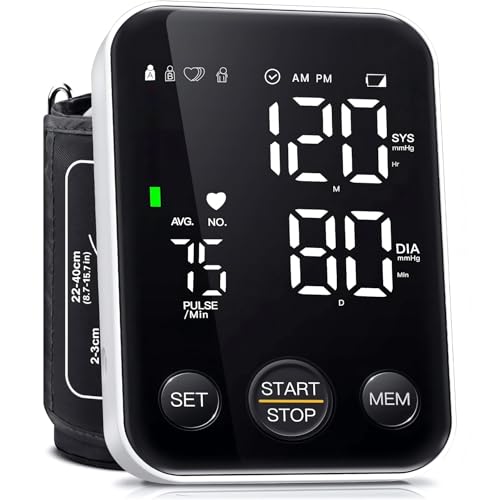 Oklar FDA Cleared Blood Pressure Monitor Upper ArmLarge4.96 x 3.34 x 1.1 Inches0.33 PoundsCheck on Amazon
 Alcedo Blood Pressure Monitor for Home Use15.7 Inch6.54 x 5.32 x 3.86 inches0.6 poundsCheck on Amazon

Top 3 picks at a glance

Best Blood Pressure Monitors for Home Use in 2026
The best blood pressure monitors for home use are the Omron 10 Series BP5450 for most households, the Microlife WatchBP Home A for users who want a strong emphasis on atrial-fibrillation screening, the A&D Medical UA-767F for straightforward multi-user measurement, and the Withings BPM Connect for reliable app-based tracking—provided the cuff fits your upper arm and the exact model appears on a current clinical-validation list.
Accuracy depends on more than the monitor itself. A validated device with the wrong cuff size, an unsupported wrist position, or measurements taken immediately after exercise can produce misleading results. Prioritize upper-arm models, a documented validation listing, a cuff range that includes your arm circumference, separate user memory, dependable data transfer, and an irregular-heartbeat feature that is clearly explained in the manual.
As an Amazon Associate we earn from qualifying purchases at no extra cost to you.


Quick comparison
| Model | Best for | Cuff range or fit note | Memory and connectivity | Irregular-heartbeat feature | Typical market range |
|---|---|---|---|---|---|
| Omron 10 Series BP5450 | Best overall for families | Included upper-arm cuff is generally intended for medium-to-large arms; confirm the current package range before buying | Two-user memory, Bluetooth app sync | Irregular-heartbeat indicator; some versions also flag possible AFib patterns | Usually $60–$100 |
| Microlife WatchBP Home A | AFib-focused monitoring and structured home measurement | Usually sold with a medium-to-large adult upper-arm cuff; verify the supplied range | Stores repeated readings and supports structured measurement modes | Designed around AFib detection during blood-pressure measurement | Usually $70–$130 |
| A&D Medical UA-767F | Simple, accurate household monitoring | Commonly supplied with a cuff covering roughly 22–42 cm, depending on package | Four-user memory on the multi-user version; no app on the standard model | Irregular-heartbeat indicator | Usually $45–$80 |
| Withings BPM Connect | Automatic app and Wi-Fi-based logging | Typically supports approximately 22–42 cm with its supplied cuff; confirm your package | Wi-Fi and Bluetooth synchronization; designed for multiple profiles in the app | Irregular-heartbeat indication; not a substitute for an ECG | Usually $90–$130 |
| QardioArm | Portable Bluetooth tracking | Usually covers approximately 22–42 cm; optional larger cuffs may be available | Bluetooth app synchronization and user profiles | Irregular-heartbeat detection | Usually $70–$100 |
Product specifications and validation status can vary by region, revision, and included cuff. Before purchase, check the exact model number on an independent validation resource such as STRIDE BP, and confirm that the cuff supplied in your box covers your measured arm circumference.
Our top picks by household need
Best overall: Omron 10 Series BP5450
The BP5450 is a strong all-round choice because it combines an upper-arm design, two-user storage, Bluetooth synchronization, and irregular-heartbeat alerts. It is especially useful when two people need separate histories rather than a single shared list of readings. Omron’s app ecosystem can also make it easier to export or show trends to a clinician.
Choose it when convenience matters but you still want physical controls and a display on the monitor. Check whether the current package includes the correct cuff: a monitor cannot compensate for a cuff that is too small, which can falsely raise readings.
Best for AFib-oriented monitoring: Microlife WatchBP Home A
The WatchBP Home A is a better fit for someone whose clinician specifically wants repeated home measurements with an emphasis on possible atrial-fibrillation detection. Its structured measurement approach is more useful than taking one random reading whenever symptoms occur.
An AFib alert is a screening signal, not a diagnosis. Occasional alerts can result from movement, talking, premature beats, or poor cuff placement. Repeated alerts should be discussed with a healthcare professional, particularly if they occur with chest pain, fainting, severe shortness of breath, or neurological symptoms.
Best no-app multi-user option: A&D Medical UA-767F
The UA-767F is a practical choice for families who want several stored profiles without depending on a phone. It has a clear upper-arm workflow and an irregular-heartbeat indicator, while avoiding account setup, Bluetooth permissions, and cloud synchronization.
It is less suitable if you need automatic long-term charts or remote sharing. In that case, select a connected version or a different model with a well-supported app rather than assuming that every Bluetooth monitor transfers readings reliably.
Best connected monitor: Withings BPM Connect
The BPM Connect is designed for people who want readings to move into an app with minimal manual entry. Wi-Fi can be more convenient than Bluetooth alone because the phone does not always need to be nearby when a measurement is taken.
Its main trade-off is dependence on software, account access, and network setup. Before relying on it for a medical log, take several readings and confirm that the date, time, user profile, and values appear correctly in the app. Keep a manual record during setup so a synchronization failure does not erase your trend history.
How to choose the right monitor
1. Confirm clinical validation
“Clinically tested,” “professional accuracy,” and similar packaging language are not the same as an independent validation listing. Search the exact model number, not only the brand. A model may be validated with one cuff size but not another, or a regional version may use a different designation.
2. Measure your arm before ordering
Wrap a flexible tape around the middle of your upper arm, halfway between the shoulder and elbow, without tightening it. Use that number against the cuff’s printed range.
| Arm circumference | Suitable cuff category | Common mistake |
|---|---|---|
| 17–22 cm | Small adult or pediatric cuff, if clinically supported | Using a standard adult cuff because it is included |
| 22–42 cm | Standard adult cuff on many home monitors | Assuming every “universal” cuff has the same range |
| 42–52 cm | Large or extra-large cuff | Forcing a standard cuff above its stated maximum |
As a useful check, if your arm measures 44 cm and a cuff is rated only to 42 cm, that cuff is not close enough. Select a model with a validated large cuff instead of hoping the overlap will be acceptable.
3. Decide whether memory matters more than connectivity
- One user, occasional checks: A basic validated monitor with at least 60 stored readings may be sufficient.
- Two users: Look for separate user buttons or clearly separated profiles. A single shared memory can make your averages unusable.
- Three or more users: Prefer four-user memory or individual app profiles, and verify that the monitor does not silently mix readings.
- Clinician sharing: Choose an app that can export a dated log or summary rather than one that only displays a graph inside the app.
4. Treat app sync as a feature to verify, not assume
Bluetooth-only devices generally require the phone to be nearby, Bluetooth enabled, and the correct app open or permitted to run in the background. Wi-Fi models can upload without the phone nearby but may need a stronger setup process. After pairing, perform this check:
- Take one reading under normal conditions.
- Confirm the monitor’s date and time.
- Open the app and check that systolic, diastolic, pulse, and user identity match.
- Take a second reading and verify that it creates a separate entry rather than overwriting the first.
- Temporarily disable Bluetooth or Wi-Fi, take another reading, then reconnect and confirm delayed upload.
This five-minute test reveals whether the system is dependable enough for a multi-week log.
How to take a more accurate home reading
- Avoid caffeine, smoking, and exercise for at least 30 minutes beforehand.
- Empty your bladder, then sit quietly for five minutes.
- Sit with your back supported, feet flat, and legs uncrossed.
- Place the cuff on bare skin, with the lower edge about 2–3 cm above the elbow crease.
- Rest the arm on a table so the cuff is approximately level with the heart.
- Do not talk, text, or move during measurement.
- Take two readings one minute apart and record both, unless your clinician gave different instructions.
For a home blood-pressure log, many clinicians prefer readings in the morning and evening over several days. Follow the schedule provided by your clinician, and do not change medication based solely on an app alert or one unusual reading.
What irregular-heartbeat detection can—and cannot—tell you
The feature detects pulse patterns that do not look regular during the measurement. It can prompt follow-up, but it cannot diagnose every rhythm problem, rule out AFib, or replace an electrocardiogram. Movement, talking, tremors, and an improperly fitted cuff can increase false alerts.
If the monitor repeatedly reports an irregular rhythm, save the readings and contact a healthcare professional. Seek urgent care for a very high reading accompanied by symptoms such as chest pain, severe breathlessness, weakness on one side, confusion, or trouble speaking.
Frequently asked questions
Can I use a wrist blood-pressure monitor instead of an upper-arm model?
Upper-arm models are the article’s priority for home use. Accuracy also depends on using the correct cuff size, positioning the arm approximately level with the heart, and avoiding movement or talking during measurement. Before buying, measure your upper-arm circumference and confirm that the supplied cuff covers it. A monitor cannot compensate for a cuff that is too small.
Should two people share the same stored readings on one monitor?
Two people should use separate memory profiles or clearly separated user storage. A single shared memory can make household averages unusable because the readings become mixed. For several users, the article recommends four-user memory or individual app profiles, while also advising you to verify that the monitor does not silently combine readings.
What should I do if the monitor’s app does not sync correctly?
Keep a manual record while setting up the monitor and check the app before relying on it for a medical log. Confirm the date, time, systolic and diastolic values, pulse, and user identity. If synchronization fails, reconnect Bluetooth or Wi-Fi and verify that delayed readings upload without overwriting earlier entries.
Can an app alert tell me to change my blood-pressure medication?
No, you should not change medication based solely on an app alert or one unusual reading. Follow the schedule provided by your clinician and record readings consistently. If an irregular-heartbeat alert repeatedly appears, discuss it with a healthcare professional, particularly when it occurs with chest pain, fainting, severe shortness of breath, or neurological symptoms.
How can I tell whether a cuff is too small for my arm?
Measure around the middle of your upper arm, halfway between the shoulder and elbow, without tightening the tape. Compare that measurement with the cuff’s stated range. For example, an arm measuring 44 cm should not use a cuff rated only to 42 cm. Choose a model with a validated large cuff rather than hoping the overlap is acceptable.
Bottom line
For most households, start with the Omron 10 Series BP5450 if its cuff fits and its exact version is clinically validated. Choose the Microlife WatchBP Home A when AFib-oriented screening and structured readings are the priority, the A&D Medical UA-767F when simple multi-user storage is more important than apps, and the Withings BPM Connect when automatic synchronization is central to your routine. In every case, cuff fit, correct technique, and confirmation of the exact validation listing matter more than extra display features.


