
Our Top Picks


Top 3 picks at a glance

Best Fezibo Standing Desks for Home Offices
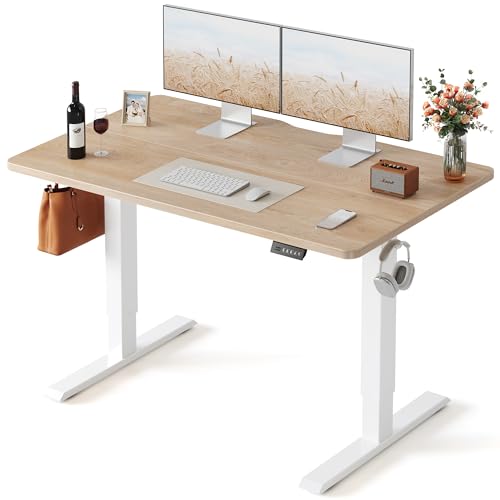
The best Fezibo standing desk for most home offices is the 55-inch rectangular dual-motor model: it provides enough depth for two monitors, a practical electric height range, better lifting headroom than compact single-motor desks, and a reasonable balance between stability, noise, and price.
Fezibo sells several desk families rather than one fixed specification. Exact dimensions, controller features, desktop finishes, and weight limits can change between generations and listings, so treat the figures below as typical ranges and confirm the specification for the exact package you are considering.
As an Amazon Associate we earn from qualifying purchases at no extra cost to you.


Quick comparison of the best Fezibo desk sizes
| Fezibo configuration | Typical desktop size | Typical height range | Typical lifting capacity | Best for | Usual market range |
|---|---|---|---|---|---|
| Compact rectangular, single motor | 40–48 x 24 inches | 28–45 inches | Up to about 176 lb | Small bedrooms and light equipment | $180–$300 |
| Standard rectangular, dual motor | 48–55 x 24 inches | 28–47 inches | Up to about 220 lb | Most home offices | $250–$400 |
| Large rectangular, dual motor | 55–63 x 24–31 inches | 28–47 inches | Up to about 220 lb | Two monitors, speakers, and accessories | $300–$500 |
| L-shaped or corner configuration | About 55–63 inches per main side | Approximately 28–47 inches | About 176–220 lb, depending on frame | Multi-monitor and gaming setups | $400–$600 |
Capacity figures normally describe the frame’s maximum moving load, not a recommendation to load every square inch of the top. A practical target is to stay below roughly 70–80% of the stated limit, especially if the desk will be raised frequently.
Head-to-head: which Fezibo desk is right for you?
Best overall: 55-inch dual-motor rectangular desk
A 55-inch top is the most flexible choice for a conventional home office. It can usually accommodate a 27-inch monitor, a laptop or second display, a keyboard, and speakers without forcing everything against the front edge. A 24-inch depth is workable; a 28–31-inch depth gives a more comfortable monitor distance and leaves space behind the keyboard for notebooks or a microphone arm.
Dual motors are the important upgrade over a compact single-motor model. They generally raise a loaded desk more smoothly, distribute force between the legs, and cope better with heavier monitor arms. Expect a low mechanical hum rather than complete silence. Motor noise is usually most noticeable during height changes and is brief during normal use.
Best for small rooms: 40–48-inch compact desk
The compact option makes sense when the desk must fit between a bed and a wall or inside a narrow office. It is suitable for one monitor, a laptop, and ordinary peripherals. It is less suitable for a large desktop tower on the top, a heavy ultrawide monitor arm, or a multi-monitor arrangement.
A smaller top also reduces leverage, which can make it feel stable at standing height despite its lighter frame. The trade-off is less surface area and, on single-motor versions, slower or less effortless lifting under load. Choose this size because of room constraints, not because a smaller desktop is automatically better.
Best for two monitors: 63-inch rectangular desk
A 63-inch Fezibo desk is the better choice for two displays, a full-size PC tower, or a work-and-gaming setup. It gives you room to separate the monitors rather than stacking accessories at the edge. The longer desktop can also support a monitor arm with a wider clamp position.
Large tops can feel less rigid if the frame is narrow relative to the desktop. Stability depends on the legs, cross-support, feet, floor, and how evenly the load is distributed—not only on the desktop’s length. Put the heaviest equipment near the center of the frame, and use a floor mat or leveling feet on uneven flooring.
Best for a corner setup: Fezibo L-shaped desk
An L-shaped model is useful when one side is dedicated to work and the other to gaming, streaming, or paperwork. It offers substantially more usable area than a rectangular top, but it also creates more leverage and adds assembly complexity. Check the desk’s orientation before ordering: some corner designs are effectively left-handed or right-handed.
Do not assume that the entire L-shaped surface has the same lifting capacity. The manufacturer’s limit may apply to the complete desktop, while the corner joint or extension can be the least rigid area. Keep heavy speakers, desktop towers, and clamp-mounted accessories over the main frame sections.
Height range: measure the person, not just the desk
Many Fezibo electric frames cover approximately 28–47 inches, excluding the desktop thickness. That range suits a broad group of seated and standing users, but the correct setting is personal. For seated work, your elbows should be close to 90 degrees with your shoulders relaxed. For standing work, the keyboard should allow relaxed shoulders and level or slightly downward-angled forearms.
To estimate your required standing height, measure from the floor to the underside of your elbow while standing naturally, then subtract the keyboard’s effective height above the desktop. If the result is close to the desk’s upper limit, consider a keyboard tray or a model with a taller frame. Users around 6 feet 2 inches and above may find a 47-inch maximum comfortable for keyboard work but marginal for a tall monitor without a monitor arm.
Stability, motors, and noise
- Two-stage legs: Common on more affordable Fezibo frames. They can be stable for ordinary work, but some movement at maximum height is normal.
- Three-stage legs: Usually provide a wider adjustment range and can improve the relationship between sitting and standing heights, though frame design still matters.
- Dual motors: Prefer these for 55-inch or larger tops, monitor arms, and heavier equipment.
- Crossbars and wide feet: These matter more at standing height than a high advertised weight limit. A desk can lift a heavy load but still wobble if its base is narrow or the floor is uneven.
- Noise: Electric lifting systems commonly produce a short motor sound during adjustment. A desk that becomes louder, jerky, or uneven over time may need its legs re-synchronized or its fasteners checked.
For a stable setup, tighten the frame only after all parts are aligned, avoid placing a heavy PC at the far edge, and use the leveling feet to remove rocking. Do not continuously hold the control button against the upper or lower limit; stopping when the desk reaches its programmed position reduces unnecessary strain.
Desktop materials and finishes
Fezibo desktops are commonly offered in laminated engineered wood, with finishes such as black, white, walnut, or rustic wood tones. Laminate is practical for a home office: it is inexpensive, easy to wipe clean, and resistant to ordinary keyboard and mouse use. It is not the same as solid hardwood, however, and exposed edges can be vulnerable to moisture or impact.
Look for a top with adequate thickness and a sealed edge, especially if you will clamp a monitor arm to it. A clamp spreads force over a small area, so use the supplied reinforcement plate or a separate protective pad when appropriate. Avoid positioning a clamp directly over a joint between desktop sections.
A useful load calculation for your setup
Suppose your equipment weighs 42 pounds: a 17-pound desktop tower, two 8-pound monitors, a 5-pound monitor arm, and 12 pounds of speakers, peripherals, and accessories. Add a 20% operating margin:
42 lb x 1.20 = 50.4 lb
That load is comfortably below a typical 176–220-pound frame rating. The calculation is not a guarantee of zero wobble, because leverage matters. A 17-pound tower at the back corner can create more rocking than the same weight centered between the legs. Place the tower near a leg or under the main frame, and keep the monitor arm close to the rear center.
Assembly time and what affects it
Allow about 60–120 minutes for a rectangular Fezibo desk if one person is assembling it carefully. A compact model may take less time, while a large or L-shaped desk can take two hours or more. A second person is helpful when attaching the desktop to the frame and turning the completed desk upright.
- Inventory the screws and frame parts before starting.
- Use a manual screwdriver or a drill at low torque; overtightening can damage engineered wood.
- Leave every frame connection slightly loose until the legs and supports are aligned.
- Center the frame on the desktop before final tightening.
- After standing the desk upright, check that all feet touch the floor.
- Run the reset or initialization procedure described in the controller instructions before saving height presets.
Decision matrix
| Your situation | Recommended choice | Reason |
|---|---|---|
| One monitor and less than 48 inches of wall space | 40–48-inch compact model | Fits the room while keeping the load modest |
| One or two monitors and normal office equipment | 55-inch dual-motor model | Best balance of surface area, capacity, and price |
| Two monitors, speakers, and a large keyboard area | 63-inch dual-motor model | More depth and width reduce desktop crowding |
| Separate work and gaming zones in a corner | L-shaped model | Maximizes usable surface but requires careful load placement |
| Heavy monitor arms or a desktop tower on the desk | Dual-motor frame with the highest available capacity | More lifting headroom and smoother movement under load |
Frequently asked questions
Can I use a monitor arm with a Fezibo standing desk?
Yes, a monitor arm can work well, especially on a larger rectangular desk, but the clamp needs care. Use the supplied reinforcement plate or a protective pad when appropriate, avoid clamping over a joint between desktop sections, and keep the arm close to the rear center to reduce leverage and rocking.
Where should I place a desktop tower on the desk?
Place the tower near a leg or under the main frame rather than at a back corner or far edge. A tower positioned at the edge can create more rocking because of leverage, even when the total equipment weight is comfortably below the frame’s stated lifting capacity.
How can I tell whether an L-shaped desk will fit my room?
Check the desk’s orientation before ordering, because some corner designs are effectively left-handed or right-handed. Also allow for the added assembly complexity and the larger footprint. An L-shaped model provides separate areas for work, gaming, streaming, or paperwork, but the corner area may be less rigid than the main frame sections.
What should I do if the desk rocks after assembly?
First check that the frame connections were aligned before final tightening and that the fasteners are secure. Use the leveling feet to remove rocking on uneven flooring, and distribute heavy equipment more evenly. A floor mat can also help on uneven floors, while wide feet and cross-support improve stability at standing height.
Can a tall user work comfortably at the desk?
A tall user may find the approximately 47-inch maximum comfortable for keyboard work but marginal for a tall monitor without a monitor arm. Measure the standing elbow height and subtract the keyboard’s effective height above the desktop. If the result approaches the upper limit, consider a keyboard tray or a taller frame.
Final recommendation
For most buyers searching for the best Fezibo standing desks, choose the 55-inch dual-motor rectangular model with a 24-inch or deeper top. Select the compact version only when floor space is the main constraint, move to 63 inches for a crowded two-monitor setup, and choose an L-shaped configuration when the room layout—not simply extra desktop width—calls for a corner workstation. Before buying, verify the exact height range, frame capacity, desktop thickness, motor count, and return or warranty terms for the specific Fezibo package.


