Students rarely need a powerful laptop, but they do need one that survives a full day of classes, boots quickly between lectures, and handles documents, video calls and a dozen browser tabs without complaint. With a cap of under 700 dollars, the real decision is not “how much power can I afford” but “which compromise suits my coursework”: more memory for multitasking, a lighter body for carrying, a Chromebook for simplicity, or a faster processor for programming and media work.
This guide helps high school and college students, and their families, sort through seven laptops for the 2026 school year using only the facts in each listing. Several are budget models with 4GB of memory and small eMMC drives, which is workable for web-based coursework but tight for anything heavier, so we put extra emphasis on memory, storage type and software. Two near-identical HP 14-inch listings that differ only in packaging were treated as one entry.
Our Top Picks
 HP 14" HD Chromebook Laptop for StudentsN4120|64GB eMMC12.85 x 8.94 x 0.72 inches3.35 poundsCheck on Amazon
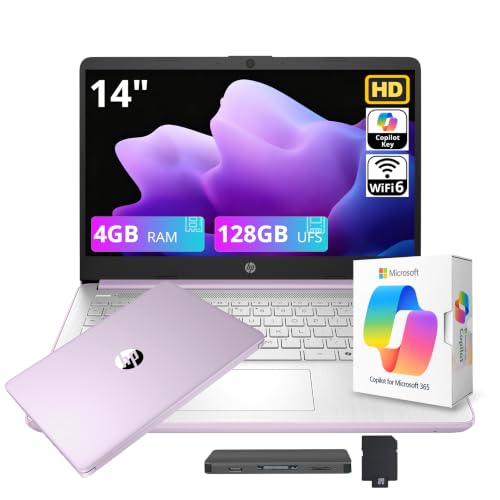
 HP 14" Ultra-Light Laptop for Student & Home4GB|128GB Storage12.76 x 8.86 x 0.71 inches3.24 poundsCheck on Amazon
 HP 14" Laptop Computer for 2026 Student Business4GB RAM + 628GB Storage12.76 x 8.86 x 0.71 inches3.24 poundsCheck on Amazon

Top 3 picks at a glance
Quick Picks
As an Amazon Associate we earn from qualifying purchases at no extra cost to you.



| Product | Best for | Key spec from the title |
|---|---|---|
| HP Stream 14 (N150) | Windows basics with a modern chip | Intel N150, 4GB RAM, 128GB UFS, Office 365 year |
| HP 14 Laptop (Celeron N4500) | All-day battery on campus | N4500, 4GB, 64GB eMMC plus 64GB SD, 12-hr battery |
| HP 14 Chromebook (N4120) | Google Docs and web classes | N4120, 4GB, 64GB eMMC, 14-hr battery |
| HP Chromebook (N4120, 128GB) | Extra storage on a Chromebook | N4120, 4GB, 64GB eMMC plus 64GB card |
| HP 14 Laptop (4-core, DDR5) | Windows 11 Pro with Office | 4GB DDR5, 628GB storage with extension |
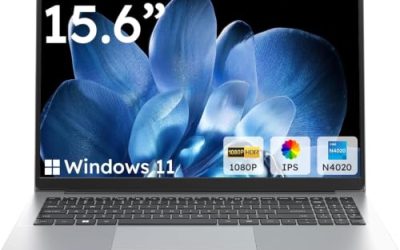
| 15.6-inch N4020 Laptop | Bigger screen at entry cost | N4020, 4GB DDR4, 128GB eMMC, FHD |
| 15.6-inch Core i7 Laptop | Coding, editing, light gaming | 16GB RAM, 512GB SSD, 15.6″ FHD, backlit keyboard |
The cap leaves more room than most of these listings use. Six of the seven sit firmly in the entry tier, with 4GB of memory and small drives, so the spread comes down to operating system, storage type and screen size rather than raw speed. Only the Core i7 listing reaches into mid-range territory, and it is the one that most clearly leaves headroom for a student who expects heavier software in later years. A family that buys the cheapest model now and replaces it in two years may spend more than one that buys the stronger machine once.
How to Choose
Pick the operating system by coursework
Chromebooks run ChromeOS and are excellent for web apps, Google Workspace and online classes, but they cannot run desktop software such as full Adobe or engineering packages. Windows laptops open the door to any program a course might require. If a syllabus lists specific software, check whether it has a web version before settling on a Chromebook, and note that a Windows model with Office included saves a separate purchase for the first year.
Memory and storage are the real limits
For smooth multitasking in Windows, 8GB is a comfortable target and 16GB is generous, so the four-gigabyte models here are for light use only. Storage type matters more than size: UFS and SSD drives load much faster than eMMC, which is slow under heavy use. Some listings add up internal storage with cards or external drives, giving a combined figure such as 628GB, but only the internal drive holds the system and apps at full speed.
Battery, weight and screen
Listings that state 12 or 14 hours of battery life are quoting best-case numbers, and real use with video calls and brightness up will be lower. Still, a student should aim for a laptop that lasts a school day at around eight hours of mixed use. A 14-inch body is easier to carry than 15.6 inches, while a larger screen helps with split-window work. Check that the display is at least 1080p if you read or write for long sessions, since basic HD panels look soft on small text.
Ignore the name tricks, watch the corners cut
Phrases such as “beat i5” or stacked storage totals are marketing. Budget laptops commonly cut corners on screen brightness, keyboard quality, port selection and build strength, so look for a webcam and a mix of USB-A and USB-C ports. Also remember that a one-year Office subscription ends, and a Windows 11 Pro label is not a reason to pay more if you will never use its business features.
The 7 Best Options
HP Stream 14 with Intel N150
The HP Stream 14 pairs a 14-inch HD display with an Intel N150 processor, 4GB of RAM, 128GB of UFS storage, one year of Office 365 and 1TB of cloud storage. UFS is quicker than eMMC, and the newer chip suits web browsing and documents. It aims squarely at students and light business use.
- Strength: UFS storage and a newer N150 chip feel snappier than older eMMC models.
- Strength: one year of Office 365 and cloud storage included.
- Trade-off: 4GB of RAM limits heavy tab use and any multitasking beyond basics.
Skip it if your coursework needs design or programming tools that want more memory.
HP 14 Laptop with Celeron N4500
This ultra-light HP 14 uses a Celeron N4500, 4GB of RAM and 64GB of eMMC with an added 64GB SD card, and the listing claims a 12-hour battery along with one year of Office 365. It targets students who walk across campus and need power through the day.
- Strength: a stated 12-hour battery suits long campus days.
- Strength: Windows with a year of Office included.
- Trade-off: 64GB eMMC fills fast, so the SD card is more of a requirement than a bonus.
Skip it if you plan to install large programs or store many files locally.
HP 14 Chromebook with N4120
The 14-inch HP Chromebook uses a quad-core Intel N4120, 4GB of RAM and 64GB eMMC, with HDMI, USB-A and USB-C ports, a webcam and a stated 14-hour battery. ChromeOS keeps the system light, and the port selection is better than most at this level.
- Strength: a good port mix with HDMI, USB-A and USB-C.
- Strength: a 14-hour battery claim and the simplicity of ChromeOS.
- Trade-off: no desktop Windows programs can run on it.
Skip it if any course requires Windows-only software.
HP Chromebook with 128GB Storage
This HP Chromebook also uses the Celeron N4120 and 4GB of RAM, with a 14-inch HD display, a webcam, WiFi and a total of 128GB made up of 64GB eMMC plus a 64GB card. It is the roomier Chromebook for students who store offline files.
- Strength: extra storage through the included card.
- Strength: ChromeOS simplicity with a webcam for online classes.
- Trade-off: the card is slower than internal storage, so only the 64GB eMMC runs the system.
Skip it if you want Windows or a full-HD screen.
HP 14 Laptop with 4-Core CPU and DDR5
This HP 14-inch model lists an Intel 4-core CPU, 4GB of DDR5 RAM, Windows 11 Pro, Microsoft Office and Copilot AI, with 628GB of combined storage (128GB internal plus an extension). The faster DDR5 memory type and Office make it a ready-to-go Windows option.
- Strength: DDR5 memory and a 4-core processor on a 14-inch body.
- Strength: Windows 11 Pro and Office are included in the listing.
- Trade-off: only 4GB of RAM, and most of the storage total comes from an external extension.
Skip it if you want a bigger screen or more than 4GB of memory.
15.6-Inch N4020 Laptop
This generic 15.6-inch laptop has an Intel N4020, 4GB of DDR4 RAM, 128GB eMMC, an FHD LCD and Windows 11, with support for 1TB TF card expansion. It is the cheapest route to a larger Windows screen, built for basic study and browsing.
- Strength: a larger 15.6-inch FHD display helps with reading and split windows.
- Strength: 128GB of internal eMMC with TF card expansion.
- Trade-off: the N4020 is an older, slower entry chip, and the brand is unknown.
Skip it if you carry the laptop all day or want brand-backed support.
15.6-Inch Core i7 Laptop
This listing stands apart with an Intel Core i7, 16GB of RAM, a 512GB SSD, Windows 11 Pro, a 15.6-inch FHD screen, a backlit keyboard and a two-year warranty. It is billed as a gaming laptop, but its title makes it the most capable general-purpose option here for programming, spreadsheets and photo work.
- Strength: 16GB of RAM and a 512GB SSD give real multitasking headroom.
- Strength: a two-year warranty and backlit keyboard help over a long program.
- Trade-off: the title does not name a specific i7 model or graphics chip, so gaming ability is unclear, and the body may be heavier.
Skip it if portability and battery life matter more than performance.
Which One Fits Your Situation
You live in Google Docs and web classes
Choose the HP 14 Chromebook with the N4120 and its USB-C and HDMI ports. If you store a lot offline, the 128GB HP Chromebook gives more room.
You need Windows and Office on a tight budget
The HP Stream 14 with the N150 and UFS storage is the quickest of the 4GB group, and the HP 14 with Celeron N4500 adds a long battery claim.
You study computer science, design or media
The Core i7 laptop with 16GB of RAM and a 512GB SSD is the only one here with the memory to match. Check weight and battery before committing.
You want a big screen for reading and writing
The 15.6-inch N4020 laptop gives you the room, with the caveat of an older chip.
Before checkout, run a short checklist: confirm the exact RAM and storage type, look for a webcam and at least one USB-C port, check how long any bundled Office license lasts, and read the return window. For younger students, a lighter 14-inch body is easier on a backpack, and for older students who write long papers, the larger screen and a decent keyboard are worth a little extra weight. Whichever model you pick, enable automatic backups to cloud storage so that a lost laptop never means a lost semester of work.
Common Mistakes
- Counting card or external storage totals as if they were a fast internal drive.
- Choosing a Chromebook without checking course software requirements.
- Expecting 4GB of RAM to handle dozens of tabs plus video calls.
- Assuming a year of Office stays free forever.
- Trusting battery claims without allowing for brightness, video and calls.
Related guides
- Gaming Chair Cushions And Lumbar Supports
- Business Laptops With Long Battery Life
- Travel Backpack With Laptop Compartment
Frequently Asked Questions
Is 4GB of RAM enough for a student laptop?
For web apps, documents and video calls it works, but expect slowdowns with many tabs. If your budget allows, 8GB or 16GB is a safer choice for four years of study.
Chromebook or Windows laptop?
A Chromebook is simpler and often lasts longer on battery, while Windows runs any desktop software. Check your course list first.
What is the difference between eMMC, UFS and SSD?
All are flash storage, but SSD is the fastest, UFS is in the middle and eMMC is the slowest. Faster storage makes startup and app launches feel noticeably quicker.
Can a gaming-labeled laptop work for school?
Yes, its extra memory and processor help with demanding coursework. Expect a heavier body and shorter battery than a thin budget model.
Related guides
More from Amazon
Programs that pair well with the guide above. Offers and eligibility are set by Amazon and may change.
Free shipping on eligible items, Prime Video and more. Eligible new members can start with a free trial.
Start a Prime free trialAd-free music streaming. Eligible new subscribers can start with a free trial.
Try Music Unlimited freeA Prime membership for ages 18-24 with a trial period. Eligibility is set by Amazon.
See Prime for Young AdultsAudiobooks and podcasts to listen to on the go. Eligible new members can start with a free trial.
Try Audible freeAs an Amazon Associate we earn from qualifying purchases.