As an Amazon Associate we earn from qualifying purchases
Best RGB Keyboard and Mouse for Gaming: Synced Sets
Buying a keyboard and mouse in one box is the fastest way to a matching desk, but the RGB part of the deal is where buyers get tripped up. Two combos can both say “RGB” on the box while offering completely different lighting: one lets you recolor individual keys in software, the other cycles a fixed rainbow that you can only pause. This guide to the best rgb keyboard and mouse for gaming focuses on that difference — how the lighting is built, whether one app controls both devices, and how realistically you can keep the keyboard and mouse glowing in sync. Every set below includes both a keyboard and a mouse with RGB lighting, sold together on Amazon US.
Top 3 picks at a glance


Quick Picks: Best RGB Keyboard and Mouse for Gaming
| Product | Best for | Key spec |
|---|---|---|
| Redragon S101-3 PRO | Software control and macros | Wired set, programmable keyboard and mouse, mouse up to 7,200 DPI |
| Havit HV-KB389L Mechanical Combo | A real mechanical keyboard in a set | Blue switches, 14 keyboard light modes, mouse up to 4,800 DPI |
| MageGee K1 RGB Combo | Simple plug-and-play rainbow lighting | 104-key wired set, 8 light colors, mouse up to 3,200 DPI |
| MageGee V560 Wireless Combo | A cable-free RGB desk | 2.4GHz wireless, rechargeable keyboard and mouse |
How to Choose an RGB Keyboard and Mouse Combo
Per-key RGB, zones and rainbow lighting are not the same thing
True per-key RGB means each key has its own LED that software can set to any color independently, which is what enables effects like a ripple spreading from the key you pressed. Zone lighting divides the board into a handful of sections that change together. Rainbow lighting is the most basic: a fixed multi-color gradient is printed across the board, and you can usually change the effect, brightness or speed, but not which color sits under a given key. Most value combos use zone or rainbow systems, and that is fine for a glowing desk — just know which one you are paying for before expecting per-key tricks.
One software ecosystem beats two
When a combo is designed as a set, the brand’s software usually sees both the keyboard and the mouse in one window. That matters for syncing: you pick one effect and one color, and both devices follow. If a set has no software at all, each device runs its own onboard effects, and the closest you get to sync is setting both to a static color or a similar breathing speed by hand. Check whether the set you want uses software, onboard Fn shortcuts, or a mix of both.
Syncing keyboard and mouse lighting in practice
Perfect frame-by-frame sync between a keyboard and a mouse is rare in combo sets. What is realistic: matching static colors, matching breathing effects at roughly the same pace, and matching brightness so one device does not overpower the other. Software-driven sets get closest because one app issues the same command to both. Onboard-only sets can still look coordinated if you lock the mouse to one color and set the keyboard to the same static shade instead of a cycling rainbow.
Decide the keyboard feel first
Combos split into membrane boards, which are quiet and soft, and mechanical boards with real switches, which are louder but far more tactile. A combo is only a bargain if the keyboard is the type you actually want to type and play on for years, because you cannot swap half the set later without breaking the matched look. Mechanical sets cost more and are usually wired; membrane sets dominate the wireless and ultra-budget end.
Check the mouse beyond its lighting
The mouse in a combo is often simpler than a standalone gaming mouse, so read its spec line closely: the DPI range and how many steps it offers, how many buttons it has and whether they are programmable, and whether its lighting is decorative only or also signals the current DPI level. A mouse whose LED color changes with each DPI step is genuinely useful in game, because you can confirm a sensitivity change at a glance.
Wired versus wireless in a combo
Wired sets never need charging and tend to offer the deepest software control. Wireless combos free the desk but add two batteries to manage, and RGB is the single biggest drain on both. If you go wireless, expect to dim or disable the lighting for long sessions away from the cable, and check whether one receiver runs both devices or each needs its own.
The Combos
Redragon S101-3 PRO Gaming Keyboard and Mouse Combo
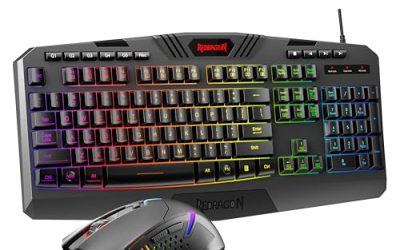
The S101-3 PRO is the software-led pick of this roundup. Both the full-size keyboard and the mouse are programmable through Redragon’s software, so lighting effects, macros and mouse settings live in one ecosystem — the easiest route to a keyboard and mouse that actually match. The keyboard adds independent macro record keys and independent media keys on top of its RGB backlighting, and the low-profile crater key structure keeps the membrane keys soft and quiet. The mouse adjusts from 800 to 7,200 DPI with programmable buttons and its own RGB lighting effects, so it can follow the keyboard’s color scheme instead of running a fixed pattern.
- Strength: One software package drives both devices, which makes synced colors and effects realistic rather than aspirational.
- Strength: Dedicated macro record keys are rare in combo keyboards and useful for MMO and strategy players.
- Trade-off: The keyboard is membrane, so the key feel is soft rather than mechanical, and the set is wired only.
- Skip it if: You want mechanical switches or a wireless desk — look at the Havit or the MageGee V560 instead.
Havit HV-KB389L Mechanical Keyboard and Mouse Combo
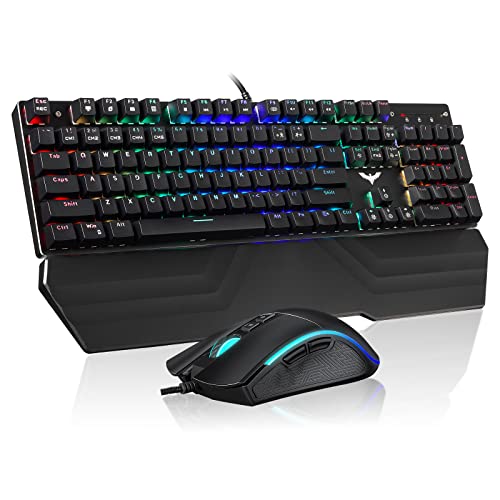
The Havit combo is the one to pick when the keyboard matters most. It is a genuine mechanical board with clicky blue switches on an aluminum top panel with floating keys, full anti-ghosting, and a detachable wrist rest. The keyboard offers 14 backlight modes with further customization through Havit’s software, and the mouse keeps up better than most bundled mice: seven programmable buttons, six DPI levels from 800 to 4,800, and an LED whose color changes to show which DPI step you are on. That last trick is the kind of lighting that earns its place, because it communicates something instead of just glowing.
- Strength: Real mechanical switches and a metal top panel give it a keyboard-first quality the membrane sets cannot match.
- Strength: The mouse lighting doubles as a DPI indicator across its six sensitivity levels.
- Trade-off: Blue switches are loud, the cable is fixed rather than detachable, and the full-size layout with wrist rest takes up a lot of desk.
- Skip it if: You play in a shared room at night or need a compact board — the click and the footprint will both work against you.
MageGee K1 RGB Gaming Keyboard and Mouse Combo
The MageGee K1 is the straightforward rainbow option. The 104-key wired keyboard sits on a transparent base that spreads its RGB backlight into a glow around the board, with 8 light colors, 5 light modes and adjustable brightness and speed, all changed from the keyboard itself. The matching mouse carries a 7-color breathing LED that can be locked to a single color by holding the side and middle buttons together, and it offers DPI steps up to 3,200. There is no software to install and nothing to configure: plug both cables in and the set lights up. That simplicity is the appeal, and also the ceiling — effects are chosen from presets, never built key by key.
- Strength: Completely plug-and-play, with lighting controls on the devices themselves and no app required.
- Strength: The transparent keyboard base throws light onto the desk, so the set looks more dramatic than its simple zone system suggests.
- Trade-off: Rainbow-style lighting cannot be recolored per key, and there is no software for macros or profiles.
- Skip it if: You want to program keys, save lighting profiles, or fine-tune the mouse beyond its preset DPI steps.
MageGee V560 Wireless Gaming Keyboard and Mouse Combo

The V560 takes the MageGee formula wireless. Keyboard and mouse share a single 2.4GHz USB receiver — stored in the bottom of the mouse — and both are rechargeable, with RGB backlighting on the keyboard and a mechanical-feel key action that stays quiet. For a couch setup, a living-room PC or a desk that doubles as a workspace, one receiver and no cables is a real quality-of-life upgrade over the wired sets here. The compromises are the usual wireless ones: the cable in the box is for charging only, since the set runs in 2.4GHz mode, and the lighting is a battery cost you manage by dimming it or switching it off between sessions.
- Strength: One receiver runs both devices, so the set works even on machines with few free USB ports.
- Strength: Rechargeable keyboard and mouse with RGB, in a full-size layout that suits work as well as play.
- Trade-off: No Bluetooth and no wired data mode, and heavy RGB use shortens the time between charges.
- Skip it if: You play competitively and want the guaranteed consistency of a wired connection for both devices.
Which One Fits Your Situation
You want the keyboard and mouse lighting to truly match
Choose the Redragon S101-3 PRO. Because one software package controls both halves of the set, setting the same color and effect on each is a two-minute job rather than an exercise in matching presets by eye.
You are upgrading from a cheap office keyboard
Choose the Havit HV-KB389L. The mechanical switches, metal panel and programmable mouse make it the only set here that feels like a genuine step up in typing and gaming hardware, with the RGB as a bonus rather than the whole point.
You are building a first gaming desk on a tight budget
Choose the MageGee K1. It is wired, simple and dependable, the lighting looks the part straight out of the box, and there is no software learning curve for a younger player or a family PC.
Your gaming PC lives in the living room
Choose the MageGee V560. A single wireless receiver, rechargeable devices and quiet keys suit a shared space, and the full-size board still works for everyday typing when the TV is off.
Common Mistakes
- Assuming “RGB” means per-key control. Most combo sets use zone or rainbow lighting. If you want individual key colors, confirm the listing says per-key and that software supports it.
- Buying for the keyboard and ignoring the mouse spec. Check the mouse DPI range, button count and whether its buttons can be remapped before the set is in your cart.
- Expecting two onboard-only devices to sync themselves. Without shared software, matching effects are manual: pick static colors or similar breathing speeds on both.
- Forgetting that RGB drains wireless batteries. Lighting is the first thing to dim when a wireless combo needs charging too often.
- Treating a membrane and a mechanical board as interchangeable. The typing feel is the biggest daily difference between these sets; pick the one you prefer before comparing light modes.
- Overlooking layout and size. Full-size boards with wrist rests leave less room for wide mouse movements, which matters in low-sensitivity shooters.
FAQ
Can the keyboard and mouse in a combo show exactly the same color?
Yes, in the ways that matter visually. Software-controlled sets like the Redragon S101-3 PRO apply one chosen color to both devices from a single app. Onboard-only sets can match too: set the keyboard to a static color and lock the mouse LED to the same shade, as the MageGee K1 allows, rather than leaving both cycling independently.
Is per-key RGB worth paying more for in a combo?
Only if you will actually use it. Per-key control enables reactive effects and per-game key highlighting, but most players settle on one static color or a slow breathing effect, which zone and rainbow sets already do well. At combo prices, putting the money toward mechanical switches usually improves daily use more than finer lighting does.
Do these combos work without installing software?
The MageGee sets do — every lighting change happens on the devices themselves. The Redragon and Havit sets also light up and work as soon as they are plugged in, but their software unlocks the deeper options: macros, remapped buttons, saved profiles and finer lighting control.
Will a gaming keyboard and mouse combo work on a laptop or console?
On a laptop, yes: wired sets need two free USB ports, and the V560 needs just one for its receiver. Console support varies by game and platform, and combo keyboards are designed and specced for Windows PCs, so check your console’s keyboard and mouse support for the specific games you play.
How long do wireless RGB combos last between charges?
It depends almost entirely on the lighting. Manufacturers quote their longest runtimes with backlighting off, and bright RGB at full brightness can cut that dramatically. The practical approach is to treat the charging cable as part of the setup and top up during downtime rather than waiting for an empty battery mid-session.
Related guides
More from Amazon
Programs that pair well with the guide above. Offers and eligibility are set by Amazon and may change.
Free shipping on eligible items, Prime Video and more. Eligible new members can start with a free trial.
Start a Prime free trialAd-free music streaming. Eligible new subscribers can start with a free trial.
Try Music Unlimited freeA Prime membership for ages 18-24 with a trial period. Eligibility is set by Amazon.
See Prime for Young AdultsAudiobooks and podcasts to listen to on the go. Eligible new members can start with a free trial.
Try Audible freeAs an Amazon Associate we earn from qualifying purchases.