
There’s a particular kind of frustration that comes with building or upgrading a 1080p gaming PC on a budget: you’ve picked your case, you’ve got a monitor that tops out at 1920×1080, and now you’re staring at GPU listings that swing from under $120 to well over $500 with no clear sense of what’s actually worth it. Open box and clearance listings make it worse in the best way — the discounts are real, but the descriptions are a wall of jargon, and it’s hard to tell whether a “6GB” card is a steal or a trap. Some of these cards are slim, low-profile units meant for small form factor builds; others are triple-fan monsters that won’t fit anything smaller than a mid-tower.
We’ve sorted through the current open box landscape specifically for 1080p gamers, ranked eight picks from budget workhorses to overkill head-turners, and flagged who each card actually makes sense for. Every price below is the live listing price at the time of writing, and we’ve noted where a card’s VRAM, physical size, or power needs should factor into your decision. If you’re targeting high-refresh 1080p in esports titles or just want stable 60+ fps in AAA games at medium-to-high settings, there’s a pick here for your budget.
As an Amazon Associate we earn from qualifying purchases at no extra cost to you. Product prices and availability are accurate as of the date shown and are subject to change.


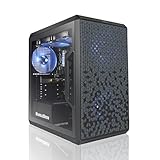



Top 3 picks at a glance
maxsun GeForce RTX 3050 6GB Graphics Cards GDDR6 Video Graphics Card GPU...ZER-LON GeForce GTX 1660 Super 6GB Graphics Cards, GDRR6 192Bit PCIE 3.0X16...AVGPC Q-Box Series Gaming PC - 4.2 GHz Max Boost AMD Ryzen...Quick Picks
| Product | Best for | Price |
|---|---|---|
| maxsun GeForce RTX 3050 6GB (Low Profile) | Small form factor and slim builds | $299.99 |
| ZER-LON GeForce GTX 1660 Super 6GB | Best budget 1080p value | $194.99 |
| AVGPC Q-Box Gaming PC (Ryzen 5 5500 + RTX 3050 6GB) | Full system on a budget | $789 |
| Gigabyte Radeon RX 7600 Gaming OC 8G | High-refresh 1080p AAA gaming | $455 |
| QTHREE GeForce GTX 960 4GB | Extreme budgets and older systems | $115.99 |
| ZOTAC RTX 3060 AMP White Edition 12GB | 1080p with headroom for streaming | $549.99 |
| Skytech Gaming Legacy 4 (RTX 5090 prebuilt) | No-compromise flagship system | $6,799.98 |
| ASUS ROG Strix GTX 1080 8GB | Pascal loyalists and used-market buyers | $329 |
How We Picked
We approached this roundup the way a 1080p gamer would: every card and system here was evaluated for what it delivers at 1920×1080, not at resolutions most buyers in this bracket will never touch. That means VRAM matters — 6GB is the practical floor for modern AAA titles at this resolution, and 8GB or more gives you comfortable room for texture-heavy games — but raw 4K marketing numbers don’t. We also weighed physical fit (a low-profile card is useless in a full tower and vice versa), power connector requirements, cooling design, and whether the price genuinely reflects a deal versus an inflated “open box” sticker.
Because these are open box and clearance listings, stock and pricing move constantly. We focused on cards from recognizable brands or sellers with defined listings — maxsun, Gigabyte, ZOTAC, ASUS, Skytech, and others — so you’re not rolling the dice on a no-name rebadge. We did not run our own benchmark lab for this roundup; instead, we leaned on each product’s published specifications, well-established generational performance tiers, and the practical experience of what these GPUs deliver at 1080p. Where a card is older silicon, we say so plainly and tell you who should still buy it.
The 8 Best Picks
1. maxsun GeForce RTX 3050 6GB — Best for Small Form Factor Builds
This is the pick for anyone squeezing a gaming PC into a slim console-style case, an HTPC, or an SFF chassis where a standard two-slot card physically won’t fit. The low-profile, mini design is the whole point here: it’s a single-slot-friendly, compact card with PCI Express 4.0, HDMI 2.1, and DisplayPort 1.4a outputs, and GDDR6 memory on the RTX 3056-class 6GB configuration. DLSS support makes it noticeably more capable than its raw spec sheet suggests at 1080p. At $299.99 it’s priced at a premium over larger 3050s, which is the usual tax for low-profile cooling, but if your case demands it, there are few alternatives.
- Genuine low-profile/SSF design that fits slim cases most GPUs can’t
- Modern I/O with HDMI 2.1 and DisplayPort 1.4a, plus PCIe 4.0
- Con: 6GB VRAM and a modest GPU tier mean you’ll run medium settings in demanding new titles
Skip it if: you have a standard mid-tower — a full-size card at this price will get you more performance.
2. ZER-LON GeForce GTX 1660 Super 6GB — Best Budget 1080p Value
At $194.99, this is the cheapest card here that still handles 1080p gaming with dignity. The GTX 1660 Super’s 6GB of GDDR6 on a 192-bit bus was the sweet spot of its generation, and it still delivers smooth 60+ fps in esports titles and solid medium-to-high settings in older AAA games. The dual Freeze fans keep a low-profile cooler reasonable, and you get HDMI, DisplayPort, and DVI — handy if you’re pairing it with an older monitor. There’s no ray tracing or DLSS, so don’t buy it for those features. But as a pure dollars-per-frame play for 1080p, nothing else on this list touches it.
- Excellent price-to-performance for 1080p at under $200
- Dual-fan cooling with a full port selection including legacy DVI
- Con: No DLSS or ray tracing, and PCIe 3.0 only
Skip it if: you play the newest AAA releases and need upscaling to hit your frame targets.
3. AVGPC Q-Box Series Gaming PC (Ryzen 5 5500 + RTX 3050 6GB) — Best Budget Complete System
Not everyone shopping open box GPU deals has a PC to drop one into. At $789, this AVGPC Q-Box bundles a 4.2 GHz max-boost Ryzen 5 5500 six-core CPU, an RTX 3050 6GB, 16GB of DDR4 3200, a 500GB SSD, liquid cooling, Wi-Fi, and Windows 11 into one working system. For a first gaming PC or a living-room build, that removes every compatibility headache — no PSU sizing, no clearance measuring, no driver fiddling. The 3050 6GB sits at the entry tier, so expect medium settings at 1080p in AAA games and very high frame rates in esports. As a total-package value, though, it’s hard to argue with.
- Complete, ready-to-run Windows 11 system with 16GB RAM and an SSD
- Liquid cooling and AC Wi-Fi included at a budget price
- Con: The RTX 3050 6GB is entry-level; the GPU is the first thing you’d upgrade
Skip it if: you already own a capable PC — put the $789 toward a standalone GPU instead.
4. Gigabyte Radeon RX 7600 Gaming OC 8G — Best for High-Refresh 1080p
If your 1080p monitor is a 144Hz or 165Hz panel, this is the card on this list actually built for it. The RX 7600 with 8GB of GDDR6 on a 128-bit bus is a genuine 1080p-high-settings GPU, and Gigabyte’s triple-fan WINDFORCE cooler keeps it quiet while doing so. FSR upscaling support adds headroom in heavier titles. At $455 it isn’t the bargain-bin pick, but open box RX 7600s routinely undercut new retail, and the 8GB framebuffer means you won’t be swapping textures down to medium in two years. It’s the pick for buyers who want to play modern games at high settings without thinking about it.
- 8GB VRAM and strong 1080p-high performance with high-refresh headroom
- Efficient triple-fan WINDFORCE cooling from a first-party AIB brand
- Con: $455 is a serious step up from the budget picks here
Skip it if: your targets are 60 fps esports at medium settings — the cheaper cards cover that.
5. QTHREE GeForce GTX 960 4GB — Best Ultra-Budget Placeholder
At $115.99, the GTX 960 is the cheapest way to get a display output and playable frame rates out of a system with no GPU at all. With 4GB of GDDR5 on a 128-bit bus and DP, HDMI, and DVI-D outputs plus 4K display support, it’s a functional card — for older games, esports at lowered settings, or as a temporary stick while you save for something real. QTHREE cards are typically refurbished or recertified stock, sometimes with re-pasted coolers, so treat this as a functional salvage part rather than a long-term gaming GPU. Modern AAA titles will simply not fit in 4GB of VRAM at acceptable settings.
- Cheapest entry point on the list by a wide margin
- Useful for reviving older prebuilt or office PCs for light gaming
- Con: 4GB VRAM is below the practical floor for current AAA games
Skip it if: you can stretch to $194.99 — the 1660 Super is a far better long-term buy.
6. ZOTAC Gaming GeForce RTX 3060 AMP White Edition 12GB — Best for Streaming and VRAM Headroom
The RTX 3060 12GB remains one of the most sensible 1080p cards ever made, and the 12GB framebuffer is the reason: it gives you room for high texture settings, streaming, and even some VR work that 8GB cards can start to choke on. This AMP White Edition pairs it with ZOTAC’s IceStorm 2.0 triple-fan cooling, active fan control, and a Freeze Fan Stop mode that shuts the fans off entirely at idle — genuinely nice in a quiet room. The white shroud also suits white-themed builds. At $549.99 it’s priced above where 3060s once sat, so it’s a pick for buyers who specifically want the VRAM and the aesthetics.
- 12GB of VRAM gives exceptional headroom for 1080p and beyond
- IceStorm 2.0 cooling with fan-stop for silent idle operation
- Con: $549.99 is steep for this performance tier in the open box market
Skip it if: you’re a pure budget buyer — the RX 7600 or 1660 Super serve 1080p better per dollar.
7. Skytech Gaming Legacy 4 (Intel Ultra 9 285K + RTX 5090) — The Overkill Flagship
Let’s be honest: a $6,799.98 system with an RTX 5090 32GB, Intel Ultra 9 285K at 5.5GHz, 64GB of DDR5-6000, a 4TB Gen4 NVMe, a 1200W Gold ATX 3.0 PSU, a 420mm ARGB AIO, and Wi-Fi 7 has no business being in a 1080p roundup — and that’s exactly why it’s here. Open box prebuilts like this occasionally hit deep discounts, and if your “1080p gaming” desk also does AI work, 3D rendering, or 4K content creation, this machine obliterates everything. The Z890 board and massive PSU also mean any future GPU upgrade is a drop-in. For pure 1080p gaming, it’s a sledgehammer cracking a nut — a magnificent one.
- Absurdly future-proof: 32GB VRAM, 64GB DDR5, 4TB storage, 1200W PSU
- Top-tier cooling (420mm AIO) and platform (Z890, Wi-Fi 7)
- Con: Enormously overkill for 1080p; the price buys a whole room of consoles
Skip it if: gaming at 1920×1080 is genuinely all you do — $789 buys 90% of the experience.
8. ASUS ROG Strix GTX 1080 8GB — The Legacy Wildcard
Pascal’s GTX 1080 with 8GB of VRAM was the 1440p/1080p high-refresh king of its day, and at $329 in open box condition it’s an interesting legacy wildcard. The ROG Strix cooler is one of the best of that generation — a big triple-fan unit with addressable RGB (on the Aura-enabled variants) and solid acoustics — and 8GB remains adequate for 1080p today. There’s no DLSS or ray tracing hardware, and driver support for Pascal is winding down over time, which caps its lifespan. But if you find one at this price from a seller with a return window, it still outperforms anything near it on this list in raw raster terms.
- Strong raw raster performance that still holds up at 1080p
- Premium ROG Strix cooling and build quality from ASUS
- Con: Aging platform with no DLSS/ray tracing and declining driver support
Skip it if: you want a card that’ll still feel current in three or four years.
Buying Guide
Match VRAM to Your Library, Not the Marketing
For 1080p gaming in 2026, treat 6GB as the floor, 8GB as the comfortable standard, and 12GB as luxury headroom. The GTX 960’s 4GB will exclude you from most modern AAA releases at acceptable settings, while the 3060’s 12GB mostly benefits streaming and texture-heavy titles. If you play mainly esports games — CS, Valorant, League, Rocket League — VRAM matters far less, and the cheaper 6GB cards will serve you for years.
Check Physical Fit and Power Before You Click Buy
Open box listings rarely volunteer dimensions, so measure first. A low-profile card like the maxsun 3050 fits slim cases where a Gigabyte triple-fan card simply won’t — triple-fan coolers commonly run 280–320mm long and need two to three expansion slots. On power: cards in this roundup without external connectors draw everything from the PCIe slot (typically 75W), while higher-tier cards need 6-pin or 8-pin feeds — verify your PSU has the connectors and at least 100–150W of GPU headroom. A $455 card that your 400W PSU can’t feed is not a deal.
Understand the Risks of Open Box
Open box means returned, display, or refurbished stock — frequently tested, sometimes not. Buy only from sellers offering at least a 14–30 day return window, and bench-test the card the day it arrives: run a stress game or free benchmark tool for 30 minutes and watch for artifacts, fan noise anomalies, or crashes. Prebuilts like the AVGPC and Skytech carry their own warranty terms, which can actually make them lower-risk than a bare open box GPU. No-name brands like QTHREE warrant extra scrutiny — read recent buyer feedback before committing.
Our Verdict
For most 1080p gamers, the ZER-LON GTX 1660 Super at $194.99 is the smartest money on this list — it plays everything your resolution can throw at it for the price of a mid-range monitor. If you can stretch, the Gigabyte RX 7600 at $455 is the best pure 1080p gaming card here, with the VRAM and performance for high-refresh panels. Buyers with slim cases should target the maxsun low-profile 3050, streamers should lean toward the 12GB ZOTAC 3060, and anyone without a PC at all should look hard at the $789 AVGPC bundle. The GTX 960 is a last-resort placeholder, the Strix GTX 1080 a legacy wildcard, and the Skytech RTX 5090 system a glorious reminder that “1080p gaming” means very different things to different wallets.
FAQ
Is 6GB of VRAM enough for 1080p gaming?
For esports titles and most games from the last several years at medium-to-high settings, yes. Demanding new AAA releases with ultra texture packs can push past 6GB, where you’ll see stuttering or forced texture downgrades. If your library skews modern and heavy, prioritize 8GB or more — the RX 7600 or the 12GB RTX 3060.
Are open box GPUs safe to buy?
Generally, yes, if you buy from a seller with a real return window and test the card immediately on arrival. Most open box cards are customer returns that work perfectly; a smaller number have been run hard or mishandled. A 30-minute stress test in the first week protects you either way.
Do I need ray tracing and DLSS at 1080p?
Ray tracing at 1080p is largely a nice-to-have — the cards in this price bracket handle it lightly, if at all. DLSS and FSR upscaling, on the other hand, genuinely matter: they can add 30–50% effective performance. That’s a point in favor of the RTX-based picks (3050, 3060) and the FSR-capable RX 7600 over the older GTX cards.
GPU only or a prebuilt like the AVGPC Q-Box?
If you already own a functioning desktop with a decent PSU, a standalone GPU is almost always the better value. If you’re starting from nothing — or replacing an aging prebuilt — the AVGPC at $789 delivers a complete, compatible, Windows 11-ready system for less than most standalone mid-range GPUs cost, with zero compatibility risk.


