StarCraft II rewards the player who issues the right command a fraction of a second sooner, and the mouse is where that speed lives. Control groups, camera locations, rally points, and production cycles all pass through your right hand, so a mouse that forces awkward reaches or drops clicks under pressure quietly costs games. The right pick puts your most-used commands on thumb buttons you can hit without thinking, tracks cleanly at the sensitivity you actually play at, and stays comfortable through a long ladder session.
This guide is for ladder players chasing cleaner macro, campaign players who want comfortable control through long missions, and returning players rebuilding their setup from scratch. Every mouse below was picked from its Amazon listing name and listed specifications, with an eye toward programmable buttons, sensor precision, and click feel that suit real-time strategy rather than generic gaming.
Our Top Picks
 Razer Basilisk V3 Customizable RGB Wired Ergonomic GamingMouse2.96 x 5.12 x 1.67 inches0.2 poundsCheck on Amazon


Top 3 picks at a glance
Quick Picks
As an Amazon Associate we earn from qualifying purchases.
| Product | Best for | Key spec from title |
|---|---|---|
| Logitech G502 HERO | Ladder play on a wired setup | HERO 25K sensor, 25,600 DPI, 11 programmable buttons |
| Razer Naga V2 Pro | Large control-group layouts | 19+1 programmable buttons, Focus Pro 30K sensor |
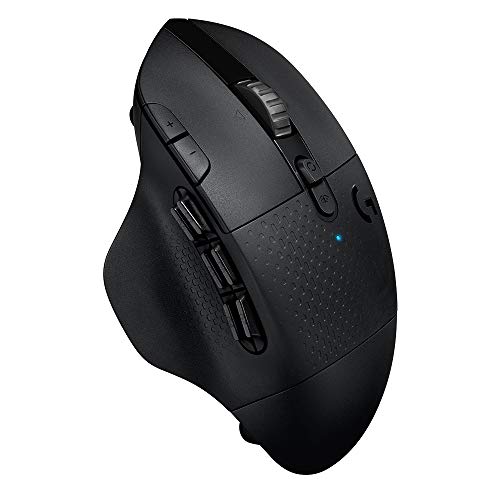
| Logitech G604 LIGHTSPEED | Wireless play with long battery life | 15 programmable controls, up to 240-hour battery life |
| Corsair Scimitar RGB Elite | A full thumb-button grid | 18,000 DPI, 17 programmable buttons |
| Razer Basilisk V3 | Ergonomic comfort with a tilt wheel | 26K DPI optical sensor, 11 programmable buttons |
How to Choose
Count the Buttons You Will Actually Bind
StarCraft II gives you ten control groups, and most players lean on four to six of them in a typical match, plus camera hotkeys and a few production commands. A mouse with six to twelve well-placed thumb buttons covers that load without forcing your left hand off its home keys. Count the buttons you can reach without shifting your grip, not the number printed on the box, because a button buried under your ring finger is dead weight in a fight. Side plates that swap between two, seven, and twelve buttons let you grow into a bigger layout instead of relearning your hand position later.
Match the Sensor to Your Sensitivity
High DPI numbers sell mice, but StarCraft II players usually settle somewhere between 800 and 1600 DPI with in-game sensitivity tuned to taste, so the sensor matters more as clean tracking than as a headline figure. Look for an optical sensor that holds its aim during fast flicks across the minimap and does not spin out when you lift and recenter the mouse. A sensor with no acceleration or angle snapping keeps camera jumps predictable, which matters when you jump between your natural expansion and a harass at the third base. Test your chosen sensitivity in a custom game before taking it to the ladder.
Weigh Click Feel Against Long Sessions
Actions per minute in StarCraft II come in bursts, and a stiff main click turns a long macro cycle into finger fatigue by the third game. Optical switches tend to feel crisp with a short travel, while well-tuned mechanical switches give a firmer snap that some players prefer for deliberate commands. Weight plays into this too: a lighter mouse changes direction faster during rapid box-selects, yet a slightly heavier shell can feel steadier when you are holding a defensive position. Aim for a mouse near or below 130 grams if you play fast, and check the grip shape against your hand before anything else.
Decide Between Wired Certainty and Wireless Freedom
A wired mouse never needs charging mid-series and never drops a connection during a decisive engagement, which is why many competitive players still reach for a cable. Modern wireless mice, though, run for hundreds of hours on a charge and poll fast enough that input lag is no longer a real concern for most ladder games. The trade is upkeep: wireless means remembering to charge or swap batteries, and a dead mouse in game three of a best-of-five is a loss you can avoid. If your desk has cable drag, a light paracord-style cable or a clean wireless setup both solve the problem.
The 5 Best Options
Logitech G502 HERO

The G502 HERO is the safe default for StarCraft II because it covers every RTS need without asking you to learn a new grip. Eleven programmable buttons put control groups, camera hotkeys, and attack-move within thumb reach, while the HERO 25K sensor tracks cleanly at the moderate sensitivities RTS players favor. Adjustable weights let you tune the shell from light and flicky to planted and deliberate, and on-board memory carries your bindings to another machine without reinstalling software. It is wired, so there is no battery to manage during a long session.
Specs
- HERO 25K sensor, up to 25,600 DPI
- 11 programmable buttons
- Adjustable weights
- On-board memory
- RGB lighting
- Wired connection, PC and Mac compatible
Best for: Ladder players who want a proven wired mouse with plenty of buttons.
Watch out for: The shell is fairly large and heavy for small hands, so check your grip size first.
ASIN: B07GBZ4Q68
Razer Naga V2 Pro
The Naga V2 Pro is built for players who bind everything and want the mouse to keep up. Swappable side plates give you two, seven, or twelve thumb buttons, so you can start with a modest layout for control groups and expand it as your hotkey habits grow. The Focus Pro 30K sensor handles fast minimap flicks, the HyperScroll Pro wheel speeds through long production menus, and the wireless link runs for up to 300 hours on a charge. Optical switches give each click a crisp, consistent feel, which helps when you are issuing rapid commands in a large engagement.
Specs
- Focus Pro 30K optical sensor
- 19+1 programmable buttons
- Three swappable side plates (2, 7, and 12 buttons)
- HyperScroll Pro wheel
- Optical Mouse Switches Gen-3
- Up to 300-hour battery life
- HyperSpeed Wireless and Bluetooth connectivity
Best for: Players who want a big button grid for control groups and camera hotkeys.
Watch out for: The wide body and button grid take time to learn, so expect a few awkward games first.
ASIN: B0BGJTLFN5
Logitech G604 LIGHTSPEED
The G604 is the wireless pick for players who want buttons and battery life in the same mouse. Fifteen programmable controls, including six thumb buttons, cover control groups and camera jumps without crowding your keyboard hand, and the dual wireless modes let you switch between a fast LIGHTSPEED link for matches and Bluetooth for everyday use. Battery life stretches up to 240 hours, so charging becomes a rare chore rather than a nightly one. The Hyper-Fast scroll wheel also helps when you are scanning long build orders or replay timelines.
Specs
- 15 programmable controls, including 6 thumb buttons
- Up to 240-hour battery life
- Dual wireless connectivity: LIGHTSPEED and Bluetooth
- Hyper-Fast scroll wheel
Best for: Wireless players who want a big button set and months between charges.
Watch out for: New stock looks scarce and some listings are third-party or used, so confirm the seller before ordering.
ASIN: B07QN369XX
Corsair Scimitar RGB Elite

The Scimitar RGB Elite turns the thumb into a second keyboard, which is exactly what a control-group-heavy StarCraft II style needs. Its twelve-button side panel slides forward and back, so you can line the grid up with your thumb instead of stretching for it, and seventeen programmable buttons in total leave room for camera locations, rally commands, and idle-worker checks. The 18,000 DPI optical sensor is more than enough for RTS sensitivities, and iCUE software stores profiles on the mouse itself. It is a wide, deliberate mouse, so palm grippers get the most from it.
Specs
- 18,000 DPI optical sensor
- 17 programmable buttons
- 12-button side panel
- iCUE compatible
- Wired connection
Best for: Palm-grip players who want a full thumb grid for control groups.
Watch out for: The wide body can feel bulky for small hands or claw grips, so measure your hand first.
ASIN: B082LRMY53
Razer Basilisk V3
The Basilisk V3 suits players who want ergonomic comfort without giving up buttons. Its sculpted right-handed shell supports the palm through long sessions, and eleven programmable buttons give you room for control groups, camera hotkeys, and a couple of production commands. The HyperScroll tilt wheel is a quiet advantage in StarCraft II: tilt left and right to jump between bases or scroll through the production tab without moving your hand. A 26K DPI optical sensor and fast optical switches keep clicks and flicks precise when a fight breaks out.
Specs
- 26K DPI optical sensor
- 11 programmable buttons
- HyperScroll tilt wheel
- Chroma RGB lighting
- Optical mouse switches
- Wired connection
Best for: Palm-grip players who want comfort plus a tilt wheel for camera work.
Watch out for: The right-handed shape does not suit left-handed players, and the cable needs a clean desk path.
ASIN: B09C13PZX7
Which One Fits Your Situation
You Play Ranked and Want Zero Surprises
Pick the Logitech G502 HERO. Its wired link removes battery and connection worries, eleven buttons cover the control groups most ladder builds need, and the adjustable weights let you settle the feel before a series starts. On-board memory means your bindings travel with the mouse if you play at a friend’s setup or a local event. Keep the Basilisk V3 in mind if your hand prefers a more sculpted palm rest.
You Run Big Control-Group Layouts
Pick the Razer Naga V2 Pro or the Corsair Scimitar RGB Elite. The Naga’s swappable side plates let you grow from a button set to a twelve-button grid, while the Scimitar’s sliding panel lines the grid up with your thumb. Both give you room for army groups, production groups, and camera locations without touching the keyboard. Choose the Naga if you want wireless freedom, and the Scimitar if you prefer a wired link and a smaller button count to learn.
You Play Long Sessions and Hate Cables
Pick the Logitech G604 LIGHTSPEED. Its battery runs up to 240 hours, so a single charge covers weeks of evening games, and the dual wireless modes let you flip to Bluetooth when the match is over. Fifteen programmable controls still leave room for your main control groups, and the Hyper-Fast wheel makes replays easy to scan. Just confirm the listing is new stock from a reliable seller before you order, since supplies look thin.
Your Hand Cramped on Your Last Mouse
Pick the Razer Basilisk V3. Its sculpted shell fills the palm and takes pressure off your fingers during long macro games, while the tilt wheel keeps camera work on the mouse instead of the keyboard. Eleven buttons are enough for the groups most players actually use, so you do not trade comfort for a grid you never fill. If your hand is small, try the G502 HERO first, since its narrower body suits a wider range of grips.
Common Mistakes
- Buying a twelve-button grid mouse and binding nothing to it for the first month, which leaves expensive buttons unused while your keyboard hand does all the work.
- Setting DPI to the maximum and wondering why the camera flies past your base with every small movement.
- Choosing a mouse by its sensor number alone and ignoring grip shape, which decides whether your hand survives a long session.
- Skipping the software setup and playing with default bindings, so the extra buttons never become part of your habits.
- Picking a heavy mouse for fast play and blaming your APM when your wrist tires before the late game.
Frequently Asked Questions
How many buttons do you need for StarCraft II?
Most players use four to six control groups in a match, plus a few camera hotkeys, so six to twelve reachable thumb buttons cover the load well. More buttons help only if you bind them and practice with them; an unbound button is decoration. Start with the groups you already use, add camera keys next, and expand only when a command keeps forcing your left hand out of position.
Is a wireless mouse fine for competitive StarCraft II?
Yes, a modern wireless mouse with a fast 2.4 GHz link is fine for ladder play, and many competitive players already use one. The link polls fast enough that input delay is not a practical concern at RTS speeds. Keep the battery charged before a series, since a mouse that dies mid-game costs far more than any tiny latency difference ever could.
What DPI should you use for StarCraft II?
Most StarCraft II players settle between 800 and 1600 DPI, then tune in-game sensitivity until a full screen cross takes a comfortable wrist movement. Lower settings give steadier box-selects and camera control, while higher settings suit players who flick across the minimap constantly. Pick a value, play ten games with it, and only change it when a specific movement keeps missing.
Does mouse weight matter for high APM?
Weight matters, but less than grip shape and click feel. A lighter mouse changes direction faster during rapid box-selects, which helps when your APM spikes in a big fight. A heavier mouse can still work well if the shape fits your hand and the clicks stay light. If you play fast, favor a lighter shell, and give any new mouse a few days before judging it.
Related guides
More from Amazon
Programs that pair well with the guide above. Offers and eligibility are set by Amazon and may change.
Free shipping on eligible items, Prime Video and more. Eligible new members can start with a free trial.
Start a Prime free trialAd-free music streaming. Eligible new subscribers can start with a free trial.
Try Music Unlimited freeA Prime membership for ages 18-24 with a trial period. Eligibility is set by Amazon.
See Prime for Young AdultsAudiobooks and podcasts to listen to on the go. Eligible new members can start with a free trial.
Try Audible freeAs an Amazon Associate we earn from qualifying purchases.