The Ryzen 5 PRO 5650G is a 6-core, 12-thread AM4 chip with Radeon Vega 7 graphics, and for gaming it is a capable budget APU that can run many titles at 720p to 1080p on low settings without a graphics card. The catch is availability: it is a PRO part sold mostly in business desktops, so the retail alternative, the Ryzen 5 5600G, is easier to buy.
Short answer for the ryzen 5 5650g: choose it if it comes inside a prebuilt or as a bargain tray chip and you want a small, quiet PC that plays lighter games. Skip it if you want demanding games at high settings; add a discrete graphics card or pick a faster CPU instead.
Our Top Picks
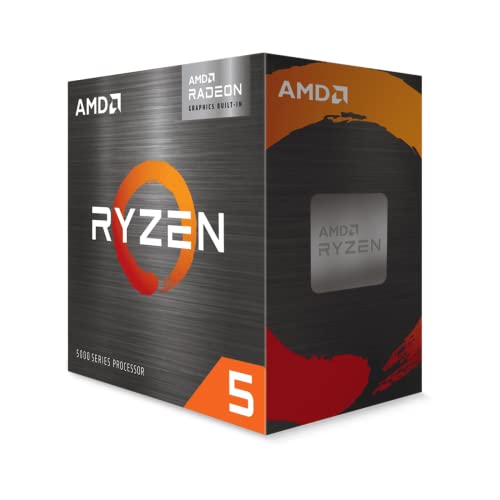 AMD Ryzen™ 5 5600G 6-Core 12-Thread Desktop Processor1.6 x 1.6 x 0.2 inches0.9 poundsCheck on Amazon
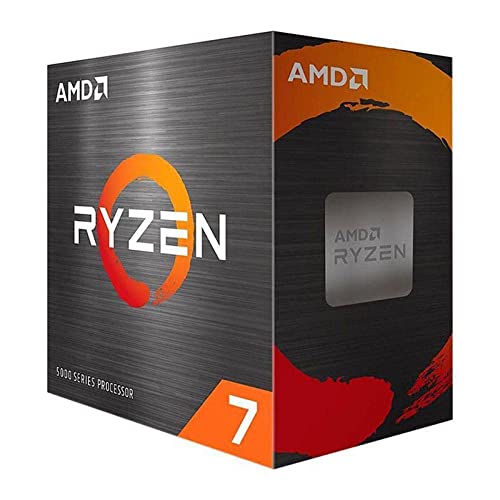


Top 3 picks at a glance
Ryzen 5 PRO 5650G specs
The amd ryzen 5 pro 5650g (also searched as ryzen 5 5650g, ryzen 5650g and 5650g) belongs to the Cezanne family, which uses Zen 3 cores and Radeon Vega graphics on a 7 nm process. It launched in 2021 alongside the other Ryzen 5000 G-series and PRO APUs. Figures below come from retailer listings and public CPU databases.
| Spec | Ryzen 5 PRO 5650G |
|---|---|
| Architecture | Zen 3 (Cezanne), 7 nm |
| Cores / threads | 6 / 12 |
| Base / boost clock | 3.9 GHz / 4.4 GHz |
| Cache | 3 MB L2, 16 MB L3 (19 MB total) |
| TDP | 65 W |
| Socket | AM4 |
| Memory | DDR4, up to 3200 MT/s, dual channel |
| Integrated graphics | Radeon Graphics (Vega), 7 compute units, up to about 1900 MHz |
| PCIe | 3.0 |
| Overclocking | Multiplier locked |
| PRO features | AMD PRO security and manageability (for example DASH) |
Not confirmed here: whether a cooler is included. PRO chips often ship as tray or OEM parts without one, so check the listing.
How good is the Radeon graphics for gaming?
The integrated Vega 7 handles esports and older titles at 1080p on low settings and many newer games at 720p. It is not a replacement for a dedicated graphics card, but it is far better than the integrated graphics in typical office processors.
What to expect by game type
| Game type | Realistic setting (approximate) | Notes |
|---|---|---|
| Esports (Counter-Strike 2, Valorant, League of Legends) | 1080p low, playable frame rates | Lowest settings, memory speed matters |
| Older and indie games | 1080p medium to high | Usually fine |
| Modern AAA | 720p low, upscaling helps | Expect compromises |
| Open-world with heavy effects | 720p low, 30 fps target | Not a comfortable experience |
These are approximate expectations based on the graphics class, not benchmark runs. Results change with the game version, driver and memory configuration.
Memory is the real graphics upgrade
An integrated GPU shares system memory, so dual-channel DDR4-3200 or faster makes a visible difference compared with a single stick. A single 16 GB module can lose a large share of graphics performance. Always install two modules.
Upscaling and settings
Use AMD FidelityFX Super Resolution where a game supports it, lower shadow and effects quality first, and keep textures at medium if the system has at least 16 GB of memory. Setting a larger graphics memory allocation in BIOS rarely helps on its own, because the APU borrows RAM dynamically.
CPU performance for games and apps
The Zen 3 cores are the strongest part of this chip. Six cores and twelve threads at up to 4.4 GHz are plenty for modern gaming, office work, streaming at moderate settings and light content creation. With a discrete graphics card added later, the chip still performs like a solid mid-range gaming CPU, although its cache is smaller than the cache on the non-APU Ryzen 5 5600, which can matter in some games. As an approximate range, expect it to land somewhat behind a 5600 in CPU-limited titles and ahead of any Zen 2 or Zen+ six-core.
- Productivity: good for browsing, spreadsheets, photo editing and 1080p video editing.
- Streaming: workable at moderate settings, with hardware encoding on a future graphics card as the better route.
- Multitasking: 12 threads give comfortable headroom.
Platform: socket, chipset, RAM and BIOS
The 5650G uses socket AM4 and DDR4. Good board choices are B550 and A520; B450 and X470 boards can work after a BIOS update that adds Zen 3 APU support. Always read the board maker’s CPU support list for this exact model, and check that the board has a video output, because APU graphics need HDMI or DisplayPort on the motherboard.
Choosing a board
A small micro-ATX A520 or B550 board is enough for most APU builds. Choose B550 if you want an M.2 slot with PCIe 4.0 for a fast SSD or plan to add a PCIe 4.0 graphics card later, though note that the chip itself runs PCIe 3.0.
BIOS update notes
Older boards may not recognize Ryzen 5000 G-series chips until the BIOS is updated. If the board offers a flashback feature that works without a CPU, use it before installing the processor. Otherwise buy a board that lists the chip as supported out of the box.
Cooler
At 65 W the chip runs well with a modest cooler. If your listing does not include one, a small tower cooler is a quiet and inexpensive choice. A slim cooler also fits small cases better.
Power, noise and thermals
With a 65 W rating the 5650G is easy to cool and efficient for the performance. It suits small-form-factor cases and quiet living-room or desk PCs. Because it needs no graphics card, total system power can stay low, which also reduces fan noise and case size.
| Use | Cooler suggestion | Outlook |
|---|---|---|
| Office and light gaming | Basic AM4 cooler or slim tower | Quiet |
| Long gaming sessions | Single-tower air cooler | Quiet, stable boost |
| Compact case | Low-profile cooler | Check the height limit |
Worked example: why dual-channel memory matters
Peak memory bandwidth equals transfer rate times 8 bytes per transfer times the number of channels. That is simple arithmetic you can check yourself, and it explains most of the gap between a good and a poor APU build.
| Memory setup | Calculation | Peak bandwidth |
|---|---|---|
| DDR4-3200, dual channel | 3200 x 8 x 2 | 51.2 GB/s |
| DDR4-3200, single channel | 3200 x 8 x 1 | 25.6 GB/s |
| DDR4-2666, dual channel | 2666 x 8 x 2 | about 42.7 GB/s |
| DDR4-2400, single channel | 2400 x 8 x 1 | 19.2 GB/s |
The graphics cores and the processor cores draw from the same pool. A single-channel setup cuts the pool in half, which is why the same chip can feel twice as slow in games with one stick. Real frame rates do not fall exactly in proportion, but the direction is clear: always buy a two-module kit.
Practical settings for integrated-graphics gaming
These steps help any Vega-based APU and are listed with the reason for each.
- Enable the memory profile (XMP or DOCP). Without it, memory often runs at a slow default speed, which lowers graphics bandwidth.
- Update the graphics driver. Newer drivers can improve compatibility for recent games, even on older integrated graphics.
- Lower the render resolution before lowering everything else. Dropping from 1080p to 900p or 720p often saves more frame time than cutting several effect settings.
- Turn on upscaling where available. FidelityFX Super Resolution in Quality or Balanced mode gives frame rate back at a small clarity cost.
- Cut shadows and volumetric effects first. They are among the most expensive settings and the least visible on a small screen.
- Cap the frame rate. A steady 30 or 60 fps cap feels smoother than a fluctuating higher number on an APU.
- Close background apps. Browsers and launchers consume the same shared memory the graphics use.
Three sample builds around the 5650G or 5600G
The chips below are descriptive tiers, not price quotes. They show how the same APU fits different goals.
Quiet desk PC
A micro-ATX A520 board, 2×8 GB DDR4-3200, an NVMe SSD and a small tower cooler in a compact case. It handles office work, streaming video and esports titles at 1080p low with very little noise.
Budget starter gaming PC
The same base, with a case that has space for a graphics card and a power supply of 450 to 550 W. Start on integrated graphics and add an entry graphics card later without rebuilding.
Small-form-factor media and light-gaming box
A mini-ITX AM4 board with a low-profile cooler. Check the cooler height limit and make sure the board has the video outputs you need for your display or TV.
Common problems and quick fixes
| Symptom | Likely cause | What to check |
|---|---|---|
| No display at first boot | BIOS too old for the chip, or cable in the wrong port | Plug the monitor into the motherboard output, not a graphics card slot; update BIOS |
| Low frame rates | Single-channel memory or memory profile off | Check that two modules are in the correct slots and the profile is enabled |
| Stutter in newer games | Memory-limited graphics | Lower texture quality and resolution; use upscaling |
| High temperature | Cooler not mounted well | Reseat the cooler and check the fan header |
| Board does not boot with the chip | No Ryzen 5000 G-series support in the BIOS | Use BIOS flashback if available or choose a compatible board |
Recommended parts for a Ryzen 5 5650G build
The store does not list a standalone 5650G processor, only a ready-made business desktop that includes it, so the cards below focus on the retail APU alternative and parts that fit the socket. Check each listing for exact compatibility.
Ryzen 5 5600G, the retail twin
As an Amazon Associate we earn from qualifying purchases at no extra cost to you.
The Ryzen 5 5600G is a 6-core, 12-thread desktop APU with Radeon graphics. Its listing is the easiest route to nearly the same experience as a 5650G in a self-built PC, with the added convenience of regular retail packaging. Check whether a cooler is included before you order.
Ryzen 7 5700G for more cores
The Ryzen 7 5700G adds two cores for 8 cores and 16 threads, with Radeon graphics that are close in class to the 5650G. It makes sense if you stream, edit video or want extra multitasking headroom without adding a graphics card.
MSI A520M-A PRO motherboard

A budget micro-ATX AM4 board listed for Ryzen 5000. It has display outputs, which the APU needs, and an M.2 slot. Verify in the manual that the shipped BIOS supports the exact chip you buy, or plan on an update.
Thermalright Assassin X120 Refined SE cooler
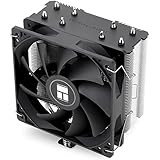
A compact four-heat-pipe air cooler with a PWM fan and AM4 support. For a 65 W chip it is more than enough, and it stays quiet. Check the height against your case before buying.
G.SKILL Ripjaws V 16GB DDR4 kit

A dual-channel 2x8GB kit rated up to 3200 MT/s. Dual channel matters for integrated graphics because the GPU shares system memory bandwidth. Enable the memory profile in BIOS after installation.
Ryzen 5 5650G vs Ryzen 5 5600G vs other options
On paper the 5650G and 5600G share the same core count, clocks and graphics, according to listings. The PRO model adds business security and manageability features and is usually sold in OEM systems. For a home gaming build, the 5600G is the simpler buy. We could not confirm other differences, so check the listing for each.
| Chip | Cores / threads | Graphics | Best for |
|---|---|---|---|
| Ryzen 5 PRO 5650G | 6 / 12 | Vega 7 | OEM or prebuilt systems |
| Ryzen 5 5600G | 6 / 12 | Vega 7 | Self-built budget gaming PC |
| Ryzen 7 5700G | 8 / 16 | Vega 8 | More threads, no GPU |
| Ryzen 5 5500 | 6 / 12 | None | Pair with a graphics card |
| Ryzen 5 8500G | 6 / 12 | Newer Radeon graphics | AM5 APU path |
The Ryzen 5 5600 and Ryzen 5 5500 have no integrated graphics, so they only make sense when you add a graphics card.
Who should pick the 5650G and who should not
| Your goal | Pick | Reason |
|---|---|---|
| Cheap PC that plays Fortnite-style or esports games at low settings | 5650G or 5600G | No graphics card needed to start |
| 1080p medium or high in recent games | Ryzen 5 5600 plus an entry graphics card | Integrated graphics are the limit |
| Office work, school, media streaming | 5650G in a business desktop | PRO manageability, low power |
| Future-proof platform | An AM5 chip | AM4 is a mature, end-of-line socket |
AM4 is a mature platform. That is both a strength, because boards, DDR4 and coolers are plentiful and affordable, and a weakness, because you cannot move to newer processor generations without a new board and memory. For a budget machine that is a fair trade; for a build meant to be upgraded for many years, consider AM5.
Is the Ryzen 5 PRO 5650G still worth buying in 2026?
As a CPU, yes for casual use. As a gaming solution, only if you accept low settings. It remains a sensible way to build a small, cheap PC today and add a graphics card later, since the Zen 3 cores will not hold back an entry-level GPU.
- Good fit: a family or office PC that also plays esports, a first budget build, a small-form-factor PC.
- Not a fit: a PC aimed at modern AAA games at 1080p high, or one expected to last on integrated graphics alone.
- Better plan for gamers: pair a Ryzen 5 5600 with an entry graphics card.
Staged upgrade plan
- Build with the APU and two memory modules.
- Play lighter games and learn which titles need more graphics power.
- Add a discrete GPU when the budget allows; the 5650G will not hold back an entry or mid-range card.
- Check the PSU wattage and a free PCIe x16 slot before choosing the card.
Buying options: prebuilt, tray or retail
The 5650G mostly appears inside business mini and small-form-factor desktops. Prebuilt desktops with this chip are usually sold with limited memory and storage, so check whether RAM is dual channel and whether the system can be upgraded. Tray or OEM processors sold alone may come without a cooler or standard retail warranty terms, so read the seller’s return policy. Avoid used listings with unclear origin. We do not quote prices here; think in tiers, with business prebuilts at the higher end for the same chip and the retail 5600G as the simpler middle option.
FAQ
What is the difference between the Ryzen 5 5650G and the Ryzen 5 PRO 5650G?
The 5650G is sold as the PRO model. It has the same core design as the consumer 5600G on paper, plus business security and management features.
Can the Ryzen 5 PRO 5650G play games without a graphics card?
Yes, at lower settings. Esports and older games run at 1080p low, while demanding titles need 720p and reduced settings.
Is the Ryzen 5 PRO 5650G the same as the 5600G?
They match on core count, clocks and graphics according to listings. The 5650G is a PRO part aimed at OEM systems, while the 5600G is the retail chip.
What memory should I use with the 5650G?
Use two matched DDR4 modules at 3200 MT/s in dual channel. Single-channel memory significantly reduces integrated graphics performance.
Does the Ryzen 5 PRO 5650G support PCIe 4.0?
No. The processor runs PCIe 3.0, even on a B550 board that supports PCIe 4.0 for other chips.
Which motherboard should I buy for it?
A micro-ATX A520 or B550 board with HDMI or DisplayPort outputs. Confirm the BIOS supports Ryzen 5000 G-series chips before you buy.
Can I overclock the Ryzen 5 PRO 5650G?
The multiplier is locked, so a traditional overclock is not available. Improving memory speed and cooling is the best way to gain performance.
Sources
- CPU-Monkey, AMD Ryzen 5 PRO 5650G
- CPU Benchmark (PassMark), AMD Ryzen 5 PRO 5650G
- LDLC, AMD Ryzen 5 PRO 5650G product page
- CpuTronic, AMD Ryzen 5 PRO 5650G specifications
Last updated: October 2026
Related guides
More from Amazon
Programs that pair well with the guide above. Offers and eligibility are set by Amazon and may change.
Free shipping on eligible items, Prime Video and more. Eligible new members can start with a free trial.
Start a Prime free trialAd-free music streaming. Eligible new subscribers can start with a free trial.
Try Music Unlimited freeA Prime membership for ages 18-24 with a trial period. Eligibility is set by Amazon.
See Prime for Young AdultsAudiobooks and podcasts to listen to on the go. Eligible new members can start with a free trial.
Try Audible freeAs an Amazon Associate we earn from qualifying purchases.