Deathloop asks for less than its looks imply: the publisher’s recommended card is an RTX 2060 or Radeon RX 5700, so almost any current mainstream GPU clears 1080p, a 12 GB to 16 GB mid-range card suits 1440p, and 4K play with ray tracing and upscaling is where the upper tier earns its place. This guide sets out what the publisher states, what technical outlets reported about upscaling, and how today’s RTX 50 and Radeon RX 9000 cards line up, without quoting frame rates the sources do not publish.
As an Amazon Associate we earn from qualifying purchases at no extra cost to you.


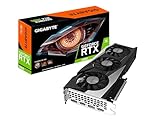

Our Top Picks
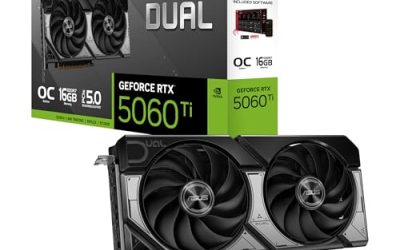
 ASUS Dual GeForce RTX 5060 Ti 16GB GDDR7RTX5060Ti|OC|16GB9 x 4.7 x 2 inches1.4 poundsCheck on Amazon
 msi Gaming RTX 3050 Ventus 2X 6G OC1.7" x 4.3" x 7.4"7.4 x 4.3 x 0.1 inches1.3 poundsCheck on Amazon
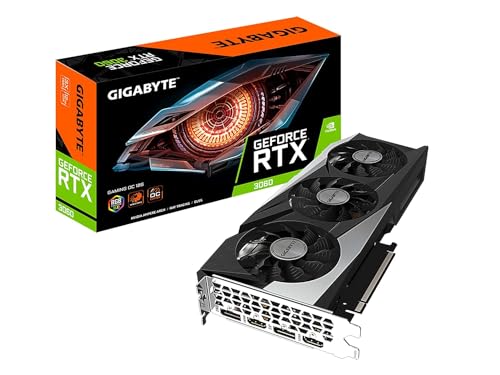

Top 3 picks at a glance
At a glance
| Goal | Class of card | Current examples | Why |
|---|---|---|---|
| 1080p at high settings | Entry level | GeForce RTX 5060, Radeon RX 9060 XT 8 GB | Far above the publisher’s RTX 2060 / RX 5700 recommendation |
| 1440p at high settings | Mid-range | GeForce RTX 5060 Ti 16 GB, RTX 5070, Radeon RX 9060 XT 16 GB | Headroom for ray-traced options and high refresh |
| 4K with upscaling | Upper tier | GeForce RTX 5070 Ti, RTX 5080, Radeon RX 9070 XT | Native 4K is the heaviest case; FSR or DLSS Quality eases it |
| Bare minimum | Publisher floor | GTX 1060 6 GB or Radeon RX 580 8 GB class | Older cards, reduced settings |
What the publisher states
The Steam store page lists the following. Minimum: 64-bit Windows 10 (version 1909 or later), a Core i5-8400 or Ryzen 5 1600, 12 GB of memory, a GeForce GTX 1060 with 6 GB or a Radeon RX 580 with 8 GB, DirectX 12 and 30 GB of storage. Recommended: a Core i7-9700K or Ryzen 7 2700X, 16 GB of memory, a GeForce RTX 2060 with 6 GB or a Radeon RX 5700 with 8 GB, plus a broadband connection. The page notes HDR support and Denuvo anti-tamper, and it does not list upscaling or ray tracing details, nor target resolutions for either tier.
Two points follow. First, the recommended GPUs are previous-generation mid-range cards from 2018 and 2019, so every current desktop card in the lineup is faster. Second, the page gives no resolution or frame rate, so the 1440p and 4K suggestions below rest on general GPU class, not on a publisher claim.
Upscaling support
Technical outlets covering the game’s 2022 updates report that Deathloop had DLSS and that a May 12, 2022 patch added AMD FSR 2.0. It was the first major title to ship FSR 2.0. TechSpot, testing four DLSS-capable cards, found FSR 2.0 came close to DLSS: at 1080p, FSR 2.0 Quality gave an 18 percent uplift while DLSS Quality gave 21 percent, and DLSS pulled ahead by about 6 percent in the Performance modes. HotHardware described the two as functionally equivalent in performance. OC3D noted a larger overhead for FSR on RTX cards and found DLSS sharper in Performance mode, while PC Gamer reported that on a Radeon RX 6800 at 4K Ultra, native ran at about 47 fps and FSR 2.0 reached about 63 fps.
The outlets disagree on how large DLSS’s advantage is, and these results come from a specific patch era. They are best read as evidence that both upscalers work well in this game, not as a guide to exact modern numbers. Because newer RTX 50 and Radeon RX 9000 cards are much faster than those test cards, upscaling here is mostly a tool for 4K and high-refresh play instead of a necessity.
Choosing by tier
1080p players
The GeForce RTX 5060 (8 GB GDDR7, 128-bit bus per the maker’s listing) and the Radeon RX 9060 XT 8 GB are more than the game requires. If a card of this class is already in the machine, there is no reason to upgrade for Deathloop alone. A used previous-generation card around the RTX 3060 or RX 6600 XT class also exceeds the publisher’s recommendation, which makes the game one of the easier ones to satisfy on a budget.
1440p players
The RTX 5070 offers 12 GB on a 192-bit bus, and reviewers place it roughly 40 to 50 percent ahead of the RX 9060 XT 16 GB across a broad range of games. The RTX 5060 Ti and RX 9060 XT in 16 GB form sit a step below it. For a game this modest, either is a comfortable 1440p choice; the extra step to the RTX 5070 mainly buys future games.
4K and high-refresh players
The RTX 5070 Ti, RTX 5080 and Radeon RX 9070 XT (16 GB class) are suited to native 4K or to 4K with FSR and DLSS in Quality mode. The RTX 5090 is beyond the game’s needs. Players targeting a 240 Hz display should note that the game’s frame cap was raised from 120 to 240 fps in 2022, according to reports of the DLSS update.
Matching the card to the display
Because the game is easy on hardware, the monitor usually determines the right card. A 1080p screen at 60 to 144 Hz is served by the entry cards. A 1440p screen at 144 Hz or 165 Hz is the best fit for the 16 GB mid-range cards and the RTX 5070. A 4K television or monitor is the one case where an upper-tier card pays off, and even there an upscaler in Quality mode reduces the demand. HDR is listed on the store page, so an HDR-capable display can use it, though HDR quality depends on the display and not on the GPU.
For power and fit, read the card maker’s page for board power, length and recommended power supply, and the case maker’s page for maximum card length. Entry cards are compact; the RTX 5070 Ti, RTX 5080 and RX 9070 XT classes are larger and need more supply headroom, so confirm the connector type the card uses and follow the card and power supply maker’s guidance. Any card that uses the 12V-2×6 connector should be fully seated and inspected, and use should stop if there is heat damage.
Finally, remember the multiplayer angle: the store listing mentions a broadband connection, and the game’s anti-tamper layer means a fresh install on a new machine needs a stable network on first launch.
Pick-this-if table
| If you | Pick | Reason | Skip |
|---|---|---|---|
| Play 1080p at 60 to 144 Hz | RTX 5060 or RX 9060 XT | Beyond the recommended spec | High-end cards |
| Want 1440p and keep cards for years | RTX 5070 or RX 9060 XT 16 GB | 12 to 16 GB memory, ample power | 8 GB cards if you also play newer titles |
| Prefer AMD with open upscaling | RX 9070 XT or RX 9060 XT | FSR 2.0 is supported in this game | Assuming FSR 4 is available; the game’s patch history lists FSR 2.0 |
| Prefer Nvidia upscaling | RTX 5060 Ti or higher | DLSS reported in the game | Counting on frame generation, which the sources do not mention for this game |
| Have a 4K television | RTX 5070 Ti or RX 9070 XT | Native 4K headroom | Cards under 12 GB |
CPU and memory side of the build
The recommended processor is a Core i7-9700K or Ryzen 7 2700X, an eight-core class chip. Pairing a very fast GPU with a quad-core processor would risk leaving the card waiting, so a current six-core or eight-core desktop part is a sensible match. The listing asks for 16 GB of memory at the recommended tier, and 12 GB at minimum, so 16 GB is the practical floor while 32 GB gives room for background apps. Storage is listed at 30 GB, which is modest by current standards, although the store page does not state whether an SSD is required.
Alternatives and what to skip
- Previous-generation cards: a GeForce RTX 4060 or Radeon RX 7600 XT satisfies the 1080p and light 1440p tiers.
- Skip 4 GB cards: the publisher’s minimum GPUs carry 6 GB and 8 GB.
- Skip pricey flagship cards for this game alone: Deathloop does not need them, and the money would be better spent on a monitor or storage.
- Skip assumptions about ray tracing: the store page does not detail ray-traced options, so decide the GPU from the stated requirements and treat any ray-tracing headroom as a bonus.
Common mistakes
- Overbuying: the recommended card is from the RTX 2060 era.
- Underbuying system memory: 12 GB is the minimum, and the recommended amount is 16 GB.
- Assuming the newest upscaler version: the game’s FSR support is reported as FSR 2.0 from the 2022 patch.
- Ignoring the anti-tamper and online elements: the game is listed with Denuvo and a broadband requirement, which can affect first launch on a new machine.
Frequently Asked Questions
What GPU does Deathloop recommend?
The publisher lists a GeForce RTX 2060 (6 GB) or Radeon RX 5700 (8 GB) as recommended, and a GTX 1060 6 GB or RX 580 8 GB as minimum. Those are modest cards by today’s standards.
Does Deathloop support DLSS and FSR?
Technical outlets report DLSS support and an FSR 2.0 patch released on May 12, 2022. The Steam store page itself does not mention either, so the reports are the source for this.
Is DLSS or FSR 2.0 faster in Deathloop?
TechSpot measured DLSS slightly ahead at the same quality setting, while HotHardware found them equivalent. OC3D noted a bit more overhead for FSR on RTX cards. The differences are small enough that either works well.
Is 8 GB of VRAM enough?
The publisher’s recommended cards carry 6 GB and 8 GB, so 8 GB is within the stated range. For 4K or for keeping a card across newer games, 12 GB or 16 GB is the safer choice.
Do I need an RTX 50-series card?
No. The game’s requirements are far below what an RTX 50-series or Radeon RX 9000 card offers. Those cards matter only if you also play newer, heavier titles.
Related guides
More from Amazon
Programs that pair well with the guide above. Offers and eligibility are set by Amazon and may change.
Free shipping on eligible items, Prime Video and more. Eligible new members can start with a free trial.
Start a Prime free trialAd-free music streaming. Eligible new subscribers can start with a free trial.
Try Music Unlimited freeA Prime membership for ages 18-24 with a trial period. Eligibility is set by Amazon.
See Prime for Young AdultsAudiobooks and podcasts to listen to on the go. Eligible new members can start with a free trial.
Try Audible freeAs an Amazon Associate we earn from qualifying purchases.