A honeycomb gaming mouse cuts weight by perforating the shell, and that single design choice changes how a mouse feels in fast games: swipes start and stop with less effort, but the holes also change grip texture, let dust reach the inside, and divide players who either love or dislike the airy feel. Choosing one is less about chasing the lowest gram count and more about matching shell size, shape, and sensor to your hand and the titles you play most.

This guide is for fingertip and claw players with small to large hands, for right-handed palm users who want an ergonomic shell, and for anyone who wants the honeycomb feel without a cable. Every pick below is a genuine perforated-shell model, selected from the names and specifications printed on its Amazon product page, with wired and wireless options kept clearly separate so the trade-offs stay easy to compare.
Top 3 picks at a glance

Quick Picks
As an Amazon Associate we earn from qualifying purchases.
| Product | Best for | Key spec from title |
|---|---|---|
| Glorious Model O Wired Gaming Mouse | Medium to large hands wanting the classic wired honeycomb pick | 67g Superlight Honeycomb Design |
| Glorious Model O- (Minus) Wired Gaming Mouse | Small hands and fingertip players | 58g Superlight Honeycomb Design |
| SteelSeries Aerox 3 (2022) Wired Gaming Mouse | Players who want spill and dust resistance | 8,500 DPI TrueMove Core Optical Sensor |
| Glorious Model D 2 Wired Gaming Mouse | Right-handed palm and claw comfort | 26K Optical Sensor |
| Glorious Model O Wireless Gaming Mouse | Cable-free desks and longer sessions | Up to 71 Hours Battery |
How to Choose
Shell Size and Hand Fit
Honeycomb shells come in distinct sizes, and the wrong size undoes the benefit of the low weight. Compact shells around 120 mm long suit small hands and fingertip grips, because your fingers stay close to the switches and the mouse turns with small movements. Full-size shells near 128 mm give medium and large hands room to rest without fingers dragging on the pad. Measure your current mouse before ordering, compare its length with the listing, and treat the stated weight as a guide only, since a cable adds drag that the scale never shows.
Shape: Ambidextrous or Ergonomic
Most perforated mice use a symmetrical ambidextrous shape with buttons on the left side only, which works for claw and fingertip grips in either hand at a basic level. Ergonomic shells curve to support a right hand, lifting the palm and angling the buttons, which palm and relaxed claw players usually find easier over long sessions. Neither shape is faster by itself. Pick the one that matches how your hand already rests, because forcing a new grip to chase a lighter shell usually costs more accuracy than the saved grams return.
Sensor, DPI and Polling Rate
Every mouse in this guide uses an optical sensor with a 1000Hz polling rate, so the real differences sit in maximum DPI, tracking speed, and acceleration figures printed on the page. High headline DPI numbers matter less than clean tracking at the low settings most shooter players actually use, typically a few hundred to a few thousand DPI. Tracking speed in IPS tells you how fast a flick can move before the sensor loses the surface, and the picks here range widely, so match that figure to how violent your swipes get.
Living With the Holes
An open shell is a daily commitment, not just a style choice. Dust, crumbs, and skin oils pass through the perforations, so the mouse needs regular blasts of compressed air and a desk kept reasonably clean. Sweat reaches the inside too, which is why one pick below seals its internals behind a rated barrier. The holes also change grip: some players find the texture secure, others find it distracting under the palm. If you snack at your desk or play in a dusty room, weigh that upkeep honestly before choosing any perforated model.
The 5 Best Options
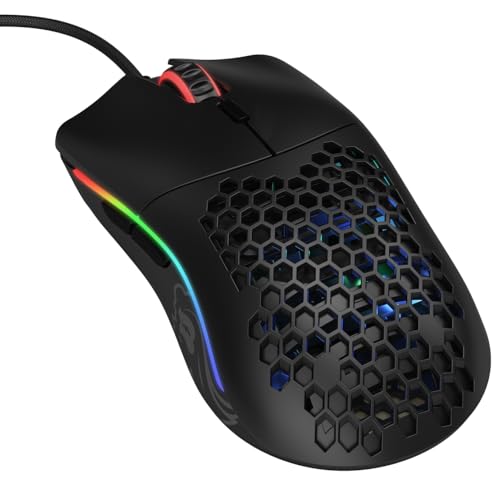
Glorious Model O Wired Gaming Mouse – Matte Black
The Model O is the mouse that started the honeycomb trend, and it still suits medium to large hands that play with a claw or fingertip grip. Its ambidextrous shell keeps the shape neutral, the flexible Ascended cord reduces drag to near wireless levels, and the Pixart 3360 sensor tracks at settings most players already use. Choose it if you want the reference design in this category: a balanced full-size shell, simple six-button layout, and RGB lighting that shows through the perforations without adding anything you need to manage.
Specs
- Weight: 67g
- Sensor: Pixart PMW-3360 optical sensor
- Max DPI: 12,000
- Polling rate: 1000Hz (1ms)
- Max tracking speed: 250+ IPS
- Acceleration: 50G
- Switches: Omron mechanical, rated for 20 million clicks
- Buttons: 6
- Shape: Ambidextrous
- Cable: Ascended cord
- Feet: G-Skates, pure virgin PTFE
- Lighting: RGB
Best for: Medium to large hands wanting the classic full-size wired honeycomb mouse.
Watch out for: The listing covers several color and finish variants, so confirm the matte black wired version is selected before ordering.
ASIN: B07LDH3TWM
Glorious Model O- (Minus) Compact Wired Gaming Mouse – Matte Black
The Model O- shrinks the same formula into a compact shell that fits small hands and fingertip players who felt stretched on the full-size version. At 58 grams it is the joint lightest wired pick here, and the shorter body lets your fingers sit closer to the main switches, which suits quick, small corrections in aim trainers and arena shooters. It keeps the Pixart 3360 sensor, Omron switches, and PTFE skates of the larger mouse, so nothing about the tracking changes; only the fit does, which is exactly the point of this model.
Specs
- Weight: 58g
- Sensor: Pixart 3360 optical sensor
- Switches: Omron
- Buttons: 6
- Shape: Ambidextrous, compact
- Feet: Virgin PTFE skates
- Lighting: RGB
- Connection: Wired USB
Best for: Small hands and fingertip grip players who want the lightest wired shell here.
Watch out for: Medium and large hands can feel cramped on the shorter shell, so compare its length with your current mouse first.
ASIN: B07VMM5LKH
SteelSeries Aerox 3 (2022) Wired Gaming Mouse – Onyx
The Aerox 3 answers the biggest objection to perforated shells: what gets inside. Its holey body carries an AquaBarrier design rated IP54, which shields the internals from water splashes, dust, and dirt, and even the Golden Micro switches carry the same rating. At 59 grams it stays firmly in ultralight territory, while the TrueMove Core sensor and detachable USB-C cable keep the setup simple. Pick it if you like the honeycomb idea but play at a desk where drinks, dust, or pets make an open shell feel risky.
Specs
- Weight: 59g
- Sensor: TrueMove Core optical sensor
- Max DPI: 8,500
- Shell: Holey design with AquaBarrier protection
- Rating: IP54 water and dust resistance
- Switches: Golden Micro IP54
- Lighting: 3-zone PrismSync RGB
- Cable: Detachable USB-C
- Model number: 62611
Best for: Players who want a honeycomb shell with rated protection against spills and dust.
Watch out for: The 8,500 DPI ceiling is lower than the other picks, so check it covers the sensitivity range you actually use.
ASIN: B09KMHZBX2
Glorious Model D 2 Wired Gaming Mouse – Matte Black
The Model D 2 is the ergonomic option in this lineup, curving its perforated shell to support a right hand instead of mirroring both sides. That shape favors palm and relaxed claw grips, and the newer BAMF 2.0 sensor raises the ceiling well beyond the older Glorious models, with headroom in DPI, tracking speed, and switch life. At 58 grams it matches the lightest wired picks here while giving your palm more shell to rest on. Choose it if symmetrical mice leave your ring and pinky fingers unsupported during long sessions.
Specs
- Weight: 58g
- Sensor: Glorious BAMF 2.0 optical sensor
- Max DPI: 26,000
- Max tracking speed: 650 IPS
- Acceleration: 50G
- Polling rate: 1000Hz
- Buttons: 6 programmable
- Switches: Rated for 80 million clicks
- Shape: Ergonomic, right-handed
- Lighting: RGB
- Feet: PTFE skates
Best for: Right-handed palm and claw players who want ergonomic support in a perforated shell.
Watch out for: The shape is right-handed only, and the wired version shares a listing family with wireless variants, so check the connection type.
ASIN: B0D38B66W3
Glorious Model O Wireless Gaming Mouse – Matte Black
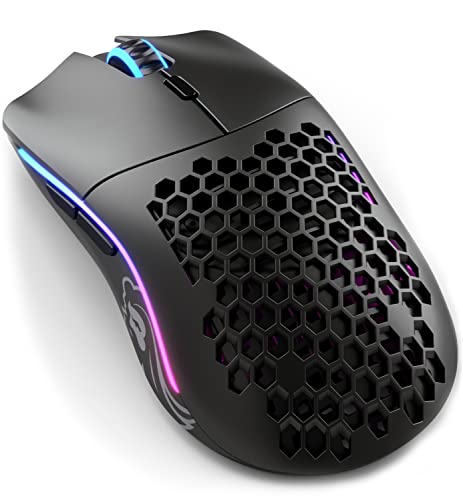
The Model O Wireless keeps the full-size honeycomb shell and removes the cable, which changes low-sensitivity play more than any spec on the page: wide arm sweeps never catch on a cord. The BAMF sensor raises the ceiling to 19,000 DPI, the 2.4GHz connection is rated lag free by the maker, and the battery is listed at up to 71 hours with the lighting off. At 69 grams it is the heaviest pick here, though still light for a wireless mouse. Choose it if your desk layout makes cable management a constant annoyance.
Specs
- Weight: 69g
- Sensor: BAMF optical sensor
- Max DPI: 19,000
- Max tracking speed: 400 IPS
- Polling rate: 1000Hz
- Connection: 2.4GHz wireless, USB-C
- Battery life: Up to 71 hours
- Buttons: 6
- Switches: Omron, rated for 20 million clicks
- Shape: Ambidextrous
- Lighting: RGB
Best for: Players who want the honeycomb feel with no cable to manage.
Watch out for: The 71-hour battery figure assumes the RGB lighting is off, so expect less with the lights running.
ASIN: B098RDFP3J
Which One Fits Your Situation
You Play Fast, Flick-Heavy Shooters
Low weight and a drag-free glide matter most here, and the wired Model O is the safest starting point: its 67-gram shell, flexible cord, and PTFE feet keep wide swipes easy to start and stop. If your hands are smaller, the Model O- gives the same tracking in a compact body. The Model D 2 adds sensor headroom with its 650 IPS tracking figure, useful if your flicks are especially violent.
Your Hands Are Small or You Grip With Fingertips
Start with the Model O-, because its compact shell is the only one here shaped around a shorter hand span, and its 58-gram weight keeps fingertip corrections light. The Aerox 3 is the alternative if you also want the sealed internals, since its body is similarly compact. Avoid the full-size Model O and Model O Wireless unless you already know a 128 mm shell fits your grip comfortably.
You Rest Your Whole Palm on the Mouse
The Model D 2 is built for you: its ergonomic curve supports the palm instead of leaving it hovering over a symmetrical shell, and the perforations keep the weight at 58 grams despite the larger contact area. Pair it with a relaxed claw if full palm contact starts to feel sticky during long sessions. The ambidextrous picks in this guide can work, but none of them fills the hand the same way.
You Want the Cable Gone From Your Desk
The Model O Wireless is the only cable-free pick here, and its listed battery life of up to 71 hours with lighting off means charging becomes a weekly habit rather than a daily one. It keeps the same full-size ambidextrous shape as the wired Model O, so the switch is about the connection, not a new grip. Keep the USB-C cable nearby for charging while you play.
Common Mistakes
- Choosing by headline DPI alone, when tracking cleanliness at your actual sensitivity setting matters far more than a five-figure maximum.
- Ignoring shell length, then blaming the sensor for aim problems that are really a hand-fit problem.
- Buying a perforated mouse for a dusty desk or a snack-heavy setup without planning regular cleaning with compressed air.
- Assuming every lightweight mouse is a honeycomb mouse, when many ultralight models use solid shells and feel different under the palm.
- Picking an ergonomic right-handed shell for a left-handed player, or an ambidextrous shell when you actually need palm support.
Frequently Asked Questions
Are honeycomb mice less durable than solid-shell mice?
Not automatically. Makers such as Glorious describe the perforated shell as engineered to keep its strength while removing material, and the switches and sensors inside are the same parts used in solid models. The realistic weak points are flex if you squeeze the sides hard and debris reaching the internals. Treat the mouse normally, keep it clean, and durability should not be the deciding factor between the two styles.
Do the holes let dust and crumbs inside the mouse?
Yes, an open shell lets fine dust and crumbs pass through, which is the main upkeep trade-off of this design. A quick blast of compressed air every week or two keeps the inside clear for most players. If your desk collects a lot of debris, the Aerox 3 in this guide is the safer pick because its AquaBarrier design is rated IP54 against dust and water reaching the internals.
Is a lighter mouse always better for aiming?
No. A lighter shell makes swipes easier to start and stop, which helps low-sensitivity players who move the mouse a long way, but it can also feel twitchy if you play at high sensitivity with a fingertip grip. Weight works together with shell size and shape, so a slightly heavier mouse that fits your hand properly often aims better than the lightest option that forces an awkward grip.
Can left-handed players use honeycomb gaming mice?
Yes, with the ambidextrous models. The Model O, Model O-, Aerox 3, and Model O Wireless in this guide use symmetrical shells that a left hand can hold, although their side buttons sit under the right thumb position, so left-handed players may not reach them comfortably. The Model D 2 is shaped for the right hand only and is not suitable. Check button placement photos on the listing before ordering.
Related guides
More from Amazon
Programs that pair well with the guide above. Offers and eligibility are set by Amazon and may change.
Free shipping on eligible items, Prime Video and more. Eligible new members can start with a free trial.
Start a Prime free trialAd-free music streaming. Eligible new subscribers can start with a free trial.
Try Music Unlimited freeA Prime membership for ages 18-24 with a trial period. Eligibility is set by Amazon.
See Prime for Young AdultsAudiobooks and podcasts to listen to on the go. Eligible new members can start with a free trial.
Try Audible freeAs an Amazon Associate we earn from qualifying purchases.