Choosing a wireless mouse for FPS play comes down to one question: can you flick, stop, and click without the connection or the shell getting in the way? Weight, sensor behaviour, and polling rate decide how a fast swipe feels, while shape decides whether your grip stays relaxed through a long session. A mouse that suits a wide palm grip may fight a fingertip player, so the right pick starts with how you hold the mouse and how much you lift it during fights.


This guide is for ranked and casual FPS players who want a cable-free desk without giving up responsive aim, from fingertip players chasing the lightest shell to palm-grip players who prefer a shaped ergonomic body. Every mouse below is a wireless model picked from the names and specifications on its Amazon product page, with the focus on low weight, high polling, and sensors built for fast, repeated swipes.
Top 3 picks at a glance

Quick Picks
As an Amazon Associate we earn from qualifying purchases.
| Product | Best for | Key spec from title |
|---|---|---|
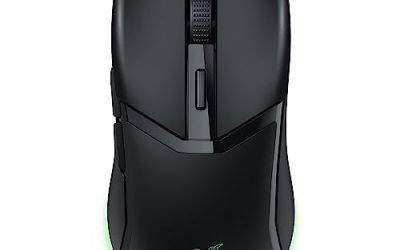
| Razer Viper V3 Pro | Fingertip and claw players who want the lightest esports shell | 54g with 8K polling |
| Logitech G PRO X Superlight 2 | Players who want a proven safe shape with very high sensor headroom | HERO 2 sensor up to 44,000 DPI |
| Razer DeathAdder V3 Pro | Palm-grip players who want a shaped ergonomic body | 63g ergonomic shape |
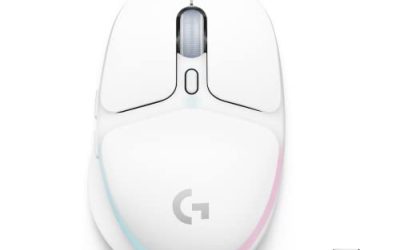
| Logitech G305 Lightspeed | Players who want wireless FPS performance with minimal upkeep | 250-hour battery life |
How to Choose
Weight and How It Changes Your Aim
Every gram shows up when you stop a fast flick. Lighter mice ask less of your wrist and forearm during repeated swipes, which suits low-sensitivity players who move the whole arm and fingertip players who steer with small corrections. Heavier shells can feel steadier for high-sensitivity players who make tiny movements, but they also tire the hand sooner in long sessions. Compare the listed weight of each model against the mouse you use now, and treat a big jump in either direction as a change you will need a few days to adjust to.
Polling Rate and the Wireless Connection
Polling rate describes how often the mouse reports its position, and higher rates can make cursor movement feel smoother on high-refresh monitors. The flagship models here list 8K polling over their wireless connection, while the G305 uses the standard rate that most players have used for years. Higher polling also drains the battery faster, so check what rate a mouse runs at by default and whether reaching the top rate needs extra software settings or a specific receiver placed close to the pad. A stable connection with the receiver nearby matters more than a headline number.
Shape, Size, and Grip Style
A symmetrical shell leaves the grip choice to you, while an ergonomic body fills the palm and guides the hand into one position. Fingertip and claw players usually prefer a lower, lighter symmetrical mouse they can reposition quickly, and palm-grip players often settle better on a taller shaped body with room for the thumb. Check the listed dimensions against your current mouse rather than guessing from photos, and pay attention to where the side buttons sit, because a button your thumb cannot reach cleanly is a button you will press by accident mid-fight.
Battery Life and Charging Habits
Battery figures on product pages are quoted under specific conditions, and running a mouse at its highest polling rate shortens the time between charges. Rechargeable models here list between 90 and 95 hours, while the G305 runs far longer on a replaceable cell, which removes charging cables from the desk entirely but adds a battery to swap. Think about your routine: a player who plugs in during a weekly break can ignore battery size, while someone who forgets cables should favour the longest listed runtime or keep a spare cell nearby.
The 4 Best Options
Razer Viper V3 Pro
The Viper V3 Pro is the pick for players who steer with their fingertips or a relaxed claw grip and want the mouse to disappear during fast target switches. Its symmetrical shell is the lightest in this guide, and the listed 8K polling over Razer HyperSpeed wireless is aimed squarely at competitive queues where every report counts. Eight programmable buttons give room for ping, melee, and push-to-talk bindings without crowding the thumb, and the optical switches are built for rapid repeated clicks in close fights.
Specs
- Sensor: Focus Pro 35K optical sensor, up to 35,000 DPI
- Polling: 8K HyperPolling wireless
- Weight: 54 g
- Switches: Razer Optical Mouse Switches Gen-3
- Buttons: 8 programmable buttons
- Battery life: up to 95 hours
- Colour: Black
- Model number: RZ01-05120100-R3U1
Best for: Fingertip and claw players in competitive FPS queues.
Watch out for: The symmetrical shape offers little palm support, so palm-grip players should compare its dimensions with a shaped model first.
ASIN: B0CW25XR5R
Logitech G PRO X Superlight 2
The Superlight 2 suits players who want a safe, medium symmetrical shape that works across claw and fingertip grips without forcing one hand position. Logitech lists the HERO 2 sensor with tracking beyond most players’ needs and an 8 kHz report rate in the product title, paired with hybrid switches that mix optical actuation with a mechanical click feel. At 60 g it stays light enough for long low-sensitivity swipes, and the PTFE feet and USB-C charging keep the setup simple between sessions.
Specs
- Sensor: HERO 2, up to 44,000 DPI
- Tracking speed: over 888 IPS
- Report rate: 8 kHz
- Switches: LIGHTFORCE hybrid optical-mechanical switches
- Weight: 60 g
- Buttons: 5 programmable buttons
- Battery life: 95 hours
- Charging: USB-C
- Feet: zero-additive PTFE
Best for: Players who want one proven symmetrical shape for every FPS title.
Watch out for: There is no dedicated DPI button on the mouse, so sensitivity changes are made in the G HUB software instead.
ASIN: B09NBWL8J5
Razer DeathAdder V3 Pro
The DeathAdder V3 Pro is the shaped option in this guide, built for right-handed palm and relaxed claw players who want the shell to support the hand through long sessions. Razer lists a 63 g ergonomic body, which keeps the weight low for an ergonomic mouse, and the Focus Pro 30K sensor with HyperSpeed wireless covers fast flicks without a cable dragging on the pad. The raised right-handed profile also gives the thumb a defined rest position for the side buttons during utility-heavy rounds.
Specs
- Sensor: Focus Pro 30K optical sensor
- Weight: 63 g
- Shape: right-handed ergonomic
- Switches: Razer Optical Mouse Switches Gen-3
- Wireless: Razer HyperSpeed Wireless
- Battery life: up to 90 hours
- Charging: USB-C
- Model number: RZ01-04630100-R3G1
Best for: Palm-grip players who want ergonomic support at a low weight.
Watch out for: The shape is right-handed only, and its taller profile can feel bulky for fingertip players with smaller hands.
ASIN: B0B6XZLNHQ
Logitech G305 Lightspeed
The G305 is the straightforward route into wireless FPS play for players who do not want to manage charging cables or pay flagship prices for polling figures they may never use. Its HERO sensor tops out at 12,000 DPI, which still covers the low sensitivities most FPS players actually run, and the listed 250-hour battery life on a single cell means the mouse simply stays on the desk ready. The compact shell suits smaller hands and claw grips, and onboard memory stores settings on the mouse itself.
Specs
- Sensor: HERO, up to 12,000 DPI
- Wireless: LIGHTSPEED wireless technology
- Buttons: 6 programmable buttons
- Battery life: 250 hours
- Memory: onboard memory
- Compatibility: PC and Mac
- Colour: Black
- Model number: 910-005280
Best for: Players who want long battery life and a compact shell for everyday ranked play.
Watch out for: It runs on a replaceable AA battery rather than a rechargeable cell, so keep a spare ready for long sessions.
ASIN: B07CMS5Q6P
Which One Fits Your Situation
You Play Fingertip and Flick Constantly
Pick the Razer Viper V3 Pro. Its 54 g symmetrical shell is the easiest here to lift and reposition between fights, and the 8K polling suits players who pair the mouse with a high-refresh monitor. The flat sides leave the grip entirely to your fingers, which is exactly what a fingertip player wants, while the optical switches keep rapid taps consistent during spray transfers.
You Palm Grip and Play Long Sessions
Choose the Razer DeathAdder V3 Pro. The shaped ergonomic body supports the whole hand instead of asking your fingers to hold the mouse in place, which reduces grip tension across a long evening of matches. It stays light for an ergonomic model at 63 g, so wide arm swipes do not become a chore, and the 90-hour battery listing means charging rarely interrupts a session.
You Want One Mouse for Every Shooter
The Logitech G PRO X Superlight 2 is the safe middle ground. Its medium symmetrical shape works for claw, fingertip, and relaxed palm grips, the sensor range covers any sensitivity a shooter might call for, and the 95-hour battery listing keeps it off the cable for weeks of ordinary play. If your grip changes between titles, this is the shape least likely to fight you.
You Want Wireless Without the Upkeep
Go with the Logitech G305 Lightspeed. The 250-hour battery listing is the longest in this guide by a wide margin, so the mouse asks almost nothing of you between matches, and the compact shell is easy to control in close fights. It gives up the flagship polling rates and rechargeable cells, but for a player who values a desk that is always ready, that trade is easy to accept.
Common Mistakes
- Buying by DPI alone, when every sensor here already exceeds the sensitivity settings FPS players actually use, so shape and weight matter more.
- Leaving the wireless receiver on a distant USB port or behind the PC, where distance and obstructions can disturb the connection during matches.
- Running the highest polling rate at all times without realising it shortens the battery life between charges.
- Choosing a shell for how it looks in photos instead of matching its size and shape to your hand and grip style.
- Forgetting that a new shape needs adjustment time, then blaming the sensor for missed flicks during the first days with it.
Frequently Asked Questions
Is wireless fast enough for competitive FPS play?
Yes. The flagship models in this guide were built for esports use, with low-latency wireless connections and polling rates that match or exceed what wired mice report. In practice, receiver placement matters more than the cable ever did: keep the receiver close to the pad, away from metal enclosures and other wireless hubs, and the connection stays stable through fast, repeated swipes.
Does a higher DPI make aiming more accurate?
Not by itself. DPI only sets how far the cursor travels for a given hand movement, and most FPS players use settings far below the maximum these sensors list. Accuracy comes from a sensitivity you can control and a sensor that tracks fast movements without smoothing, so treat the headline DPI figure as headroom rather than a quality score.
How much does mouse weight really matter for FPS?
Weight changes how much effort each flick and stop takes. Lighter mice are easier to lift and redirect, which suits low-sensitivity arm aiming and fingertip grips, while slightly heavier shells can feel calmer for small, high-sensitivity movements. There is no single correct figure, so compare each listed weight with your current mouse and expect an adjustment period after a big change.
How often will I need to charge a wireless FPS mouse?
It depends on the model and the polling rate you run. The rechargeable mice here list between 90 and 95 hours, which covers many evenings of play, while the G305 lists 250 hours on its replaceable cell. Running a flagship at its highest polling rate shortens the gap between charges, so a weekly charging habit keeps surprises away.
Related guides
More from Amazon
Programs that pair well with the guide above. Offers and eligibility are set by Amazon and may change.
Free shipping on eligible items, Prime Video and more. Eligible new members can start with a free trial.
Start a Prime free trialAd-free music streaming. Eligible new subscribers can start with a free trial.
Try Music Unlimited freeA Prime membership for ages 18-24 with a trial period. Eligibility is set by Amazon.
See Prime for Young AdultsAudiobooks and podcasts to listen to on the go. Eligible new members can start with a free trial.
Try Audible freeAs an Amazon Associate we earn from qualifying purchases.