A laptop budget of under 800 dollars sits in an awkward, interesting spot. It is high enough that you no longer have to accept an 8GB memory ceiling or a tiny drive, yet low enough that every model forces a trade between screen size, processor generation, graphics ability, and portability. The keyword really asks one question: where should the limited money go? For some buyers the answer is a big 17-inch panel and a numeric keypad for spreadsheets. For others it is a modern efficiency chip that sips power on a train commute, and for a smaller group it is a discrete graphics card that can still run games.
This guide is written for students, home-office workers, and families buying a single shared machine, plus the occasional gamer who refuses to spend more. Everything below is judged from the specifications named in each listing, such as processor family, memory, storage, and panel details. Expect honest trade-offs rather than miracles: at this level, one strong spec usually means one compromise elsewhere, and the goal is to help you pick the compromise you can live with in 2026.
Our Top Picks
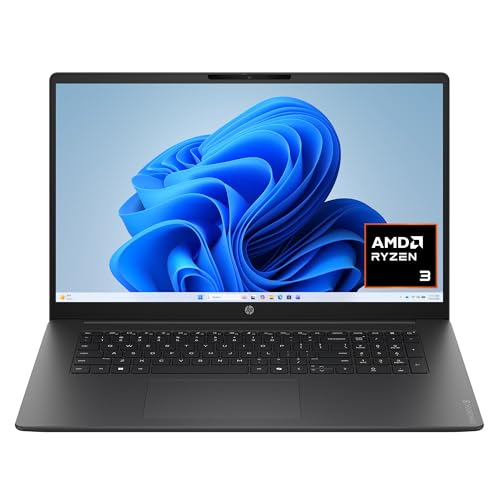 HP OmniBook 3 17.3 inch Laptop PCRyzen3|8GB|256GB|Touch15.65 x 10.09 x 0.65 inches4.43 poundsCheck on Amazon


Top 3 picks at a glance
Quick Picks
As an Amazon Associate we earn from qualifying purchases at no extra cost to you.





| Product | Best for | Key spec from the listing |
|---|---|---|
| HP 17 Business Laptop (Ryzen 5) | Big-screen office work | 17.3″ FHD, 16GB RAM, 512GB SSD, numeric keypad |
| Dell 15.6 (Core Ultra 5 225U) | Newer-generation everyday use | Core Ultra 5 225U, DDR5, 300-nit anti-glare screen |
| ASUS Vivobook 16 (Ryzen AI 5 340) | AI-ready productivity | Copilot+ PC, XDNA NPU, 16″ WUXGA |
| ASUS Vivobook 16 (Snapdragon X) | Light, efficient browsing and documents | Qualcomm Snapdragon X, Adreno GPU, 16GB RAM |
| Lenovo V15 (Ryzen 5 5500U) | Wired connectivity on a budget | Hexa-core Ryzen 5 5500U, HDMI, RJ45 |
| HP Victus 15.6 Gaming Laptop | Casual gaming and creative work | RTX 4050 6GB, 144Hz FHD, Core i5-13420H |
| acer Aspire Go 15 | Basic tasks and a tight budget | Core 3 N355, 8GB DDR5, 15.6″ FHD IPS |
How to Choose
Start with memory and storage
Sixteen gigabytes of RAM is the practical floor for anyone who keeps a browser full of tabs open next to a video call and a document. Eight gigabytes still works for light use, but it leaves almost no headroom as software grows. Pair that with at least a 512GB solid-state drive; a 128GB drive fills quickly once Windows updates and a few apps arrive. Check whether memory is DDR5 or DDR4 as well, because newer memory helps integrated graphics and keeps the platform current for longer.
Match the processor to the job
A six-core Ryzen 5 or a recent Core Ultra chip handles office suites, streaming, and light photo editing comfortably. Entry chips such as a Core 3 or Ryzen 3 are fine for email, schoolwork, and video, but they will feel slow with heavy multitasking. Snapdragon X machines run on an Arm architecture and are praised for efficiency, yet some older desktop programs need compatibility checks before you buy. If you rely on specialized software, confirm it runs on Arm first.
Screen size, brightness, and refresh rate
A full HD panel (1920 by 1080) is the minimum worth considering. Look for the words IPS or anti-glare, and a brightness figure of 300 nits if you work near windows. A 16-inch WUXGA screen adds vertical space for documents, while a 17.3-inch panel suits a desk-bound machine. A 144Hz refresh rate only matters for games; for office use, 60Hz is perfectly adequate and nothing to pay extra for.
Ignore marketing noise, watch where budget models cut corners
Ignore claims such as “latest” or “long battery” unless a capacity is given. Budget laptops most often cut corners on display brightness, keyboard backlighting, port selection, and storage speed. Also remember that a graphics card matters only if you play games or render video; for everyone else, integrated graphics are enough and the saved money is better spent on memory and a brighter screen.
The 7 Best Options
HP 17 Business Laptop (Ryzen 5)
This model is aimed at people who want a large workspace without moving to a desktop. The listing names a 17.3-inch FHD display, a current AMD Ryzen 5 processor, 16GB of RAM, a 512GB SSD, and a numeric keypad, which is a real convenience for accounting and data entry. It reads like a straightforward home-office machine rather than a thin travel notebook.
- Strength: the large 17.3-inch screen and full-size keypad make long spreadsheet sessions easier.
- Strength: 16GB of memory with a 512GB SSD is a solid baseline for the budget.
- Trade-off: a 17-inch chassis is bulkier to carry than a 14- or 15-inch model.
Skip it if you commute daily with a small bag or need dependable graphics for games.
Dell 15.6 (Core Ultra 5 225U)
Dell pairs an Intel Core Ultra 5 225U with 16GB of DDR5 memory and a 512GB SSD in a standard 15.6-inch frame. The listing highlights an anti-glare WVA panel rated at 300 nits and a backlit keyboard, details that matter far more in daily use than a flashy model name. It suits students and office staff who want a current-generation chip and a screen readable in bright rooms.
- Strength: the 300-nit anti-glare display is brighter than many budget panels.
- Strength: DDR5 memory and a newer processor family give the platform longer relevance.
- Trade-off: it relies on Intel integrated graphics, so gaming and video rendering are not its strengths.
Skip it if you need a discrete graphics card or a larger display.
ASUS Vivobook 16 (Ryzen AI 5 340)
This Vivobook is sold as a Copilot+ PC and lists an AMD Ryzen AI 5 340 with an XDNA neural processing unit, 16GB of RAM, a 512GB SSD, and a 16-inch WUXGA 60Hz screen. The taller 16:10 style panel gives extra room for documents and web pages. It fits buyers who want built-in AI features such as local transcription and who plan to keep the laptop for several years.
- Strength: the NPU qualifies it for Copilot+ features that older chips cannot run.
- Strength: the 16-inch WUXGA display adds useful vertical working space.
- Trade-off: the 60Hz panel and AMD Radeon integrated graphics make it a poor fit for fast-paced games.
Skip it if you do not care about AI features and would rather spend on a discrete graphics card.
ASUS Vivobook 16 (Snapdragon X)
The second Vivobook uses a Qualcomm Snapdragon X processor with an Adreno GPU, alongside 16GB of RAM and a 512GB SSD. It shares the 16-inch WUXGA 60Hz display with its Ryzen sibling, but the Arm-based chip is the story here. Buyers who spend most of the day in a browser, office suite, and video calls are the natural audience, since Arm designs are known for efficient power use.
- Strength: the Snapdragon platform is built around efficiency, which suits mobile workers.
- Strength: 16GB of RAM and a 512GB SSD are generous for the category.
- Trade-off: Arm architecture can limit compatibility with some older or specialized Windows programs.
Skip it if you depend on legacy software, niche drivers, or PC games.
Lenovo V15 (Ryzen 5 5500U)
The V15 uses a hexa-core AMD Ryzen 5 5500U with 16GB of RAM and a 512GB SSD in a 15.6-inch FHD frame. What sets it apart is its port list: the listing names HDMI, an RJ45 Ethernet jack, and a numeric keypad. That makes it a sensible office or classroom workhorse where wired networking and external displays are routine, even if the processor generation is older than the others here.
- Strength: a built-in Ethernet port and HDMI output simplify office and dock-free setups.
- Strength: six cores with 16GB of memory handle multitasking comfortably for the category.
- Trade-off: the 5500U belongs to an older generation than the newest chips in this list.
Skip it if you want the latest AI features or the longest possible software support window.
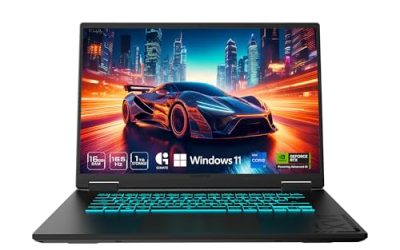
HP Victus 15.6 Gaming Laptop
The Victus is the only model in the group with a dedicated graphics card: an NVIDIA GeForce RTX 4050 with 6GB of video memory, backed by an Intel Core i5-13420H, 16GB of DDR4 RAM, and a 512GB SSD. Its 15.6-inch FHD screen runs at 144Hz, which gives smoother motion in supported games. It is the pick for anyone who wants to game and do schoolwork on one machine.
- Strength: RTX 4050 graphics and a 144Hz screen open the door to modern games at full HD.
- Strength: an H-series Core i5 processor and 16GB of RAM handle creative apps as well.
- Trade-off: gaming laptops are heavier and typically offer shorter battery life than thin office models.
Skip it if portability and battery endurance matter more than frame rates.
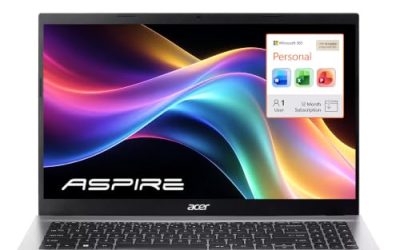
acer Aspire Go 15
The Aspire Go 15 is the leanest choice, listing an Intel Core 3 N355 processor, Intel graphics, 8GB of DDR5 memory, and only 128GB of UFS storage on a 15.6-inch FHD IPS display. It targets buyers with a very small budget who need a screen for web browsing, streaming, and homework, and who store files in the cloud instead of on the drive.
- Strength: an IPS full HD panel offers better viewing angles than basic budget displays.
- Strength: DDR5 memory is a modern choice even at the entry level.
- Trade-off: 8GB of RAM and 128GB of storage leave little room to grow.
Skip it if you plan to install large programs, store many files locally, or multitask heavily.
Which One Fits Your Situation
You work in spreadsheets all day
Choose the HP 17 Business Laptop. The 17.3-inch screen and numeric keypad speed up data entry, and 16GB of RAM keeps large workbooks responsive. The Lenovo V15 is a close alternative if you also need wired Ethernet.
You want to play games after class
The HP Victus 15.6 is the only option here with a dedicated RTX 4050, plus a 144Hz display. Accept the extra weight in exchange for real graphics power, and keep the charger in your bag.
You commute and value efficiency
Look at the ASUS Vivobook 16 with Snapdragon X if your software is browser and Microsoft Office based. If you prefer standard x86 compatibility with newer features, the Dell 15.6 with Core Ultra 5 is the safer bet.
You want AI features and long-term relevance
The ASUS Vivobook 16 with Ryzen AI 5 340 carries an NPU and Copilot+ branding, which positions it well for software that increasingly uses local AI. The acer Aspire Go 15 is only for the tightest budgets.
Common Mistakes
- Buying a laptop with 8GB of RAM and 128GB of storage because the headline is cheap, then running out of space within months.
- Paying for a discrete graphics card when the work is documents and video calls, where integrated graphics are enough.
- Ignoring screen brightness and coating, then struggling to read a dim glossy display near a window.
- Assuming every Arm-based Windows laptop runs every program, without checking compatibility for your essential software.
- Choosing by processor name alone and overlooking the generation, since an older six-core chip can trail a newer, more efficient design.
Specs and Terms Explained
Processor suffixes and the “AI” label
The letter after a processor number tells you its power class. U-class chips, such as the Core Ultra 5 225U in the Dell, are designed for efficiency and long battery life. Ryzen 5 and Ryzen AI 5 chips cover a similar space on the AMD side. “AI” in a name usually refers to a built-in neural processing unit for features like background blur, not to faster everyday performance.
Nits and screen brightness
Nits measure how bright a screen can get. A dim panel is hard to read near a window or outdoors, even if its resolution is high. For coursework or travel, brightness is more useful than a high refresh rate. If the listing does not state a brightness figure, treat it as a likely weak point.
Resolution and panel type
Full HD is the practical minimum for a modern laptop. Lower resolutions look coarse on a 15- or 17-inch screen. IPS panels offer wider viewing angles and better color than the older TN type, which can wash out when you tilt the lid.
Battery capacity versus claimed hours
Manufacturers publish runtime claims from light tasks. The watt-hour figure is the better indicator, and efficient chips stretch it further. Windows on Arm and U-class processors generally lead here, while the gaming-focused HP Victus is built for performance rather than long unplugged use.
Sizing and Compatibility Checklist
- Choose screen size by how often you carry the laptop. The 17-inch HP is comfortable on a desk, but it is bulkier in a bag than a 15-inch model.
- Check the ports: you want at least one USB-C connection, HDMI for a monitor, and a headphone jack.
- Find out whether memory is soldered or replaceable. Many thin laptops permanently fix it, so buy the amount you will need.
- Confirm that a second storage slot exists if you expect to add a drive later.
- Look at the charger type. USB-C charging lets you share a single adapter with a phone or tablet.
- Check keyboard layout, including whether a number pad is included for spreadsheet work.
- Verify that the software you need runs on Windows on Arm before choosing the Snapdragon model.
Who Should Skip These
Skip the HP Victus if you want a thin travel laptop, since gaming hardware adds weight and noise. Skip the Lenovo V15 if you want the newest processor generation, because its chip is older. Skip the acer Aspire Go 15 if you edit photos or run many programs at once, as it is designed for basic tasks. And skip the Snapdragon Vivobook if you rely on specialist or older programs.
Related guides
- Gaming Chair Cushions And Lumbar Supports
- Business Laptops With Long Battery Life
- Warranty Considerations When Buying On Sale
Frequently Asked Questions
Is 16GB of RAM necessary for a laptop under 800 dollars?
For most people, yes. Sixteen gigabytes gives breathing room for multitasking and keeps the machine useful for several years. Eight gigabytes works for light browsing and schoolwork but becomes limiting sooner.
Can a laptop in this range handle games?
Only if it has a dedicated graphics card, such as the RTX 4050 in the HP Victus. Integrated graphics can run older or lightweight titles but struggle with modern 3D games at full detail.
Is a 60Hz screen a problem?
Not for office work, streaming, or browsing. A higher refresh rate such as 144Hz only helps with fast motion in games, so skip it unless gaming is on your list.
Should I worry about the Snapdragon processor?
Browsers, Microsoft Office, and streaming apps generally run well on Arm. Check any specialized or older programs, printer drivers, and peripherals for compatibility before you commit.
Related guides
More from Amazon
Programs that pair well with the guide above. Offers and eligibility are set by Amazon and may change.
Free shipping on eligible items, Prime Video and more. Eligible new members can start with a free trial.
Start a Prime free trialAd-free music streaming. Eligible new subscribers can start with a free trial.
Try Music Unlimited freeA Prime membership for ages 18-24 with a trial period. Eligibility is set by Amazon.
See Prime for Young AdultsAudiobooks and podcasts to listen to on the go. Eligible new members can start with a free trial.
Try Audible freeAs an Amazon Associate we earn from qualifying purchases.