The best all-in-one laptop for most people is a touchscreen 2-in-1: a single machine that works as a laptop for typing and as a tablet for reading, notes and sketching. This does not mean an all-in-one desktop with the computer built into the monitor. Of the seven listings here, the Dell 14 2-in-1 with Ryzen 7 8840HS and the HP OmniBook X Flip 14 have the strongest specs, while the other five trade performance for a lower entry cost.
Our Top Picks
 HP 14 2-in-1 Chromebook 14in FHD Intel CPU4GB Ram 64GB Storage14 x 13 x 1 inches5 PoundsCheck on Amazon
 HP OmniBook X Flip 14 2-in-1 Touchscreen Laptop16GB RAM | 512GB SSD12.32 x 8.6 x 0.58 inches3.06 poundsCheck on Amazon
 Tylvx 15.6" 2-in-1 Laptop/Tablet16GB+512SSD Laptop14.14 x 9.8 x 0.89 inches3.59 poundsCheck on Amazon

Top 3 picks at a glance
Quick answers by use
As an Amazon Associate we earn from qualifying purchases at no extra cost to you.


- Dell 14 2-in-1 (Ryzen 7 8840HS) – best for a flexible all-rounder with 1TB of storage
- HP OmniBook X Flip 14 – best for pen users who want 32GB of memory
- Tylvx 15.6 2-in-1 – best for a large flip screen with 16GB RAM on a modest budget
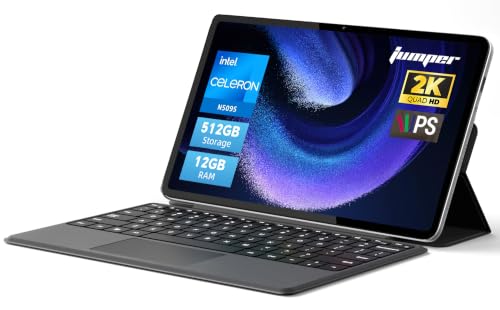
- Jumper 12-inch 2-in-1 – best for a small tablet-style form with 512GB storage
- HP 14 2-in-1 Chromebook (renewed) – best for web-only convertibles
- HP New Everyday Slim – not a 2-in-1, best as a simple Office-bundled laptop
- HP 14 student laptop (Win 11 Pro) – not a 2-in-1, best only if you can verify the mixed storage
| Model | Form | Key specs (seller title) | Best for |
|---|---|---|---|
| Dell 14 2-in-1 | 2-in-1, touch | Ryzen 7 8840HS, 16GB DDR5, 1TB | Daily power use |
| HP OmniBook X Flip 14 | 2-in-1, touch | Core Ultra 5 226V, 32GB, 512GB | Pen and notes |
| Tylvx 15.6 | 2-in-1, touch | Core m3-8100Y, 16GB, 512GB | Big-screen budget |
| Jumper 12-inch | 2-in-1 tablet | N5095, 12GB, 512GB | Portable media |
| HP 14 Chromebook | 2-in-1, Chrome OS | Intel (model not stated), 4GB, 64GB | Web apps |
| HP Everyday Slim | Clamshell | N150, 128GB SSD | Light office work |
| HP 14 student | Clamshell | 4-core Intel, 4GB DDR5, 128GB UFS | Basic study |
Seven machines, one by one
Dell 14 2-in-1 Laptop with Ryzen 7 8840HS, 16GB, 1TB SSD
The title lists an FHD+ touchscreen, an AMD Ryzen 7 8840HS, 16GB DDR5, a 1TB SSD, AMD Radeon graphics, Wi-Fi 6E and Windows 11 Home, in Indigo, with the code INSPIRON-14-2. It is the broadest spec sheet here: a full-power laptop processor class, a roomy drive and a flip hinge. FHD+ means a slightly taller panel than standard Full HD, which gives more vertical space for documents.
The title does not mention a pen, a battery capacity or a port list, so check the listing. Whether the DDR5 is soldered is also unstated.
One practical point: 1TB on a convertible removes the usual storage anxiety. You can keep project files, photo libraries and a few large applications locally without leaning on cloud sync, which matters when you work offline on a train or plane.
- Pros: 1TB of storage; 16GB DDR5; Wi-Fi 6E; touchscreen with FHD+ resolution.
- Cons: the premium tier of this list; no pen mentioned; battery and weight unknown.
Who it’s for: people who want one laptop for work, light creative projects and tablet-style reading.
Who should skip it: buyers who will never fold the screen and would rather spend on a standard clamshell.
HP OmniBook X Flip 14 with Core Ultra 5 226V, 32GB RAM, 512GB SSD
The listing names a 14-inch WUXGA IPS touchscreen, an Intel 8-core Ultra 5 226V, an Intel Arc 130V GPU, 32GB of RAM, a 512GB SSD, Thunderbolt 4 and Windows 11, and it includes a stylus pen. WUXGA is a 1920 x 1200 class panel, taller than standard Full HD. Thunderbolt 4 is a useful extra for docks and fast external drives.
Memory on this class of processor is usually built onto the chip package, so treat the 32GB as fixed. That is generous for multitasking, but it means there is nothing to upgrade later. The pen mention makes this the best fit for handwritten notes among the seven. Because the title does not give the pen model, check whether it is rechargeable or battery-powered, and whether it supports pressure levels for sketching, before you count on it for art.
- Pros: 32GB of RAM; stylus included; Thunderbolt 4 named.
- Cons: 512GB is smaller than the Dell’s drive; memory likely not expandable; pen model not named.
Who it’s for: note-takers, students and professionals who annotate documents.
Who should skip it: buyers who need more than 512GB of local storage.
Tylvx 15.6-inch 2-in-1 Laptop/Tablet, Core m3-8100Y, 16GB, 512GB SSD
The seller describes a 360-degree flip, an FHD touchscreen, an Intel Core m3-8100Y up to 3.4GHz, 16GB RAM, a 512GB SSD and Windows 11, in Deep Purple, for note-taking, design and entertainment. The screen is the largest convertible on the list. The m3-8100Y is a low-power Y-series part, so expect modest speed; it is a different class from the Dell and HP chips above.
The “up to 3.4GHz” figure is a peak, not a sustained speed. A chip from this era may not appear on Microsoft’s Windows 11 supported list, so check the processor against that list before you buy. If Windows 11 cannot be updated on it later, you could be left on an operating system with an end date.
It is still a credible way to get a 15.6-inch flip screen with 16GB and 512GB, which is hard to find elsewhere, provided your expectations on speed are low.
- Pros: 16GB and 512GB at a modest tier; large 15.6-inch touchscreen; 360-degree hinge.
- Cons: low-power processor; unfamiliar brand; weight of a 15.6-inch convertible is likely high.
Who it’s for: someone who wants a big touchscreen for sketching and video on a budget.
Who should skip it: anyone who needs a fast processor, or a laptop to carry all day.
Jumper 12-inch 2-in-1 Laptop Tablet, 2K Touchscreen, N5095, 12GB, 512GB
The title lists a 12-inch 2K touchscreen, an N5095 processor, 12GB of RAM and a 512GB SSD. It does not state an operating system, which is a gap worth closing: if the listing does not confirm a Windows 11 installation, ask before buying. The brand is unfamiliar, so look for warranty terms and a support contact.
The N5095 model number points to a low-power class, so this is a media and light-office device rather than a workhorse. The 12GB figure is more memory than many same-class units offer, and 512GB is roomy. A 2K panel on a 12-inch screen makes text sharp, but it also means scaling settings matter, so expect to adjust display scaling in Windows if text looks small.
Because the title is terse, ask the seller about the keyboard cover, charger and warranty before committing.
- Pros: compact 12-inch size; 2K resolution; 12GB and 512GB.
- Cons: operating system not stated; unfamiliar brand; modest processor class.
Who it’s for: travelers who want a small screen for reading and video.
Who should skip it: buyers who need brand support or a larger display.
HP 14 2-in-1 Chromebook, 14-inch FHD, 4GB, 64GB (Renewed)
The title gives a 14-inch FHD 2-in-1 Chromebook with an Intel CPU (model not stated), 4GB of memory and 64GB of storage, model 14b, renewed. It is the only Chrome OS convertible here. The unnamed processor is a hole in the spec sheet, so find the exact model number in the specification table.
Chrome OS needs less memory than Windows, so 4GB is more usable, and the flip design fits reading and classroom use. Check the automatic update expiry date, which controls how long the Chromebook stays supported and secure.
A renewed Chromebook with a short remaining update window is a poor bargain at any entry cost, so ask the seller for the end-of-support date in writing. Also confirm what the renewed grade promises about battery health, because a tired battery undermines the idea of a take-anywhere machine.
- Pros: FHD screen; Chrome OS runs light; flips into tablet mode.
- Cons: renewed; 64GB of storage; CPU not named.
Who it’s for: web-based study and cloud documents.
Who should skip it: anyone needing Windows software.
HP New Everyday Slim Laptop (not a 2-in-1), N150, 128GB SSD, Office 365
Not a 2-in-1 – listed because it is a bundled, do-it-all laptop under the same keyword. The title shows an Intel N150, a 128GB SSD plus 1TB of cloud storage, Microsoft Office 365, Copilot AI and Windows 11. It calls itself the “2027 Edition”, which is a marketing label, not a hardware spec. RAM, screen size and resolution are all missing, so check the listing.
Office is likely a time-limited subscription, and cloud storage is not local. The N150 is a low-power chip that suits documents and video.
The 1TB cloud allowance is separate from the internal drive, so photos and videos you want offline still have to fit into 128GB. The listing also says Windows 11 without naming the edition, so check whether it is Home or S mode, which limits apps to the Microsoft Store until you switch it off.
- Pros: Office bundle; Windows 11; small-drive plus cloud mix.
- Cons: no touchscreen or flip; RAM not stated; only 128GB locally.
Who it’s for: a simple laptop for email, video and office documents.
Who should skip it: anyone who wants touch, pen or tablet mode.
HP 14-inch Student Laptop (not a 2-in-1), Win 11 Pro, 4GB DDR5, “628GB” Storage
Not a 2-in-1 – listed as a bundled, do-it-all laptop. The title shows a 14-inch laptop with Microsoft Office, Windows 11 Pro, Copilot AI, an Intel 4-core CPU, 4GB DDR5 and Wi-Fi 6. The headline “628GB storage” is a sum of 128GB UFS internal storage and a 500GB external device, so the internal drive is only 128GB. The word “HubxcelAddon” in the title suggests a bundled accessory, so check exactly what is in the box.
The title mixes Windows 11 Pro with 4GB of memory, which is a mismatch between a professional operating system and an entry-level RAM amount. Count the 628GB as 128GB, and think of the external 500GB as a bonus you may have to plug in.
The Lavender color and add-on wording look like a bundle of extras around a basic laptop, so compare it with the HP Everyday Slim before you pay for the accessories.
- Pros: Windows 11 Pro; DDR5 memory type; Office mention.
- Cons: mixed storage claim; 4GB RAM; bundled accessories may inflate the title.
Who it’s for: basic school and office tasks if the details check out.
Who should skip it: buyers who want clear internal specs and a flip hinge.
How we picked these
We began with seven Amazon listings returned for the all-in-one laptop search and read each title for form factor, processor, memory, storage, screen and operating system. Specs come only from the titles; missing facts are marked “check the listing”. Two plain clamshell laptops are kept as labeled runner-ups. Sources are manufacturer documentation and general buyer-review themes. Nobody on the team used or measured these units. Ranking favors clear specs and real convertible hardware over bundled extras. Where a title looks inflated, such as a combined storage figure, we report the internal number and say so.
What to look for in a laptop that does everything
Convertible, detachable or plain clamshell
A 2-in-1 flips its screen through 360 degrees, a detachable pops the screen off the keyboard, and a clamshell does neither. Convertibles keep the keyboard attached, which makes them heavier but sturdier on a lap. Hinges are a wear point, so look for a clear warranty. If you only want a bigger screen and a keyboard, a regular laptop usually offers better hardware for the same money. Also decide how you will hold it: tent and stand modes are convenient on a desk or a tray table, while tablet mode on a 14-inch or larger screen gets tiring after a while.
Touch, pen and tablet mode
A touchscreen is not the same as pen support. Pens use a specific standard, and not every panel accepts every stylus. Among these seven, only the HP OmniBook X Flip title names a pen. A 14-inch panel is a good size for tablet use, while a 15.6-inch convertible is awkward to hold. Check that the display is anti-glare or at least bright enough, since glossy touchscreens reflect lights. Palm rejection also matters when writing, and you only learn how good it is from buyer reviews, so read them for comments on stylus lag and palm rejection.
Processor class and what it can handle
The Ryzen 7 8840HS and Core Ultra 5 226V sit in the upper bracket, suited to multitasking, photo editing and light video work. The Core m3-8100Y, N5095 and N150 are low-power parts for documents, browsing and streaming. Match the processor to your heaviest task, not your average one. A low-power chip is perfectly fine for note-taking and streaming, but it will feel slow if you also run a spreadsheet, a video call and a browser with twenty tabs together. Heat matters too: thin convertibles with strong chips can run warm in tablet mode, so look for buyer comments about it.
RAM and storage
Eight gigabytes is the working minimum for Windows 11, 16GB is comfortable and 32GB leaves room for years. A 128GB drive fills quickly; 512GB is a healthy floor. Many thin laptops solder the memory, so buy what you need. Storage deserves the same thought: an SSD is faster and more durable than eMMC or UFS storage, and UFS appears on the HP student listing. If the drive type is not named, check the specification table. External drives help, but they are no substitute for a roomy internal one.
Display, ports and battery
FHD or better is the right resolution for a 14-inch panel. Thunderbolt 4, named only on the OmniBook, matters for docks and fast storage. Resolution matters more on small screens than people expect, since text on a low-resolution 14-inch panel looks rough. Battery life is not stated in any title, so find the watt-hour rating and treat “long battery life” claims cautiously. For gamers reading this: a convertible rarely has a discrete GPU, which is covered in our guide to graphics cards and GPUs for laptops and the question of whether an external GPU is worth it for a gaming laptop.
Worked example: which device does it replace?
| You currently carry | Look for | Fits from this list |
|---|---|---|
| Laptop and paper notebook | Pen, 14-inch, 16GB+ | HP OmniBook X Flip 14 |
| Laptop and tablet | 360-degree flip, FHD | Dell 14 2-in-1, Tylvx |
| Tablet for video only | Small, light, 2K | Jumper 12-inch |
| School laptop | Chrome OS, long update window | HP 14 Chromebook |
Mistakes buyers make with all-in-one laptops
- Confusing laptops with all-in-one desktops. The computer-in-a-monitor design is a different product; see whether an all-in-one gaming PC is worth the money if that is what you meant.
- Assuming touch means pen. Check the pen standard and whether one is included.
- Reading “628GB” as internal storage. Bundled external storage inflates totals.
- Ignoring the operating system line. One listing here omits it.
- Buying a 15.6-inch convertible for tablet use. It is heavy to hold and awkward to carry around a room.
- Paying for a bundle instead of a spec. Add-on accessories, Office subscriptions and edition labels like “2027” do not make a laptop faster.
- Skipping the update window on Chromebooks. Renewed units can be near end of support.
Verdict
The Dell 14 2-in-1 with Ryzen 7 8840HS is the best overall for a mix of work, study and tablet use. The HP OmniBook X Flip 14 is the pick for pen users who want 32GB of memory. The Tylvx is the budget big-screen option, and the plain HP laptops are only worth it if you do not need a flip hinge. Always confirm missing specs before ordering, especially the operating system on the Jumper and the processor on the Chromebook, and decide before you buy whether you will really use touch.
Related guides
- How To Use Camelcamelcamel For Amazon Deals
- Warranty Considerations When Buying On Sale
- Browser Extensions For Finding Deals
Frequently asked questions
What is an all-in-one laptop?
The phrase has two common meanings. Most shoppers use it for a laptop that replaces several devices, usually a touchscreen 2-in-1 that folds into a tablet and often works with a pen. Others confuse it with an all-in-one desktop, where the computer is built into the monitor. This guide covers the first meaning: a single portable machine that handles work, study and sketching.
Is a 2-in-1 laptop better than a regular laptop?
It is better if you will actually use touch, tablet mode or a pen, for example for note-taking, annotating PDFs or reading on the couch. If you only type and browse, a regular clamshell laptop with the same chip and memory usually costs less and avoids hinge and touch-layer parts that could fail. Decide based on your habits, not the feature list.
How much RAM does a 2-in-1 laptop need?
Eight gigabytes is a workable floor for Windows 11 with light multitasking, and 16GB is the better target if you keep many tabs, a video call and a notes app open together. Four-gigabyte listings, which appear twice in this guide, are only suited to one task at a time. Check whether memory is soldered before assuming an upgrade is possible.
Do all-in-one laptops come with a stylus?
Not as a rule. Among the seven listings here, only the HP OmniBook X Flip title mentions a stylus pen. For the others, assume no pen is included unless the specification table says so, and check which pen standard the screen supports before buying one separately, because not every touchscreen works with every stylus.
Can a 2-in-1 laptop replace a tablet?
For many people, yes, as long as the apps you need run on Windows or Chrome OS. A convertible is heavier than a dedicated tablet and has a shorter list of touch-first apps, but it also gives you a real keyboard and file system. If you mostly read and draw, a lightweight 12 to 14-inch model is the best fit.
Related guides
More from Amazon
Programs that pair well with the guide above. Offers and eligibility are set by Amazon and may change.
Free shipping on eligible items, Prime Video and more. Eligible new members can start with a free trial.
Start a Prime free trialAd-free music streaming. Eligible new subscribers can start with a free trial.
Try Music Unlimited freeA Prime membership for ages 18-24 with a trial period. Eligibility is set by Amazon.
See Prime for Young AdultsAudiobooks and podcasts to listen to on the go. Eligible new members can start with a free trial.
Try Audible freeAs an Amazon Associate we earn from qualifying purchases.