The most useful gaming desk accessory is the one that fixes your biggest annoyance: not enough outlets, a cable knot, a spill risk or a cramped mouse area. Eight listings cover those jobs, from a clamp-on power strip to a boom arm. The notes rely on titles and published wording only, and every limit, rating and certification here is the seller’s claim to verify. A short worksheet on desk thickness and electrical load follows the picks, because those two numbers decide whether most of these accessories will work on your desk at all.
Our Top Picks
 Jgstkcity Desk Clamp Power Strip USB C5 Outlets & 6 USB Ports - 40W11.5 x 1.9 x 0 inchesCheck on Amazon

Top 3 picks at a glance
Eight add-ons compared
As an Amazon Associate we earn from qualifying purchases at no extra cost to you.


| Model | Key point from title | Price tier | Best for |
|---|---|---|---|
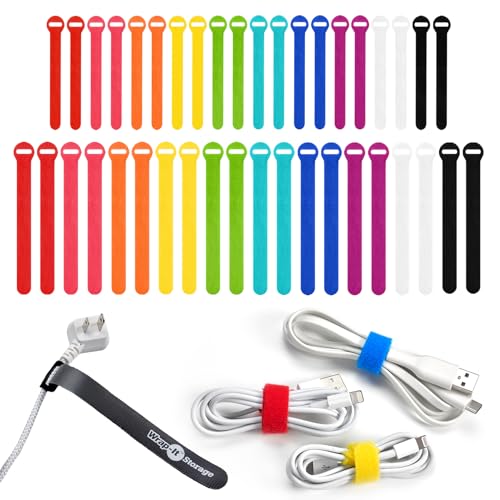
| Jgstkcity clamp power strip | 5 outlets, 4 USB-C ports, 40W total claim, fits 1.96 in edge | Mid-range | Charger overload |
| Wrap-It cable ties | 40 hook-and-loop ties, 5 and 8 in | Budget | Cable bundling |
| Large desk cup holder clamp | Fits 20 to 40 oz cups, clamp mount | Budget | Spill protection |
| Rolling tower stand | 10 height levels, outlet, locking wheels | Mid-range | Floor towers |
| VIVO PC mount | Under desk or wall, 22 lb limit, 3.5 to 7.8 in | Mid-range | Compact cases |
| BONTEC keyboard tray | 25.6 x 11.8 in tray, C-clamp | Mid-range | Wrist height |
| MAX SMART mouse platform | Rotating clip-on, up to 1.5 in desk | Budget | Narrow desks |
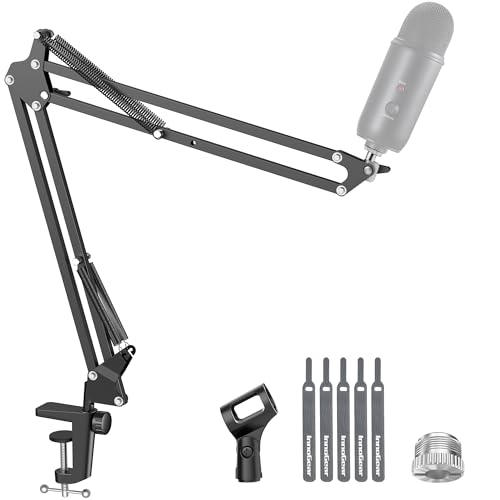
| InnoGear boom arm | Desk mount for condenser mics, folds away | Budget | Streaming mics |
The add-ons, one at a time
Jgstkcity desk clamp power strip with USB-C
An edge-mounted power strip with five outlets and four USB-C PD ports, listed at 40W total fast charging and for tabletops up to 1.96 inches thick. The title says ETL Listed, which is a seller claim, so check the listing for documentation. The numbers are ambiguous: four 20W ports would add up to 80W, but the title says 40W in total, so expect the ports to share power.
Pros
- Clamps to the desk edge with no drilling
- Five outlets plus four USB-C ports
Cons
- The 40W total is shared across ports
- Only fits tops up to 1.96 inches thick
Who it’s for: Desks with too few wall outlets and several chargers.
Wrap-It self-gripping cable ties, 40-pack
Reusable hook-and-loop ties in five and eight inch lengths, color-coded, sold for desk and charger cables. This is the cheapest and least technical item in the set. Ties do not hide cables, but they group them, which makes it easy to trace a cord when something stops working, and they can be reopened when you swap a device. Two lengths let you use short ties for single cables and long ones for the thick bundle running to a tower or power strip.
Pros
- Reusable, so you can re-route as gear changes
- Two lengths cover thin and thick bundles
Cons
- Does not manage cable length, only bundles it
- Plain look; not a hidden solution
Who it’s for: Anyone whose cables form a knot behind the monitor.
Original Large Desk Cup Holder Clamp
A heavy-duty plastic clamp holder, listed as made in the U.S.A. and for 20 to 40 oz tumblers, bottles, cans and mugs, with a multi-directional mount. Keeping a drink off the surface and away from the PC is its whole job, and it does that job well if the clamp grips. The title does not give the maximum desk thickness, so check the listing before buying.
Pros
- Moves liquids off the desk top
- Fits a wide range of cup sizes
Cons
- Thickness limit not in the title
- A full tumbler can still spill into the gear if knocked
Who it’s for: Players who drink at the desk and fear a spill.
Computer tower stand with power outlet, rolling, 10 levels
A mobile tower stand with ten height levels, locking wheels, adjustable feet and a power outlet, for under-desk use on carpet or hard floors. The title gives no weight rating or width range, so confirm that your case fits before ordering. Raising a PC off the floor reduces dust intake and kicks, and wheels let you roll it out for cable access. Keep the rear vents clear of walls and carpet, because a stand that boxes in the case undoes the cooling benefit.
Pros
- Wheels simplify cleaning and cable access
- Ten height levels and locking wheels
Cons
- Weight rating and width range not in the title
- Wheels can drift if not locked
Who it’s for: Floor-tower owners with carpet or dusty rooms.
VIVO under-desk and wall PC mount
A bracket sold for under-desk or wall mounting, with swivel, secure locking and a stated 22 lb limit for cases 3.5 to 7.8 inches wide. Many full towers exceed 22 lb, so this suits small form factor and compact cases only. Check your case width and weight on the listing first.
Pros
- Frees floor space; swivels for access
- Weight and width limits stated in the title
Cons
- 22 lb ceiling excludes most gaming towers
- Needs screws into the desk or wall
Who it’s for: Small-case owners who want the PC off the floor.
BONTEC under-desk keyboard tray, white
A pull-out keyboard and mouse platform clamped to the desk, listed at 31.3 inches including clamps with a 25.6 by 11.8 inch tray. It sits below the desk and slides out when needed. Check the desk thickness range on the listing, since clamp trays can bind on a very thick or very thin top. Shorter users sometimes lower the tray further than their wrists need, so keep the keyboard close to elbow height.
Pros
- Large tray holds keyboard and mouse together
- Clamp mounts avoid drilling
Cons
- Takes leg room under the desk
- Clamp compatibility depends on desk edge
Who it’s for: People who want to lower the keyboard for wrist comfort.
MAX SMART clamp-on mouse platform
A small clip-on platform with a 360 degree rotation and a slide-out tray, for desks up to 1.5 inches thick. It adds mouse space beside an existing keyboard tray or on a narrow desk. A small tray means less room for sweeping movements, so low-sensitivity players may find it tight. It also sits at the desk edge, so any shift in the clamp changes your mouse height mid-game.
Pros
- Rotates and slides away when idle
- Cheap way to add mouse space
Cons
- Small surface for wide mouse sweeps
- 1.5 inch thickness limit excludes thick desks
Who it’s for: Office desks too narrow for a pad.
InnoGear boom arm microphone stand
A desk-mounted boom arm for Blue Yeti, Fifine and HyperX mics, with adjustable reach and a fold-away design. It lifts the mic off the desk, which reduces keyboard thump and frees space. The title does not show mic weight limits, so verify the listing against your mic’s weight before mounting. Condenser mics are sensitive to vibration, so an arm that is tight at the clamp and joints will give cleaner audio than a loose one.
Pros
- Frees desk space and reduces desk-borne noise
- Folds away and rotates
Cons
- Weight limit not in the title
- Clamp needs a suitable desk edge
Who it’s for: Streamers and chatters with a condenser mic.
How we chose these
The Editorial team selected these eight from published specifications, manufacturer documentation and buyer reviews, reading each title for mounting method, size limits and power claims. Nobody on the team used or measured these units. Some titles include certifications or made-in claims; we quote them as the seller’s words rather than confirming them. Where a title omits a limit, such as weight or desk thickness, we say so and point you to the listing instead of filling the gap from memory.
What to look for before you add to your desk
Clamp and mount compatibility
Measure your desk edge thickness. The Jgstkcity strip lists up to 1.96 inches, the MAX SMART platform 1.5 inches, and the others do not say in the title. Check for curved edges, lips and cross braces under the top, which can block a clamp.
Power and charging
Add up what you plug in, because a clamp strip is only as good as the circuit behind it. As an estimate, a gaming PC may draw 300 to 500W under load, a monitor 30 to 50W and speakers 20W, so roughly 450 to 650W. A typical 15A, 120V circuit tops out near 1,800W, with a safer continuous limit of about 1,440W; check the strip’s own rating before connecting a heater or a second PC. USB-C ports that share a total wattage cannot all charge at full speed at once.
Weight and stability
Under-desk mounts and tower stands carry real weight. Compare your case weight with the stated limit, and screw into the desk frame, not just thin particleboard. If you are sizing a desk around a full tower, our full tower desk size guide has measurements.
Ergonomics and tidiness
A keyboard tray should let your elbows sit near a right angle. A boom arm should leave your hands free. Cable ties are the easiest tidiness win, and none of this needs drilling when a clamp fits. Position the keyboard tray so the front edge clears your knees, and keep the mouse platform at the same height as the keyboard so your wrist stays straight. If you mount a microphone arm, route its cable along the arm rather than letting it dangle, to avoid pulling the mic out of position.
Install without drilling
Clamps and adhesive hooks avoid damage, while screws are stronger. For renters, prefer clamps; for heavy loads, screw into a solid frame. Before drilling anything, check what is under the desk so you do not hit a drawer rail or a metal brace, and use the screw length the bracket’s manual suggests.
Mistakes buyers make
- Ordering a clamp accessory without measuring the desk thickness; a clamp that almost fits will slip under load.
- Putting a heavy tower into a mount rated for 22 lb.
- Daisy-chaining a power strip into another strip, which can overload the circuit.
- Ignoring leg room when adding a keyboard tray, which can leave your knees hitting the tray every time you stand.
- Buying a boom arm without checking the microphone weight.
- Treating a made-in or certification line in a title as proof; look for documents on the listing before you trust it.
Verdict
For most desks, start with the Wrap-It ties and the Jgstkcity power strip. Add the BONTEC tray if your wrists ache, the InnoGear arm if you use a condenser mic, and the VIVO mount only for compact cases. Whichever you choose, check the listing for desk thickness, weight and certification details first. If you can only buy two things, make them the cable ties and the clamp power strip, since they improve almost every desk regardless of size.
Desk accessory questions
What desk accessories improve a gaming setup the most?
Cable ties, a clamp-on power strip and a tray or mouse platform solve the most common problems. They tidy cables, add outlets and improve arm position. The right pick depends on whether your pain point is clutter, power or comfort, so name the problem first and buy for that rather than filling the desk with extras.
Will a desk clamp fit my desk?
Check the maximum thickness listed, such as 1.96 inches for the Jgstkcity strip or 1.5 inches for the MAX SMART platform. Measure your tabletop edge and watch for lips and braces underneath that can block the clamp. If your desk has a thick or curved edge, a screw-in option may suit it better.
Can I put my PC tower on an under-desk mount?
Only if your case fits the width range and weight limit. The VIVO bracket lists 22 lb and 3.5 to 7.8 inches wide, which excludes many gaming towers. A rolling stand may suit heavier cases better, but check its own weight rating on the listing first, since the title does not give one.
Is a clamp-on power strip safe?
It can be if the rating covers your devices and it is plugged into a proper outlet. The title says ETL Listed, but verify that on the listing. Avoid chaining strips, and keep heavy appliances off it. Unplug it during storms and replace it if it feels hot or the outlets loosen.
Do I need a boom arm for a USB mic?
Not strictly, but an arm lifts the mic off the desk, cutting keyboard thump and freeing space. Check the mic’s weight against the arm’s stated range before you mount it. A loose clamp can also let the arm sag over time.
Related guides
- Gaming Chair Cushions And Lumbar Supports
- Warranty Considerations When Buying On Sale
- How To Use Camelcamelcamel For Amazon Deals
Related guides
More from Amazon
Programs that pair well with the guide above. Offers and eligibility are set by Amazon and may change.
Free shipping on eligible items, Prime Video and more. Eligible new members can start with a free trial.
Start a Prime free trialAd-free music streaming. Eligible new subscribers can start with a free trial.
Try Music Unlimited freeA Prime membership for ages 18-24 with a trial period. Eligibility is set by Amazon.
See Prime for Young AdultsAudiobooks and podcasts to listen to on the go. Eligible new members can start with a free trial.
Try Audible freeAs an Amazon Associate we earn from qualifying purchases.