Choosing a smartphone for an older parent, grandparent, or yourself is not the same as choosing one for a twenty-year-old. The priorities shift toward a screen that is easy to read without glasses, a battery that does not need nightly babysitting, a setup that does not require a technical afternoon, and a phone plan that is simple to understand. Raw speed and camera megapixels matter far less than readable text, loud-enough sound, and a design that survives the occasional drop onto a kitchen floor.
This guide looks at six Android smartphones through that lens. It does not cover basic button phones, which are a separate category with their own trade-offs. Some of these models are marketed directly to seniors, while others are simple budget Android phones that happen to offer a large screen and an easy interface. Because 2026 shoppers face a lot of unfamiliar brand names, each entry sticks to concrete facts from the listing title: screen size, battery capacity, memory, storage, SIM and network details, and any durability rating. Where the title leaves gaps, we say so.
Our Top Picks
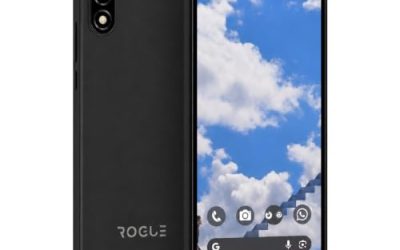
 Rogue R67S Unlocked 4G LTE Smartphone for T-Mobile6.78 x 3.13 x 0.39 inches0.5 poundsCheck on Amazon


Top 3 picks at a glance
Quick Picks
As an Amazon Associate we earn from qualifying purchases at no extra cost to you.



| Product | Best for | Key spec from the title |
|---|---|---|
| LIVELY Jitterbug Smart5 | Seniors who want a guided plan with no SIM swap | No SIM needed, requires an activated phone plan |
| Gigglizio 4G Senior Phone | Dust and splash resistance with a big battery | 6.56-inch HD+, 3GB RAM, 32GB, 4000mAh, IP52 |
| Rogue R67S | Largest screen for easy reading | 6.8-inch HD+, Android 15 Go, 32GB |
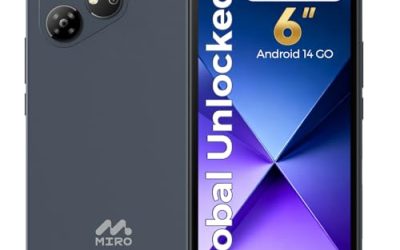
| MIRO 4G Android 14 Go | Simple phone with a card slot | 6-inch, 2GB + 32GB, up to 256GB expandable |
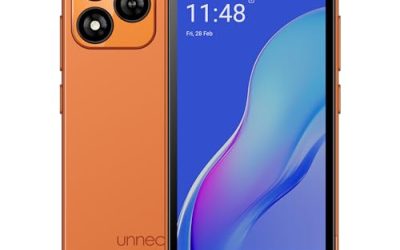
| Unnecto Bolt One | Small hands and warranty support | 5.0-inch, 32GB, US warranty, dual SIM |
| POZZI NEO 1 | Most memory and storage in the group | 6.57-inch HD+, 4GB + 64GB, 5000mAh |
How to Choose
Screen size and legibility
A bigger screen lets the operating system show larger text without cramping the layout. Phones in the 6.5 to 6.8-inch range give the most room for big fonts, while a 5-inch phone fits a small pocket and small hands but crowds text. Look at the resolution too: HD+ is adequate, though it will not look as crisp as higher-end displays. Plan to enable the large-font and display-size settings on day one, and treat the listing as a first filter rather than a guarantee of comfortable reading.
It also helps to think about the tasks that matter most. Reading messages from family, joining a video call with grandchildren, checking a pill reminder, and following a map to an appointment all depend on legible text and a responsive touch panel. A phone with 3GB or 4GB of memory handles those jobs with less waiting than one with 2GB, and that smoothness matters more for a new smartphone user than a sharper camera. Brightness is another quiet factor, since a dim screen is hard to read outdoors, and the titles here do not state brightness figures, so look for that detail on the full listing.
Battery life and charging habits
Older users often forget nightly charging, so a larger battery buys forgiveness. A 5000mAh cell behind a 6.57-inch screen is a typical full-day-plus design, while a 2000mAh cell in a 5-inch phone suggests a midday top-up. None of these titles mention wireless charging, so check that the charger and cable are included and that the port is easy to plug in. A charging routine tied to the bedside table matters more than any spec on paper.
Plan, SIM, and setup
The most underrated senior feature is how simple the carrier setup is. The Jitterbug-style model needs an activated plan with its own service, which can mean friendly support but less freedom to switch carriers. Unlocked phones need a SIM or eSIM from your carrier, so confirm your network is named in the listing, and ask a family member to set up contacts, emergency numbers, and emergency alerts before handing the phone over. Dual SIM is only useful if a second number is actually needed.
Durability, sound, and what to ignore
An IP52 rating, as listed on one model, means protection against dust ingress and light vertical dripping water, not submersion, so a case is still wise. Check for a loud speaker and a 3.5mm headphone connection if the user wears wired earphones or a hearing aid accessory. Ignore camera megapixel claims, processor jargon, and inflated RAM numbers that count virtual memory. Budget models most often cut corners on speaker quality, software update promises, and screen brightness outdoors.
Think about who will own the phone day to day. A retired reader who mainly sends texts and looks at family photos is well served by a large screen and plenty of storage. Someone who walks daily may value a lighter body and a case with a wrist strap. A person living alone may care most about reliable calling, loud ringtones, and quick access to emergency contacts. Matching the phone to the routine, rather than to the longest spec list, is what keeps it in use instead of in a drawer.
The 6 Best Options
LIVELY Jitterbug Smart5
The Jitterbug Smart5 is built for seniors and says no SIM is needed, though it requires an activated phone plan and states it is not compatible with some options. In practice, that points to a model where the phone works with its own dedicated service plan instead of a SIM you bring yourself, so read the compatibility note in the full listing before ordering. It suits a family that wants the phone and the plan sorted out together.
- Strength: Designed specifically for seniors, with a plan-based setup instead of SIM shopping.
- Strength: The title says no SIM is needed, so there is no card to buy or insert.
- Trade-off: Requires the service plan, so you are not free to move the phone to any carrier.
Skip it if you already have a carrier you prefer or want to bring your own plan.
Gigglizio 4G Senior Phone
This 4G unlocked smartphone is aimed at seniors and lists a 6.56-inch HD+ display, 3GB of RAM, 32GB of storage, a 4000mAh battery, IP52 protection, and eSIM support. It fits someone who wants a bigger screen and some resistance to dust and splashes, which suits kitchens and workshops.
- Strength: IP52 rating adds a layer of everyday protection.
- Strength: 4000mAh battery plus a 6.56-inch screen is a sensible senior combination.
- Trade-off: Only 32GB of storage, which can fill with photos.
Skip it if you need very high storage or fully water-resistant protection.
Rogue R67S
The Rogue R67S offers the largest screen in the group at 6.8 inches, running Android 15 Go with 3GB of RAM plus 3GB of extended memory and 32GB of storage. It names T-Mobile and AT&T compatibility. It suits a reader who wants big text and a clean, uncluttered Go interface.
- Strength: 6.8-inch HD+ display gives the most space for large fonts.
- Strength: Android 15 Go is lightweight and recent.
- Trade-off: Limited to certain networks, and the extended memory is not physical RAM.
Skip it if your carrier is not T-Mobile or AT&T, or if the size is too large for one-handed use.
MIRO 4G Android 14 Go
The MIRO is a 6-inch Android 14 Go phone with 2GB of RAM, 32GB of storage expandable up to 256GB, a 3000mAh battery, dual SIM, and a 3.5mm audio connection. It suits a first smartphone for someone who mainly calls, texts, and takes occasional photos.
- Strength: Expandable storage means photos do not need to be deleted constantly.
- Strength: A 6-inch screen is a good compromise between readability and pocket size.
- Trade-off: 2GB of RAM and a 3000mAh battery are modest.
Skip it if the user will run video calls and many apps every day.
Unnecto Bolt One
The Unnecto Bolt One is a 5.0-inch Android 14 Go phone with 32GB of storage, dual SIM, a quad-core processor, a 2000mAh battery, and a listed US warranty. It fits a user with small hands who wants a basic smartphone and clearer support options.
- Strength: Small, light body is easy to handle.
- Strength: Listed US warranty offers a clearer support path.
- Trade-off: The smallest screen and the smallest battery here, so text is tighter and charging is more frequent.
Skip it if reading comfort or all-day battery is the top priority.
POZZI NEO 1
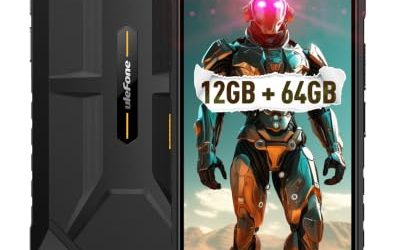
The POZZI NEO 1 is marketed for kids and seniors, with a 6.57-inch HD+ display, 4GB of RAM, 64GB of storage, a 5000mAh battery, and dual SIM 4G LTE. It has the strongest memory, storage, and battery combination of the six, making it the most future-proof pick for someone who will keep the phone for years.
- Strength: 4GB and 64GB give the most headroom in this group.
- Strength: 5000mAh battery supports long days between charges.
- Trade-off: Marketing for both kids and seniors means the interface may need setup to feel simple.
Skip it if you want a service plan bundled with the phone.
Which One Fits Your Situation
You want the family to handle as little setup as possible
The LIVELY Jitterbug Smart5 fits best, because the plan-based setup avoids SIM purchases and carrier activations.
You need the biggest, easiest-to-read screen
Go with the Rogue R67S, whose 6.8-inch display gives large fonts the most space, provided your carrier is T-Mobile or AT&T.
You want a phone that lasts through the day and survives kitchens
Pick the Gigglizio 4G Senior Phone for its 4000mAh battery and IP52 rating, or the POZZI NEO 1 if you want the 5000mAh cell and extra storage.
You need a small, supported phone for a light user
The Unnecto Bolt One is the choice for small hands and a listed US warranty, while the MIRO is better if photos need an expandable card.
Common Mistakes
- Choosing a tiny screen to save pocket space, then raising font size until the interface becomes cramped.
- Skipping carrier checks and finding that an unlocked phone does not support the user’s network.
- Counting virtual RAM as real memory and expecting smooth multitasking.
- Forgetting to set up emergency contacts, large fonts, and volume before handing over the phone.
- Ignoring the charger and cable, which should be simple enough for the user to plug in alone.
Related guides
- Gaming Chair Cushions And Lumbar Supports
- Warranty Considerations When Buying On Sale
- How To Use Camelcamelcamel For Amazon Deals
Frequently Asked Questions
Do seniors need a special phone?
Not necessarily. Many standard Android phones offer large text, simple home screens, and emergency features. A senior-oriented model can help when it bundles a plan or simplifies setup.
What screen size is best for older users?
A screen between 6 and 6.8 inches generally gives the most room for large fonts and big buttons. Smaller screens are easier to carry but crowd the text.
Is an IP52 rating enough protection?
It covers dust and light dripping water, which suits daily life, but not rain, spills, or submersion. A protective case is still a good idea for any phone.
Should I choose an eSIM or a physical SIM?
A physical SIM is usually easier for someone to swap or have a family member handle. An eSIM is convenient when your carrier supports it and someone can set it up for you.
Related guides
More from Amazon
Programs that pair well with the guide above. Offers and eligibility are set by Amazon and may change.
Free shipping on eligible items, Prime Video and more. Eligible new members can start with a free trial.
Start a Prime free trialAd-free music streaming. Eligible new subscribers can start with a free trial.
Try Music Unlimited freeA Prime membership for ages 18-24 with a trial period. Eligibility is set by Amazon.
See Prime for Young AdultsAudiobooks and podcasts to listen to on the go. Eligible new members can start with a free trial.
Try Audible freeAs an Amazon Associate we earn from qualifying purchases.