The reason to shop for an AirPlay-ready TV is simple: you want to throw a video, a photo album, or your whole iPhone screen onto the living room display without plugging in a cable or installing a casting app. The catch is that AirPlay support is a feature a TV either has or does not, and it is not always obvious from the box or the model name. This guide looks at four televisions with Apple AirPlay named in their listings, plus the Apple TV 4K box for anyone who wants to add the feature to a set that lacks it.
It is written for iPhone, iPad, and Mac owners who watch on a bedroom, dorm, or main living room screen. The decision comes down to screen size, picture technology, and whether you would rather buy a smart TV with AirPlay built in or keep an older TV and plug in an Apple streamer. The sections below show how those options differ on paper, using only what each listing states, so you can match the hardware to the room instead of guessing. Think of it as a decision between built-in convenience and flexible add-ons. Whichever route you take, make sure your Wi-Fi network is stable, because AirPlay streams over your home network and a weak router will show up as buffering.
Our Top Picks
 Hisense 55" Class E6SR Series Hi-QLED 4K UHD55 Inch2.9 x 48.6 x 28.1 inches20.5 poundsCheck on Amazon


Top 3 picks at a glance
Quick Picks
As an Amazon Associate we earn from qualifying purchases at no extra cost to you.


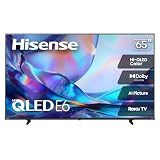

| Product | Best for | Key spec from the listing |
|---|---|---|
| Apple TV 4K (4th generation) | Adding AirPlay and Apple apps to any TV | 4K Dolby Vision, HDR10+, Dolby Atmos, Siri |
| Westinghouse Roku 32-inch | Bedrooms and small spaces | 32-inch HD, Roku, Apple AirPlay, Alexa |
| Hisense 65-inch E6SR | Main living room, movies and gaming | Hi-QLED 4K, Dolby Vision, VRR, ALLM, AirPlay |
| Hisense 55-inch E6SR | Mid-size rooms at a lower tier | Hi-QLED 4K, Roku TV, Dolby Vision, AirPlay |
| VIZIO D-Series 32-inch | Kitchens, dorms, secondary rooms | 720p, AirPlay and Chromecast built in |
How to Choose
Pick a size that matches the room
Screen size should follow viewing distance. A 32-inch set suits a bedside table, kitchen counter, or dorm desk where you sit within a few feet. For a couch about eight to ten feet away, 55 inches is a comfortable minimum and 65 inches adds a more cinematic feel. Larger TVs cost more, so decide which room matters most and spend there instead of buying one large screen for every space. Measure your stand or wall space before ordering, since bezels vary. A common mistake is choosing the largest screen that fits the budget and then discovering the room is too shallow for comfortable viewing.
Resolution and HDR standards
A 720p panel is acceptable on a small screen but looks soft once the screen grows. For 55 inches and up, choose 4K. Look for Dolby Vision or HDR10+ support for high dynamic range, which affects contrast and highlights more than raw pixel count. Gamers should look for variable refresh rate (VRR) and auto low-latency mode (ALLM), both listed on the Hisense models, which help with smooth, responsive play when a console is connected.
Confirm AirPlay support and the platform
Check that the listing names Apple AirPlay, not just “screen mirroring.” Roku TV and VIZIO platforms both support it on the models here. Also consider the operating system: Roku offers a simple interface with many streaming apps, while VIZIO adds Chromecast built in, helpful in mixed households with Android phones. Voice assistants such as Alexa are a nice extra but not essential, so do not let them drive the decision. What matters more is that AirPlay is named in the listing and that the TV connects reliably to your home network.
What to ignore and where budget sets cut corners
Ignore smart-TV claims that do not name AirPlay, and be wary of generic wireless HDMI dongles that promise mirroring from any phone; they are accessories, not televisions, and are not covered here. Small budget TVs often skimp on HDR, brightness, and audio quality, so plan on a soundbar if sound matters. Buying in 2026 means you can reasonably expect 4K to be standard at 55 inches and above, so a lower resolution on a big screen is a red flag rather than a bargain. Also check the number of HDMI ports if you plan to connect a console, a soundbar, and a streaming box at the same time.
The 5 Best Options
Apple TV 4K (4th Generation)
Not a television but the most direct way to add AirPlay to any TV with an HDMI port. The title lists 4K Dolby Vision, HDR10+, Dolby Atmos, Siri, far-field microphones, home theater surround sound support, and a Siri Remote with Find My. It suits anyone who already likes the TV they own and wants Apple apps and casting without replacing the screen. Its Siri Remote adds Find My support, which is a small but real convenience in a household that loses remotes.
- Brings Apple apps and AirPlay to a TV that lacks them.
- Supports Dolby Vision, HDR10+, and Dolby Atmos.
- Adds another device and remote to your setup.
Skip it if you want a single-box solution; a TV with AirPlay built in is simpler and has fewer cables. It also costs more than a bare streaming stick, so it makes sense mainly for Apple-focused households.
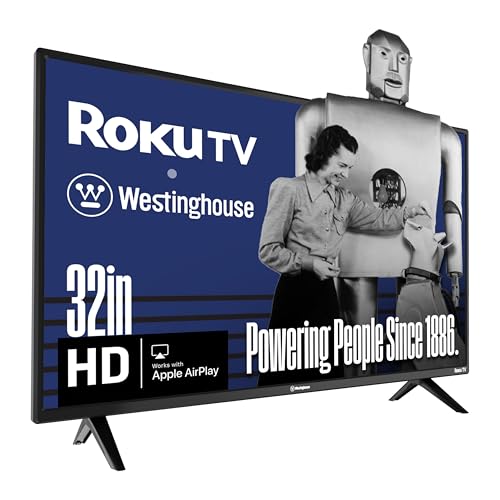
Westinghouse Roku 32-Inch HD Smart TV
A small HD Roku TV listed with Dolby Audio, Apple AirPlay, Alexa support, and Wi-Fi connectivity plus a mobile app. It suits bedrooms, offices, or kids’ rooms where you want to cast a video from an iPhone without a separate streaming box and without spending much. The Alexa support listed in the title also makes it easy to fit into a smart home.
- AirPlay and Roku apps built in at a budget tier.
- Compact size fits small furniture and tight spaces.
- HD resolution means a softer image than 4K sets.
Skip it if you want a primary TV or strong picture quality for movie nights in a larger room. It works best as a second set that rarely sees guests.
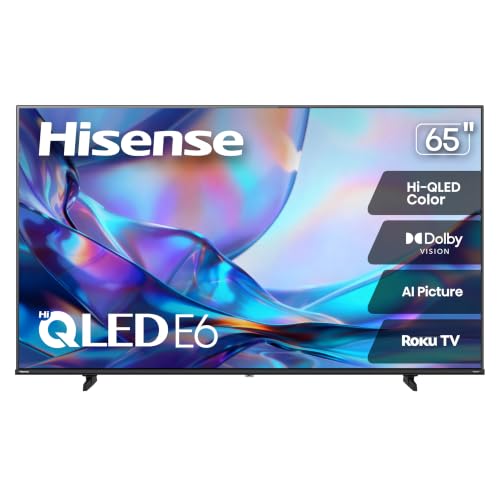
Hisense 65-Inch E6SR Hi-QLED Roku TV
The largest and most feature-rich option here. The listing calls out Hi-QLED 4K UHD, Dolby Vision, Game Mode Plus, VRR, ALLM, DTS Virtual:X, and Apple AirPlay on the Roku platform. It is aimed at buyers who want a big living room screen that also handles gaming and casting from an iPhone.
- Dolby Vision and Hi-QLED technology target strong contrast and color.
- VRR and ALLM make it a good match for console gaming.
- Large screens sit at a higher price tier than the smaller sets.
Skip it if your room is small or you rarely watch at more than a casual level. It also asks for a wide stand or a sturdy wall mount, so plan the furniture before the purchase.
Hisense 55-Inch E6SR Hi-QLED Roku TV
The same E6SR series in a more common size. It carries the Hi-QLED 4K panel, Dolby Vision, Game Mode Plus, VRR, ALLM, DTS Virtual:X, and Apple AirPlay, which makes it the more practical pick for many living rooms and apartments where a 65-inch screen would dominate the wall. You still get Game Mode Plus and DTS Virtual:X as listed, so the trade is size, not capability.
- Same feature list as the larger model at a lower tier.
- Roku interface keeps apps and AirPlay easy to reach.
- A 55-inch screen is less immersive for big rooms with long viewing distances.
Skip it if you sit far from the screen and want a theater feel. For a long room, the 65-inch version is a better match.
VIZIO D-Series 32-Inch D32h-J
This 720p set lists Apple AirPlay and Chromecast built in, with Alexa compatibility. That dual casting support is its main advantage: iPhone and Android users in the same home can both send content without extra gear. It is an older model year, so expect a basic feature set rather than modern HDR. It remains a sensible low-cost pick when the TV will mostly show news, cartoons, or casted photos.
- AirPlay and Chromecast both built in.
- Simple, small, and budget friendly.
- 720p resolution is the lowest in this group.
Skip it if you want 4K or HDR; this one is for secondary rooms. Buyers who care about picture quality should move up to the Hisense sets.
Which One Fits Your Situation
You want a big-screen TV for movies and games
Choose the Hisense 65-inch E6SR. Dolby Vision, VRR, and ALLM cover both cinema and gaming needs, and AirPlay lets guests share photos or videos from an iPhone without cables. If movie nights are the goal, this size makes the most of Dolby Vision.
You live in an apartment or smaller living room
The Hisense 55-inch E6SR keeps the same feature set at a more manageable size and tier. It is the balanced choice when you want 4K and AirPlay but do not have the wall space for the largest screen.
You need a TV for a bedroom or kitchen
The Westinghouse Roku 32-inch is simple and AirPlay ready, while the VIZIO D-Series adds Chromecast for mixed-device households where not everyone owns an Apple phone. Both sets keep the cost low, which suits a room that gets only light use.
You already own a TV you like
Add the Apple TV 4K rather than replacing the set. It brings AirPlay and Apple services to the screen you already have and supports Dolby Vision and Dolby Atmos if your TV and audio gear can use them. Because it connects over HDMI, it also keeps working if you upgrade the TV later.
Common Mistakes
- Assuming every smart TV supports AirPlay when only specific models and platforms do.
- Buying a wireless HDMI dongle expecting a true AirPlay experience from the TV itself.
- Picking a 720p set for a large screen and being disappointed by the picture.
- Forgetting that a thin TV often needs a soundbar for satisfying audio.
- Ignoring gaming features like VRR and ALLM if a console is part of the plan.
Related guides
- Gaming Chair Cushions And Lumbar Supports
- Business Laptops For Graphic Designers
- Warranty Considerations When Buying On Sale
Frequently Asked Questions
Do I need Apple TV if my TV has AirPlay?
No. AirPlay built into the TV lets you cast video, music, and photos from an iPhone, iPad, or Mac. An Apple TV adds Apple apps and a dedicated remote but is optional.
Is 720p acceptable?
On a 32-inch screen used in a secondary room, yes. For anything larger or for a main TV, 4K is the better choice because a low-resolution picture becomes more obvious as the screen grows.
Can Android phones use these TVs?
The VIZIO lists Chromecast built in, so Android phones can cast directly. Roku models also support their own casting methods, so mixed households have options. Check the model number in the listing, because AirPlay support can differ between sets of the same brand.
Is a bigger screen always better?
Not if it does not match your viewing distance. A very large TV in a small room can feel overwhelming, so match the size to the space and the seating position. Sit at the intended spot and imagine the screen before you buy.
Related guides
More from Amazon
Programs that pair well with the guide above. Offers and eligibility are set by Amazon and may change.
Free shipping on eligible items, Prime Video and more. Eligible new members can start with a free trial.
Start a Prime free trialAd-free music streaming. Eligible new subscribers can start with a free trial.
Try Music Unlimited freeA Prime membership for ages 18-24 with a trial period. Eligibility is set by Amazon.
See Prime for Young AdultsAudiobooks and podcasts to listen to on the go. Eligible new members can start with a free trial.
Try Audible freeAs an Amazon Associate we earn from qualifying purchases.