The phrase “gaming TV under 500 dollars” hides a real tension. The features that make a television good for consoles, namely HDMI 2.1 ports, a 120Hz or higher panel, variable refresh rate, and low input lag, used to belong to expensive sets. Today they show up on budget-friendly screens, but usually with trade-offs in peak brightness, local dimming, or the number of ports that carry the full signal. So the real question is which compromise suits you, and whether a smaller smart monitor would serve you better than a large TV.
This guide is for console players, living-room gamers, and students setting up a PS5 or Xbox in a dorm or bedroom. Two Skytech desktop PCs appeared in the brief and were left out because they are computers, not TVs. The remaining picks include four large Mini-LED televisions and two smaller smart monitors that double as TVs. Large panels in this tier can sit near or above the under 500 dollars line depending on the day, so confirm the current cost on the listing against your cap. Judgments here use only the specs written in each product title.
Our Top Picks




Top 3 picks at a glance
Quick Picks
As an Amazon Associate we earn from qualifying purchases at no extra cost to you.




| Product | Best for | Key spec from the title |
|---|---|---|
| iFFALCON 55″ 4K MiniLED | Console gaming with several devices | 4x HDMI 2.1, 144Hz VRR, Dolby Vision gaming |
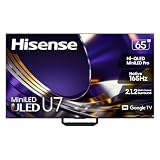
| Hisense 65″ U7 | Big-screen premium gaming | Mini-LED ULED, native 165Hz, Google TV |
| Ember 55″ Mini-LED Fire TV | Fire TV users who want a 144Hz mode | QLED 4K, Dolby Vision IQ, 144Hz gaming mode |
| Hisense 65″ U6 Pro | Large-screen value with a fast panel | Mini-LED ULED, native 144Hz, Motion Rate 480 |
| Samsung 32″ M5 (M50F) | Small room, TV plus desk use | FHD smart monitor, Gaming Hub, HDR10 |
| Samsung 28″ Odyssey 4K | Tiny-footprint 4K gaming | 4K, 144Hz, 1ms, FreeSync Premium Pro compatible |
How to Choose
HDMI 2.1 and refresh rate
For 4K at 120 frames per second on a PS5 or Xbox Series X, you need an HDMI 2.1 port and a panel that handles 120Hz. Many budget TVs enable 2.1 on only one or two ports, so count them if you use a console, a soundbar with eARC, and a PC; a TV with only one full-speed port forces you to unplug something. A native 144Hz or 165Hz panel gives headroom for PC gaming, but a console tops out at 120Hz, so do not overpay for higher numbers if you only play consoles.
Variable refresh rate and input lag
VRR, along with AMD FreeSync or HDMI VRR support, keeps motion smooth when frame rates dip. Look for an automatic low-latency or game mode. Ignore vague claims like “pro gaming” in a title; the listed specifications are what count. A 1ms response figure on a monitor is a pixel-speed claim, which is a separate thing from total input lag.
Picture quality: Mini-LED, dimming, and HDR
Mini-LED backlights allow many more dimming zones than ordinary LED, improving contrast. HDR formats such as Dolby Vision and HDR10+ matter only if your console and games support them. Budget sets cut corners on peak brightness, so HDR highlights may look modest, and on contrast in dark rooms when the dimming zones are few. Treat any zone count or nit figure not in the listing as unknown, and be wary of sellers who fill the gap with big numbers.
Size, smart platform, and sound
A 55-inch screen suits a seat six to eight feet away; 65 inches fits a larger living room. A 32-inch or 28-inch monitor is for a desk or bedroom. Look at the smart platform too, whether Google TV or Fire TV, because it affects apps and menus. Built-in speakers on budget sets are weak, so plan for a soundbar. In 2026, many buyers expect Dolby Atmos pass-through for that setup.
The 6 Best Options
iFFALCON 55″ 4K MiniLED
A feature-packed 55-inch set for console owners. The title lists a 4K MiniLED panel, PS5 and Xbox readiness, four HDMI 2.1 ports, 144Hz, VRR up to 240Hz, Dolby Vision gaming, Dolby Atmos, and IMAX support. It is aimed at households with a console, a streaming box, and a soundbar who do not want to juggle ports. The 144Hz and VRR claims make it a reasonable match for a console that outputs 120Hz, though the title’s 240Hz VRR mention reads like a marketing range rather than a panel rate.
- Strength: four HDMI 2.1 ports are listed, a rare feature at lower tiers.
- Strength: Dolby Vision gaming and Dolby Atmos support appear in the title.
- Trade-off: the brand is less familiar, so check support and return terms.
Skip it if you want a larger 65-inch picture or a household-name brand with a long track record in the US market.
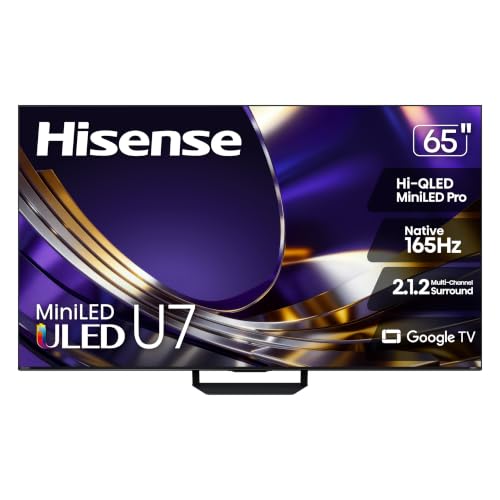
Hisense 65″ U7
The biggest and most premium set in the group. The title lists a 65-inch Mini-LED ULED 4K panel, Google TV, a native 165Hz refresh rate, VRR, HDR10+, Dolby Vision, and a new-model label. It suits a living room where gaming shares time with movies and sports and a large panel matters. The Google TV platform is listed, which gives familiar app access without a separate streaming stick, and the HDR10+ and Dolby Vision support covers both major HDR formats.
- Strength: native 165Hz is the highest panel rate among the televisions.
- Strength: a 65-inch size with Mini-LED backlighting.
- Trade-off: as the largest, newest model it is the most likely to exceed a tight budget cap.
Skip it if your budget cap is firm or your room is small.
Ember 55″ Mini-LED Fire TV
A 55-inch option for people who already like the Fire TV interface. The title lists a Mini-LED QLED 4K UHD smart TV with Dolby Vision IQ, a 144Hz gaming mode, and an Ambient Experience feature. It fits a bedroom or den where voice search and an app-first menu matter as much as gaming. Players who mostly stream and occasionally game will appreciate that the gaming mode is a listed feature rather than an afterthought, even if the port count needs confirming.
- Strength: a 144Hz gaming mode is listed alongside Mini-LED and QLED.
- Strength: Fire TV makes streaming apps easy to reach.
- Trade-off: the title excerpt does not state how many HDMI 2.1 ports it has.
Skip it if you need several 2.1 ports for multiple consoles, or if you want a verified port-by-port spec before buying.
Hisense 65″ U6 Pro
A large-screen value choice with a fast panel. The title lists a 65-inch Mini-LED ULED 4K HDR set with Fire TV, a native 144Hz panel, Motion Rate 480, Dolby Vision, and a new-model label. It suits a family room where a big picture comes first and the gaming needs are modest. Parents setting up a console for the household, or anyone who prefers a larger image over the fastest possible panel, would see the benefit of its size.
- Strength: a native 144Hz panel at 65 inches.
- Strength: Fire TV smart platform and Dolby Vision are listed.
- Trade-off: Motion Rate 480 is a marketing figure, not a measure of true refresh rate.
Skip it if you want the highest panel rate or Google TV.
Samsung 32″ M5 (M50F)
A smart monitor rather than a traditional TV. The title lists a 32-inch FHD display with streaming TV built in, speakers, HDR10, Gaming Hub, multiple ports, and a workout tracker. It fits a dorm, small bedroom, or home office where one screen does streaming, light console play, and desk work. It is also a sensible choice for a first console setup because the Gaming Hub feature is listed right in the title.
- Strength: streaming apps and Gaming Hub mean no extra box is needed.
- Strength: a compact size suits small spaces.
- Trade-off: 1080p resolution and no high refresh rate are listed.
Skip it if you want 4K, a high refresh rate, or a big-screen experience for a group of viewers.
Samsung 28″ Odyssey 4K
A small panel with serious gaming specs. The title lists a 28-inch 4K UHD display with smart TV features, a Game Bar, built-in speakers, HDR 400, 144Hz, 1ms, and FreeSync Premium Pro compatibility. It suits PC gamers and console owners who sit close and want sharpness in a small footprint. A desk-bound player who splits time between a gaming PC and a console on one display will like having both ports and smart apps in a single panel.
- Strength: 4K at 144Hz with FreeSync Premium Pro compatibility.
- Strength: smart TV features add streaming without another device.
- Trade-off: 28 inches is too small for couch viewing.
Skip it if you want a living-room television.
Which One Fits Your Situation
You own a PS5 and a soundbar
The iFFALCON 55″ lists four HDMI 2.1 ports, so your console, soundbar, and second device can all connect without swapping cables.
You want the biggest picture for movie nights and games
The Hisense 65″ U7 offers the largest panel and a native 165Hz rate, but confirm its cost against your cap. If it fits, it is the one to buy for shared movie and sports nights.
You live in a dorm or small room
The Samsung 32″ M5 or the Samsung 28″ Odyssey 4K fit tight spaces. Choose the Odyssey if you want 4K and 144Hz at a desk, and the M5 if streaming and everyday use come first. Neither replaces a big living-room screen, but both avoid the clutter of a separate box.
You prefer Fire TV
The Ember 55″ Mini-LED or the Hisense 65″ U6 Pro bring Fire TV with a high-refresh gaming mode.
Common Mistakes
- Assuming every HDMI port on a budget TV supports 120Hz.
- Paying for 165Hz when your console tops out at 120Hz.
- Judging picture quality by Mini-LED branding without knowing zone counts.
- Ignoring the sound, then needing a soundbar that eats the savings.
- Forgetting that a small monitor is a poor fit for couch viewing from several feet away.
Frequently Asked Questions
Do I need HDMI 2.1 for a PS5?
For 4K at 120 frames per second, yes. For 60 frames per second, HDMI 2.0 is enough, so the answer depends on whether your games actually offer a 120 frame mode, which many big releases do not at full 4K.
Is Mini-LED worth it?
It usually improves contrast and brightness over standard LED. The benefit depends on the number of dimming zones, which these titles do not list, so treat the Mini-LED label as a promising sign rather than a guarantee of deep blacks.
Can a monitor replace a TV?
For a desk, bedroom, or dorm, yes, especially smart monitors with built-in apps. For a living room, a larger TV is more comfortable.
What is the difference between VRR and a high refresh rate?
Refresh rate is how often the screen updates, while VRR matches that rate to your frame rate to reduce tearing. They work together.
Related guides
More from Amazon
Programs that pair well with the guide above. Offers and eligibility are set by Amazon and may change.
Free shipping on eligible items, Prime Video and more. Eligible new members can start with a free trial.
Start a Prime free trialAd-free music streaming. Eligible new subscribers can start with a free trial.
Try Music Unlimited freeA Prime membership for ages 18-24 with a trial period. Eligibility is set by Amazon.
See Prime for Young AdultsAudiobooks and podcasts to listen to on the go. Eligible new members can start with a free trial.
Try Audible freeAs an Amazon Associate we earn from qualifying purchases.