Shopping for a gaming laptop starts with a question that desktop builders never face: how much of the machine are you willing to carry around? The phrase “best laptop computer for gaming” covers everything from a slim 15.6-inch chassis with a midrange graphics chip to a 16-inch workstation-sized slab with a flagship GPU. The right answer depends on whether you play on a desk most nights, haul the machine to campus, or want one device that handles school, streaming, and a weekend of shooters. This guide sorts six current gaming laptops by what their listed specs actually promise, so you can match the hardware to your habits instead of chasing the biggest number on the box.
This is written for buyers who want a real discrete graphics card, a fast-refresh screen, and enough memory that new releases in 2026 will not choke on loading screens. Every pick below lists an RTX-series GPU in its title, which is the dividing line between a true gaming laptop and a thin laptop wearing a gaming sticker. We left out listings that name only a generic processor without a graphics card, because they cannot be compared fairly with the machines here.
Our Top Picks


Top 3 picks at a glance
Quick Picks
As an Amazon Associate we earn from qualifying purchases at no extra cost to you.




| Product | Best for | Key spec from the title |
|---|---|---|
| ASUS ROG Strix G16, RTX 5060 | Balanced all-rounder with a speedy panel | 16-inch FHD+ 16:10, 165Hz/3ms, Core i7 14650HX, 16GB DDR5 |
| Acer Nitro V 16S AI | Memory-heavy multitasking | Ryzen 7 260, RTX 5060, 16-inch WUXGA IPS 180Hz, 32GB |
| MSI Katana 15 HX | Highest frame rates at 1440p-class sharpness | RTX 5070, Core i9-14900HX, 15.6-inch QHD+ 165Hz, 32GB DDR5 |
| Alienware 16 Aurora | Sharper, taller display | RTX 5060, Core 7 240H, 2560×1600 120Hz 16:10, 16GB DDR5 |
| ASUS ROG Strix G16, RTX 5080 | Premium, no-compromise play | RTX 5080, Core Ultra 9 290HX Plus, 2.5K 240Hz HDR, 32GB DDR5 |
| ASUS ROG Strix G16, RTX 5050 | Entry ticket to RTX gaming | RTX 5050, Core i5 14450HX, 165Hz/3ms, 16GB DDR5-5600 |
How to Choose
Start with the graphics card tier
The GPU decides how high you can push settings, so rank laptops by it before anything else. In this group the ladder runs from RTX 5050 at the entry level, through RTX 5060 in the middle, to RTX 5070 and RTX 5080 at the top. As a rough guide, the entry tier suits 1080p play at medium-to-high settings, the 5060 class is comfortable at 1080p with high settings, and the 5070 and above make sense when the screen is 1440p or sharper. Be wary of any listing that boasts a processor speed but never names a graphics chip.
Match the screen to the GPU
A panel’s refresh rate only helps if the graphics card can feed it. For competitive shooters, look for 144Hz at minimum and treat 165Hz to 240Hz as the comfortable range. For story-driven games, a sharper panel such as 2560×1600 or QHD+ matters more than raw speed. The 16:10 aspect ratio gives you extra vertical space, which helps in strategy games and when the same laptop doubles as a work machine. Ignore peak brightness claims and “HDR” labels on unlabeled panels unless the spec sheet gives a certification.
Memory and storage thresholds
Sixteen gigabytes of DDR5 is the sensible floor for new releases, and 32GB buys breathing room if you stream, run Discord and a browser, or mod games. It also helps with the heavy texture packs that open-world games load into memory, which is why two of the machines below start at 32GB. Storage should start at 512GB, but modern titles regularly exceed 100GB each, so a 1TB drive saves you from constant uninstalling. Check whether the title says Gen 4 or NVMe, since that points to a faster solid-state drive than the basic SATA-class options in cheaper machines.
Where budget models cut corners
Entry-level gaming laptops usually trim the GPU tier, ship with smaller storage, and use a slower processor variant. Those are acceptable trade-offs. The corners worth refusing are single-channel memory, an unnamed display panel, and a processor without an H-class or HX-class label, because the letters point to a higher-power part designed for sustained load. Weight, cooling, and keyboard feel are rarely spelled out in titles, so favor brands with established gaming lines when you cannot see the details.
It also pays to read processor names closely. Parts ending in HX are high-power mobile chips, which is why the Core i7, Core i9, and Core Ultra 9 processors here sit in gaming-class machines rather than thin office laptops. A shorter “H” or “U” part trades speed for battery life, so do not expect a gaming laptop to stay unplugged for a full workday under load.
The 6 Best Options
ASUS ROG Strix G16 with RTX 5060
This ROG Strix is aimed at players who want a dependable midrange machine without paying flagship money. Based on the listed specs, it pairs a Core i7 14650HX with an RTX 5060 and 16GB of DDR5, and the 16-inch FHD+ 16:10 panel runs at 165Hz with a 3ms response time. That combination fits fast 1080p shooters well, and it also leaves the 16:10 shape for spreadsheets, browsing, and schoolwork between matches, which makes it an easy machine to live with daily.
- Strength: the 165Hz/3ms screen suits competitive play.
- Strength: a 1TB Gen 4 drive gives room for a sizeable library.
- Trade-off: 16GB of memory leaves less headroom than the 32GB machines here.
Skip it if you plan to render video or run heavy background apps, where more RAM would pay off.
Acer Nitro V 16S AI with RTX 5060
The Nitro V 16S AI is for buyers who treat their laptop as a do-everything computer. The title lists an AMD Ryzen 7 260, an RTX 5060 Laptop GPU, a 16-inch WUXGA IPS display at 180Hz, and 32GB of memory. That memory figure is the standout in the midrange, since it keeps games, a browser, and chat apps open together without forcing you to close things before a match. The title also cites 572 AI TOPS, an AI-processing figure that matters for software features rather than for frame rates.
- Strength: 32GB of memory is generous for this tier.
- Strength: the 180Hz IPS panel is the fastest screen of the three RTX 5060 models.
- Trade-off: WUXGA is a 1080p-class resolution, so the sharpness matches cheaper rivals.
Skip it if you want an Intel processor or a higher-resolution panel for slower, cinematic games.
MSI Katana 15 HX with RTX 5070
Katana 15 HX is built for players who care about frame rates and a crisp image. The listed specs show a Core i9-14900HX, an RTX 5070, 32GB of DDR5, a 1TB NVMe drive, and a 15.6-inch QHD+ screen at 165Hz. That is the strongest graphics tier outside the premium ROG, and the QHD+ resolution gives the card something worthwhile to push. Buyers who play on a desk most of the time and plug into the wall will get the most from the high-power processor.
- Strength: RTX 5070 plus QHD+ is the best match of GPU and screen in the midrange.
- Strength: 32GB of DDR5 and an RGB keyboard come standard.
- Trade-off: the smaller 15.6-inch body may leave less room for cooling than 16-inch rivals.
Skip it if you want the biggest possible display or need a bargain-tier cost.
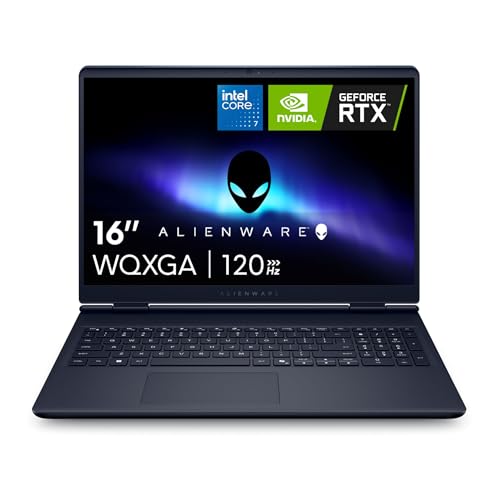
Alienware 16 Aurora with RTX 5060
The Alienware 16 Aurora is for buyers who want a taller, sharper display and a recognizable gaming brand. The title shows an RTX 5060, an Intel Core 7 240H, 16GB of DDR5, a 1TB SSD, and a 2560×1600 16:10 panel at 120Hz. The resolution is the draw here, since it offers more detail than the 1080p-class screens on similar cards. It suits someone who plays single-player adventures and also wants a roomy canvas for creative or office work.
- Strength: the 2560×1600 display is sharper than most RTX 5060 rivals.
- Strength: the 16:10 shape gives extra vertical room for work and strategy games.
- Trade-off: 120Hz is the slowest refresh rate in this group, so esports players may want more.
Skip it if you play fast shooters and want 165Hz or higher.
ASUS ROG Strix G16 with RTX 5080
This is the flagship pick, for players who want maximum settings and do not mind the premium tier. The listing names an RTX 5080, a Core Ultra 9 290HX Plus, 32GB of DDR5, a 1TB PCIe drive, and a 16-inch ROG Nebula HDR 2.5K panel at 240Hz with a 3ms response time. It is the only machine here that pairs a top-tier GPU with a high-refresh, higher-resolution HDR screen, so it is the one to look at if you expect to keep a laptop for several years.
- Strength: RTX 5080 graphics give the most headroom for demanding games.
- Strength: the 240Hz 2.5K HDR panel covers both speed and image quality.
- Trade-off: it sits at the top of the cost scale, which is hard to justify for casual play.
Skip it if you mainly play older or esports titles that a midrange card handles easily.
ASUS ROG Strix G16 with RTX 5050
This ROG Strix is the entry point for shoppers who want RTX features and the ROG name at a gentler tier. According to the title, it carries an RTX 5050 Laptop GPU, a Core i5 14450HX, 16GB of DDR5-5600, 512GB of storage, and a 16-inch FHD+ 16:10 panel at 165Hz with 3ms response. For 1080p play at sensible settings, those specs are coherent and well suited to a first gaming laptop, especially for students or newcomers moving up from integrated graphics.
- Strength: the 165Hz/3ms panel is the same speed as the pricier ROG model above.
- Strength: DDR5-5600 memory is a step up from slower budget kits.
- Trade-off: 512GB fills quickly with modern game installs.
Skip it if you expect to run 1440p settings or keep a large library installed.
Which One Fits Your Situation
You play fast shooters on a 1080p budget
The ASUS ROG Strix G16 with RTX 5060 delivers the 165Hz/3ms screen and a capable midrange GPU in one package. If you want to save a bit more, the ASUS ROG Strix G16 with RTX 5050 shares the same panel speed and is the gentlest entry point, though its 512GB drive will fill quickly.
You also edit video, stream, or multitask
Choose the Acer Nitro V 16S AI. Its 32GB of memory is the main advantage, and the 180Hz screen leaves no gap for gaming.
You want sharper visuals for story games
Pick the Alienware 16 Aurora for its 2560×1600 display, or step up to the MSI Katana 15 HX if you want the faster RTX 5070 behind a QHD+ screen.
You want the best hardware available
The ASUS ROG Strix G16 with RTX 5080 is the only option here with a top-tier GPU and a 240Hz 2.5K panel, so it fits buyers who will use that headroom every day.
Common Mistakes
- Buying on processor name alone while ignoring the graphics card tier, which drives frame rates far more.
- Paying for a 240Hz panel when the GPU cannot reach those frame rates at the settings you use.
- Settling for 512GB of storage without planning for the size of modern game installs.
- Assuming a thin, generic laptop that says “gaming” in the title has a real discrete GPU.
- Forgetting that laptop GPUs differ from desktop cards with the same number, so names alone overstate comparisons.
Graphics Tier Ladder
All six machines in this guide use a recent RTX chip, so the useful question is how much headroom you need. This table sorts them by graphics rung.
| Graphics chip | Model | Aimed at |
|---|---|---|
| RTX 5050 | ASUS ROG Strix G16 with RTX 5050 | 1080p play on a limited budget |
| RTX 5060 | ASUS ROG Strix G16 with RTX 5060, Acer Nitro V 16S AI with RTX 5060, Alienware 16 Aurora with RTX 5060 | Smooth 1080p and capable 1440p in many games |
| RTX 5070 | MSI Katana 15 HX with RTX 5070 | High settings at 1440p, plus creative work |
| RTX 5080 | ASUS ROG Strix G16 with RTX 5080 | Maximum settings and room to grow |
Specs and Terms Explained
Graphics power limit
A laptop chip with the same name as another can behave quite differently depending on the wattage the maker allows. Thicker chassis with larger fans tend to let a chip stretch further than slim ones, so a lower-rung chip in a roomy body can sometimes close in on a higher-rung one in a thin body.
DLSS and frame generation
These features render fewer pixels natively and rebuild the rest with AI, raising frame rates. They only work in games that support them, so check that your favorites are on the list before leaning on them to justify a lower rung.
MUX switch
A MUX switch lets the display connect directly to the dedicated GPU instead of routing through the integrated one. It can raise frame rates and trim latency, so it is a useful line to find on a spec sheet when the maker includes it.
Sizing and Portability Checklist
- Decide how often the laptop leaves the desk. A large gaming body plus its power brick is a real load in a backpack.
- Check that your bag has a sleeve big enough for a 16-inch screen, since many are cut for 15.6-inch machines only.
- Look at the ports: you want HDMI or DisplayPort for an external monitor, and at least one fast USB-C for accessories.
- Think about noise. A high-power chip means loud fans at full load, so plan on headphones if you share a room.
Setup and Care Tips
Use the top performance mode only when plugged in, because running on battery limits how much power the graphics chip can draw. Keep the vents clear and consider a cooling stand for long sessions. Update the BIOS and graphics drivers periodically, and avoid leaving the machine charging at full for weeks if it is mostly used at a desk.
Related guides
- Gaming Chair Cushions And Lumbar Supports
- Business Laptops With Long Battery Life
- Warranty Considerations When Buying On Sale
Frequently Asked Questions
Is 16GB of RAM enough for gaming laptops?
Yes for most games, and it is the baseline we looked for. Move to 32GB if you stream, edit video, or keep many apps open while playing.
Does a higher refresh rate always mean smoother gameplay?
Only if your graphics card can produce frames that fast. A 240Hz screen paired with a modest GPU will often run below its limit, so match the panel to the card.
Is an RTX 5050 laptop worth considering?
For 1080p gaming at sensible settings, it can be. Treat it as an entry tier and expect to lower settings in the most demanding new releases.
Should I choose 15.6 inches or 16 inches?
The 16-inch models here use a 16:10 shape that adds vertical space, while the 15.6-inch option is slightly more compact. Pick the size that fits your bag and desk.
Related guides
More from Amazon
Programs that pair well with the guide above. Offers and eligibility are set by Amazon and may change.
Free shipping on eligible items, Prime Video and more. Eligible new members can start with a free trial.
Start a Prime free trialAd-free music streaming. Eligible new subscribers can start with a free trial.
Try Music Unlimited freeA Prime membership for ages 18-24 with a trial period. Eligibility is set by Amazon.
See Prime for Young AdultsAudiobooks and podcasts to listen to on the go. Eligible new members can start with a free trial.
Try Audible freeAs an Amazon Associate we earn from qualifying purchases.