The closest thing to a custom gaming laptop builder is a manufacturer that lets you pick RAM, storage and sometimes processor or graphics tiers at checkout, combined with models that let you upgrade memory and drives yourself afterwards. Unlike a desktop, you cannot choose each part. This guide explains what customization really means for laptops, then compares twelve listings by how much room they leave you to adjust. Prices drift, so check each listing.
Our Top Picks
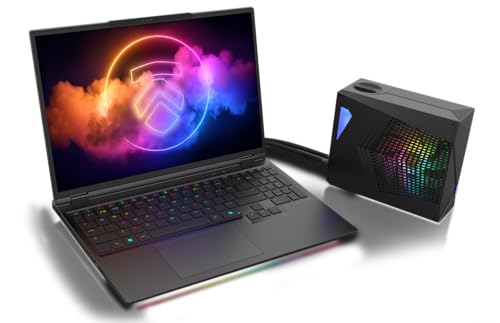 Eluktronics HYDROC 16 Flagship Gaming Laptop: NVIDIA GeForce1TB SSD + 32GB RAM14.04 x 9.64 x 1.04 inchesCheck on Amazon
 Eluktronics HYDROC 16 G2R RTX 5090 Gaming Laptop:4TB SSD + 64GB RAM14.04 x 9.64 x 1.08 inches6.23 PoundsCheck on Amazon
Top 3 picks at a glance
Twelve listings compared by configurability and class
As an Amazon Associate we earn from qualifying purchases at no extra cost to you.





| Model | Key point from title | Price tier | Best for |
|---|---|---|---|
| Eluktronics HYDROC 16 (RTX 5090) | Core Ultra 9 275HX, QHD 300Hz, 32GB, 1TB, liquid cooled | Premium | Maximum-performance configurators |
| Eluktronics HYDROC 16 G2R | RTX 5090, Mini LED 1000-nit HDR, ambiguous memory and storage line | Premium | Buyers who verify the configuration first |
| ASUS ROG Strix G18 | 18-inch, RTX 5070, i9-14900HX, 32GB, 1TB | Premium | Large-screen desktop replacement |
| ASUS ROG Strix G16 (RTX 5070) | Ryzen 9 9955HX, 16GB, 1TB, 165Hz | Premium | Buyers who will upgrade RAM |
| Acer Nitro V (RTX 4050) | i5-13420H, 8GB DDR5, 512GB | Budget | A low base to upgrade from |
| ASUS ROG Strix G16 (RTX 5050) | i5 14450HX, 16GB, 512GB, Wi-Fi 7 | Mid-range | Entry GPU with room to add storage |
| YOZISUAN 15.6-inch | No GPU named, 16GB, 512GB, for students and business | Budget | Not a gaming pick |
| Acer Nitro V 16S | RTX 5060, Ryzen 7 260, 32GB, 1TB | Mid-range | Buyers wanting memory already maxed |
| HP Victus 15.6 | RTX 3050, i5-12450H, 16GB, 512GB | Budget | A cheap platform to improve |
| msi Crosshair 18 HX AI | RTX 5070 8GB, Ultra 9 275HX, 32GB, 2TB | Premium | Storage-heavy libraries |
| Alienware 16 Aurora | RTX 5060, Core 7 240H, 2560×1600 120Hz | Mid-range | Screen resolution over refresh |
| msi Katana 15 HX | RTX 5070, i9-14900HX, QHD+ 165Hz, 32GB | Premium | Strong spec in a 15-inch frame |
The listings, one by one
Eluktronics HYDROC 16 flagship
The title names an RTX 5090, Core Ultra 9 275HX, a 16-inch QHD 300Hz panel rated 500 nits, 32GB RAM and a 1TB Gen 4 SSD, with liquid cooling. The brand is known for configurable builds, but whether this listing offers options is not in the title, so check the page.
- Pro: Top-tier graphics named
- Pro: Liquid cooling listed
- Con: Highest tier of cost
- Con: Configuration choices unclear from the listing
Who it’s for: Buyers who treat a laptop as a workstation.
Eluktronics HYDROC 16 G2R
The title lists an RTX 5090, Core Ultra 9 290HX Plus, a QHD 300Hz Mini LED 1000-nit HDR display and Windows 11 Pro. Its trailing “(128, GB, 4, TB)” is ambiguous and may be a memory and storage selector, so confirm exactly what ships before you pay.
- Pro: Mini LED HDR panel
- Pro: Windows 11 Pro
- Con: Memory and storage line is unclear
- Con: Most expensive tier in the set
Who it’s for: Buyers who will confirm the configuration with the seller.
ASUS ROG Strix G18
An 18-inch FHD+ 16:10 144Hz display sits above an RTX 5070, i9-14900HX, DDR5-5600 and a 1TB Gen 4 SSD. The title writes “32B”, which is almost certainly 32GB, but verify it. A large chassis tends to leave more physical room for cooling.
- Pro: Big screen
- Pro: Fast CPU class
- Con: Bulky to carry
- Con: Typo in memory figure
Who it’s for: Desk-bound players who want an all-in-one machine.
ASUS ROG Strix G16 with RTX 5070
This build pairs an RTX 5070 with a Ryzen 9 9955HX, 16GB DDR5-5600 and a 1TB Gen 4 SSD. Sixteen gigabytes is light for the CPU and GPU on offer, which makes a memory upgrade the first customization to price.
- Pro: High-end CPU named
- Pro: 1TB Gen 4 storage
- Con: 16GB feels light for the class
Who it’s for: Buyers planning a RAM upgrade.
Acer Nitro V with RTX 4050
The title lists an i5-13420H, RTX 4050, 15.6-inch 165Hz display, 8GB DDR5 and 512GB. The low base spec means memory and storage upgrades matter most here, if the chassis permits them. Check the manufacturer’s service documents.
- Pro: Lowest cost of the Acer options
- Pro: DDR5 memory
- Con: 8GB RAM needs upgrading
Who it’s for: Tinkerers starting from a small base.
ASUS ROG Strix G16 with RTX 5050
An RTX 5050, Core i5 14450HX, 16GB DDR5-5600 and 512GB PCIe Gen 4 storage come with Wi-Fi 7. It is entry graphics in a premium-branded chassis, so extra storage is the likely first change.
- Pro: Wi-Fi 7
- Pro: 16GB RAM
- Con: Only 512GB
Who it’s for: Buyers who want a brand-name chassis cheaply.
YOZISUAN 15.6-inch laptop
This listing never names a GPU and describes itself as a traditional laptop for students, commuters and business users. Despite the “gaming” label in its title, we treat it as not a gaming laptop. It has no place on a customization shortlist.
- Pro: Very low cost
- Con: No graphics card named
- Con: Marketed to office users
Who it’s for: Nobody shopping for a custom gaming setup.
Acer Nitro V 16S
The title lists an RTX 5060 laptop GPU, Ryzen 7 260, 32GB DDR5 and a 1TB Gen 4 SSD behind a 16-inch 180Hz panel. With memory already generous, it needs little customization out of the box.
- Pro: 32GB and 1TB listed
- Pro: 180Hz panel
- Con: Wi-Fi 6 only
Who it’s for: Buyers who want a ready configuration.
HP Victus 15.6
An RTX 3050 with an i5-12450H, 16GB RAM and 512GB SSD is the oldest-generation listing here. It offers a cheap base for a storage upgrade, though the GPU cannot be changed.
- Pro: Low tier
- Pro: 16GB RAM
- Con: Entry GPU
- Con: Older platform
Who it’s for: First-time buyers adding a second SSD later.
msi Crosshair 18 HX AI
The title lists an 18-inch 2560×1600 240Hz display, Core Ultra 9 275HX, RTX 5070 with 8GB GDDR7, 32GB RAM and a 2TB NVMe SSD, with an HDMI cable thrown in. Large storage reduces your need to upgrade.
- Pro: 2TB storage
- Pro: 240Hz high-resolution panel
- Con: 8GB VRAM on a premium-tier price
Who it’s for: Players with a large game library.
Alienware 16 Aurora
An RTX 5060 and Intel Core 7 240H drive a 2560×1600 120Hz 16:10 screen with 16GB DDR5 and a 1TB SSD. Resolution is the draw rather than refresh rate.
- Pro: High-resolution 16:10 panel
- Pro: 1TB included
- Con: 120Hz only
Who it’s for: Buyers who value image sharpness.
msi Katana 15 HX
Here the title lists a Core i9-14900HX, RTX 5070, 32GB DDR5, 1TB NVMe and a 15.6-inch QHD+ 165Hz display. High specs in a compact frame can mean heat management matters, so read cooling information on the manufacturer page.
- Pro: 32GB and QHD+ screen
- Pro: Strong CPU and GPU
- Con: Compact chassis may run hot
Who it’s for: Buyers who want power without an 18-inch body.
How we picked these
The Editorial team built this list from published specifications, manufacturer documentation and buyer reviews, favouring models with generous base memory and storage or a configurable-maker pedigree. Nobody on the team used or measured these units. All details come from listing titles, so confirm them on the product page and the manufacturer’s site.
What “custom” actually means for a gaming laptop
Configurable makers versus desktop builders
Some makers, including the Eluktronics brand in this set, let you choose memory, storage and sometimes tier of processor or graphics before shipping. Desktop builders let you choose nearly every part; see prebuilt versus custom-built desktops. For laptops the graphics chip and screen are soldered or fixed, which also affects whether an external GPU is worth it.
Upgrade paths and warranty
Memory and storage are normally the only user upgrades. Confirm the number of memory slots and M.2 slots in service documentation, and read the warranty to see whether opening the case affects coverage terms.
MUX switch and cooling
A MUX switch routes the display straight to the dedicated GPU. None of the titles mention one, so verify it on the spec page. Cooling design matters more than a core count when you stress a small chassis.
Storage maths for a library
As a planning estimate, assume games average 60 to 100GB each and keep 15 percent of the drive free. A 512GB drive holds roughly four to five titles after the operating system, 1TB around nine to eleven, and 2TB around twenty. If your list is longer, buy the bigger drive up front or budget a second M.2 SSD.
Memory configuration and speed
Two matched sticks run in dual-channel mode, which usually helps integrated and shared-memory workloads and can help games that are bandwidth-hungry. When a title says 16GB without saying how it is split, check whether it is one stick or two, and whether one slot is free. If the memory is soldered, no upgrade is possible, so that fact decides how much RAM to buy on day one.
A short upgrade-reserve worksheet
Take your total budget and set aside roughly 10 to 15 percent for post-purchase upgrades, which is our planning estimate rather than a rule. Next list what the listing lacks: more RAM, a second SSD, a cooling pad. Price those from current store listings, subtract them from the reserve, and only then decide whether a cheaper base laptop with upgrades beats a pricier all-in-one listing.
Display and battery trade-offs
High-refresh panels at 240Hz or 300Hz only pay off if the graphics chip can feed them, and bright Mini LED or HDR screens draw more power on the move. A configurable maker may offer panel choices; a retail listing will not. Decide whether you play mainly plugged in at a desk, because that changes how much battery life you should pay for.
Mistakes buyers make
Assuming a laptop can take a new GPU. Paying for a premium chassis with minimal memory and no upgrade plan. Trusting ambiguous titles, such as the memory line on the G2R, without confirming. Buying a listing that is not really a gaming laptop. Ignoring warranty rules for opening the case. Overspending on resolution without a GPU able to drive it comfortably. Forgetting that heavier, larger chassis cost more to ship, carry and insure, so a travel-heavy buyer may regret an 18-inch machine within a few weeks.
Verdict
For customization headroom, the Acer Nitro V 16S and msi Crosshair 18 HX AI arrive with generous memory and storage listed, while the ROG Strix G16 with RTX 5070 is a good platform for a RAM upgrade. The Eluktronics models suit buyers who verify configuration options. Skip the YOZISUAN listing. Before ordering any of them, confirm on the manufacturer’s page how many memory and M.2 slots exist, what the warranty says about user upgrades, and whether a MUX switch is fitted. Those three facts decide how custom your laptop can really become, and none of them appear in most listing titles.
Related guides
- Gaming Chair Cushions And Lumbar Supports
- Business Laptops With Long Battery Life
- Travel Backpack With Laptop Compartment
Frequently asked questions
Can you really build a custom gaming laptop?
Not the way you build a desktop. A laptop’s board, cooling and screen are fixed by the chassis, so true customization means choosing a configurable maker’s options for RAM, storage and sometimes the processor and graphics tier, then upgrading memory and drives yourself. Anything fully assembled from loose parts is a desktop job.
Which parts of a gaming laptop can usually be upgraded?
Memory and storage are the most common, and some chassis have a second M.2 slot. The GPU and CPU are normally soldered or not user-replaceable. Titles rarely list slot counts, so check the manufacturer’s service documentation for your exact model before buying parts.
Will upgrading RAM or an SSD void the warranty?
Policies differ by maker. Some allow user upgrades of memory and storage if you cause no damage, others require a service centre. Read the warranty text for your model, and ask support in writing before opening the case if you are unsure.
What is a MUX switch and does it matter?
A MUX switch lets the display connect directly to the dedicated GPU instead of routing through the integrated graphics, which can lift frame rates in some games. It is a feature to look for on the manufacturer’s spec page, since none of the titles here mention it.
Is a desktop builder a better choice than a configurable laptop?
If you want maximum upgradability and easy part swaps, a desktop is stronger, as our comparison of prebuilt and custom-built desktops explains. A laptop wins on portability and a built-in screen. Decide which trade matters most before comparing individual models.
Related guides
More from Amazon
Programs that pair well with the guide above. Offers and eligibility are set by Amazon and may change.
Free shipping on eligible items, Prime Video and more. Eligible new members can start with a free trial.
Start a Prime free trialAd-free music streaming. Eligible new subscribers can start with a free trial.
Try Music Unlimited freeA Prime membership for ages 18-24 with a trial period. Eligibility is set by Amazon.
See Prime for Young AdultsAudiobooks and podcasts to listen to on the go. Eligible new members can start with a free trial.
Try Audible freeAs an Amazon Associate we earn from qualifying purchases.