For most gaming builds in 2026 the Fractal Design North suits buyers who want strong airflow with a living-room look, the Lian Li Lancool 217 suits buyers who want maximum cooling out of the box, and the Corsair 3500X suits builders who want a panoramic glass showcase with generous graphics card space. The Fractal Design Torrent is the pick when airflow matters above everything else. The right case depends on cooling needs, graphics card length and how much visual style you want.
As an Amazon Associate we earn from qualifying purchases at no extra cost to you.


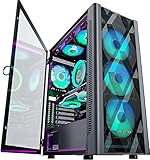

Our Top Picks
 MUSETEX ATX PC Case Pre-Install 6 PWM ARGB18.98" x 15.75" x 8.07"15.75 x 8.07 x 18.98 inches14.64 poundsCheck on Amazon
 MUSETEX ATX PC Case 7 PWM ARGB Fans16.73"D x 8.35"W x 18.5"H16.73 x 8.35 x 18.5 inchesCheck on Amazon


Top 3 picks at a glance
At a glance
| Case | Best for | Key stated details | Limits |
|---|---|---|---|
| Fractal Design North | Airflow plus furniture-style looks | Reviewers list a walnut front option, 355 mm maximum GPU length and two 140 mm fans in the stock kit | Fewer fans than some rivals, and some reviewers say it is less ideal on a tight budget |
| Lian Li Lancool 217 | Cooling out of the box | Reviewers report five pre-installed fans including two 170 mm front fans, wood accents and a sideways PSU mount | Large front fans mean checking radiator and clearance details in the maker’s manual |
| Corsair 3500X | Panoramic glass showcase builds | Reviewers list panoramic glass, a 425 mm GPU clearance, GPU anti-sag support and reverse-connector motherboard compatibility | Ranks below the others for pure airflow in several roundups |
| Fractal Design Torrent | Highest-airflow builds | Newegg’s guide describes a chimney-style layout, 180 mm front fans and an open mesh front | Open front means more dust and noise exposure |
The specifications above are attributed to retailer guides and review roundups that list them, and they can differ between variants and colour options. Read the maker’s page for the exact variant before ordering.
What defines a mid tower for gaming
A mid tower is the most common gaming case size. It normally supports ATX motherboards and smaller, takes graphics cards from compact models up to roughly 350 to 420 mm depending on design, and fits a decent number of fans and a front or top radiator. Compared with a full tower it is cheaper, lighter and easier to place on a desk. The trade-off is less internal room, so very long graphics cards, thick radiators and large coolers need a check against the specification sheet.
Choosing by tier
Budget tier
Budget mid towers focus on a mesh front panel, a few preinstalled fans and basic cable routing. Retail guides point to cases in the same category as the Corsair 4000D RS Frame and the Lancool III as common recommendations for most mid-range builds. Expect fewer included fans and less polished dust filtering than in higher tiers, and plan to add fans if you run a hot graphics card.
Mid-range tier
This tier is where the Fractal North and the Lancool 217 sit in reviewer roundups. You get mesh panels, several fans, better build quality, and room for AIO coolers. For most gaming PCs with a mid-range or high-end graphics card, this tier is the sweet spot.
Premium tier
Premium mid towers add panoramic glass, strong cable management, higher-grade materials and flexible radiator mounts. The Corsair 3500X and the Torrent are examples reviewers mention. You pay for looks, build quality or maximum airflow rather than for extra frame rates.
Airflow versus looks
Mesh fronts move more air and keep components cooler, but let more noise and dust through. Glass-heavy designs look striking but can restrict intake and run warmer unless there are enough fans and a ventilated top. Reviewers generally rank the Lancool 217 and the Torrent at the top for pure airflow, the North as a balance of airflow and style, and the 3500X as a display case that still cools adequately.
Fit and compatibility notes
- Graphics card length: the maker lists a maximum. The North is reported at 355 mm and the 3500X at 425 mm, and some current graphics cards, including large RTX 50-series models, can be long or thick, so confirm length and slot width.
- CPU cooler height: check the maker’s limit if you use a tall air cooler.
- Radiator support: look at supported front, top and side sizes and any thickness limits with the motherboard installed.
- Power supply: ATX supplies fit these cases, and the Lancool 217 is reported to allow a sideways mount.
- Motherboard size: these are mid towers for ATX, micro-ATX and mini-ITX boards, and E-ATX typically needs a larger case.
- Power connector clearance: if you use a 12VHPWR or 12V-2×6 graphics card cable, leave enough space for a gentle bend, and follow the card and power supply maker’s guidance. Stop use if you see heat damage.
- Fan connectors and front I/O: confirm the case’s USB-C header against your motherboard.
Pick this case if decision table
| Pick | If you |
|---|---|
| Fractal Design North | Want a quiet, good-looking case that cools well and suits a desk setup. |
| Lian Li Lancool 217 | Want the most fans included and strong cooling for a hot graphics card. |
| Corsair 3500X | Want a glass showcase, a long graphics card and a clean look. |
| Fractal Design Torrent | Prioritise airflow above looks and do not mind a larger case. |
| Budget mesh mid tower | Need an affordable case and plan to add fans later. |
Alternatives to consider
- Lian Li Lancool III: named in Newegg’s guide for mid-range builds, with a mesh front.
- Corsair 4000D RS Frame: a mainstream airflow-oriented option in the same guide.
- Lian Li V100: picked as best overall in one roundup, though that is a single outlet’s view.
Common mistakes
Choosing only on looks
Glass panels without enough intake can raise temperatures. Look for a mesh or perforated intake and enough fans.
Ignoring graphics card dimensions
Many current cards are long and thick. Measure against the maker’s limit, including space for power cable bends.
Assuming included fans are enough
Fan counts differ greatly. The Lancool 217 ships with several fans while others ship with two, so you may need extras.
Forgetting radiator and motherboard clearances
A radiator that fits an empty case may collide with memory or a motherboard heat sink. Check the maker’s notes.
Trusting one roundup
Many roundups are affiliate-style and rankings disagree. Compare the maker’s specification and more than one independent reviewer.
Building tips
Plan airflow as front or bottom intake and rear plus top exhaust. Dress cables behind the tray to keep intake paths clear. Install the power supply first when it mounts sideways, and fit the graphics card last. Unplug the PC before opening it, and do not open a power supply.
Noise, dust and daily use
Mesh panels let more sound out and need cleaning, so removable dust filters on the front, top and bottom are worth looking for in the maker’s listing. Larger fans such as the 170 mm and 180 mm units reported on the Lancool 217 and the Torrent can move air at lower speeds, which reviewers associate with quieter operation, although fan curves and motherboard settings also matter. Glass panels show fingerprints and dust more clearly, and a case with a tempered glass side is heavier to move.
Front panel ports and extras
Look at the front I/O the maker lists, particularly a USB-C port, which needs a matching header on your motherboard. Consider whether you need extra drive mounts, a vertical GPU mount, or a hinged side panel for easier building. Reverse-connector motherboard support, which Corsair lists for the 3500X, helps if you use a board with rear-facing connectors.
Which tier gives the best return
Reviewers repeatedly place the mid-range tier as the best return, because the step up from budget adds fans and build quality, while the premium tier mostly adds looks and refinement. If your graphics card runs warm, spend on airflow first. If your build is on show, spend on glass and cable management second.
Frequently Asked Questions
What is the best mid tower case for gaming in 2026?
There is no single winner. Reviewers often cite the Fractal Design North for balance, the Lian Li Lancool 217 for cooling and the Corsair 3500X for display builds. The Fractal Torrent is regularly named for airflow.
Is a mid tower big enough for a high-end graphics card?
Usually yes, but check the maker’s maximum length and thickness. The North is reported at 355 mm and the 3500X at 425 mm, so large cards may suit one better than the other.
Mesh front or glass front?
Mesh generally cools better and glass looks cleaner. If you choose glass, make sure there are enough fans and intake paths elsewhere.
How many case fans do I need?
Many builders aim for at least two intake and one exhaust fan. Cases with more included fans, such as the Lancool 217, need fewer add-ons.
Can I use liquid cooling in a mid tower?
Yes, most support a front or top radiator, with sizes and thickness limits set by the maker. Review the specification sheet for the exact supported lengths.
Does the case affect gaming performance?
Not directly, but better airflow can keep components cooler and help them hold boost clocks. A poorly ventilated case can reduce sustained performance because of heat.
Related guides
More from Amazon
Programs that pair well with the guide above. Offers and eligibility are set by Amazon and may change.
Free shipping on eligible items, Prime Video and more. Eligible new members can start with a free trial.
Start a Prime free trialAd-free music streaming. Eligible new subscribers can start with a free trial.
Try Music Unlimited freeA Prime membership for ages 18-24 with a trial period. Eligibility is set by Amazon.
See Prime for Young AdultsAudiobooks and podcasts to listen to on the go. Eligible new members can start with a free trial.
Try Audible freeAs an Amazon Associate we earn from qualifying purchases.