For Borderlands 4, the realistic pick is a 16 GB mid-range or upper mid-range card, such as the GeForce RTX 5070 Ti or Radeon RX 9070 XT, if you want smooth 1440p with upscaling, while a GeForce RTX 5060 Ti or Radeon RX 9060 XT is the practical entry point and only the GeForce RTX 5090 is described by reviewers as coming near native 4K. The game is one of the heavier Unreal Engine 5 releases, so buy with upscaling in mind rather than aiming for native resolution.
As an Amazon Associate we earn from qualifying purchases at no extra cost to you.

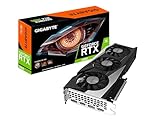


Our Top Picks
 ASUS Dual GeForce RTX 5060 Ti 16GB GDDR7RTX5060Ti|OC|16GB9 x 4.7 x 2 inches1.4 poundsCheck on Amazon
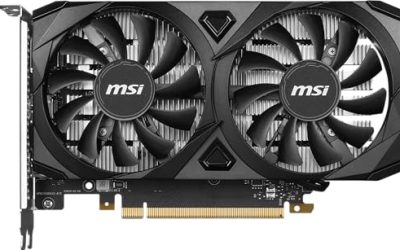
 msi Gaming RTX 3050 Ventus 2X 6G OC1.7" x 4.3" x 7.4"7.4 x 4.3 x 0.1 inches1.3 poundsCheck on Amazon
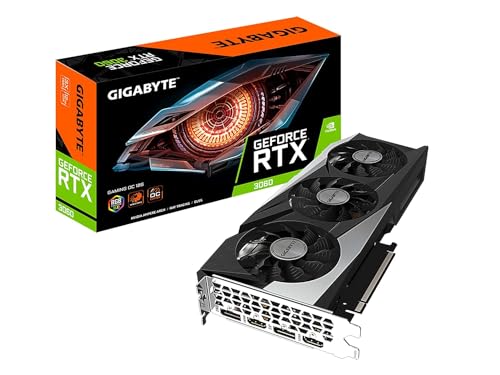

Top 3 picks at a glance
At a glance
| Target | GPU class | Example models | Reality check |
|---|---|---|---|
| Minimum playable | Older mid-range | RTX 2070, RX 5700 XT, Arc A580 (8 GB) | Publisher minimum, expect low settings |
| Recommended per publisher | Previous-gen high end | RTX 3080, RX 6800 XT, Arc B580 | Press coverage says the developer aims at 1440p, Medium preset, 60 fps |
| 1080p high with upscaling | Lower mid-range | RTX 5060, RX 9060 XT, Arc B580 | Likely needs DLSS or similar |
| 1440p high with upscaling | Upper mid-range | RTX 5070, RTX 5070 Ti, RX 9070, RX 9070 XT | Best fit for most buyers |
| 4K | Flagship | RTX 5080, RTX 5090 | Even the RTX 5090 fell below 60 fps native at 4K at launch, per reviewers |
What the publisher says
The Steam page lists as minimum a Windows 10 or 11 PC with an Intel Core i7-9700 or Ryzen 7 2700X, 16 GB of RAM, and a GeForce RTX 2070, Radeon RX 5700 XT or Intel Arc A580 with 8 GB of VRAM, plus an SSD with 100 GB free and 8 CPU cores. The recommended profile is an Intel Core i7-12700 or Ryzen 7 5800X, 32 GB of RAM, and a GeForce RTX 3080, Radeon RX 6800 XT or Intel Arc B580. The page does not list a resolution or frame rate for either level.
Press coverage reports that Gearbox described the recommended profile as targeting 1440p at 60 fps on the Medium preset. If that is accurate, the practical meaning is simple: the card named in the recommended list gets you Medium, not Badass, at 1440p.
What reviewers found at launch
The outlets that published full benchmarks in September 2025 reached the same conclusion. TechSpot reported that performance deteriorates quickly below the top GPU and that mid-range cards struggle to reach 60 fps at 1440p even with balanced upscaling, and it noted a large gain from DLSS on an RTX 5060 Ti. Wccftech reported that with DLSS Quality at 4K the RTX 5090 reached only a moderate frame rate, and that the RTX 4090 was lower still. DSOGaming reported that Medium settings were needed to hold 60 fps at native 4K on an RTX 5090, and that frame generation lifted numbers a lot. Notebookcheck summed up its review as having almost no chance without DLSS and similar tools. Patches since launch may have shifted these results, so use them as a guide to relative demand rather than exact numbers.
What follows for a buyer is a pattern, not a figure: the engine’s lighting and geometry features are expensive, upscaling is expected, and the gap between the Badass preset and Medium is large. That makes the buying decision about two things, the resolution you want and how comfortable you are with upscaled images.
Resolution by resolution
1080p
If you play at 1080p, an RTX 5060, RX 9060 XT or Intel Arc B580 fits the publisher’s recommended class, which already covers the Arc B580 by name. Expect to use upscaling and High or Medium presets, and do not expect Badass at 60 fps.
1440p
This is the resolution where the choice matters most. The RTX 5070 or RX 9070 is a reasonable mid-point, and the RTX 5070 Ti or RX 9070 XT gives more margin. TechSpot’s remark about mid-range cards struggling at 1440p is a reason to avoid buying the cheapest card for this target.
4K
At native 4K, reviewers reported that no GPU reached 60 fps at the highest preset, and DSOGaming needed Medium on an RTX 5090. Buying for 4K means accepting an upscaler and, probably, a lowered preset. The RTX 5080 and RTX 5090 are the plausible cards, and an RX 9070 XT is the high-end Radeon option.
VRAM
The publisher lists 8 GB of VRAM as part of the minimum. For anything above 1080p, 12 GB or 16 GB is the safer target, since the game uses large textures and Nanite and Lumen features. The RTX 5060 Ti and RX 9060 XT are each sold in more than one memory size, so confirm the version before buying.
Upscaling and frame generation
Reviewers lean on DLSS in their results, including multi-frame generation on newer GeForce cards. That gives GeForce RTX 50 series cards an advantage in reported frame rates, although the visual cost of frame generation, such as added latency, is a matter of personal tolerance. Radeon and Intel Arc cards can use the upscaling options the game offers for them, and the game’s menu shows which ones are available. If you plan to rely on multi-frame generation, check that your chosen card supports it, because it is limited to certain models.
Pick X if
| If you … | Choose | Why |
|---|---|---|
| want to play at 1080p on a budget | RTX 5060 or RX 9060 XT | Meets the publisher class with upscaling |
| want a balanced 1440p setup | RTX 5070 or RX 9070 | More room than entry cards |
| want high settings and high refresh at 1440p | RTX 5070 Ti or RX 9070 XT | 16 GB and strong raster power |
| want to try 4K with upscaling | RTX 5080 or RTX 5090 | Top tier, still not native 4K at the highest preset |
| already have an RTX 3080 or RX 6800 XT | Keep it | It is the publisher recommended card |
Alternatives and what to skip
- Previous-generation high-end cards: an RTX 4070 Super, RTX 4080 or Radeon RX 7900 XT class card can be a good alternative when it is discounted.
- Intel Arc B580: the lowest-cost route to the publisher recommended class, with 12 GB.
- Skip: any card with less than 8 GB of VRAM.
- Skip: buying a flagship only to run native 4K at the top preset, since reviewers found that even the RTX 5090 does not reach 60 fps there at launch.
- Skip: pairing the card with fewer than 8 CPU cores or a hard drive, since the publisher lists both as requirements.
Common mistakes
- Expecting the recommended card to deliver the highest preset.
- Ignoring the processor. The listing requires 8 CPU cores and names an i7-12700 or Ryzen 7 5800X for the recommended level.
- Buying an 8 GB version of a card that also exists with 16 GB.
- Judging results from launch benchmarks without allowing for patches.
- Leaving the game on a hard drive, when the listing requires an SSD.
Frequently Asked Questions
What GPU do I need for Borderlands 4?
The publisher lists an RTX 2070, RX 5700 XT or Arc A580 as the minimum and an RTX 3080, RX 6800 XT or Arc B580 as recommended. For better results at 1440p, a current 16 GB mid-range or upper mid-range card is a better fit.
Can the RTX 5090 run it at 4K?
Reviewers reported that at launch it stayed below 60 fps at native 4K on the top preset and needed upscaling or lowered settings. Later patches may have improved this.
Is DLSS important for this game?
Reviewers describe it as close to essential on all but the fastest cards. GeForce cards also gain access to frame generation, which raised reported frame rates considerably.
How much VRAM do I need?
The publisher lists 8 GB at minimum. For 1440p or 4K, 12 GB to 16 GB is a safer choice.
Is a Radeon card a good choice?
The Radeon RX 9070 and RX 9070 XT are credible 1440p options with 16 GB of VRAM. They lack the same frame generation features as GeForce cards, so reported frame rates from GeForce-based reviews may not transfer directly.
Related guides
More from Amazon
Programs that pair well with the guide above. Offers and eligibility are set by Amazon and may change.
Free shipping on eligible items, Prime Video and more. Eligible new members can start with a free trial.
Start a Prime free trialAd-free music streaming. Eligible new subscribers can start with a free trial.
Try Music Unlimited freeA Prime membership for ages 18-24 with a trial period. Eligibility is set by Amazon.
See Prime for Young AdultsAudiobooks and podcasts to listen to on the go. Eligible new members can start with a free trial.
Try Audible freeAs an Amazon Associate we earn from qualifying purchases.