A MacBook changes the wireless mouse decision in two practical ways: modern models ship with USB-C ports only, and macOS handles gaming-mouse software differently from Windows. A mouse that feels effortless on a desktop can turn awkward on a MacBook when its receiver needs an adapter, or when its companion app cannot remap buttons on macOS. The real choice is between Bluetooth pairing with no dongle at all and a low-latency 2.4 GHz receiver that needs a hub, plus how much of the mouse still works when the app is closed.
This guide fits MacBook owners who play games between classes or work sessions, students and remote workers who want one mouse for documents by day and matches by night, and competitive players who need a fast sensor without a cable. Every mouse below was chosen from its Amazon listing name and specifications, with wireless connectivity, macOS compatibility, and a confirmed ASIN checked before writing.
Our Top Picks
 Logitech G502 X Plus Wireless RGB Gaming MouseWireless7.1 x 4.6 x 2.7 inches0.84 poundsCheck on Amazon

Top 3 picks at a glance


Quick Picks
As an Amazon Associate we earn from qualifying purchases
| Product | Best for | Key spec from title |
|---|---|---|
| Logitech G309 Lightspeed | Travelling light with no charging breaks | HERO 25K sensor, 300+ hr battery |
| Razer Basilisk V3 Pro | Button-heavy games with a palm grip | Focus Pro 30K sensor, 13 controls |
| Razer Cobra Pro | Light ambidextrous play with long battery life | Focus Pro 30K sensor, 170 hr battery |
| Logitech G604 Lightspeed | MMO shortcuts and rare battery changes | 15 programmable controls, 240 hr battery |
| Logitech G502 X Plus | A docked desk setup with a USB-C hub | HERO 25K sensor, 13 programmable controls |
How to Choose
Bluetooth or a receiver
Bluetooth pairs straight to a MacBook with no dongle, no occupied port, and nothing to lose on a trip. A 2.4 GHz receiver answers with lower latency and higher polling, which matters in fast shooters where every millisecond of cursor response counts. Modern MacBooks carry USB-C ports only, so a USB-A receiver needs an adapter or a hub before it works at all. Competitive players should plan on the receiver, while travellers and casual players will be happy on Bluetooth. Onboard memory matters either way, because settings stored on the mouse itself keep working when the companion app is not running.
macOS software support
Companion apps are not equal on macOS, and the gap decides how much of a mouse you actually own. Some apps remap every button and adjust DPI steps on a Mac, others cover only the basics, and a few reserve firmware updates for Windows. Before buying, decide which buttons and DPI steps matter to you, then confirm those settings can live on the mouse itself. Onboard profiles are the safety net here: once a profile is saved to the mouse, it travels between machines and keeps working even if the app is missing. A mouse with no onboard memory leans on the app for everything.
Shape, weight, and grip
Hand size and grip style decide comfort far more than sensor numbers do, so start with the shell rather than the spec sheet. Palm grips suit larger ergonomic shapes with a thumb rest, while claw and fingertip grips suit shorter, lighter mice that pivot quickly. Weight matters on a laptop that moves around: a mouse under 90 grams flicks fast in shooters, while a heavier mouse with many thumb buttons suits MMO play and creative apps. Match the length of the mouse to your hand, and remember that a shape that cramps after an hour will lose to a comfortable one every time.
Battery and charging
AA-powered mice swap in a fresh cell in seconds and run for hundreds of hours, which suits travel and long sessions away from a charger. Rechargeable mice charge over USB-C and keep playing while plugged in, but a flat battery still means a cable break at the wrong moment. RGB lighting shortens run time on every mouse in this guide, so treat bright lighting as a trade against battery life. Wireless charging mats remove the cable entirely for compatible models, yet they add a separate purchase. Pick the charging habit that fits your desk before you pick the mouse.
The 5 Best Options
Logitech G309 Lightspeed Wireless Gaming Mouse
The G309 is the lightest Logitech pick in this guide and the easiest to live with on a MacBook, because it pairs over Bluetooth when the receiver stays at home and switches to LIGHTSPEED for ranked matches. Its HERO 25K sensor tracks cleanly at high sensitivity, and the six programmable buttons cover the essentials without crowding the shell. A single AA battery powers it for hundreds of hours, so charging never interrupts a trip, and the white finish suits a silver laptop. G HUB on macOS handles remapping and DPI steps.
Specs
- LIGHTSPEED wireless and Bluetooth connectivity
- HERO 25K sensor with up to 25,600 DPI
- LIGHTFORCE hybrid optical-mechanical switches
- 6 programmable buttons
- 300+ hours on one AA battery, included in the box
- 86 g with the AA battery, 68 g with POWERPLAY, sold separately
- Operating System Windows, macOS; Hardware Platform Mac, PC
Best for: Travellers and students who want Bluetooth plus a fast receiver mode in one light mouse.
Watch out for: Only six programmable buttons, and POWERPLAY charging needs a mat sold separately.
ASIN: B0C8523DT8
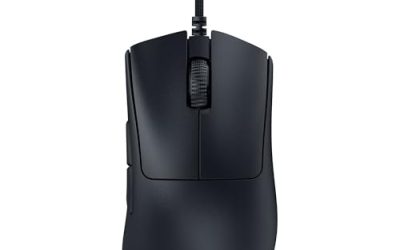
Razer Basilisk V3 Pro Wireless Gaming Mouse
The Basilisk V3 Pro is the button-rich ergonomic option, built around a right-handed shell with a thumb rest and a tilt wheel that scrolls through long pages and weapon lists alike. Its Focus Pro 30K sensor and HyperSpeed receiver suit fast shooters, while Bluetooth covers lectures and couch sessions without a dongle. Thirteen programmable controls give MMO and strategy players room for macros, and onboard profiles keep settings when the mouse moves between machines. The trade-off is size and weight against lighter rivals in this guide.
Specs
- Focus Pro 30K optical sensor
- HyperScroll Tilt Wheel
- Gen-3 optical switches
- 13-zone Chroma RGB lighting
- 13 programmable controls
- HyperSpeed wireless, Bluetooth, and wired USB-C
- Operating System Windows, macOS
- Average battery life 90 hours; item weight 3.84 ounces
Best for: Palm-grip players who want many buttons, a tilt wheel, and a full-featured ergonomic shell.
Watch out for: Heavier than the other Razer pick, and the deepest customization runs through Synapse.
ASIN: B0B6Y3XYFG
Razer Cobra Pro Wireless Gaming Mouse
The Cobra Pro is the lightest Razer pick in this guide and the most flexible shape, with a symmetrical shell that suits claw and fingertip grips and either hand for basic use. Its Focus Pro 30K sensor tracks on glass as well as cloth, and the underglow lighting adds character to a desk setup without changing how the mouse plays. Bluetooth stretches battery life well past receiver mode, and five onboard profiles store bindings for different games. Wireless charging works with the matching dock and puck, sold separately.
Specs
- Focus Pro 30K optical sensor, 30,000 DPI maximum
- Gen-3 optical switches with a 90-million click lifecycle
- 10 customizable controls and 5 onboard memory profiles
- 11-zone Chroma RGB lighting with underglow
- Bluetooth, HyperSpeed Wireless 2.4GHz, and wired USB-C
- Operating System Windows, macOS, Linux
- Average battery life 170 hours; weight 77 g
- Ambidextrous shape
Best for: Claw and fingertip players who want a light ambidextrous mouse with long Bluetooth battery life.
Watch out for: Wireless charging needs a dock and puck sold separately, and RGB shortens battery life.
ASIN: B0C51934VF
Logitech G604 Lightspeed Wireless Gaming Mouse
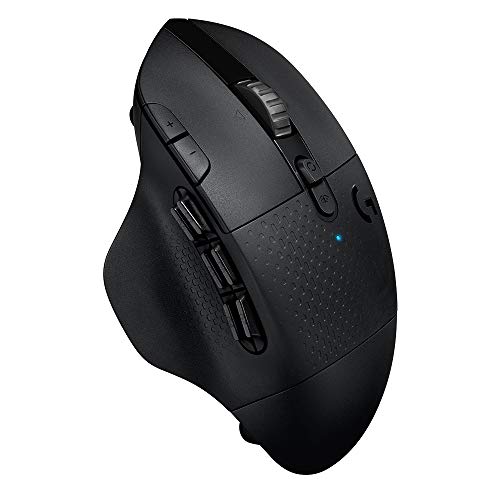
The G604 is the marathon pick, built for players who want a dozen shortcuts under the thumb and a battery that lasts for weeks of daily use. Fifteen programmable controls, including six thumb buttons, map cleanly to MMO rotations and creative apps, and the dual wireless toggle jumps between Bluetooth on the MacBook and LIGHTSPEED on a desktop. A single AA battery keeps it running, so a dead mouse means a fresh cell rather than a charging break. The larger shell suits palm grips and bigger hands best.
Specs
- 15 programmable controls, including 6 thumb buttons
- Dual wireless: Bluetooth and LIGHTSPEED
- HERO sensor with up to 25,600 DPI
- Hyper-fast scroll wheel
- Up to 240-hour battery life
- Runs on 1 AA battery, included in the box
- Operating System Mac OSX; Hardware Platform Mac, PC
Best for: MMO players and anyone who wants many thumb buttons with almost no charging routine.
Watch out for: Larger and heavier than the other picks, and Bluetooth polling runs lower than LIGHTSPEED.
ASIN: B07QN369XX
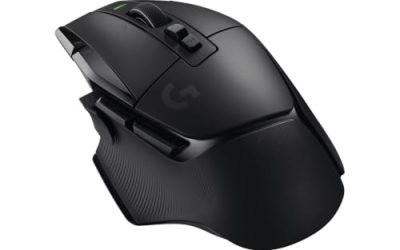
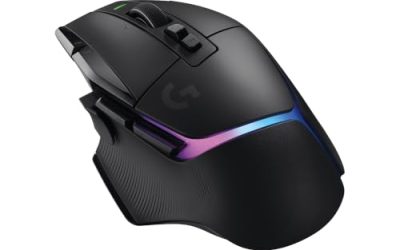
Logitech G502 X Plus Wireless Gaming Mouse
The G502 X Plus is the only mouse here without Bluetooth, and it earns its place through the receiver alone: LIGHTSPEED latency, a HERO 25K sensor, and thirteen programmable controls in the familiar G502 shape. The infinite scroll wheel flips between notched steps and free spin, which helps in long documents as much as in games. LIGHTSYNC lighting runs through eight zones, and the mouse can charge on a PowerPlay mat while playing. MacBook owners need a USB-C adapter or hub for the USB-A receiver.
Specs
- HERO 25K sensor with up to 25,600 DPI
- LIGHTFORCE hybrid optical-mechanical switches
- LIGHTSPEED wireless via the included USB-A receiver
- 13 programmable controls
- LIGHTSYNC RGB with 8 LED lighting zones
- Infinite scroll toggle
- Average battery life 140 hours; USB-C charging cable included
- PowerPlay wireless charging capable; compatible devices Mac, Personal Computer
Best for: Desk players who already use a USB-C hub and want the classic G502 shape with a receiver.
Watch out for: No Bluetooth at all, so the receiver must stay plugged in through an adapter or hub.
ASIN: B092CB69Q4
Which One Fits Your Situation
You travel with only the MacBook
The Logitech G309 fits a bag with nothing extra to carry, pairing over Bluetooth and running for hundreds of hours on one AA battery. At 86 grams with the battery fitted, it stays light in a laptop sleeve, and the white finish matches a silver MacBook. Keep the tiny LIGHTSPEED receiver in the bag for ranked matches at a desk, and leave it at home when every gram and every port counts.
You play MMO or strategy games
The Logitech G604 gives thumb-button players fifteen programmable controls, including six thumb buttons arranged for rotations, macros, and inventory shortcuts. Its dual wireless toggle jumps between Bluetooth on the MacBook and LIGHTSPEED on a desktop, and the AA battery lasts for weeks of daily sessions. Larger hands and palm grips will find the shell comfortable, while smaller hands may prefer the Razer Cobra Pro instead.
You want the lightest competitive mouse
The Razer Cobra Pro weighs 77 grams and pairs a Focus Pro 30K sensor with HyperSpeed wireless, so flicks stay quick and tracking stays clean in fast shooters. Its symmetrical shell suits claw and fingertip grips, and Bluetooth mode stretches battery life for travel days. Five onboard profiles store bindings for different games, and the underglow lighting adds desk character without adding weight.
You already have a docked desk setup
The Logitech G502 X Plus makes sense once a USB-C hub is already on the desk, because its LIGHTSPEED receiver plugs into the hub and stays there. Thirteen programmable controls, an infinite scroll wheel, and LIGHTSYNC lighting cover work and play alike, and PowerPlay charging keeps it topped up during sessions. Just remember there is no Bluetooth fallback, so the receiver always needs a port.
Common Mistakes
- Buying a receiver-only mouse and discovering the MacBook has no USB-A port for the dongle.
- Assuming the companion app works fully on macOS instead of checking remapping and firmware support first.
- Choosing by sensor numbers alone when shape, grip, and weight decide comfort over a long session.
- Leaving RGB lighting at full brightness and wondering why the battery drains faster than expected.
- Picking a heavy button-laden mouse for fast shooters, or a six-button mouse for MMO rotations.
Frequently Asked Questions
Can I use a wireless gaming mouse with a MacBook without a dongle?
Yes, if the mouse has Bluetooth. The Logitech G309, Razer Basilisk V3 Pro, Razer Cobra Pro, and Logitech G604 all pair directly to a MacBook over Bluetooth with no receiver. The Logitech G502 X Plus is the exception in this guide: it connects only through its LIGHTSPEED receiver, so it needs a USB-C adapter or hub on a modern MacBook.
Does Bluetooth add lag in games?
Bluetooth polling runs lower than a 2.4 GHz receiver, so competitive shooter players will feel the difference in fast flicks and tracking. Casual games, strategy titles, and everyday work feel fine over Bluetooth. For ranked play, switch to the receiver mode on a dual-wireless mouse, or keep a wired USB-C connection handy for the most demanding matches.
Will the extra buttons work on macOS?
Basic clicks, scrolling, and the main buttons work natively on macOS with no software at all. Extra side buttons and DPI steps need either the companion app or profiles saved to the mouse itself. Onboard memory is the reliable route: once bindings are stored on the mouse, they work on any MacBook without installing anything first.
Do I need special software on a MacBook?
No software is needed for basic use, since macOS recognises these mice as standard pointing devices. G HUB and Synapse both run on macOS for remapping buttons, adjusting DPI, and tuning lighting on the models in this guide. Some advanced features arrive on Windows first, so confirm the exact feature you need is available on macOS before buying.
Related guides
More from Amazon
Programs that pair well with the guide above. Offers and eligibility are set by Amazon and may change.
Free shipping on eligible items, Prime Video and more. Eligible new members can start with a free trial.
Start a Prime free trialAd-free music streaming. Eligible new subscribers can start with a free trial.
Try Music Unlimited freeA Prime membership for ages 18-24 with a trial period. Eligibility is set by Amazon.
See Prime for Young AdultsAudiobooks and podcasts to listen to on the go. Eligible new members can start with a free trial.
Try Audible freeAs an Amazon Associate we earn from qualifying purchases.