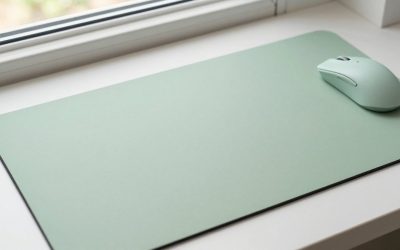
A laptop trackpad turns every close fight into a wrestling match, so the real decision is not whether to add a mouse but which one survives life outside a fixed desk. Laptop gaming happens on train trays, coffee tables, dorm desks and hotel nightstands, where space is short, surfaces vary, and a cable snaking across the keyboard gets in the way. The mouse has to pack small, connect without fuss and keep tracking when the only surface available is a bare wooden table.
This guide is for students who carry a gaming laptop between lectures, commuters who play on the move, and anyone whose gaming setup is a laptop on a small desk. Each mouse below was picked from its Amazon listing name and stated specifications, with weight, sensor, connection type and battery life checked against what the listing actually says.
Our Top Picks
 Razer Orochi V2 Wireless Gaming Mouse4.26 x 1.52 inch (Pack of 1)4.26 x 1.52 x 2.47 inches0.13 poundsCheck on Amazon
Top 3 picks at a glance

Quick Picks
As an Amazon Associate we earn from qualifying purchases.
| Product | Best for | Key spec from title |
|---|---|---|
| Logitech G305 Lightspeed | Everyday laptop gaming with months of battery | HERO 12K sensor, 12,000 DPI, 250-hour battery |
| Razer Orochi V2 | Travel and tiny bags | Under 60 g, HyperSpeed and Bluetooth, 18K DPI |
| Razer Viper V3 HyperSpeed | Claw and fingertip competitive play | Focus Pro 30K sensor, 30,000 DPI, 82 g |
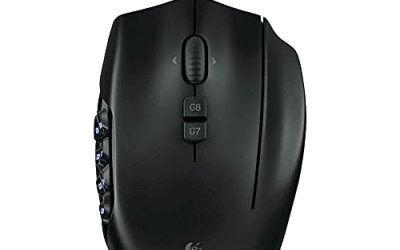
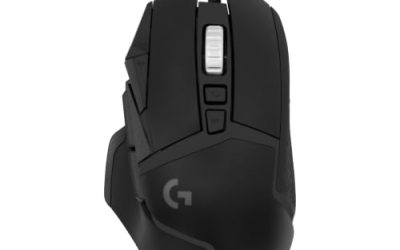
| Logitech G502 X Lightspeed | Games that need many buttons | HERO 25K sensor, 25,600 DPI, 13 programmable controls |
| Logitech G PRO X Superlight 2 | Competitive shooters at the lightest weight | HERO 2 sensor, 44,000 DPI, 60 g, 8,000 Hz polling |
How to Choose
Match the size and weight to your bag
A mouse that lives in a laptop sleeve has to earn its space every day. Anything under 70 grams disappears into a bag and spares your wrist, while a heavier ergonomic shape still works if it stays on one desk. Compact symmetrical shells suit small hands and claw grips, and they slide into a side pocket beside a charger without a second case. Check the listed dimensions against the pocket you actually use, because a mouse that only just fits gets left at home. Shape matters as much as grams: a low, narrow body packs flat, while a tall thumb rest catches on bag zips.
Pick the wireless link your laptop can spare
Most gaming laptops have few USB ports, so a mouse that monopolises one with a dongle can force a choice between the mouse and a headset or drive. Bluetooth models sidestep the dongle entirely and pair straight to the laptop, which also helps on tablets. A dedicated 2.4 GHz receiver usually gives steadier timing for fast games, and many mice now carry both links so you can switch between them. Check whether the receiver stores inside the mouse body, because a loose dongle is the first thing lost in a bag. A single AA cell can be swapped anywhere, while a rechargeable mouse needs its cable packed too.
Check the sensor and the surfaces you play on
A good optical sensor keeps its aim steady at high speeds and does not stutter when you flick across the screen. The headline DPI number matters less than the sensor family and the tracking speed it lists, since most players settle well below the maximum. What matters more for laptop gaming is surface tolerance: a sensor that tracks on glass, glossy wood or a bare tabletop frees you from carrying a pad everywhere. Look for the listing to name the surfaces it handles, and treat a mouse that only promises cloth-pad tracking as a desk-only tool. Large PTFE feet also help a mouse glide on rough or uneven surfaces.
Count the buttons and test the grip in your head
Extra side buttons turn inventory, reload and ability keys into thumb movements instead of keyboard reaches, a real advantage when your left hand is busy on a cramped laptop keyboard. Five or six buttons cover most shooters, while a dozen or more suit strategy and online role-playing games where commands pile up. Grip shape decides whether those buttons are reachable: a right-handed ergonomic shell supports a palm grip during long sessions, while a symmetrical low shell suits claw and fingertip styles. If your hands are large, a compact travel mouse can cramp your fingers within an hour, so compare the listed length with a mouse you already own.
The 5 Best Options
Logitech G305 Lightspeed

The G305 is the mouse to buy when you want proper gaming performance without thinking about charging. Its HERO sensor reaches 12,000 DPI with a 1 ms report rate over LIGHTSPEED wireless, and one AA battery is listed for 250 hours of play, so a single cell can last months of evening sessions. The compact ambidextrous shell weighs 99 grams with the battery inside, and the receiver stows in the body, which makes it a natural fit for a laptop sleeve. Six programmable buttons and on-board memory cover the essentials, and the shape works for most hand sizes.
Specs
- HERO sensor with up to 12,000 DPI
- 99 g with battery installed
- Up to 250 hours of play on one AA battery
- LIGHTSPEED wireless with 1 ms report rate
- 6 programmable buttons with on-board memory
- USB receiver stores inside the mouse body
Best for: Everyday laptop gaming when you want long battery life and a low-maintenance setup.
Watch out for: No Bluetooth connection, so a lost receiver leaves the mouse unusable until replaced.
Razer Orochi V2
The Orochi V2 is built for players who game wherever the laptop opens. At under 60 grams it is one of the lightest wireless gaming mice available, and it carries both HyperSpeed wireless and Bluetooth, so it pairs with a laptop, a tablet or a phone without occupying a USB port. The 5G Advanced 18K DPI optical sensor tracks precisely for its size, and battery life is listed at up to 950 hours, which means a single AA cell can run for most of a year of casual play. Six programmable buttons and second-generation mechanical switches round out a mouse that slips into a jacket pocket.
Specs
- 5G Advanced 18K DPI optical sensor
- Under 60 g
- HyperSpeed wireless and Bluetooth
- Up to 950 hours of battery life
- 2nd-gen Razer Mechanical Mouse Switches
- 6 programmable buttons, AA or AAA battery
Best for: Travel and commuting, where size, weight and Bluetooth matter most.
Watch out for: The compact shell can feel small for large hands during long sessions.
Razer Viper V3 HyperSpeed
The Viper V3 HyperSpeed is the pick for competitive players who use a claw or fingertip grip on a laptop. Its Focus Pro 30K optical sensor reaches 30,000 DPI and is listed as tracking on glass, which is genuinely useful when the only surface is a glossy table. One AA battery powers up to 280 hours of play, and the mass-centralised 82-gram shell keeps swipes consistent. Six programmable buttons and a top DPI control that cycles through five stages keep the essentials within reach, while second-generation mechanical switches are built for 60 million clicks.
Specs
- Focus Pro 30K optical sensor, up to 30,000 DPI
- 82 g with AA battery installed
- Up to 280 hours of battery life on one AA battery
- HyperSpeed wireless
- Mechanical Mouse Switches Gen-2, built for 60 million clicks
- 6 programmable buttons, tracks on glass
Best for: Competitive shooters played with a claw or fingertip grip on varied surfaces.
Watch out for: No Bluetooth and no wired mode, so it depends entirely on its receiver.
Logitech G502 X Lightspeed

The G502 X Lightspeed suits players who want a full set of controls under their thumb. Thirteen programmable controls cover abilities, macros and DPI shifts without reaching for the keyboard, and the dual-mode scroll wheel switches between a notched step and a free spin. The HERO 25K sensor reaches 25,600 DPI, the battery is listed for up to 140 hours, and LIGHTFORCE hybrid switches combine optical actuation with a mechanical feel. At 102 grams it is the heaviest mouse here, yet the ergonomic right-handed shape supports long sessions, and USB-C charging plus POWERPLAY compatibility keep it running.
Specs
- HERO 25K sensor, up to 25,600 DPI
- 102 g
- Up to 140 hours of battery life
- 13 programmable controls
- LIGHTFORCE hybrid optical-mechanical switches
- Dual-mode scroll wheel, USB-C, POWERPLAY compatible
Best for: Games with many commands, where extra buttons and a comfortable ergonomic shape matter.
Watch out for: The larger body and 102-gram weight make it the least portable mouse in this guide.
Logitech G PRO X Superlight 2

The Superlight 2 is the lightest serious option here and the one competitive players reach for first. At 60 grams with a HERO 2 sensor reaching 44,000 DPI and polling up to 8,000 Hz, it is built for fast, precise aim with nothing extra in the way. The symmetrical shell has just five programmable buttons, which keeps the weight down and the grip neutral for either hand. Battery life is listed at up to 95 hours of constant motion, charging runs over USB-C, and the mouse also works with POWERPLAY charging mats. Its plain shape has become a standard in competitive play for a reason.
Specs
- HERO 2 sensor, up to 44,000 DPI
- 60 g
- Up to 95 hours of battery life
- Up to 8,000 Hz polling rate
- LIGHTFORCE hybrid optical-mechanical switches
- 5 programmable buttons, USB-C charging, POWERPLAY compatible
Best for: Competitive shooters where the lowest weight and the fastest sensor matter most.
Watch out for: Only five buttons and no Bluetooth, so it is a focused tool rather than an all-rounder.
Which One Fits Your Situation
Gaming in a dorm room or shared flat
A small desk with a laptop, a notebook and a drink leaves little room for a mouse, so pick the G305. Its compact shell fits the gap beside the keyboard, the receiver stays tucked inside the body when you pack up, and a single AA battery runs for months, so charging never becomes another chore. On a shared desk, the simple shape and modest button count mean little to break or misconfigure.
Playing on the move
Trains, cafes and hotel rooms call for the Orochi V2. Its sub-60-gram body disappears into a jacket pocket, Bluetooth connects without a dongle, and the long battery life means you can leave the spare cells at home. The sensor handles most surfaces, and the six buttons cover shooters and strategy games alike. Pair it with a laptop that has Bluetooth built in and you carry nothing extra at all.
Chasing ranked wins on a laptop
Ranked shooters reward the Superlight 2, with the Viper V3 HyperSpeed as its AA-powered alternative. The Superlight 2 pairs the lightest shell here with the fastest sensor and polling rate, which shows in fast flicks and tracking. The Viper V3 counters with one AA cell lasting 280 hours and a sensor that tracks on glass. Choose the Superlight 2 for pure performance, the Viper V3 for long battery life and a claw-friendly grip.
Long sessions with complex games
Online role-playing and strategy games pile on commands, so the G502 X Lightspeed earns its place. Thirteen programmable controls put abilities and macros under your thumb, the ergonomic shape supports your hand through long evenings, and the dual-mode scroll wheel speeds through inventories and maps. The extra weight is a fair trade when the mouse stays on one desk, and the 140-hour battery means weekly charging is enough.
Common Mistakes
- Buying a heavy ergonomic mouse for a laptop bag, then leaving it at home because it never fits beside the charger.
- Picking a receiver-only mouse when your laptop has one free USB port and no Bluetooth fallback.
- Judging a mouse by its maximum DPI instead of the sensor family, tracking speed and the surfaces it handles.
- Ignoring battery design: a rechargeable mouse is useless on a trip if its charging cable stays behind.
- Choosing a tiny travel mouse for large hands, which causes cramping within the first hour of play.
Frequently Asked Questions
Can I game on a laptop without a mouse pad?
Yes, most modern optical sensors track well on wood, plastic and other smooth hard surfaces. Mice with sensors listed for glass tracking, like the Viper V3 HyperSpeed, cope with the widest range of tables. A pad still gives the most consistent glide and protects the mouse feet, so pack a thin folding pad if you play competitively away from home.
Is Bluetooth good enough for gaming?
Bluetooth works fine for casual and single-player games, and it saves a USB port on laptops that have few. For fast competitive shooters, a dedicated 2.4 GHz receiver gives steadier timing and lower delay, which is why the mice here that target ranked play use LIGHTSPEED or HyperSpeed links. Mice with both links let you switch between convenience and performance.
How long does a wireless gaming mouse battery last?
It varies widely by model and use. AA-powered mice in this guide list 250 to 950 hours from one cell, while rechargeable models list 95 to 140 hours between charges. Higher polling rates drain the battery faster, so a mouse set to 8,000 Hz will need charging sooner than the same mouse at 1,000 Hz. Check the listed figure for the polling rate you actually use.
Do I need a lightweight mouse for laptop gaming?
Not always, but weight matters more on a laptop than on a desktop because the playing surface is smaller and your arm moves the mouse more. A mouse under 70 grams reduces wrist fatigue over long sessions and packs easily. Heavier mice can still suit palm-grip players who value stability and extra buttons, especially when the mouse stays on one desk.
Related guides
More from Amazon
Programs that pair well with the guide above. Offers and eligibility are set by Amazon and may change.
Free shipping on eligible items, Prime Video and more. Eligible new members can start with a free trial.
Start a Prime free trialAd-free music streaming. Eligible new subscribers can start with a free trial.
Try Music Unlimited freeA Prime membership for ages 18-24 with a trial period. Eligibility is set by Amazon.
See Prime for Young AdultsAudiobooks and podcasts to listen to on the go. Eligible new members can start with a free trial.
Try Audible freeAs an Amazon Associate we earn from qualifying purchases.