Dota 2 asks more from a mouse than most games do. Camera control, last hits, ability casts, item use, and pinging all happen in quick succession, and each is faster under your thumb than across the keyboard. A mouse built for MOBA play gives you a grid of programmable side buttons, a sensor that tracks cleanly at low sensitivity, and a shape that stays comfortable through long matches.
This guide compares five mice that fit Dota 2 well. Three carry a full 12-button thumb grid for players who want every ability and item one thumb press away, while the other two trade buttons for wireless freedom or a familiar shape. Every mouse below is sold on Amazon US, and every spec comes from its Amazon product page.
Our Top Picks

Top 3 picks at a glance

Quick Picks
- Most buttons: Logitech G600 MMO — 20 programmable buttons, a 12-button thumb grid, and a G-Shift button that doubles every input.
- Best wireless multi-button mouse: Logitech G604 LIGHTSPEED — 15 programmable controls, 6 thumb buttons, and up to 240 hours of battery life.
- Most adjustable side panel: Corsair Scimitar RGB Elite — a 12-button panel that slides to match your thumb reach.
- Best low-cost thumb-grid mouse: Redragon M908 Impact — 18 programmable buttons with a weight tuning set.
- Best all-rounder: Logitech G502 HERO — 11 programmable buttons, a HERO 25K sensor, and tunable weights.
| Mouse | Programmable Buttons | Max DPI | Connection | Standout Trait |
|---|---|---|---|---|
| Logitech G600 MMO | 20 | 8,200 | Wired USB | G-Shift doubles every button |
| Logitech G604 LIGHTSPEED | 15 | 25,600 | Wireless (LIGHTSPEED / Bluetooth) | 6 thumb buttons, 240-hour battery |
| Corsair Scimitar RGB Elite | 17 | 18,000 | Wired USB | Sliding 12-button side panel |
| Redragon M908 Impact | 18 | 12,400 | Wired USB | 8-piece weight tuning set |
| Logitech G502 HERO | 11 | 25,600 | Wired USB | Dual-mode hyper-fast scroll wheel |
How to Choose
Count the buttons you will actually use. Each hero has four abilities, up to six item slots, and a courier, shop, and scoreboard to reach. A 12-button thumb grid maps neatly onto abilities plus the most-used items. If you keep items on the keyboard, 8 to 11 programmable buttons is enough.
Check the thumb grid layout. The feel of the rows matters more than the count. Raised dividers help you find each button by touch during a teamfight. A panel that slides forward or back, like the one on the Scimitar RGB Elite, helps shorter or longer thumbs reach the back row without shifting grip.
Match the sensor to your sensitivity. Most Dota 2 players use low to medium sensitivity with a large pad, so clean tracking at 400 to 1,600 DPI matters more than a huge maximum DPI number. Every mouse here tracks well in that range. A high maximum DPI helps only if you also play fast shooters on the same mouse.
Pick a shape for your grip. Palm players want a tall, full shell. Claw players want a shorter shell with a defined hump. Fingertip players want a light, compact body. A thumb-grid mouse is almost always right-handed and ergonomic, so left-handed players should look at the all-rounder picks instead.
Think about weight. A heavier mouse feels planted for precise camera drags, while a lighter mouse is easier to flick across the screen for map checks. Tunable weights adjust the balance but add bulk. For long sessions, a mouse under 100 g puts less strain on the wrist.
Wired or wireless. A wired mouse never needs charging and costs less for the same sensor, while a wireless mouse removes cable drag during fast camera movement. For Dota 2, either works, because the game does not punish a millisecond of latency the way a twitch shooter does.
Use the software. Every mouse here ships with software for binding keys, setting DPI steps, and saving profiles. Build one profile for Dota 2 with abilities on the thumb grid and items on the remaining buttons. On-board memory keeps your bindings when you move the mouse to another PC.
1. Logitech G600 MMO Gaming Mouse

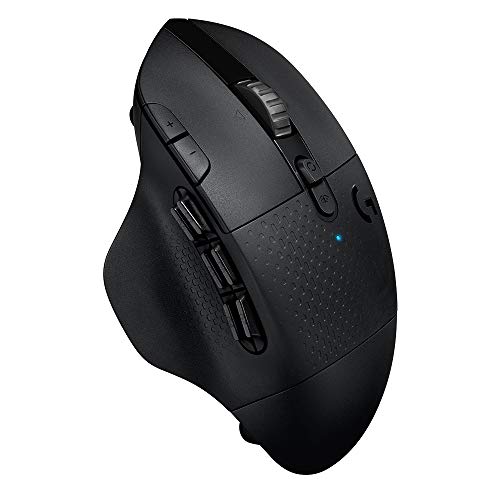
The G600 is the classic thumb-grid mouse, and it remains the button king for Dota 2. Twenty programmable buttons cover four abilities, six item slots, and the courier, with inputs to spare. The 12-button grid uses two rows of six, shaped so you can tell them apart by touch once muscle memory sets in. The G-Shift button under the ring finger doubles the function of every other button while held, so one grid holds two full layers of bindings.
The sensor reaches 8,200 DPI, more than enough for the low sensitivities Dota 2 players favor, and the 1 ms report rate keeps clicks and camera drags responsive.
At 133 g without the cable, the G600 is a full, sculpted mouse built for palm grips and long sessions. The right-handed shape fills the hand, and the matte shell resists slipping during tense moments. It is an older design without the ultra-light body of newer mice, but no other mouse here puts this many inputs under one thumb.
Specs
- Buttons: 20 programmable buttons, including a 12-button thumb grid
- Sensor: up to 8,200 DPI
- Switches: built for 20 million clicks
- Weight: 133 g without cable
- Connection: wired USB
- Lighting: RGB backlit thumb grid
- Report rate: 1 ms
- Dimensions: 118 x 75 x 41 mm
- Model: 910-002864
Best for: players who want every ability, item, and utility bound to the mouse.
Watch out for: the older design is heavier than newer thumb-grid mice, and the right-handed shape does not suit left-handed players or small hands. Check availability before ordering, as stock of this long-running model varies.
Logitech G600 MMO Gaming Mouse on Amazon
2. Logitech G604 LIGHTSPEED Wireless Gaming Mouse
The G604 is the wireless multi-button pick in this guide. Fifteen programmable controls include six thumb buttons in two rows under the thumb. The HERO 25K sensor tracks from 100 to 25,600 DPI with 1:1 tracking and no smoothing, and the 1 ms LIGHTSPEED report rate keeps clicks and camera drags responsive. Dual connectivity covers LIGHTSPEED wireless and Bluetooth.
Battery life is the G604’s quiet advantage. One AA battery powers up to 240 hours of play in LIGHTSPEED mode, or up to 5.5 months in Bluetooth mode. The hyper-fast scroll wheel switches between free spin and stepped clicks, and G HUB software handles bindings and profiles.
At 135 g with the battery, the G604 is a full, right-handed ergonomic shell for palm and claw grips, with a thumb rest for long sessions. It trades the full 12-button grid for six well-placed thumb buttons and no cable, which suits players who want plenty of bindings plus wireless freedom.
Specs
- Buttons: 15 programmable controls, including 6 thumb buttons
- Sensor: HERO 25K, 100 to 25,600 DPI
- Switches: built for 20 million clicks
- Weight: 135 g with AA battery
- Battery life: up to 240 hours (LIGHTSPEED), up to 5.5 months (Bluetooth)
- Connection: LIGHTSPEED wireless and Bluetooth
- Scroll wheel: hyper-fast, dual-mode
- Report rate: 1 ms (LIGHTSPEED)
- Dimensions: 130 x 80 x 45 mm
- Model: 910-005622
Best for: players who want many bindings without a cable and long battery life between changes.
Watch out for: six thumb buttons are fewer than a full 12-button grid, and the 135 g body is heavier than the light mice here. Stock of this long-running model varies, so check availability before ordering.
Logitech G604 LIGHTSPEED Wireless Gaming Mouse on Amazon
3. Corsair Scimitar RGB Elite
The Scimitar RGB Elite is built around its side panel. Twelve programmable buttons sit on a panel that slides forward and back on a Key Slider control, so you can place the grid exactly where your thumb rests. That matters in Dota 2, because the back row of a fixed grid is the hardest to reach during a teamfight, and a panel that fits your hand keeps every button within easy reach.
Seventeen programmable buttons give you room for abilities, items, and utility keys, all managed through iCUE software. The optical sensor reaches 18,000 DPI, and the wired connection keeps input consistent. RGB backlighting covers the side panel and the logo.
The shape is a right-handed ergonomic shell with a textured side grip, built for palm and claw grips. The panel adjustment sets this mouse apart from other thumb-grid mice and is worth the setup time. Spend a few minutes sliding the panel and testing the back row before you lock it in place.
Specs
- Buttons: 17 programmable buttons, including a 12-button side panel
- Sensor: optical, up to 18,000 DPI
- Side panel: Key Slider control repositions the 12-button panel
- Software: iCUE compatible
- Connection: wired USB
- Lighting: RGB backlighting
- Model: CH-9304211-NA
Best for: players whose thumb does not comfortably reach the back row of a fixed thumb grid.
Watch out for: the software setup takes time, and the mouse is a right-handed shape only. Make sure to pick the NA model listed here, as other regional variants carry different model numbers.
Corsair Scimitar RGB Elite on Amazon
4. Redragon M908 Impact

The M908 Impact is the low-cost way into thumb-grid play. Eighteen programmable buttons include 12 side buttons arranged for MMO and MOBA bindings, so abilities and items fit on the thumb without touching the keyboard. The Pixart PAW3327 sensor reaches 12,400 DPI across five adjustable levels, fine-tuned through the software in small steps.
An 8-piece weight tuning set changes the balance, with each weight adding 2.4 g, suiting players who like a planted feel for steady camera control; the weights come out for a lighter, faster feel. Five memory profiles store bindings and lighting, and the 6 ft braided cable routes cleanly across a desk.
The M908 is a large, right-handed ergonomic mouse that suits palm grips and medium to large hands best. It is the heaviest-feeling option here once the weights are added, but the tuning set means you control that trade-off. For players who want to try a thumb grid without committing to a premium-tier mouse, it is the sensible place to begin.
Specs
- Buttons: 18 programmable buttons, including 12 side buttons
- Sensor: Pixart PAW3327 optical, up to 12,400 DPI
- DPI levels: 5 adjustable levels (500 / 1000 / 2000 / 3000 / 6200)
- Polling rate: 1000 Hz
- Acceleration: 30G
- Weight tuning: 8-piece set, 2.4 g per weight
- Memory: 5 profiles
- Lighting: RGB, 16.8 million colors
- Connection: wired USB, 6 ft braided cable
- Model: M908
Best for: players who want a thumb grid and weight tuning at a low cost.
Watch out for: the large shell does not suit small hands, and the software is basic compared with the suites from larger brands. Remove weights if the mouse feels too heavy for fast camera movement.
Redragon M908 Impact on Amazon
5. Logitech G502 HERO

The G502 HERO is the all-rounder of this guide. Eleven programmable buttons cover abilities and the most-used items without a full thumb grid, which keeps the shell slimmer and the learning curve short. The dual-mode hyper-fast scroll wheel is a quiet advantage in Dota 2: click it for precise steps through the shop, or spin it freely through long lists and the courier menu.
The HERO 25K sensor tracks from 100 to 25,600 DPI with no smoothing, filtering, or acceleration, keeping camera movement predictable at the low sensitivities most Dota 2 players use. Five removable 3.6 g weights tune the balance, and on-board memory stores up to five profiles.
At 121 g before weights, the G502 HERO is a steady, planted mouse for palm and claw grips. It is the pick for players who play Dota 2 alongside other games and want one mouse for shooters, strategy, and everyday use without relearning a thumb grid.
Specs
- Buttons: 11 programmable buttons
- Sensor: HERO 25K optical, 100 to 25,600 DPI
- Scroll wheel: dual-mode hyper-fast
- Weights: five removable 3.6 g weights
- Weight: 121 g base
- Memory: on-board, 5 profiles
- Lighting: RGB
- Connection: wired USB
- Model: 910-005469
Best for: players who want one mouse for Dota 2 and other games without a full thumb grid.
Watch out for: the 121 g body is heavy for players who prefer light mice, and the right-handed shape does not suit left-handed players or small hands.
Which One Fits
If you want the most buttons: the Logitech G600 gives you 20 programmable inputs and a second layer through G-Shift. Nothing else here matches that count, and it is the pick for players who bind everything to the mouse.
If you want multi-button play without a cable: the Logitech G604 LIGHTSPEED gives you 15 programmable controls, 6 thumb buttons, and up to 240 hours of battery life on one AA battery.
If your thumb cannot reach the back row: the Corsair Scimitar RGB Elite slides its 12-button panel to meet your thumb.
If you want to try a thumb grid at a low cost: the Redragon M908 Impact gives you 18 programmable buttons and a weight tuning set, the low-risk way to learn thumb-grid play.
If you play more than Dota 2: the Logitech G502 HERO covers abilities and items with 11 buttons and handles shooters and strategy games with the same sensor and shape. — the simplest choice for a mixed library.
If you have small hands: skip the thumb-grid mice and look at the G502 HERO. A grid you cannot reach is worse than fewer buttons you can hit every time.
Common Mistakes
Buying on maximum DPI alone. A 25,600 DPI sensor does not make you better at Dota 2. Most players use 400 to 1,600 DPI with a large pad, and every mouse here tracks cleanly in that range. Pick the button layout and shape first, then check the sensor.
Binding everything to the mouse on day one. A new thumb grid takes time to learn. Bind four abilities first and play several matches before adding items. Adding all twelve buttons at once leads to mis-clicks in teamfights.
Ignoring grip and hand size. A thumb-grid mouse is a large, right-handed shell. Small hands and left-handed play fight a large right-handed grid. Measure your hand against the listed dimensions and be honest about your grip style before ordering.
Skipping the software. The buttons on these mice do nothing useful until you bind them. Install the software, build a Dota 2 profile, and save it to on-board memory.
Forgetting the scroll wheel. The wheel handles shop scrolling, camera zoom, and courier control. A dual-mode wheel that switches between stepped and free spin, like the one on the G502 HERO, is genuinely useful in Dota 2.
Choosing weight by habit. Players coming from office mice often pick the heaviest option because it feels solid, then tire during long sessions. Try the mouse without added weights first.
FAQ
How many buttons do I need for Dota 2?
Four abilities plus a few items is the practical minimum, so 8 to 11 programmable buttons cover most players. A 12-button thumb grid is worth it if you want items, the courier, and utility keys on the mouse as well.
Is a wireless mouse fine for Dota 2?
Yes. Dota 2 does not punish a millisecond of latency the way a twitch shooter does, so a modern wireless mouse with a 1 ms report rate plays identically to a wired one. The Logitech G604 in this guide is wireless, with LIGHTSPEED mode for play and Bluetooth for a second machine. The other four mice are wired, which keeps the cost down and removes charging from the routine.
What DPI should I use for Dota 2?
Most players settle between 400 and 1,600 DPI with a large mouse pad, using in-game sensitivity to fine-tune camera speed. A lower DPI gives steadier control for last hits and precise clicks. Try 800 DPI first and adjust in small steps until camera drags feel natural.
Can I use one mouse for Dota 2 and other games?
Yes, and the Logitech G502 HERO is the strongest pick for that job, with 11 buttons and a sensor that suits shooters and strategy games alike. The thumb-grid mice also work in other games, but their strength is MOBA and MMO bindings. Save separate profiles for each game in the mouse software.
Conclusion
The best gaming mouse for Dota 2 is the one whose buttons match how you play. The Logitech G600 gives you the most inputs, the Logitech G604 LIGHTSPEED gives you 15 programmable controls without a cable, the Corsair Scimitar RGB Elite adjusts its panel to your thumb, the Redragon M908 Impact opens thumb-grid play at a low cost, and the Logitech G502 HERO covers Dota 2 and everything else with one shape. Pick the layout that fits your hand, bind abilities first, and give the thumb grid a few matches to learn.
As an Amazon Associate, we earn from qualifying purchases.
Related guides
More from Amazon
Programs that pair well with the guide above. Offers and eligibility are set by Amazon and may change.
Free shipping on eligible items, Prime Video and more. Eligible new members can start with a free trial.
Start a Prime free trialAd-free music streaming. Eligible new subscribers can start with a free trial.
Try Music Unlimited freeA Prime membership for ages 18-24 with a trial period. Eligibility is set by Amazon.
See Prime for Young AdultsAudiobooks and podcasts to listen to on the go. Eligible new members can start with a free trial.
Try Audible freeAs an Amazon Associate we earn from qualifying purchases.