A standard gaming mouse reports its position to your PC 1,000 times per second. An 8000Hz gaming mouse reports 8,000 times per second, cutting the interval between updates from one millisecond to 0.125 milliseconds. That difference sounds tiny on paper, and in raw numbers it is, but polling rate shapes how smooth and consistent your cursor movement feels, especially on high-refresh-rate monitors where the display is redrawing the scene often enough to expose the stepping that lower polling rates can produce. If you play competitive shooters and you have the monitor and the PC to support it, an 8000Hz gaming mouse is one of the few upgrades that changes how aiming physically feels rather than just how it looks on a spec sheet.


This guide collects four gaming mice that deliver a true 8000 Hz polling rate, either over a wired connection or through a dedicated 8K wireless receiver included for that purpose. Every pick below is a gaming mouse with 8K polling stated in its own product listing, and every specification quoted here comes from that listing rather than from assumptions or third-party summaries. As an Amazon Associate we earn from qualifying purchases.
Top 3 picks at a glance

What 8000 Hz Polling Actually Changes
Polling rate is the frequency at which the mouse sends movement and click data to the computer. At 1,000 Hz, the longest possible wait between a physical movement and the next report is one millisecond. At 8,000 Hz, that wait shrinks to an eighth of a millisecond. The practical effects players look for are smoother cursor paths during slow, precise tracking and less micro-stutter during fast flicks, because the position data arriving at the game is denser and more evenly spaced.
There are conditions attached. The benefit is most visible on monitors running at 240 Hz or higher, because a 144 Hz screen simply does not refresh often enough to show much of the extra smoothness. High polling also costs resources: an 8K mouse asks more of your CPU than a 1K mouse, and on wireless models it drains the battery far faster, which is why every wireless pick in this guide lists its long battery figure at lower polling rates and treats 8K as a mode you switch on for matches. Finally, not every game engine handles 8K input equally well, so the sensible approach is to treat 8000 Hz as a ceiling you can use when your setup supports it, not as a setting you must run everywhere.
How These Picks Were Chosen
Only mice with a genuine 8000 Hz polling rate in their listing made the cut. That ruled out several popular models that advertise high polling but require a separately sold receiver that many listings bundle inconsistently, and it ruled out mice whose 8K mode applies only to clicks or only to a wired connection when the listing presents the product as wireless. Each mouse below is a current Amazon US listing, and the mix covers the main ways to get 8K today: flagship wireless mice from the two biggest esports brands, an ultralight specialist mouse that ships with its 8K dongle in the box, and a larger-shell alternative for players with bigger hands.
The Picks at a Glance
| Mouse | Connection | Weight | Sensor | Max DPI | 8K route |
|---|---|---|---|---|---|
| Razer Viper V3 Pro | Wireless and wired | 54 g (black) | Razer Focus Pro 35K Gen-2 | 35,000 | Included HyperPolling dongle |
| Logitech G PRO X Superlight 2 | Wireless and wired | 60 g | Logitech HERO 2 | 44,000 | LIGHTSPEED receiver, up to 8 kHz |
| Pulsar X2 CrazyLight (Medium) | Wireless and wired | 39 g with dot skates | Pulsar XS-1 | 32,000 | Included 8K dongle |
| Fnatic x Lamzu Maya X 8K | Wireless and wired | 47 g | PixArt 3950 | 30,000 | Included 8K dongle |
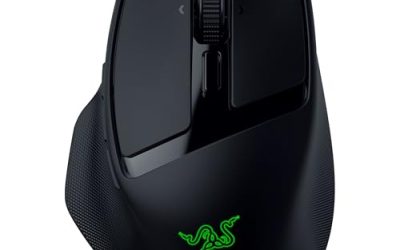
Razer Viper V3 Pro
The Razer Viper V3 Pro is the reference point for wireless 8K gaming mice. Its listing describes a symmetrical esports shell at 54 g in the black version, built around Razer’s Focus Pro 35K Optical Sensor Gen-2 with a maximum sensitivity of 35,000 DPI and one-DPI step adjustments for granular control. The listing states that pairing Razer HyperSpeed wireless with the included HyperPolling Wireless Dongle delivers a true polling rate of up to 8000 Hz, and the dongle is part of the box contents rather than an extra purchase, which matters because 8K wireless is the entire reason to consider this mouse.
Around that core, the listing lists Gen-3 optical switches, eight programmable buttons, and a battery rated for up to 95 hours of use, with the understanding that the long figure applies at standard polling and that running 8,000 Hz shortens runtime considerably. The sensor is also listed as tracking on a wide variety of surfaces, including glass, which widens mousepad choices for players who travel to events. The shape is a safe, low-profile symmetrical design that suits claw and fingertip grips, and because the side buttons sit on the left side only, it is aimed at right-handed players despite the symmetrical shell.
Choose the Viper V3 Pro if you want the most established 8K wireless package: a proven symmetrical shape, a flagship sensor, the 8K dongle included, and software support from the largest peripheral ecosystem in this group. It is the pick that asks the fewest compromises of anyone whose grip fits its shape.
- https://www.amazon.com/dp/B0CW25XR5R
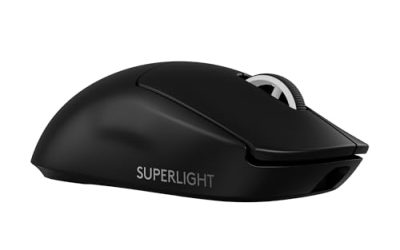
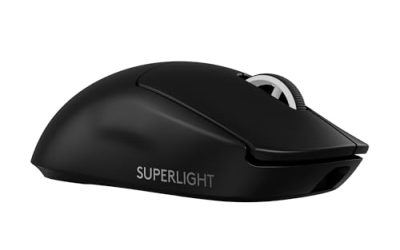
Logitech G PRO X Superlight 2
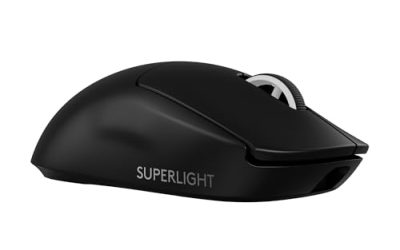
Logitech’s G PRO X Superlight 2 takes a different route to the same headline number. The listing gives a 60 g weight, the HERO 2 sensor with up to 44,000 DPI, and LIGHTSPEED wireless operating at up to 8 kHz polling, which Logitech positions as a tournament-grade connection. The listing also specifies tracking figures of 888 IPS and 88 G acceleration for the HERO 2, sub-micron accuracy, and LIGHTFORCE hybrid switches that combine an optical actuation path with a mechanical click feel. Battery life is listed at up to 95 hours, charging is over USB-C, and the feet are zero-additive PTFE.
Two details separate the Superlight 2 from the Razer. First, its higher polling settings and advanced sensor options are managed through Logitech G HUB software, so the 8 kHz mode is something you enable deliberately rather than a property of a separate dongle in the box. Second, the shell is a compact symmetrical shape with a long competitive pedigree, and at 60 g it carries a little more substance than the lightest rivals, which some players prefer for control during slow tracking. The listing describes five programmable buttons, keeping the layout clean and focused on shooter essentials.
Choose the Superlight 2 if you already live in Logitech’s software ecosystem, want the highest listed DPI ceiling in this group, or prefer a slightly more planted feel than the sub-55 g mice provide. Its 8K support is fully integrated into the standard receiver setup, which makes it the lowest-friction way to try high polling.
- https://www.amazon.com/dp/B09NBWL8J5
Pulsar X2 CrazyLight (Medium, Jet Black)
The Pulsar X2 CrazyLight is the extreme-weight entry in this guide. In Medium size, the listing describes a symmetrical shell with a low hump and wide waist, weighing 39 g with the included dot skates fitted. Inside is Pulsar’s XS-1 flagship sensor, listed at up to 32,000 DPI with 750 IPS tracking and 50 g acceleration, plus adjustable lift-off distance and fine DPI adjustment in small increments. The listing states up to 8,000 Hz wireless polling with the 8K dongle included in the box, so there is no separate receiver purchase standing between the buyer and the headline feature.
Pulsar also lists optical switches rated for 100 million clicks, the highest click-life figure among these four listings, and a package that includes the 8K dongle, a USB-C cable, and a set of UHMW-PE dot skates alongside the standard feet. The shape is aimed squarely at claw and fingertip grips; palm-grip players with larger hands may find the low hump offers little support. Pulsar’s own guidance for the 8K dongle asks for a recent CPU and a USB 3.0 port, which is a useful reminder that 8K polling is a system-level commitment, not just a mouse setting. Battery expectations should be set accordingly: like every wireless mouse here, sustained 8K use is measured in far fewer hours than standard polling.
Choose the X2 CrazyLight if weight is your first priority and your grip is claw or fingertip. Nothing else in this guide comes close to 39 g, and it reaches that figure without giving up the flagship sensor or the included 8K receiver.
- https://www.amazon.com/dp/B0FVKKP2T8
Fnatic x Lamzu Maya X 8K
The Fnatic x Lamzu Maya X 8K answers a complaint the other three mice share: most ultralight shells are small. The Maya X is the larger version of Lamzu’s Maya, and its listing describes a 47 g wireless mouse with an 80-hour battery figure, optical switches, and a PixArt 3950 sensor with a maximum of 30,000 DPI. The listing’s feature set leads with an 8,000 Hz polling rate using the dongle included in the box, so like the Pulsar it delivers 8K wireless out of the box with no extra purchase.
The larger footprint makes this the natural pick in the group for medium-to-large hands and for palm or relaxed claw grips that feel cramped on compact shells. Lamzu builds the mouse around a Nordic 52840 microcontroller, and the design keeps the symmetrical shape that competitive players tend to prefer while adding the size that smaller ultralights sacrifice. This Fnatic special edition carries the collaboration branding and colorway; the underlying hardware matches the Maya X formula of a flagship PixArt sensor, optical switches, and true 8K wireless in a sub-50 g package.
Choose the Maya X 8K if your hands are on the larger side, or if you want an 8K mouse that fills the palm more completely than the compact esports shapes. It is also the pick for players who want flagship internals from outside the two biggest brands.
- https://www.amazon.com/dp/B0DDQLKVFL
Buying Guide: Getting Real Value from 8000 Hz
Check your monitor first. The smoother cursor path that 8K polling produces is easiest to see at 240 Hz and above. On a 60 Hz or 144 Hz display, the same mouse still works perfectly well, but the upgrade over 1,000 Hz will be subtle, and the money may do more elsewhere in your setup.
Check your CPU and ports. High polling generates eight times the interrupt load of a standard mouse. The Pulsar listing’s guidance of a recent Core i5 or Ryzen 5 class processor and a USB 3.0 port for the 8K dongle is a sensible baseline for every mouse here. Plug 8K receivers directly into the motherboard rather than through unpowered hubs, and keep wireless receivers close to the mouse with the extension adapter most of these mice include.
Plan around battery life. Every wireless mouse in this guide quotes its headline battery figure at conventional polling. Running 8,000 Hz continuously can cut runtime to a fraction of that figure. A common pattern is to bind 8K to the profile you use for competitive matches and drop back to 1,000 Hz for desktop work and casual games, which all four of these mice support through their software or onboard settings.
Match the shape to your grip. Polling rate is identical across these picks; shape is not. The Viper V3 Pro and Superlight 2 are compact symmetrical shells for claw and fingertip grips. The X2 CrazyLight is even smaller in feel, with a low hump built for fingertip control at minimal weight. The Maya X is the larger shell for bigger hands and palm support. A shape that fits will improve your aim more than any specification on this page.
Wired is the simplest 8K path. If you do not mind a cable, wired 8K avoids battery trade-offs entirely, and every wireless mouse here also works over its cable, though wired polling ceilings vary by model, so check the listing for the mode you actually plan to use. Players who compete at a desk that never moves often find that a light, flexible cable removes the main reason to go wireless.
Frequently Asked Questions
Is 8000 Hz noticeably better than 1000 Hz? It is measurable and, on a high-refresh monitor, perceptible as smoother tracking, particularly in slow pans and micro-corrections. It will not transform a player’s aim on its own, and it matters most to competitive players already using fast displays.
Does 8000 Hz cause problems in games? Some older titles and some anti-cheat environments handle very high polling poorly, and CPU load rises. Because all four mice can step down to lower polling rates, the practical fix is to lower the setting for a problem game rather than avoid an 8K mouse.
Do I need a special dongle for wireless 8K? For the Viper V3 Pro, Pulsar X2 CrazyLight, and Maya X 8K, the listings state that the 8K-capable receiver is included. The Superlight 2 reaches up to 8 kHz through its LIGHTSPEED setup with settings managed in G HUB. In all four cases, no separate receiver purchase is required according to the listings.
Does DPI matter as much as polling rate? They do different jobs. DPI sets how far the cursor moves per inch of hand movement; polling rate sets how often position updates are sent. The sensors here, ranging from 30,000 to 44,000 DPI maximums, all far exceed the sensitivity settings players actually use, so shape, weight, and the 8K connection should drive the decision.
Verdict
For most players, the Razer Viper V3 Pro is the safest route into 8000 Hz: a true 8K wireless connection with the dongle included, a flagship sensor, and a shape that fits the widest range of grips. The Logitech G PRO X Superlight 2 matches it feature for feature with a different feel and Logitech’s software at the center. The Pulsar X2 CrazyLight is the specialist’s choice, trading everything for minimum weight at 39 g, while the Fnatic x Lamzu Maya X 8K serves larger hands that the compact shells leave out. Whichever you choose, pair it with a fast monitor and a direct receiver connection, and 8000 Hz polling becomes a real, repeatable part of how the mouse feels rather than a number on a box.
Related guides
More from Amazon
Programs that pair well with the guide above. Offers and eligibility are set by Amazon and may change.
Free shipping on eligible items, Prime Video and more. Eligible new members can start with a free trial.
Start a Prime free trialAd-free music streaming. Eligible new subscribers can start with a free trial.
Try Music Unlimited freeA Prime membership for ages 18-24 with a trial period. Eligibility is set by Amazon.
See Prime for Young AdultsAudiobooks and podcasts to listen to on the go. Eligible new members can start with a free trial.
Try Audible freeAs an Amazon Associate we earn from qualifying purchases.