Path of Exile asks more of a mouse than almost any other action RPG. Your main skill lives on a mouse click, movement is constant, and a mapping session can mean thousands of clicks, rapid flicks between packs, loot, and your inventory, plus split-second flask presses when a boss hits hard. In Path of Exile 2 the pace changes in places, but the core demand stays the same: precise tracking, clicks that stay crisp after heavy use, and enough accessible buttons that your keyboard hand is not doing everything alone.
That is why the best gaming mouse for Path of Exile is rarely a plain two-side-button esports mouse. Most exiles want a few well-placed thumb buttons for flasks, a guard skill, and a movement skill, a shape they can hold for a full evening without wrist complaints, and a sensor that does not drift when you flick to dodge a slam.
The four mice below cover that spectrum. Two Razer Naga models give you a full thumb grid, with one offering swappable side plates. The Corsair Scimitar Elite Wireless makes its thumb panel adjustable, and the SteelSeries Aerox 9 Wireless keeps the grid but cuts weight dramatically. Read How to Choose first if you are unsure how many buttons you need, because three buttons you press reliably beat twelve you hit by accident.
As an Amazon Associate we earn from qualifying purchases.
Top 3 picks at a glance


Quick Picks
Here are the four picks at a glance: full grids for flask-heavy builds, an adjustable grid for larger hands, and a light grid for fast movers.
| Product | ASIN | Best For |
|---|---|---|
| Razer Naga V2 Pro | B0BGJTLFN5 | Players who want swappable 2, 6, or 12-button side plates |
| Razer Naga V2 HyperSpeed | B0BGJT87N2 | Long wireless sessions on a single AA battery |
| Corsair Scimitar Elite Wireless | B0CCVYHZ9N | Palm-grip players who want an adjustable thumb panel |
| SteelSeries Aerox 9 Wireless | B09VNPB6Q1 | Players who want a thumb grid in a lightweight shell |
How to Choose
Choosing a mouse for Path of Exile starts with your build and session length, not the highest DPI on the box.
Thumb Buttons for Flasks and Skills
This is the defining decision. Path of Exile gives you five flask slots, a main skill, supporting skills, a movement skill, and often a guard skill or warcry. Moving even two or three of those actions to your thumb frees your keyboard hand for movement and makes flask timing more consistent. A twelve-button grid, as on all four picks here, lets you bind an entire flask row plus extra skills. The trade-off is accuracy: small grid buttons take practice, and accidental presses early on are normal. If your build uses only one or two extra actions, a six-button plate may serve you better, which is why the Naga V2 Pro suits undecided players.
Click Durability and Switch Feel
No genre wears out a left click like an action RPG. Your main skill, looting, stash management, crafting, and trading all run through the primary buttons, league after league. Optical switches, used in the Naga V2 Pro and the Scimitar Elite Wireless, actuate with light and the listings rate them for long lifecycles. Mechanical switches, as in the Naga V2 HyperSpeed and the Aerox 9, feel familiar and tactile. Whichever you choose, check the stated click rating, because replacing a mouse mid-league over a double-clicking button is a frustration exiles know well.
Shape, Grip, and Session Comfort
A mapping session is not a ten-minute match. You may hold the mouse for three or four hours, with your grip tightening during boss fights and relaxing during stash time. Right-handed ergonomic shapes with a raised hump, like the Naga and Scimitar bodies, support a palm or relaxed claw grip and suit longer sessions. Hand size decides more than brand loyalty does: a wide mouse will cramp a small hand around a thumb grid, and a grid positioned for a long thumb will sit out of reach for a short one. Corsair’s sliding Key Slider panel addresses this by letting the grid move to your thumb.
Weight and How Much You Move the Mouse
Weight shapes how Path of Exile feels minute to minute. Players who clear with large area skills and steer with small movements often prefer a heavier, planted mouse, and the Naga V2 Pro at 134 grams delivers that stability. Players running fast movement skills, flicking to distant packs and picking up scattered loot, make hundreds of small lifts, and for them the Aerox 9 at 89 grams reduces arm and wrist load. The Naga V2 HyperSpeed at 95 grams splits the difference. There is no correct number, only the number matching how much ground your cursor covers.
Sensor, DPI, and Polling Rate
Path of Exile does not need extreme sensitivity, because you are guiding a cursor, not snapping to headshots, but it does need clean tracking at the moderate DPI most players actually use. All four mice here use modern optical sensors with maximums far beyond what mapping requires, from 18,000 DPI on the Aerox 9 up to 30,000 DPI on the Naga models, so set a comfortable level and leave it there. For polling rate, 1,000 Hz is a sensible standard. What matters is consistency: no stutter across a crowded screen, and no drift when you stop on a small loot label.
Wireless, Battery Life, and Cable Freedom
A cable dragging during a frantic boss fight adds up over a league, which is why all four picks here are wireless. The differences are in power. The Naga V2 HyperSpeed runs on a single AA battery and lists very long runtimes, so you can swap a battery in seconds. The other three use built-in rechargeable batteries, with listings ranging from up to 150 hours on the Scimitar and Naga V2 Pro over their performance modes to up to 180 hours on the Aerox 9 over Bluetooth. For gaming, use 2.4 GHz rather than Bluetooth, because it is the low-latency mode intended for play.
Software, Profiles, and Onboard Memory
Every extra button depends on software for binding, so check that you are comfortable living in Razer Synapse, Corsair iCUE, or SteelSeries GG before you commit. In those apps you assign flasks, skills, and macros, adjust DPI, and save profiles. Onboard memory matters if you play on more than one computer, and the Naga V2 Pro lists multiple onboard profiles for that. Keep binds simple: one clear action per button, with your most urgent flask under the part of your thumb that moves fastest.
4 Best Options
These four mice solve the same problem, more reliable actions under your thumb and clicks built for heavy use, in four different ways.
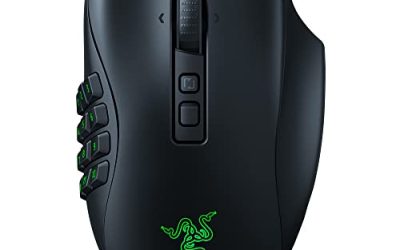
Razer Naga V2 Pro

Specs
- Sensor: Razer Focus Pro 30K optical sensor, up to 30,000 DPI, 750 IPS
- Buttons: Up to 19+1 programmable, with 3 swappable side plates in 2, 6, and 12-button layouts
- Switches: Razer Optical Mouse Switches Gen-3, rated for 90 million clicks
- Connectivity: Razer HyperSpeed Wireless 2.4 GHz, Bluetooth, and wired USB-C
- Battery life: Up to 150 hours on HyperSpeed Wireless, up to 300 hours on Bluetooth
- Weight and size: 134 g, 119.5 x 75.5 x 43.5 mm, right-handed ergonomic shape
- ASIN: B0BGJTLFN5
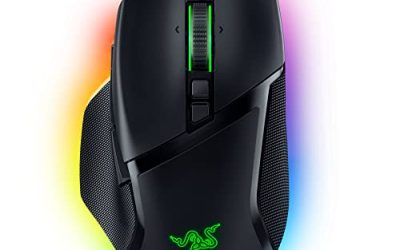
Best for: Players unsure how big a thumb grid they want, and players who split time between Path of Exile and other genres. Start a league on the 12-button plate with flasks and skills mapped across it, and if you only use half the grid, swap to the 6-button plate for larger targets without buying a second mouse. The optical switches suit heavy main-skill clicking, and the HyperScroll Pro wheel adds configurable scrolling for stash work. This is the most adaptable option here.
Watch out for: At 134 grams it is the heaviest mouse here, and players who lift constantly may find it tiring. The plates also make it the most involved mouse to set up, so expect real time in Razer Synapse before it feels natural.
Razer Naga V2 HyperSpeed
Specs
- Sensor: Razer Focus Pro 30K optical sensor, up to 30,000 DPI, 750 IPS
- Buttons: 19 programmable buttons, including a 12-button side panel
- Switches: Razer Mechanical Mouse Switches Gen-2, rated for 60 million clicks
- Connectivity: Razer HyperSpeed Wireless 2.4 GHz and Bluetooth
- Battery life: Up to 250 hours on HyperSpeed Wireless, up to 400 hours on Bluetooth, from a single AA battery
- Weight and size: 95 g excluding battery, 119.5 x 75 x 43.5 mm, right-handed shape
- ASIN: B0BGJT87N2
Best for: Players who want the full Naga grid and the simplest power story. Because it runs on a single AA battery, a low-power moment is a ten-second swap rather than a charging break, and the listed runtimes are the longest here, suiting players who map daily through a whole league. You still get the Focus Pro 30K sensor, a fixed 12-button panel, and HyperScroll with free-spin and tactile modes for long stash and crafting lists.
Watch out for: The side plate is fixed, so if the full grid is more buttons than your build needs, you cannot slim it down as the V2 Pro allows. It has no RGB lighting, and its mechanical switches carry a lower stated click rating than the V2 Pro’s optical switches.
Corsair Scimitar Elite Wireless
Specs
- Sensor: Corsair Marksman optical sensor, up to 26,000 DPI
- Buttons: 16 programmable buttons, including a 12-button side panel
- Side panel: Patented Key Slider design that adjusts the panel position to your thumb reach
- Connectivity: Slipstream Wireless 2.4 GHz, Bluetooth, and USB wired
- Polling rate: Up to 2,000 Hz hyper-polling as stated in the listing
- Battery life: Up to 150 hours on a single charge
- ASIN: B0CCVYHZ9N
Best for: Palm-grip players, especially those with larger hands, who have tried a thumb grid before and found the buttons out of reach. The Key Slider is the standout idea: the whole 12-button panel slides and locks in place, so your flasks sit where your thumb naturally lands. That adjustment can be the difference between a grid you trust in a boss fight and one you keep mis-pressing. The 16 programmable buttons cover a flask row, movement and guard skills, and utility binds, and a wired fallback lets you play while charging.
Watch out for: The contoured, palm-oriented shape is a commitment, and claw or fingertip players may find the body taller than they like. Setup runs through Corsair iCUE, a separate ecosystem to learn, and you should check the panel is locked before a session.
SteelSeries Aerox 9 Wireless

Specs
- Sensor: TrueMove Air optical sensor, up to 18,000 CPI, 400 IPS, 40G acceleration
- Buttons: 18 programmable buttons, including a 12-button side panel
- Switches: SteelSeries mechanical switches, rated for 80 million clicks
- Connectivity: 2.4 GHz wireless, Bluetooth 5.0, and USB-C
- Battery life: Up to 80 hours on 2.4 GHz, up to 180 hours on Bluetooth
- Weight and size: 89 g, 128.8 x 62.8 x 42.1 mm, with AquaBarrier IP54-rated protection
- ASIN: B09VNPB6Q1
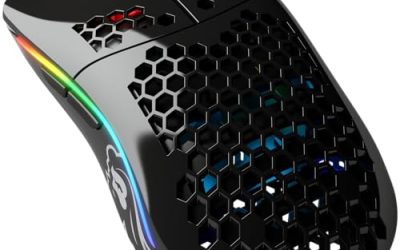
Best for: Players who want a full flask and skill grid without the usual MMO-mouse weight. At 89 grams the Aerox 9 is far lighter than the Naga and Scimitar designs, and that shows in fast, repeated cursor work: flicking between packs, snapping onto loot, and repositioning during hectic fights feels less effortful across a long evening. The perforated shell achieves that weight, and the listed IP54 AquaBarrier protection addresses the obvious worry about dust and splashes. With 18 programmable buttons you give up nothing on binds.
Watch out for: The perforated shell is a preference split, since some players dislike the feel of the holes under the palm. Its 2.4 GHz battery figure is the shortest here, so expect to charge more often than the Bluetooth figure suggests.
Which One Fits You
- Flask-heavy build, unsure about grid size: Choose the Razer Naga V2 Pro, and use its 2, 6, and 12-button plates to find the layout you press most reliably.
- You map daily and hate charging breaks: Choose the Razer Naga V2 HyperSpeed, whose AA battery and long runtimes make power a non-issue across a league.
- Larger hands or a palm grip, and grids never line up: Choose the Corsair Scimitar Elite Wireless, and slide its Key Slider panel until the flask row sits under your thumb.
- You move the mouse constantly and your arm tires: Choose the SteelSeries Aerox 9 Wireless, which keeps 18 programmable buttons at 89 grams.
Common Mistakes
- Binding every flask to the grid on day one: Add one or two thumb binds at a time and learn them in easy maps first, or you will press the wrong flask in the first hard fight.
- Chasing maximum DPI: Setting 20,000 or 30,000 DPI because the box advertises it makes loot labels and inventory items harder to hit, so use a moderate setting you can control.
- Ignoring switch ratings in a click-heavy game: Path of Exile consumes left clicks faster than most genres, so overlooking the stated click lifecycle can mean replacing a mouse sooner than expected.
- Playing on Bluetooth to save battery: Bluetooth is fine for browsing, but for mapping use the 2.4 GHz connection these mice provide for low-latency play.
FAQ
How many side buttons do you actually need for Path of Exile?
Most players do well with four to eight reliable thumb actions: two or three flasks, a movement skill, and a guard or utility skill. A 12-button grid gives room for more complex builds, but only choose one if you will learn the layout in low-risk maps first.
Is a heavier mouse or a lighter mouse better for mapping?
It depends on how much you move the mouse. Players making constant flicks and lifts usually prefer a lighter mouse like the 89-gram Aerox 9, while players who steer with small, planted movements often prefer the stability of the Naga V2 Pro. Session length amplifies the difference, so judge comfort over a full evening, not a first impression.
Should you play Path of Exile on 2.4 GHz wireless or Bluetooth?
Use 2.4 GHz for playing, because it is the low-latency gaming connection on all four mice here. Bluetooth is useful for a second computer or desktop work and extends battery life on several models, but it is not the connection to trust during a boss fight.
Can you use one of these mice for Path of Exile 2 as well?
Yes, because the demands are closely related: heavy clicking, precise cursor control, and a handful of skills and flasks or charms within easy reach. Set up a separate software profile for each game so your binds stay clear, and prefer onboard profiles if you switch computers as well.
Closing
The best gaming mouse for Path of Exile is the one whose buttons you press correctly at the worst moment of a fight, not the one with the longest spec sheet. Decide how many thumb actions your build needs, match weight and shape to how you move through maps, and give any new grid a few sessions of easy content before you judge it.
Related guides
More from Amazon
Programs that pair well with the guide above. Offers and eligibility are set by Amazon and may change.
Free shipping on eligible items, Prime Video and more. Eligible new members can start with a free trial.
Start a Prime free trialAd-free music streaming. Eligible new subscribers can start with a free trial.
Try Music Unlimited freeA Prime membership for ages 18-24 with a trial period. Eligibility is set by Amazon.
See Prime for Young AdultsAudiobooks and podcasts to listen to on the go. Eligible new members can start with a free trial.
Try Audible freeAs an Amazon Associate we earn from qualifying purchases.