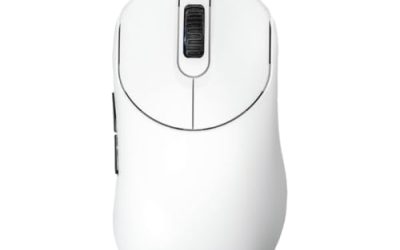
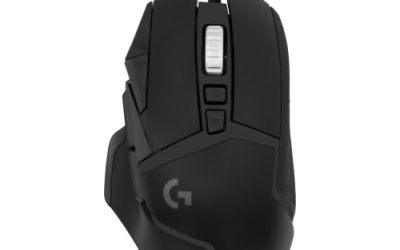
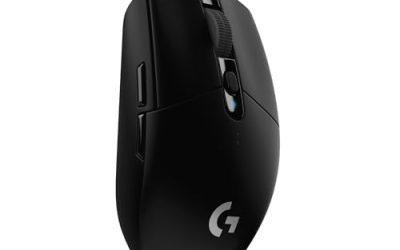
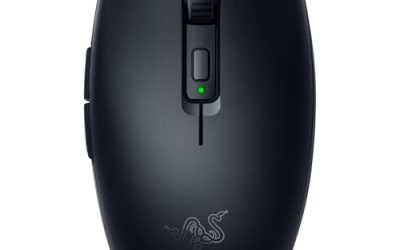
A good gaming mouse does not need a flagship sensor or a long list of extras to feel right in play. What it needs is a sensor that tracks cleanly, a shape that fits your hand, a weight you can move without effort, and buttons that respond the same way every time you press them.
Our top pick: Logitech G203 LIGHTSYNC. Runner-up: Redragon M711 Cobra. This guide compares published specifications only: every DPI figure, button count, weight, polling rate and sensor name below comes from the product listing for that mouse, so you can compare the four picks on the same terms and choose the one that matches your hand, your grip and the games you play most.
Cheap here means value in general, not a single spending limit. Some players want the lowest-cost mouse that still tracks well in fast shooters. Others want a few more buttons for MOBA abilities, a lighter shell for long sessions, or RGB lighting that matches the rest of a desk. All four mice in this guide sit in the value tier of the gaming mouse market, and each one earns its place for a different reason.
Our Top Picks
 Razer DeathAdder Essential Ergonomic Wired Gaming Mouse5.01 x 2.86 x 1.69 inches0.3 poundsCheck on Amazon

Top 3 picks at a glance
At a Glance
| Product | Best for | Key specification |
|---|---|---|
| Logitech G203 LIGHTSYNC | All-round value and first gaming mouse | 8,000 DPI sensor, 6 programmable buttons, 85 g |
| Razer DeathAdder Essential | Comfortable palm grip and simple setup | 6,400 DPI optical sensor, 5 programmable buttons |
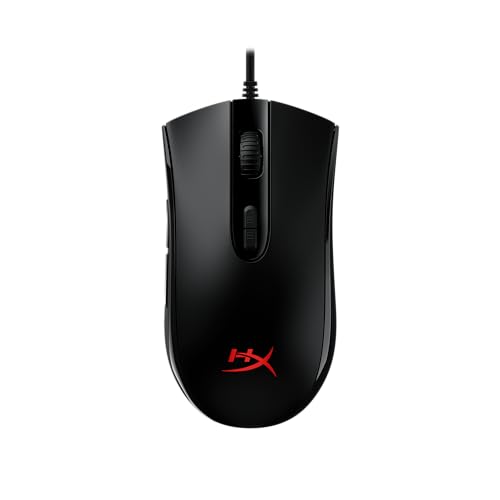
| HyperX Pulsefire Core | Symmetrical shape and extra buttons | Pixart 3327 sensor up to 6,200 DPI, 7 programmable buttons, 87 g |
| Redragon M711 Cobra | Highest DPI ceiling and on-the-fly switching | 10,000 DPI sensor, 7 programmable buttons, 100 IPS tracking |
How to Choose
1. Start with the sensor and its DPI range
The sensor decides how accurately the mouse turns hand movement into cursor movement. DPI, short for dots per inch, sets how far the cursor moves for a given hand movement. A higher DPI ceiling gives you more room to set a sensitivity that suits you, and it matters most when you switch between games that need very different speeds.
All four mice in this guide use optical sensors with DPI ceilings between 6,200 and 10,000. That range is more than enough for most players, because very few people play at the top of the range. What matters more is whether the sensor holds its tracking at the DPI you actually use. Look for a mouse that lists a clear sensor name and a DPI range that covers your usual setting with room to spare.
2. Match the shape to your hand and grip
Shape is the part of a mouse that no specification sheet can fully describe, and it is also the part that decides whether a mouse feels good after an hour of play. Palm grip players rest the whole hand on the mouse and want a taller, fuller shell. Claw grip players arch their fingers and want a shell that supports the palm while leaving the fingertips free to click fast. Fingertip grip players hold the mouse with the fingertips alone and want a shorter, lighter shell.
3. Check the weight and how it affects movement
Weight changes how a mouse feels when you flick to a target or lift it to reposition. Lighter mice need less effort to start and stop, which helps in fast shooters and long sessions, while heavier mice can feel steadier for deliberate aiming. The G203 LIGHTSYNC lists a weight of 85 g and the Pulsefire Core lists 87 g, which puts both in the light-to-mid range for wired gaming mice. If you play at low sensitivity and move your whole arm, a lighter mouse will tire your shoulder less. If you play at high sensitivity with wrist movement only, shape will matter more than a few grams.
4. Count the buttons you will actually use
Extra buttons are useful only when they sit where your thumb and fingers can reach them without changing your grip. Most players use the two main buttons, the scroll wheel click, and two side buttons. MOBA and MMO players often want more, because abilities, items and camera controls all benefit from a button under the thumb. The number to look for is the count of programmable buttons, which tells you how many inputs you can reassign in software.
The Pulsefire Core and the M711 Cobra each list 7 programmable buttons, which gives you the most room for extra commands in this guide. The G203 LIGHTSYNC lists 6 programmable buttons, and the DeathAdder Essential lists 5. Before you choose, count the commands you press most often in your main game and check that the mouse has a button in a comfortable spot for each one.
5. Look at polling rate, tracking speed and acceleration
Polling rate is how often the mouse reports its position to the computer, measured in hertz. A 1000 Hz polling rate reports every millisecond, which is the standard for gaming mice and the figure listed for the G203 LIGHTSYNC, the Pulsefire Core and the M711 Cobra. Tracking speed, measured in inches per second, and acceleration, measured in G, describe how fast you can move the mouse before the sensor stops tracking cleanly. The M711 Cobra lists 100 IPS tracking speed and 20G acceleration, which covers fast flicks in most games. Use these numbers as a tie-breaker between two mice that are otherwise equal, not as the first thing you compare.
6. Choose wired for a simple, steady connection
All four mice in this guide are wired, which keeps the choice simple. A wired mouse connects through a USB cable, draws its power from the computer, and never needs charging or a battery change. That makes it a good fit for a fixed desk setup, where the cable can run in a straight line to the computer and stay out of the way.
Cable design still matters. The Pulsefire Core lists a flexible braided cable, which resists tangling and drags less across a desk than a stiff rubber cable. The M711 Cobra lists a braided cable as well. When you set up a wired mouse, give the cable enough slack to move freely across your whole mousepad.
7. Check switch life and software support
Switch life tells you how many clicks the main buttons are rated for before the maker expects them to wear out. The Pulsefire Core lists switches rated for 20 million clicks, and the DeathAdder Essential lists mechanical switches rated for 10 million clicks.
Software matters because it is where you change DPI steps, reassign buttons, and adjust lighting. The G203 LIGHTSYNC works with Logitech G HUB, where you can set DPI presets and lighting effects and store settings in the on-board memory of the mouse. The Pulsefire Core works with HyperX NGENUITY software for lighting, DPI and macro settings. The DeathAdder Essential works with Razer Synapse for button reassignment and DPI steps. The M711 Cobra uses Redragon programming software for DPI levels, button assignments and lighting modes. Check that the software runs on your operating system before you buy, and look for on-board memory if you want your settings to travel with the mouse to another computer.
Our Picks
Logitech G203 LIGHTSYNC — ASIN B07YN82X3B
The Logitech G203 LIGHTSYNC pairs an 8,000 DPI gaming-grade sensor with 6 programmable buttons, LIGHTSYNC RGB lighting, on-board memory and a 1000 Hz polling rate in an 85 g wired body. The on-board memory stores DPI presets and lighting settings on the mouse itself. It is the most balanced mouse in this guide, with a DPI ceiling above the DeathAdder Essential and the Pulsefire Core, a light body, and software support through Logitech G HUB.
Best for: players who want one mouse for FPS, MOBA and everyday use, and a first gaming mouse that covers the basics well.
Consideration: the compact classic shape suits small to medium hands best, so players with large hands should check the dimensions on the listing before choosing it.
Razer DeathAdder Essential — ASIN B094PS5RZQ
The Razer DeathAdder Essential uses a true 6,400 DPI optical sensor with 5 programmable buttons, mechanical switches rated for 10 million clicks, and rubber side grips in a right-handed ergonomic shell. The listing highlights on-the-fly sensitivity adjustment through dedicated DPI buttons, which lets you change sensitivity in the middle of a game without opening software. It is the simplest mouse in this guide, with no extra buttons to learn and a shape that fits a palm grip well.
Best for: palm-grip players who want a comfortable, uncomplicated mouse for long sessions and straightforward FPS play.
Consideration: the 6,400 DPI ceiling is the lowest in this guide, and the 5-button layout gives you less room for extra commands than the 7-button picks.
HyperX Pulsefire Core — ASIN B07H3GFJJ2
The HyperX Pulsefire Core uses a Pixart 3327 optical sensor with native DPI up to 6,200, 7 programmable buttons, switches rated for 20 million clicks, a 1000 Hz polling rate and an 87 g body with textured side grips. The listing describes a symmetrical shape that suits palm and claw grips, software-controlled RGB lighting, and HyperX NGENUITY software for DPI, macro and lighting settings with on-board memory. It is the most button-rich symmetrical mouse in this guide, and its switch rating is the highest of the four picks.
Best for: claw-grip players and MOBA players who want extra programmable buttons in a symmetrical shell with a durable click.
Consideration: the 6,200 DPI ceiling is the lowest in this guide, so players who play at very high sensitivity should check that it covers their setting.
Redragon M711 Cobra — ASIN B0751D11BL

The Redragon M711 Cobra uses a 10,000 DPI optical sensor with 7 programmable buttons, 5 adjustable DPI levels, 100 IPS maximum tracking speed, 20G acceleration and RGB backlighting with 16.8 million colours. The listing describes DPI adjustment from 100 to 10,000 in steps of 100, on-the-fly DPI switching, and Redragon programming software for button assignments, DPI levels and lighting modes. It has the highest DPI ceiling in this guide and the most flexible DPI stepping.
Best for: players who want the widest DPI range and quick on-the-fly sensitivity changes for games that mix sniping, tracking and close-quarters movement.
Consideration: the aggressive ergonomic curve suits medium hands best, and the listing does not headline a weight figure, so shape matters more than grams when you judge this mouse.
Which One Is Right for You?
Start with your grip and your main game, then let the specifications narrow the choice. If you play a mix of FPS, MOBA and everyday games and want one mouse that does all of them well, the G203 LIGHTSYNC is the natural starting point, because it pairs the second-highest DPI ceiling in this guide with a light body, 6 programmable buttons and on-board memory. It is the top pick for that reason: it asks the fewest compromises across the most games.
If comfort in long sessions matters more than extra buttons, choose the DeathAdder Essential. Its tall right-handed shell and rubber side grips support a palm grip through long play, and its 5-button layout keeps every command within easy reach.
If you play MOBA games or want a symmetrical shell with more commands under your thumb, choose the Pulsefire Core. Its 7 programmable buttons give you the most room for abilities and macros, and its symmetrical shape works for claw and palm grips alike.
If you want the widest DPI range and the fastest way to change sensitivity mid-game, choose the M711 Cobra. Its 10,000 DPI ceiling, 100-step DPI adjustment and 5 preset levels make it the easiest mouse in this guide to tune to an exact sensitivity, and its 7 programmable buttons cover the extra commands that a high-DPI player often wants. It is the runner-up for that reason: it trades a little of the G203 LIGHTSYNC balance for a clear lead in DPI flexibility.
Check the dimensions of your chosen mouse against your hand before you buy, and confirm that its software runs on your operating system.
Frequently Asked Questions
What DPI should I use for gaming?
There is no single DPI that suits every player, because the right setting depends on your sensitivity in the game, the size of your mousepad, and whether you aim with your wrist or your whole arm. A common starting point is 800 DPI for low-sensitivity FPS play and 1600 DPI for a faster, more general setting. All four mice in this guide cover both of those settings with room to spare, and the M711 Cobra covers the widest range, from 100 to 10,000 DPI in steps of 100.
Is a wired gaming mouse better than a wireless mouse for gaming?
A wired mouse has a direct USB connection, draws power from the computer, and never needs charging, which makes it simple to set up and reliable in long sessions. A wireless mouse removes the cable, which some players prefer for a clear desk, but it needs a battery or a charging routine. All four picks in this guide are wired, so the choice here is about which wired mouse fits your hand and your games, not about managing a battery.
How much does weight matter in a gaming mouse?
Weight matters most when you make large, fast movements or lift the mouse often to reposition it. A lighter mouse needs less effort to start and stop, which helps in fast shooters and reduces fatigue in long sessions. The G203 LIGHTSYNC at 85 g and the Pulsefire Core at 87 g are both in the light-to-mid range for wired gaming mice. If you play at low sensitivity with arm movement, weight is worth checking closely.
How many buttons do I need on a gaming mouse?
Most players use the two main buttons, the scroll wheel click and two side buttons, which is 5 inputs in total. MOBA and MMO players often want more, because abilities, items and camera controls all benefit from a button under the thumb. The Pulsefire Core and the M711 Cobra each list 7 programmable buttons, the G203 LIGHTSYNC lists 6, and the DeathAdder Essential lists 5. Count the commands you press most often in your main game, then choose a mouse with a button in a comfortable spot for each one.
Can I use a gaming mouse for everyday work as well?
Yes. A gaming mouse works as a normal computer mouse for browsing, documents and everyday tasks, and its DPI buttons make it easy to switch to a faster setting for desktop work and a slower setting for precise work such as image editing. The programmable buttons can carry shortcuts such as copy, paste, forward and back in a browser, or undo and redo in an editor. The G203 LIGHTSYNC and the Pulsefire Core both store settings in on-board memory, so your DPI presets travel with the mouse if you move it to another computer.
What should I check on the listing before I buy?
Check the sensor name and DPI range, the number of programmable buttons, the weight, the polling rate, the cable length, the dimensions, and the software the mouse uses. Confirm that the software runs on your operating system and that the mouse connects through a port your computer has free. Read the full specification table on the listing rather than the headline alone, because the table is where the maker lists tracking speed, acceleration, switch ratings and grip details.
Bottom Line
The best cheap gaming mouse is the one that matches your hand, your grip and the games you play, with a sensor that tracks cleanly at the sensitivity you use. The Logitech G203 LIGHTSYNC is the top pick in this guide because it balances an 8,000 DPI sensor, 6 programmable buttons, a light 85 g body and on-board memory in a shape that suits many players. The Redragon M711 Cobra is the runner-up because its 10,000 DPI ceiling and flexible DPI stepping give you the widest room to tune sensitivity. The Razer DeathAdder Essential is the comfort pick for palm-grip players, and the HyperX Pulsefire Core is the button-rich pick for claw-grip and MOBA players who want 7 programmable buttons in a symmetrical shell.
Disclosure: As an Amazon Associate, this site earns from qualifying purchases.
Related guides
More from Amazon
Programs that pair well with the guide above. Offers and eligibility are set by Amazon and may change.
Free shipping on eligible items, Prime Video and more. Eligible new members can start with a free trial.
Start a Prime free trialAd-free music streaming. Eligible new subscribers can start with a free trial.
Try Music Unlimited freeA Prime membership for ages 18-24 with a trial period. Eligibility is set by Amazon.
See Prime for Young AdultsAudiobooks and podcasts to listen to on the go. Eligible new members can start with a free trial.
Try Audible freeAs an Amazon Associate we earn from qualifying purchases.