If you aim with your whole arm at low sensitivity, you already know the failure mode: a long flick runs off the edge of the pad mid-fight, and the re-centre costs you the round. The fix is not a mat that swallows your whole desk and buries your keyboard. It is a pad with genuine mouse area — roughly 450 mm of width where your mouse actually travels — while the rest of your setup stays exactly where it is.
This roundup is for low-DPI arm aimers, tactical FPS players who sweep wide, and anyone whose current pad forces constant lifting and repositioning. Every pick below is an extra-large mouse-area pad in the 450 mm class, chosen from the dimensions, thickness, surface and base details in its Amazon listing name and specifications — no desk-width mats, no hard pads, just cloth XXL pads compared on the numbers that decide how they feel.
Our Top Picks
 Logitech G640 Large Cloth Gaming Mouse Pad15.8L x 18.1W inches18.1 x 15.7 x 3 inches0.9 poundsCheck on Amazon

Top 3 picks at a glance

Quick Picks
Short on time? These are the five pads compared below, grouped by what each one does best.
As an Amazon Associate we earn from qualifying purchases
| Product | Best for | Key spec from title |
|---|---|---|
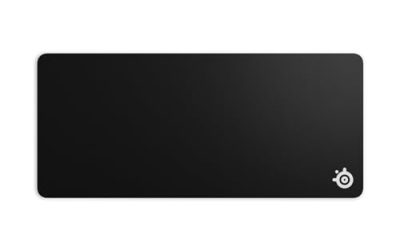
| SteelSeries QcK XXL | The classic all-round XXL cloth pad | 450 x 400 mm micro-woven cloth |
| SteelSeries QcK Heavy | A thick, cushioned control surface | 450 x 400 mm extra-thick cloth |
| SteelSeries QcK+ | XXL space with a thin, firm feel | 450 x 400 mm, 2 mm class cloth |
| ROCCAT Sense Pro Square | Speed fabric and stitched edges in a true square | 450 x 450 mm, low-profile stitched edges |
| Logitech G640 | Moderate-friction cloth tuned for gaming sensors | 460 x 400 mm, 3 mm thick |
How to Choose
Measure the mouse area, not the desk
Start with the space your mouse actually uses. A 450 mm wide pad gives a low-sensitivity player room for full arm sweeps without the cursor dying at the edge, and 400 to 450 mm of depth covers the vertical travel most FPS players use. Measure your desk before ordering: the pad needs that footprint clear where your mouse hand sits, not under the keyboard. Also read dimensions rather than the size label — “XXL” now appears on 900 mm desk mats too, which are a different product for a different problem.
Pick a thickness for control and comfort
Thickness is the quiet spec that changes how a pad plays. Standard cloth pads in this class sit around 2 to 3 mm: they feel firm, keep the mouse close to the desk surface and suit players who like a direct, consistent stop. An extra-thick pad like the QcK Heavy adds real cushion under the wrist and forearm, which helps during long sessions and slightly softens how the mouse settles. Neither is objectively better — match the thickness to whether your hand wants support or a firmer, flatter tracking feel.
Match surface speed to your sensitivity
Cloth is not one surface. Micro-woven cloth, used across the SteelSeries pads here, is the balanced option: enough friction for controlled stops at low sensitivity without feeling sticky on small corrections. A speed fabric like the ROCCAT Sense Pro’s glides faster, which suits higher sensitivity and tracking-heavy games but can feel loose if you rely on friction to brake. The Logitech G640 sits between them with moderate surface friction. Pick the glide that matches how you actually stop the mouse, not the fastest label.
Check edges and base before you buy
Edges decide how a pad ages. Low-profile stitched edges, like those on the Sense Pro Square, resist fraying and sit low enough that a sweeping forearm does not catch on a raised border. Unstitched cloth edges lie perfectly flat from day one but can start to separate after heavy use. Underneath, every pad here uses a rubber base; a non-slip base matters more than usual at this size, because hard arm sweeps will walk a poorly gripped 450 mm pad across the desk.
The 5 Best Options
SteelSeries QcK XXL

The original XXL cloth pad and still the reference point for this size class. Its 450 x 400 mm footprint is the classic recipe: wide enough for full low-sensitivity sweeps, deep enough that vertical tracking rarely runs out, and a micro-woven cloth surface with the balanced friction most players mean when they say a pad feels “normal”. At roughly 2.5 mm thick it stays firm and flat rather than cushioned. If you want the safe, standard-feeling XXL pad that the rest of the category is measured against, this is the one to start from.
Specs
- Dimensions: 450 x 400 mm (17.72 x 15.75 in)
- Thickness: approx. 2.5 mm
- Surface: micro-woven cloth
- Base: non-slip rubber
- Model: 67500
Best for: Players who want the classic, balanced XXL cloth pad.
Watch out for: SteelSeries also sells a newer 900 x 400 mm desk mat under the QcK XXL name — check the dimensions on the listing so you order the 450 x 400 mm mouse pad, not the desk mat.
ASIN: B00WAA2704
SteelSeries QcK Heavy
Same 450 x 400 mm footprint as the standard QcK, but built extra thick — and that one change alters the whole feel. The added cloth depth cushions your wrist and the edge of your forearm through long sessions, and the mouse settles into stops with a slightly softer, more damped character. Players who press down as they aim, or who find thin pads fatiguing on a hard desk, usually prefer this style. The trade-off is height: your hand sits noticeably higher than on a 2 mm pad, which some wrist aimers dislike.
Specs
- Dimensions: 450 x 400 mm
- Construction: extra-thick cloth (QcK Heavy line)
- Surface: cloth
- Base: rubber
- Compatibility: laser and optical mice, per listing title
- Model: 63008
Best for: Long sessions and players who want maximum cushion under the wrist.
Watch out for: The extra thickness raises your hand position; if you prefer your mouse hand low and flat, a standard 2 to 3 mm pad will feel more natural.
ASIN: B000V7ARAU
SteelSeries QcK+
The QcK+ is the thin option in SteelSeries’ 450 mm line: same generous footprint, but a 2 mm class profile that keeps your hand low and the tracking feel firm and direct. The micro-woven cloth surface matches the standard QcK’s balanced friction, so this is the pick for players who want the big-pad space without any of the Heavy’s cushion or height. It also rolls and packs flatter than thicker pads, which makes it the easiest of the three SteelSeries options to take to a LAN or a second setup.
Specs
- Dimensions: 450 x 400 mm
- Thickness: 2 mm class
- Surface: micro-woven cloth
- Base: non-slip rubber
- Compatibility: laser and optical mice, per listing title
Best for: Players who want XXL space with a thin, firm, low-profile feel.
Watch out for: Minimal cushioning — on a hard desk your wrist rests almost directly on the surface, and thin unstitched cloth edges can fray sooner than stitched designs.
ASIN: B000UVRU6G
ROCCAT Sense Pro Square

The only true square here: 450 x 450 mm gives you as much vertical room as horizontal, which suits players whose aim style uses big diagonal and downward sweeps. Its military-grade polyester fabric is a speed surface — faster and slicker than the SteelSeries cloth — and the low-profile stitched edges are the durability upgrade this category usually lacks, sitting flat enough that a forearm passes over them without catching. At 2 mm it stays firm and low. Choose it if your current pad feels too grippy or too rectangular.
Specs
- Dimensions: 450 x 450 x 2 mm (true square)
- Surface: military-grade polyester speed fabric
- Edges: low-profile stitched
- Back: natural rubber, non-slip
- Model: ROC-13-175
Best for: A faster glide, a square playing area and stitched-edge durability.
Watch out for: The speed fabric offers less braking friction than control cloth — at very low sensitivity, stopping precisely takes more deliberate hand pressure.
ASIN: B09GRRYQQ7
Logitech G640
Logitech sells this size as “Large” rather than XXL, but the geometry is the same class: 460 x 400 mm of cloth at 3 mm thick, the joint-widest footprint here. The surface is tuned with moderate friction and a texture Logitech positions for gaming sensors, so it tracks consistently while still giving you something to brake against — a middle path between the QcK’s control feel and the ROCCAT’s speed. If you are inside the Logitech G ecosystem or want a slightly thicker standard pad, it is the natural alternative to the QcK XXL.
Specs
- Dimensions: 460 x 400 mm
- Thickness: 3 mm
- Surface: cloth, moderate surface friction
- Base: non-slip rubber
- Model: 943-000797
Best for: A middle-ground friction feel in the widest footprint here.
Watch out for: Logitech labels this size “Large”, not XXL, and older G640 listings exist — check the dimensions and model details on the listing before ordering.
ASIN: B0BHMKVF1P
Which One Fits Your Situation
You play tactical FPS at low sensitivity
Your problem is running out of pad, not desk. Any of the 450 mm pads fixes the sweep space; the standard QcK XXL or QcK+ gives you the controlled cloth friction that suits deliberate, stop-heavy aiming. Start with the QcK XXL unless you already know you prefer a thinner, firmer pad under your hand.
Your desk is deep, but the keyboard stays off the pad
You want the mouse area without reorganising your whole desk. All five picks are mouse-only footprints, so your keyboard, monitor stand and speakers keep their places. Measure the clear patch beside your keyboard: if it fits 450 x 400 mm, the QcK line or G640 works; the square Sense Pro needs the full 450 mm of depth as well as width.
Your wrist aches during long sessions
Extra thickness is the fix to try first. The QcK Heavy’s deep cloth cushions the wrist and forearm edge where they rest and roll on the pad, which takes pressure off during long queues and practice sessions. Pair it with a chair and desk height check — a pad softens contact, but it cannot fix a setup that holds your arm at a bad angle.
You play tracking-heavy games at mid sensitivity
Constant tracking rewards glide more than braking power. The ROCCAT Sense Pro Square’s speed fabric keeps the mouse moving with less effort, and its square shape gives diagonal tracking equal room in every direction. If it feels too loose at first, the G640’s moderate friction is the halfway step before committing to a full speed surface.
Common Mistakes
- Buying a 900 mm desk mat when only your mouse needed more room — it rearranges your whole desk layout to solve a mouse-area problem.
- Trusting the “XXL” label instead of the dimensions; the same name now covers both 450 mm mouse pads and 900 mm desk mats.
- Forgetting desk depth: a pad that is 400 to 450 mm deep will not sit properly on a shallow desk or a keyboard tray setup.
- Choosing a speed surface for a low-sensitivity control style, or control cloth for fast tracking, then blaming the pad when stops feel wrong.
- Judging a new cloth pad while it is still curled from the box — lay it flat first, weighted at the corners if needed, before deciding how it tracks.
Frequently Asked Questions
How big is an XXL gaming mouse pad?
In the mouse-pad class covered here, XXL means roughly 450 x 400 mm or 450 x 450 mm — about three times the area of a standard pad. The label is not consistent across brands, though: some companies now use XXL for 900 mm desk mats. Always compare the printed dimensions against the space beside your keyboard before ordering.
Is a thicker mouse pad better?
Thicker is different, not automatically better. An extra-thick pad like the QcK Heavy cushions your wrist and slightly softens how the mouse settles into a stop. A 2 mm pad feels firmer and keeps your hand lower, which many players prefer for consistency. Choose based on whether your hand wants support or a flatter, more direct surface.
Do stitched edges actually matter?
Yes, mostly for lifespan and comfort. Stitched edges resist the fraying and peeling that unstitched cloth pads develop along the side your forearm crosses most. Low-profile stitching, like the Sense Pro Square’s, also avoids a raised lip catching your wrist mid-swipe. If you replace pads often anyway, raw edges are fine; if you keep one for years, stitching pays off.
Will a 450 mm pad fit on my desk?
Measure the clear area to the side of your keyboard: you need about 450 mm of width and 400 to 450 mm of depth with nothing overhanging the desk edge. Most full-size desks manage this easily beside a keyboard. Shallow desks, corner desks and keyboard trays are the usual problem cases — measure first rather than folding the pad under other gear.
Related guides
More from Amazon
Programs that pair well with the guide above. Offers and eligibility are set by Amazon and may change.
Free shipping on eligible items, Prime Video and more. Eligible new members can start with a free trial.
Start a Prime free trialAd-free music streaming. Eligible new subscribers can start with a free trial.
Try Music Unlimited freeA Prime membership for ages 18-24 with a trial period. Eligibility is set by Amazon.
See Prime for Young AdultsAudiobooks and podcasts to listen to on the go. Eligible new members can start with a free trial.
Try Audible freeAs an Amazon Associate we earn from qualifying purchases.