The best refurbished gaming PC deal is not necessarily the desktop with the most RGB lighting, the largest memory number, or the word “gaming” in its title. In this group, the most important distinction is whether the computer includes a dedicated graphics card and, if so, which model. A renewed office desktop with a solid-state drive can be useful for school, work, older games, and lightweight esports, but it should not be evaluated the same way as a modern gaming tower with a current graphics card.
For most buyers, the right choice depends on the intended games and whether a monitor and accessories are needed. The Dell systems with GTX 750 Ti graphics offer a more credible starting point for light 1080p gaming than listings that do not identify a dedicated GPU. The Dell bundle with a GT 1030 is more attractive as a complete starter setup because it includes a monitor, keyboard, mouse, and headset, but the GT 1030 remains an entry-level graphics card. The KOTIN desktop is the strongest modern gaming option listed here, with a Ryzen 7 8700F, RTX 5060 Ti, DDR5 memory, and a 1TB NVMe SSD, although it is presented as a new PC rather than a refurbished one.
As an Amazon Associate we earn from qualifying purchases at no extra cost to you.




Our Top Picks
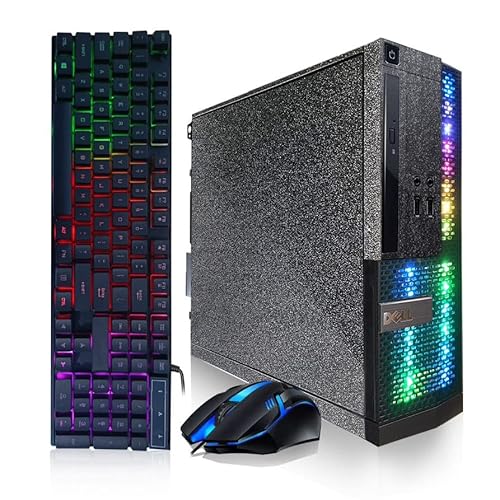
 Dell Gaming OptiPlex Desktop RGB Computer PCi7-16GB-512GB+GT1030+24 inch20 x 16 x 8 inches25.3 poundsCheck on Amazon
Pros & cons
- RTX 5060 Ti and DDR5 memory combination suits 1080p and 1440p gaming
- Five ARGB fans and a 6-pipe cooler support sustained airflow
- Four DDR5 slots and three M.2 slots leave room for future upgrades
- Monitor must connect to the graphics card ports, not the motherboard ports
- 650W Gold PSU leaves modest headroom for a future GPU upgrade



Top 3 picks at a glance
Quick Answer
- Best modern gaming alternative: KOTIN Gaming PC Desktop — Ryzen 7 8700F, RTX 5060 Ti 8GB, 16GB DDR5, and a 1TB SSD make it the most current gaming-focused configuration in this selection.
- Best renewed option with a dedicated GPU and RGB accessories: Dell RGB Gaming OptiPlex Desktop — GTX 750 Ti 4GB, 16GB RAM, 512GB SSD, Wi-Fi, and RGB keyboard and mouse are bundled together.
- Best renewed option for a complete starter setup: Dell Gaming OptiPlex Desktop RGB Computer — includes a 24-inch HDMI monitor, keyboard, mouse, and headset along with a GT 1030 and 16GB RAM.
- Best basic renewed gaming tower with a GTX 750 Ti: Dell OptiPlex PC — combines a Core i5-6500, GTX 750 Ti 4GB, 16GB RAM, and a 512GB SSD.
- Best renewed option when a monitor is essential: Dell Optiplex PC with 24-inch Monitor — provides a 24-inch display, 16GB RAM, and a 512GB SSD, but the graphics hardware should be confirmed before purchase.
- Best low-demand office and light-gaming candidate: HP ProDesk Desktop RGB Lights Computer — its Core i5-6500, 8GB RAM, and 256GB SSD suit basic use, but the listing does not identify a dedicated graphics card.
- Best compact-spec renewed option for everyday use: Dell PC Treasure Box RGB Desktop — lists a quad-core Core i5, 16GB RAM, Wi-Fi, Bluetooth, and a 512GB SSD, while the graphics solution needs verification.
- Best inspection-focused starting point: Refurbished gaming PC inspection listing — the available product information focuses on checking cooling components, ports, and warranty, so buyers should verify the actual computer specifications before ordering.
How We Compared This Guide
This guide compares the specifications available for each listing, including processor, graphics card, memory, storage, included accessories, operating system, connectivity, and warranty information where available. The rankings are based on the practical differences between these configurations rather than on RGB lighting or the use of “gaming” in a product title.
Refurbished computers require extra caution because the same desktop family can be sold with different processors, graphics cards, power supplies, storage devices, and cosmetic conditions. Where a listing does not identify a component, this guide treats that omission as something to verify rather than filling in the gap with an assumption. Gaming expectations are therefore described conservatively: a confirmed dedicated GPU is a meaningful advantage, while a renewed office tower without identified graphics hardware should be considered primarily for everyday use until the seller confirms otherwise.
The KOTIN system is included because it provides a useful comparison point. Its listed components are substantially newer and more gaming-oriented than those in the renewed office-based systems, but its product information describes it as a new, assembled Windows 11 Home desktop with a one-year limited warranty. It should not be confused with a refurbished model.
How to Choose a Refurbished Gaming PC
1. Start With the Graphics Card, Not the RGB Lighting
For gaming, the graphics card is usually the first component to identify. It renders the game image and has a major effect on resolution, visual quality, frame rate, and support for newer features. A refurbished desktop can have a relatively capable Core i5 or Core i7 processor but still provide weak gaming performance if it uses integrated graphics or an entry-level card.
The listings include several very different graphics situations. The GTX 750 Ti models have a confirmed dedicated GPU with 4GB of listed graphics memory. The Dell bundle identifies a GT 1030 with 2GB of GDDR5. The KOTIN lists an RTX 5060 Ti with 8GB and support for DLSS 4 and ray tracing. By contrast, the HP ProDesk, Dell PC Treasure Box, and Dell monitor bundle do not provide enough graphics information in the listings to judge their gaming capability confidently.
As a general buying rule, look for a named dedicated graphics card when gaming is the main purpose. Then check whether the card is suitable for the games you play. Older dedicated cards may work for lighter esports games and older titles at modest settings, but they are not automatically appropriate for current demanding releases. Avoid treating a large amount of system RAM or a fast-sounding processor as a substitute for missing graphics hardware.
2. Check the Processor Generation and Platform
The processor still matters for game loading, background applications, simulation-heavy games, and maintaining consistent frame delivery. However, a processor name alone is incomplete. A listing that says only “Intel Core i7” or “Intel Core i5” does not tell you the generation, exact model, clock behavior, integrated graphics, or platform age.
Among the renewed systems, the Dell OptiPlex with a Core i5-6500 provides a more specific processor identification than listings that name only a Core i5 or i7. The Dell PC Treasure Box describes an Intel quad-core Core i5 running up to 3.6GHz, but buyers should still confirm the exact processor model. The KOTIN uses the Ryzen 7 8700F, a much newer platform paired with DDR5 memory and a current dedicated GPU.
Avoid choosing solely by the words “i5” or “i7.” Intel has used those tiers across many generations, and an older i7 is not automatically faster or more suitable than a newer i5. Ask the seller for the exact CPU model when the listing omits it. Also check whether the motherboard and power supply leave room for a future graphics-card upgrade.
3. Look for Enough RAM and Useful Storage
Memory and storage affect general responsiveness, multitasking, game installation, and how much maintenance the computer requires. The renewed listings with 16GB of RAM are more flexible for everyday use and light gaming than the HP ProDesk listing with 8GB. The KOTIN also lists 16GB, but it uses DDR5 memory rather than the unspecified memory type found on several renewed systems.
For a refurbished gaming PC, 16GB is a sensible target when the system supports it. Eight gigabytes can be workable for basic tasks and less demanding games, but it leaves less headroom for a game, browser tabs, voice chat, launchers, and other applications running together. Confirm whether the listed memory is installed as one module or two, and ask about available slots if upgrading is important.
Solid-state storage is preferable to an older mechanical hard drive for boot times, application launches, and game loading. Several listings provide a 512GB SSD, while the HP ProDesk lists a 256GB SSD. The KOTIN specifies a 1TB Gen4 NVMe SSD. Storage capacity is not the same as gaming performance, however, and an SSD cannot compensate for a weak graphics card. Check the drive type, available capacity after Windows is installed, and whether an additional M.2 or SATA drive can be added.
4. Investigate the Power Supply and Upgrade Path
Power-supply information is particularly important with refurbished office desktops. Some OptiPlex and ProDesk systems use proprietary cases, compact internal layouts, or power supplies designed around the original office configuration. Those limitations can make a future graphics-card upgrade difficult even when the processor and RAM appear adequate.
Ask for the power-supply wattage, connector configuration, manufacturer, and physical format when the information is missing. A dedicated GPU may require specific power connectors, and a replacement supply may not fit a slim or proprietary chassis. Do not assume that a desktop advertised as a gaming PC has a gaming-oriented PSU.
The KOTIN listing provides more upgrade information than most of the renewed products: it identifies a 650W 80 PLUS Gold power supply, four DDR5 DIMM slots, and three M.2 SSD slots. That does not make every future upgrade guaranteed, but it gives buyers a clearer starting point. With a renewed office tower, confirm the number of open RAM slots, the maximum supported memory, available drive bays, GPU clearance, and whether the case has standard mounting points.
5. Treat Refurbished Condition as a Specification
“Renewed” does not describe one universal cosmetic or mechanical condition. It generally indicates that the computer has been previously owned, inspected, repaired, cleaned, or reconfigured, but the exact process can vary by seller and program. A refurbished gaming PC may have scratches, replacement components, mixed-brand parts, or a different internal configuration from the original system.
Before buying, check the condition description and look for information about cleaning, data wiping, component replacement, BIOS operation, and included operating-system license. Confirm that the storage drive is new or has been checked if drive longevity is a concern. Also ask whether the graphics card is the exact model shown in the title and whether the photographs represent the actual configuration.
Do not confuse cosmetic refurbishment with performance refurbishment. New RGB fans can improve appearance without improving the quality of the power supply, graphics card, cooling system, or motherboard. A clean exterior is useful, but component identification and return coverage matter more.
6. Inspect Cooling, Airflow, and Physical Ports
Cooling is easy to overlook in older renewed towers. Dust buildup, worn fans, blocked vents, dried thermal compound, and restricted cases can create noise or instability. The inspection-focused listing specifically points buyers toward cooling components, ports, and warranty coverage, which are sensible areas to verify before purchasing any refurbished PC.
Look for the number and location of case fans, the condition of the CPU cooler, the presence of unobstructed intake and exhaust vents, and the clearance around the graphics card. Confirm that the system has the display outputs you need. The KOTIN listing warns buyers to connect the monitor to the graphics-card ports on the lower back of the PC rather than the motherboard ports above them; it supports HDMI and DisplayPort output, while VGA or DVI displays require an adapter.
Check USB ports, audio jacks, Ethernet, Wi-Fi antennas, Bluetooth functionality, and monitor connections. Older renewed systems may have ports that are loose, absent, or different from what a buyer expects. If a monitor is included, confirm its input type and whether the required cable is included.
7. Decide Whether Bundled Accessories Actually Help
A tower-only listing can be the better choice for buyers who already own a monitor and peripherals. A bundle can be more convenient for a first-time buyer, but the included accessories should be evaluated separately from the computer’s gaming performance.
The Dell Gaming OptiPlex bundle includes a 24-inch HDMI monitor, keyboard, mouse, and headset. That makes it a more complete setup than a bare tower, but its GT 1030 remains the limiting gaming component. The Dell RGB Gaming OptiPlex includes an RGB keyboard and mouse, while the Dell monitor listing supplies a 24-inch display. These additions may reduce the number of separate purchases, but they do not necessarily indicate a high-refresh-rate monitor, mechanical keyboard, gaming mouse, or premium headset.
Check the monitor’s resolution, refresh rate, panel condition, input ports, and included cables. For keyboards and mice, verify the connection type and layout. For headsets, check whether the computer has the required audio or USB connection. Do not pay extra attention to a bundle’s accessories while overlooking an unidentified graphics card or an inadequate power supply.
8. Verify Warranty, Returns, and Seller Support
Warranty coverage is one of the most important differences between a refurbished purchase and a new custom-built PC. A useful warranty should clearly explain its duration, covered failures, return process, shipping responsibility, and whether replacement parts or a replacement computer are provided.
Ask whether the warranty covers the graphics card, power supply, storage drive, and accessories, not just the main system. Confirm whether opening the case or installing additional memory affects coverage. Save the listing, order information, serial number, and seller correspondence after purchase.
The KOTIN listing identifies a one-year limited warranty and free technical support. The available information for several renewed models does not provide equivalent warranty details, so buyers should check the current listing and seller terms directly. A low-spec renewed tower with clear return support may be less risky than a supposedly stronger system with vague condition information and no practical way to resolve a component failure.
Common Mistakes to Avoid
- Assuming RGB means gaming performance: Lighting changes appearance, not frame rates. Identify the exact graphics card first.
- Buying from the CPU name alone: An unspecified Core i5 or i7 may belong to an older generation. Confirm the exact model.
- Ignoring the power supply: A future graphics-card upgrade may be impossible if the PSU is proprietary, underpowered, or missing the required connectors.
- Expecting every dedicated GPU to handle modern games: A named GPU is better information than integrated graphics, but its age and performance tier still matter.
- Forgetting the monitor connection: Verify HDMI, DisplayPort, VGA, or DVI compatibility and use the graphics-card outputs when a dedicated GPU is installed.
- Assuming included peripherals are premium: Bundled keyboards, mice, headsets, and monitors may be basic accessories. Check their specifications separately.
- Skipping the return terms: Refurbished parts can vary between batches. Make sure the return window and warranty are clear before ordering.
Detailed product breakdowns
1. Refurbished gaming PC inspection for cooling components, ports, and warranty
Overview: This option is presented as a refurbished gaming PC inspection focused on the areas that matter most when buying a renewed machine: cooling components, connectivity ports, and warranty coverage. The available product information does not identify the computer’s brand, processor, graphics card, memory, storage, operating system, included accessories, or gaming performance. As a result, it should be treated as a verification-first listing rather than a clearly specified gaming configuration.
Key specifications from the listing: No hardware specifications or feature list are available in the listing. Buyers should verify the exact CPU model, dedicated or integrated graphics, GPU memory, RAM capacity, storage type and capacity, power-supply details, wireless connectivity, operating system, and whether a monitor or peripherals are included. It is also important to confirm whether the listing is for a complete computer or primarily an inspection-related product or service.
Strengths:
- Calls attention to cooling, ports, and warranty—the areas that can be overlooked when comparing refurbished systems.
- Encourages buyers to assess condition and support rather than relying only on “gaming” language or RGB styling.
- Could suit a buyer who is comfortable confirming missing details directly before ordering.
Trade-offs: Without component information, there is no reliable way to classify this system for esports, modern AAA games, streaming, or general productivity. Cooling quality cannot be judged from the listing, and the available ports, physical condition, warranty length, and return terms are unknown. A refurbished computer also deserves specific confirmation that fans, heatsinks, dust removal, storage health, and the power supply have been checked.
Best for: Buyers who want to investigate a refurbished listing carefully and are willing to contact the seller for a complete parts list and condition details.
Skip it if: You need known gaming performance, a clearly identified graphics card, or a straightforward plug-and-play purchase without additional verification.
Check the refurbished PC inspection listing
2. Dell Gaming OptiPlex Desktop RGB Computer with GT 1030, monitor, and peripherals
Overview: This renewed Dell-based bundle is aimed at buyers who need an entire starter setup rather than a tower alone. It combines an Intel Core i7 processor with a GeForce GT 1030 graphics card, 16GB of RAM, and a 512GB SSD, then adds a 24-inch HDMI monitor, keyboard, mouse, and headset. The bundle simplifies setup, but the GT 1030 is the key limitation: it is an entry-level dedicated GPU, so the system is better suited to light gaming and everyday use than demanding modern releases.
Key specifications:
- Intel Core i7 processor; the processor generation is not specified.
- GeForce GT 1030 with 2GB of GDDR5 graphics memory.
- 16GB of RAM.
- 512GB SSD.
- 24-inch HDMI monitor.
- Keyboard, mouse, and headset included.
- WiFi connectivity.
- Windows 11 Pro.
- Renewed condition with RGB styling.
Strengths: The complete bundle is the main advantage. Someone starting without a display or accessories can receive the core setup in one purchase, while 16GB of RAM and a 512GB SSD provide a more comfortable everyday baseline than many older refurbished systems. WiFi is also included, avoiding the need for a separate adapter in a typical wireless setup. The dedicated GT 1030 is preferable to relying on unknown integrated graphics, although its performance remains limited.
Trade-offs: The GT 1030’s 2GB of GDDR5 memory and entry-level positioning make it the likely performance bottleneck. Buyers should expect to focus on lighter esports games, older titles, and reduced graphics settings rather than current AAA gaming. The listing does not specify the i7 generation, power supply, monitor refresh rate, or the precise models and condition of the included peripherals. Bundled keyboard, mouse, headset, and monitor may be functional but should not automatically be assumed to be premium gaming equipment.
Best for: A first-time PC buyer who values a monitor and basic accessories as much as the tower and primarily plays lighter games.
Skip it if: You want high-refresh-rate competitive gaming, modern AAA performance, ray tracing, or a clearly documented newer processor and graphics platform.
Check the Dell GT 1030 renewed bundle
3. Dell PC Treasure Box RGB Desktop with quad-core i5
Overview: This renewed Dell desktop is a basic, upgrade-conscious entry point built around an Intel quad-core i5 processor listed at up to 3.6GHz. It includes 16GB of memory, a 512GB SSD, WiFi, Bluetooth, a DVD drive, RGB gaming keyboard and mouse, and Windows 11 Pro. The listing does not identify a dedicated graphics card, so buyers should not assume that the RGB design or “gaming” label means it can run demanding games. The absence of a listed GPU is the central issue to resolve before purchase.
Key specifications:
- Intel quad-core i5 processor, up to 3.6GHz.
- 16GB of RAM.
- 512GB SSD.
- WiFi and Bluetooth.
- DVD drive.
- RGB gaming keyboard and mouse included.
- Windows 11 Pro.
- Renewed Diamond Black finish.
Strengths: The 16GB memory capacity and SSD should make ordinary Windows use, browsing, office work, and game-launcher management more comfortable than systems with 8GB or mechanical storage. WiFi and Bluetooth add useful convenience, while the DVD drive may help buyers who still use optical media. Including a keyboard and mouse also reduces the number of separate accessories needed for a basic setup.
Trade-offs: No dedicated graphics card is identified in the listing. Buyers should verify whether the system uses integrated graphics and confirm which games, if any, are supported at playable settings. The processor’s exact generation is also missing, as are the motherboard, power supply, upgrade options, and video outputs. RGB accessories add appearance but do not establish gaming capability. Storage capacity is useful for a starter machine, although the listing does not identify the SSD interface or provide any additional drive details.
Best for: General-purpose users who want an affordable renewed desktop for productivity, media, browsing, and older or very light games.
Skip it if: You specifically need a dedicated GPU, current 3D gaming, or a system whose gaming performance can be evaluated from a complete parts list.
Check the Dell PC Treasure Box renewed desktop
4. HP ProDesk RGB computer with Core i5-6500
Overview: This renewed HP ProDesk uses an Intel Core i5-6500 processor and includes 8GB of RAM, a 256GB SSD, an RGB-style gaming keyboard and mouse, and Windows 11 Pro. It is best understood as a compact general-use or light-gaming desktop unless the seller confirms additional graphics hardware. The listing does not list a dedicated GPU, so the visual styling should not be confused with gaming performance.
Key specifications:
- Intel Core i5-6500 processor at 3.2GHz.
- 8GB of RAM.
- 256GB SSD.
- RGB gaming keyboard and mouse included.
- Windows 11 Pro.
- Renewed HP ProDesk platform.
Strengths: The specified processor gives buyers more clarity than listings that provide only a generic “Core i5” label. An SSD should help with Windows startup and application loading, while the included keyboard and mouse make the package more immediately usable. The ProDesk platform may also appeal to buyers who prefer a conventional business desktop form factor.
Trade-offs: 8GB of RAM is a modest starting point for modern multitasking and gaming, and the 256GB SSD can fill quickly after installing Windows, applications, and several larger games. No dedicated graphics card is listed, so gaming capability is uncertain and should be verified before ordering. Buyers should also check whether the chassis has room for a graphics-card upgrade, whether the power supply can support one, and which display outputs are available. The exact condition of the fans, storage drive, and case should be confirmed because this is a renewed system.
Best for: Buyers seeking a simple renewed desktop for everyday computing, schoolwork, streaming, and very light or older games.
Skip it if: You want a ready-made gaming PC with a known dedicated GPU, more generous storage, or enough memory for demanding modern games and multitasking.
Check the HP ProDesk renewed computer
5. KOTIN Gaming PC with Ryzen 7 8700F and RTX 5060 Ti
Overview: The KOTIN is the most fully specified and most modern gaming-oriented system in this group. It pairs an AMD Ryzen 7 8700F with a GeForce RTX 5060 Ti 8GB, 16GB of DDR5 memory, and a 1TB Gen4 NVMe SSD. Its feature set is aimed at 1080p and 1440p gaming, esports, AAA titles, streaming, and creative work. Unlike the renewed systems in this roundup, the listing describes this as a new, professionally assembled Windows 11 Home desktop with a one-year limited warranty and free technical support.
Key specifications:
- AMD Ryzen 7 8700F processor.
- GeForce RTX 5060 Ti with 8GB of graphics memory.
- 16GB DDR5 RAM.
- 1TB PCIe Gen4 NVMe SSD.
- DLSS 4 and ray tracing support.
- CPU air cooler with six copper heat pipes and a digital temperature display.
- Five 120mm ARGB fans.
- WiFi 7 and Bluetooth.
- 650W 80 PLUS Gold power supply.
- Four DDR5 DIMM slots and three M.2 SSD slots.
- Windows 11 Home pre-installed.
- One-year limited warranty and free technical support.
Strengths: This is the only option here with a clearly modern performance platform and a feature list designed around contemporary gaming. The RTX 5060 Ti 8GB provides dedicated graphics hardware with ray tracing and DLSS 4 support, while the Ryzen 7 8700F is positioned for gaming, streaming, and creative workloads. A 1TB Gen4 NVMe SSD offers useful initial storage, and the DDR5 platform leaves room for future memory expansion. The 650W 80 PLUS Gold power supply, multiple M.2 slots, WiFi 7, and Bluetooth add practical flexibility. The cooling package is also more thoroughly described than the refurbished listings.
Trade-offs: This is not a refurbished computer, so buyers comparing only renewed systems should account for the different condition category. The listing does not specify the motherboard model, exact SSD brand, memory configuration, or the number and type of rear-panel display outputs. It also warns that the monitor must be connected to the graphics-card ports on the lower horizontal row rather than the upper motherboard ports. VGA or DVI displays require an HDMI or DisplayPort adapter. Buyers should confirm monitor compatibility and consider whether 16GB of RAM is enough for their preferred games and creative applications before deciding on future upgrades.
Best for: Gamers who want the strongest clearly documented gaming hardware in this selection, including support for modern 1080p and 1440p play, streaming, and upgrade planning.
Skip it if: You specifically require a renewed or refurbished machine, Windows 11 Pro, or a bundled monitor and peripherals.
Check the KOTIN Ryzen 7 gaming PC
6. Dell OptiPlex with Core i5-6500 and GTX 750 Ti
Overview: This renewed Dell OptiPlex is one of the more straightforward gaming configurations among the older systems because it specifies a dedicated GeForce GTX 750 Ti with 4GB of graphics memory. It also includes a Core i5-6500, 16GB of RAM, and a 512GB SSD. The combination is dated, but it is more appropriate for light 1080p gaming and older titles than an otherwise similar office desktop with no listed dedicated GPU.
Key specifications:
- Intel Core i5-6500 processor.
- GeForce GTX 750 Ti with 4GB of graphics memory.
- 16GB of RAM.
- 512GB SSD.
- Renewed Dell OptiPlex desktop.
Strengths: The GTX 750 Ti is a genuine dedicated graphics card, and the 4GB capacity provides a clearer gaming proposition than listings that omit GPU information. The i5-6500 is specifically identified, while 16GB of RAM and a 512GB SSD establish a reasonable baseline for everyday use and older gaming libraries. This configuration may also be attractive to buyers who want a simple tower without paying for bundled accessories they already own.
Trade-offs: Both the processor and graphics card are older, so buyers should set expectations around older games, lighter esports titles, and reduced settings rather than current demanding releases. The listing does not specify the power-supply wattage or brand, upgrade clearance, wireless connectivity, video outputs, or operating system. Because it is a renewed OptiPlex, buyers should verify the exact chassis form factor and confirm that the installed GTX 750 Ti is compatible with the case and power supply. Condition, fan noise, and warranty terms should also be checked.
Best for: Budget buyers who want a clearly identified dedicated GPU for light 1080p gaming and older PC titles.
Skip it if: You need modern ray tracing features, high-end 1440p gaming, a current-generation platform, or a fully documented upgrade path.
Check the Dell GTX 750 Ti renewed PC
7. Dell OptiPlex with 24-inch monitor
Overview: This renewed Dell OptiPlex bundle combines a Core i5 processor, 16GB of RAM, a 512GB SSD, and a 24-inch monitor. It is aimed at buyers who need a display as well as a desktop, but the listing does not identify a dedicated graphics card or the exact processor model. That makes it difficult to classify as a gaming computer from the listing alone. The bundle may be practical for general computing and light gaming, but the missing GPU information must be resolved first.
Key specifications:
- Intel Core i5 processor; the exact model is not specified.
- 16GB of RAM.
- 512GB SSD.
- 24-inch monitor included.
- Renewed Dell OptiPlex desktop.
Strengths: The 16GB memory and 512GB SSD provide a useful everyday configuration, while the included 24-inch monitor helps buyers who do not already own a display. This can be a convenient office, school, browsing, and media setup, and it may handle lighter games depending on the installed graphics hardware. The bundle also avoids the compatibility questions that arise when separately matching an older tower with a monitor.
Trade-offs: The exact CPU generation, GPU, monitor resolution, refresh rate, input ports, operating system, WiFi support, and included accessories are not stated. Without a confirmed dedicated graphics card, buyers should not select it for modern gaming based solely on the “gaming PC” category or OptiPlex branding. Confirm whether the monitor is HDMI-compatible and whether the tower has the required output. Also verify the computer’s case size, power supply, and upgrade space before planning to add a graphics card.
Best for: Buyers who need a basic renewed desktop and 24-inch monitor in one package, with gaming as a secondary use.
Skip it if: You want known gaming performance, a specified dedicated GPU, or a monitor with documented gaming-oriented specifications.
Check the Dell OptiPlex monitor bundle
8. Dell RGB Gaming OptiPlex with GTX 750 Ti and peripherals
Overview: This renewed Dell RGB OptiPlex provides a named dedicated GPU—the GeForce GTX 750 Ti with 4GB of graphics memory—alongside an Intel Core i5 processor, 16GB of RAM, and a 512GB SSD. It also includes an RGB keyboard and mouse, WiFi, and Windows 11 Pro. The dedicated graphics card gives it a clearer light-gaming role than the listings that do not specify a GPU, although its older hardware places firm limits on modern game settings.
Key specifications:
- Intel Core i5 processor; the exact generation is not specified.
- GeForce GTX 750 Ti with 4GB of graphics memory.
- 16GB of RAM.
- 512GB SSD.
- RGB keyboard and mouse included.
- WiFi connectivity.
- Windows 11 Pro.
- Renewed Dell OptiPlex desktop.
Strengths: The GTX 750 Ti is a real dedicated GPU rather than an unspecified integrated solution, and the 4GB graphics-memory figure makes the configuration easier to assess. The 16GB of RAM and 512GB SSD are sensible capacities for everyday use and a modest game library. WiFi, Windows 11 Pro, and the included RGB peripherals make this a more complete starter setup for buyers who do not already have accessories.
Trade-offs: The exact Core i5 model is missing, and the GTX 750 Ti is an older entry-level gaming card. Buyers should focus on lighter esports games, older releases, and conservative settings rather than current AAA titles. The listing does not identify the power supply, motherboard, chassis form factor, monitor outputs, or upgrade capacity. RGB keyboard and mouse styling does not indicate advanced switch, sensor, or durability specifications, so those accessories should be viewed as basic inclusions unless the seller provides more detail.
Best for: Buyers who want a renewed tower with a specified dedicated GPU, WiFi, Windows 11 Pro, and basic RGB peripherals included.
Skip it if: You need current-generation gaming performance, a modern processor, ray tracing, high-resolution gaming, or a fully specified power and upgrade platform.
Check the Dell RGB GTX 750 Ti renewed PC
Refurbished Gaming PC Comparison
These listings cover very different kinds of purchases. Some are renewed Dell or HP office desktops with added RGB lighting, some include a monitor and peripherals, and one is a modern new gaming tower rather than a refurbished system. The most important comparison point is the graphics hardware: a dedicated GPU generally matters more for gaming than RGB lighting, bundled accessories, or a high-sounding processor description. Where the listing does not provide a detail, treat it as something to confirm before ordering.
| Product | Condition | Processor | Graphics | Memory | Storage | Included extras | Best fit |
|---|---|---|---|---|---|---|---|
| Refurbished gaming PC inspection for cooling components ports and warranty | Check listing | Check listing | Check listing | Check listing | Check listing | Cooling, ports, and warranty are referenced; exact specifications are not available | Buyers prioritizing inspection criteria before choosing a refurbished PC |
| Dell Gaming OptiPlex Desktop RGB Computer | Renewed | Intel Core i7; generation check listing | GeForce GT 1030, 2GB GDDR5 | 16GB | 512GB SSD | 24-inch HDMI monitor, keyboard, mouse, headset, WiFi, Windows 11 Pro | First-time buyers who need a complete computer setup |
| Dell PC Treasure Box RGB Desktop Computer | Renewed | Intel quad-core i5, up to 3.6G | Check listing | 16GB | 512GB SSD | WiFi, Bluetooth, RGB keyboard and mouse, DVD drive, Windows 11 Pro | Everyday use and light gaming when dedicated graphics are not required |
| HP ProDesk Desktop RGB Lights Computer | Renewed | Intel Core i5-6500, 3.2GHz | Check listing | 8GB | 256GB SSD | RGB lighting, gaming keyboard and mouse, Windows 11 Pro | Basic desktop use and light gaming with modest expectations |
| KOTIN Gaming PC Desktop | New | AMD Ryzen 7 8700F | GeForce RTX 5060 Ti, 8GB | 16GB DDR5 | 1TB Gen4 NVMe SSD | WiFi 7, Bluetooth, five 120mm ARGB fans, air cooler with six copper heat pipes and digital temperature display, 650W 80 PLUS Gold PSU, Windows 11 Home, one-year limited warranty, technical support | Modern 1080p and 1440p gaming, streaming, and creative work |
| Dell OptiPlex PC | Renewed | Intel Core i5-6500 | GTX 750 Ti, 4GB | 16GB | 512GB SSD | Check listing | Budget 1080p gaming with a real dedicated GPU |
| Dell Optiplex PC with 24-inch Monitor | Renewed | Intel Core i5; exact model check listing | Check listing | 16GB | 512GB SSD | 24-inch monitor | Buyers who need a monitor with the tower |
| Dell RGB Gaming OptiPlex Desktop PC | Renewed | Intel Core i5; exact model check listing | GeForce GTX 750 Ti, 4GB | 16GB | 512GB SSD | RGB keyboard and mouse, WiFi, Windows 11 Pro | Entry-level gaming with included peripherals |
Best Pick by Need
Best choice for modern gaming
The KOTIN Gaming PC is the clear fit for buyers seeking current hardware rather than a repurposed office desktop. Its Ryzen 7 8700F, RTX 5060 Ti 8GB, 16GB DDR5 memory, and 1TB Gen4 NVMe SSD are specified together as a current gaming configuration. The listing also identifies support for DLSS 4 and ray tracing, along with WiFi 7, Bluetooth, a 650W 80 PLUS Gold power supply, and Windows 11 Home. It is listed as new, not renewed, so buyers specifically seeking refurbished equipment should treat it as the modern alternative rather than as part of the renewed category.
Best choice for a complete starter setup
The Dell Gaming OptiPlex bundle is the most convenient option for someone who needs more than a tower. It includes a 24-inch HDMI monitor, keyboard, mouse, headset, WiFi, and Windows 11 Pro. Its 16GB of RAM and 512GB SSD are useful for general computing, but the GT 1030 2GB GDDR5 is the key gaming limitation to consider. This is better suited to light gaming and basic PC use than demanding modern titles. Confirm the exact i7 generation and inspect the included accessories before buying.
Best choice for a dedicated GPU on a basic budget
The Dell OptiPlex with the GTX 750 Ti is one of the more straightforward gaming-oriented renewed options because the listing identifies a discrete 4GB graphics card, 16GB of RAM, and a 512GB SSD. The Intel Core i5-6500 is an older processor, so expectations should remain focused on lighter gaming and older titles rather than current demanding releases. Ask the seller to confirm the power supply, available video outputs, physical condition, and whether the graphics card is installed in a standard expansion slot.
Best choice for RGB peripherals and dedicated graphics
The Dell RGB Gaming OptiPlex combines the same stated GTX 750 Ti 4GB class of graphics hardware with 16GB of RAM and a 512GB SSD, then adds an RGB keyboard and mouse, WiFi, and Windows 11 Pro. It suits buyers who want a ready-to-use basic gaming setup without separately sourcing input devices. The Core i5 model is not fully identified, so check the exact processor, included power supply, and the condition of the keyboard and mouse before placing an order.
Best choice when storage and memory matter for everyday use
The Dell PC Treasure Box provides 16GB of memory and a 512GB SSD, along with WiFi, Bluetooth, a DVD drive, and Windows 11 Pro. Its Intel quad-core i5 is listed as reaching up to 3.6G. Because the available product information does not identify a dedicated graphics card, it should not be selected solely from the RGB or gaming language in the title. Confirm the graphics solution and monitor outputs if gaming is a primary reason for purchase.
Best choice for a monitor-inclusive office-to-gaming setup
The Dell Optiplex with a 24-inch monitor includes 16GB of RAM and a 512GB SSD, making it convenient for someone who does not already own a display. However, the graphics specification is not available, and the exact Core i5 model is also unspecified. Treat it as a general-purpose refurbished desktop until the seller confirms the GPU or integrated graphics, display connections, monitor condition, and whether any keyboard or mouse is included.
Best choice for basic computing with light gaming expectations
The HP ProDesk has an identified Core i5-6500 processor, 8GB of RAM, and a 256GB SSD, plus a gaming keyboard and mouse. Those specifications can cover everyday tasks, but the lower memory and storage capacities leave less room for large game installations and multitasking than the 16GB/512GB combinations elsewhere in the list. The graphics hardware is not provided, so verify it before treating this as a gaming purchase.
Refurbished Gaming PC Care and Setup Tips
- Verify the core parts before opening the box. Match the processor, graphics card, memory, storage, operating system, and included accessories against the listing. For products with missing specifications, contact the seller before ordering rather than relying on the title’s “gaming” wording.
- Inspect the exterior and ports. Look for damaged panels, bent connectors, loose USB ports, cracked fan mounts, and missing expansion-slot covers. Test the monitor connection, USB devices, networking, audio, and any DVD drive soon after delivery.
- Use the correct display output. If a system has a dedicated graphics card, connect the monitor to the graphics-card ports rather than automatically using the motherboard ports. The KOTIN listing specifically says to use the lower horizontal graphics-card ports and notes that VGA or DVI monitors require an HDMI or DisplayPort adapter.
- Give the tower clear airflow. Keep vents away from walls, carpet, and piles of dust. Do not block front, rear, or top fan openings, and avoid placing a desktop inside a tightly enclosed cabinet.
- Update Windows and drivers. After setup, install available Windows updates and obtain graphics drivers from the appropriate GPU manufacturer. Avoid driver-download sites that bundle unrelated software.
- Check activation and recovery information. Confirm that Windows is activated, create a recovery drive if appropriate, and set up your own user account. Do not assume that a refurbished computer includes a separate recovery partition or original manufacturer media.
- Test gradually. Begin with ordinary desktop use, then launch a game and watch for crashes, display dropouts, unusual fan noise, or network problems. Record issues promptly while the return and warranty terms are still available.
- Review the warranty before modifying hardware. A graphics-card, memory, storage, or power-supply upgrade may affect warranty coverage depending on the seller’s terms. The KOTIN listing states a one-year limited warranty and free technical support; coverage for the renewed listings should be confirmed individually.
Frequently Asked Questions
Are all of these computers actually refurbished gaming PCs?
No. Several are renewed Dell or HP desktops with RGB lighting, while the KOTIN listing is identified as new. Some products do not provide graphics specifications, so “gaming” in a title should not be treated as proof of a dedicated gaming GPU. Check the exact component list and condition designation for the individual listing.
Which specification should I check first?
Start with the graphics card, because it usually has the greatest effect on game rendering. Then check the processor, RAM, storage, power supply, video outputs, and cooling arrangement. For a renewed office desktop, also confirm that the case and power supply can safely support the installed graphics card.
Is a GT 1030 suitable for modern gaming?
The GT 1030 in the Dell bundle is an entry-level 2GB GDDR5 graphics card. It may suit lighter games and basic graphics workloads, but buyers should not choose this system expecting the same experience as a modern gaming tower. The value of this listing is primarily its included 24-inch monitor and peripherals.
Do RGB lights mean a PC has a dedicated graphics card?
No. RGB lighting is cosmetic and does not identify the graphics hardware. A computer can have RGB fans, a gaming keyboard, or an RGB case while using integrated graphics or an unspecified GPU. Confirm the exact graphics-card model separately.
Can these refurbished PCs run Windows 11?
The Dell and HP renewed listings specify Windows 11 Pro, while the KOTIN specifies Windows 11 Home. For products where the operating system is not provided, check the listing. Also confirm that Windows is activated after delivery and that the edition matches your expectations.
Will a refurbished PC include a monitor and accessories?
Only when the listing says so. The Dell Gaming OptiPlex bundle includes a 24-inch HDMI monitor, keyboard, mouse, and headset. The Dell Optiplex monitor bundle includes a 24-inch monitor. The RGB OptiPlex includes an RGB keyboard and mouse. Other accessories should be treated as “check listing.”
What should I ask the seller about an unspecified graphics card?
Ask for the exact GPU model, video memory, display outputs, and whether the card is installed and functional. Also ask whether the computer uses integrated graphics, whether the power supply is adequate, and which ports should connect to the monitor. These answers can prevent buying an office desktop that cannot meet your gaming needs.
Is 16GB of RAM enough for a refurbished gaming PC?
Sixteen gigabytes is a more comfortable starting point than the 8GB listed for the HP ProDesk, particularly when gaming, browsing, launchers, and voice or streaming applications run together. Actual requirements vary by game and software. Check the number of occupied memory slots and the maximum supported capacity before planning an upgrade.
Final Verdict
The KOTIN Gaming PC is the strongest overall gaming specification in this group, with a Ryzen 7 8700F, RTX 5060 Ti 8GB, DDR5 memory, 1TB NVMe storage, modern wireless connectivity, documented cooling features, and a stated one-year limited warranty. It is new rather than refurbished, but it is the logical choice for buyers who want current gaming hardware and can accept that distinction.
Among the renewed systems, choose according to the component that matters most. The Dell OptiPlex with GTX 750 Ti graphics is the clearest dedicated-GPU option when basic 1080p gaming is the goal. The RGB version adds keyboard and mouse convenience. The Dell GT 1030 bundle is more attractive as a complete starter setup than as a high-performance gaming machine. The Treasure Box and HP ProDesk are better treated as general-purpose computers unless their graphics specifications are confirmed. The monitor bundles make sense when a display is also needed.
Before buying any renewed model, confirm the exact processor generation, graphics hardware, power supply, ports, storage condition, included accessories, return policy, and warranty. A careful specification check is more reliable than RGB styling or a gaming label, especially when several listings leave important component details unspecified.
Related guides
More from Amazon
Programs that pair well with the guide above. Offers and eligibility are set by Amazon and may change.
Free shipping on eligible items, Prime Video and more. Eligible new members can start with a free trial.
Start a Prime free trialAd-free music streaming. Eligible new subscribers can start with a free trial.
Try Music Unlimited freeA Prime membership for ages 18-24 with a trial period. Eligibility is set by Amazon.
See Prime for Young AdultsAudiobooks and podcasts to listen to on the go. Eligible new members can start with a free trial.
Try Audible freeAs an Amazon Associate we earn from qualifying purchases.