
Streaming while you game used to demand two computers or a punishing performance hit. Modern hardware encoders changed that, and they also changed where your money should go. If you are building one PC to both play and broadcast on a budget, the smart moves are not obvious — some expensive upgrades barely help, while a couple of cheap ones make the difference between a smooth stream and a stuttering mess. Getting the priority order right saves real money and looks better on screen at the same time.
Top 3 picks at a glance
Let the GPU encoder do the heavy lifting
Modern graphics cards include dedicated video encoders that compress your stream with almost no impact on game performance. Using one frees your CPU from software encoding, which used to be the single biggest cause of dropped frames and forced streamers into expensive many-core chips. This is the core value insight for streamers: a card with a good hardware encoder is worth more to you than a slightly faster one without, because it protects both your frame rate and your stream quality at once, and it lets you buy a cheaper processor.
As an Amazon Associate we earn from qualifying purchases at no extra cost to you. Product prices and availability are accurate as of the date shown and are subject to change.

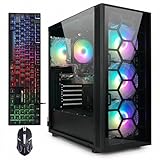


Priority order for a single-PC streamer
| Priority | Component | Why it matters for streaming | Sensible spend |
|---|---|---|---|
| 1 | GPU with hardware encoder | Encodes stream without hurting FPS | Mid-range card |
| 2 | CPU, 6–8 cores | Game logic plus overlay and chat apps | $180–280 |
| 3 | 32GB RAM | Game, encoder, browser, chat all at once | $80–110 |
| 4 | Upload & wired network | Stable bitrate beats raw horsepower | Router settings, free |
Cheap upgrades that punch above their price
The two most underrated streaming investments cost little. First, jump from 16GB to 32GB of RAM — running the game, the encoder, a browser with several tabs, and a chat client simultaneously eats memory quickly, and swapping to disk causes hitching that viewers see. Second, use a wired connection and check your upload speed; a stable 6–10 Mbps upload delivers a clean 1080p stream, and stability matters more than a bigger number. Neither upgrade requires a new GPU, yet both do more for stream quality than a pricier graphics card would.
Where not to overspend
You do not need a top-tier processor. Once you have six to eight capable cores and the GPU is handling encoding, extra cores sit idle during a typical stream. A capture card is also unnecessary for single-PC streaming — that hardware exists for two-PC setups. Skipping it saves $100–200 you can put toward RAM or a better microphone, which viewers notice far more than a few extra frames of game performance.
Spend a little on sound
Audiences forgive middling video long before they forgive bad audio. Once your core hardware is sorted, a modest microphone upgrade in the $50–100 range does more for perceived stream quality than almost any component. It is the cheapest way to sound professional, and it is the upgrade new streamers most often skip while overspending on parts nobody can see.
FAQ
Do I need two PCs to stream and game?
No. A single modern PC with a hardware video encoder on the GPU handles both jobs well. Two-PC setups and capture cards are for creators who want zero performance impact or complex production, not for most streamers on a budget, and skipping them keeps a lot of money in your pocket.
Is more CPU or more RAM better for streaming?
Once you have six to eight cores, more RAM usually helps more. Streaming stacks game, encoder, browser and chat in memory, so moving from 16GB to 32GB removes stutter that extra CPU cores will not fix. Prioritise the memory upgrade before spending on a bigger processor.
Bottom line: Build your streaming rig around a GPU with a strong hardware encoder, add 32GB of RAM, a stable wired upload and a decent microphone, and stop there. Those targeted choices deliver a smooth game-and-broadcast experience for hundreds less than a spec-sheet arms race that spends money where streaming never feels it.


