The Skytech Blaze II suits budget-minded 1080p gamers who accept older hardware, while buyers who want a current-generation system are better served by the newer Blaze listings on the maker’s site or a different Skytech line. “Blaze II” is a model name that was used on several configurations over the years, so the label alone does not tell you the processor, graphics card or memory inside. This guide explains what the line is, how listings have described it, and which kinds of buyers it fits.
As an Amazon Associate we earn from qualifying purchases at no extra cost to you.


Our Top Picks
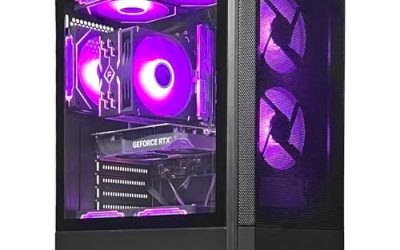
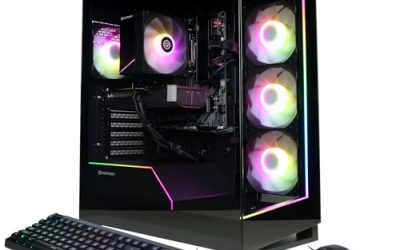
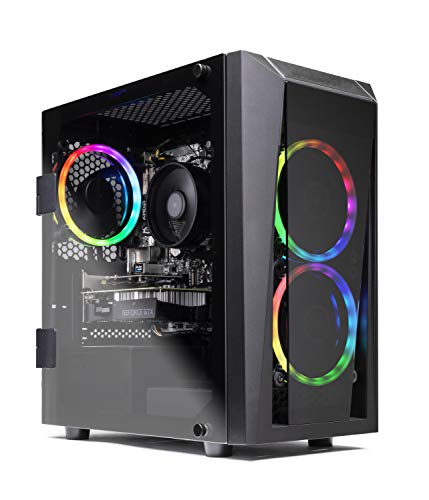 SkyTech Blaze II Gaming Computer PC Desktop2600 | 16gb | 1660 Super20.1 x 9.7 x 21 inchesCheck on Amazon

Top 3 picks at a glance
Quick Answer: What Is the Skytech Blaze II?
Skytech Gaming is a US prebuilt desktop brand that assembles systems from standard parts and sells them in numbered lines. The Blaze family has historically been its entry-to-mid-range tier. Retail listings for the Blaze II show older Ryzen 3000-era processors paired with GTX 1650, GTX 1660 Super and RTX 2060 Super-class graphics, along with 8GB or 16GB of DDR4 and a 500GB SSD in the common versions. Other listings pair a Ryzen 5 5600G with an RTX 3060-class card. Because the name covers several builds, configurations vary by year and listing, and the exact parts printed on the product page you are viewing are the only reliable guide.
Searches such as “skytech blaze 2”, “sky tech blaze 2”, “skytech blaze ii” and “blaze ll” all point to the same product name. The double-L spelling is simply a typing variant of “II”.
At a Glance: Blaze II Versus Newer Skytech Options
| Option | Best for | Stated specs (as presented by maker or listings) | Limits |
|---|---|---|---|
| Blaze II, older Ryzen 3000-era listings | Esports titles and light 1080p play on a tight budget | Ryzen 3 or Ryzen 5 class CPU, GTX 1650 or GTX 1660 Super, 8GB to 16GB DDR4, 500GB SSD, Wi-Fi, RGB case | Previous-generation platform, small SSD, limited headroom for new releases |
| Blaze II, higher-tier listings | Buyers wanting stronger 1080p with ray-tracing-capable graphics | Ryzen 7 2700X with RTX 2060 Super, or Ryzen 5 5600G with RTX 3060 in some listings | Older GPU generation, no current upscaling and frame-generation features of newer cards |
| Blaze Mini | Smaller footprint with a newer GPU | Ryzen 7 5700, RTX 4060 Ti class, 1TB NVMe, 16GB DDR4, 650W Gold PSU in one listing | Compact case limits cooling and expansion |
| Current Blaze (such as Blaze 5) | Buyers who want current parts and warranty coverage on a new system | The maker’s site advertises DDR5 systems and RTX 50-series class graphics across its range | Specs change between listings; confirm the exact build |
The maker’s front page currently advertises Ryzen 7 9800X3D and 9850X3D processors, RTX 5070 through RTX 5080 graphics, 16GB to 32GB of DDR5 and 1TB to 2TB NVMe storage across the broader catalog, which shows how far the current lineup has moved beyond what the Blaze II name originally meant.
Who the Blaze II Suits
A Blaze II listing makes sense when the buyer plays popular esports and older titles at 1080p, wants Windows installed and ready, and values a case with built-in lighting and Wi-Fi. Owners quoted in retail reviews of the related Blaze 3.0 describe entry-to-mid-range 1080p performance as the core appeal, and one reviewer described it as hard to build cheaper at the time. Those comments refer to a neighbouring model and an earlier market, so they indicate the positioning of the line rather than guarantee any specific result.
It is a weaker fit for players who want high settings in the newest releases, 1440p or 4K gaming, or a system expected to last many years without upgrades. In those cases a current-generation line offers a far better starting platform.
Key Specs to Read on Any Blaze Listing
Processor and platform
Older Blaze II builds use AM4-socket Ryzen processors with DDR4 memory. That platform is mature and stable, but it cannot take DDR5 or the newest Ryzen chips. If upgrade life matters, check the socket and memory type before buying.
Graphics card
The graphics card sets most of the gaming experience. The GTX 1650 is an entry-level choice, the GTX 1660 Super a mid-range step above it, and the RTX 2060 Super and RTX 3060 add ray-tracing hardware. None of these belong to the current RTX 50-series generation.
Memory and storage
Listings range from 8GB to 16GB of DDR4. Eight gigabytes is tight for modern games and background apps, so a 16GB listing is the more practical choice. The 500GB SSD in common versions fills quickly with large game installs, so plan on adding storage.
Power supply, case and cooling
Reviewers of Skytech systems generally report ATX-standard motherboards and cases, with parts from familiar makers such as ASUS, MSI, Gigabyte and ASRock for boards, and Corsair, Kingston, TeamGroup and Crucial for memory. One reviewer notes that exact board and power supply models are not always disclosed in advance and can differ by stock, which is another reason to read the specific listing. Power supply ratings in the Blaze family listings range from about 550W in older versions to 650W Gold in the Blaze Mini listing. Cooling on lower-tier models is typically air-based, so fan noise under load depends on the case and cooler supplied.
Upgrade Path
Because Skytech uses standard-format parts, reviewers describe upgrading graphics cards, storage, memory and coolers as straightforward. For a Blaze II, the most useful upgrades are usually extra RAM to reach 16GB, a larger NVMe or SATA SSD, and a graphics card swap if the power supply has enough capacity and the right connectors. Always confirm the power supply wattage and available cables on your unit before buying a new card, and follow the card maker’s power guidance. Unplug the system before opening the case.
Cooling and Noise
Lower-tier Blaze builds use air cooling with case fans, and some Blaze 3.0 listings mention a 240mm liquid cooler. Noise depends on the cooler and the graphics card installed, and no benchmark figures are available for the Blaze II line as a whole. A tempered-glass case with lighting looks good but restricts airflow compared with a mesh front panel, so keep the case in an open area and clean dust filters regularly.
Support and Warranty
The maker states that every system is assembled and tested in the USA, ships free within the contiguous United States, and includes lifetime technical support. Independent sources describe a one-year parts and labor warranty with extension options. Customer feedback on after-sale service is mixed: reviewers describe good rather than exceptional support, with some owners praising responsiveness and others reporting slow replacements or disputes over warranty claims. Keep your order records, test the system soon after delivery and read the warranty terms on the maker’s site before purchasing.
Pick the Right Option
| Pick this if… | Choose |
|---|---|
| You play esports and older games at 1080p on a tight budget | A Blaze II listing with 16GB RAM and a GTX 1660 Super-class card |
| You want stronger 1080p and ray-tracing support | A Blaze II listing with RTX 2060 Super or RTX 3060 class graphics |
| You want a small case and a newer graphics tier | A Blaze Mini listing |
| You want DDR5, a newer platform and long upgrade life | A current Skytech line such as the newer Blaze, Azure or King systems |
| You care most about support and warranty length | A brand that advertises longer coverage |
Alternatives to Consider
- Current Skytech lines. The maker’s site lists Blaze, King, Tempest, Chronos, Azure, Viper and Harpy systems with current CPUs and graphics cards.
- MSI Aegis. Reviewers describe it as using standard consumer parts, which supports upgrades, with a standard one-year limited warranty.
- Corsair prebuilts. One roundup notes the a7500 carries a two-year warranty with lifetime technical support, which may appeal to buyers focused on coverage.
- Building your own. A reviewer noted prebuilt systems carry a premium over a self-built equivalent in exchange for assembly, testing and warranty.
Common Mistakes When Buying
- Comparing reviews of different configurations that share the Blaze name.
- Ignoring the memory type and assuming every system uses DDR5.
- Assuming the power supply can handle any graphics card upgrade.
- Overlooking that some retail reviews were collected as part of promotions.
Frequently Asked Questions
Is the Skytech Blaze II a current model?
The Blaze II name belongs to an older generation, with listings built around Ryzen 3000-era processors and GTX 16-series or RTX 20 and 30-series graphics. The maker’s current catalog highlights newer lines such as Blaze 5 with current parts. Treat a Blaze II as a previous-generation system.
Is Blaze II the same as Blaze 2.0?
Searches use both names, but a search for an RTX 4060 version of a Blaze II did not return a confirmed listing. Listings found used older GPUs, and the Blaze Mini is a separate product. Read the exact specification list rather than relying on the name.
Can the Blaze II run modern games?
Higher-tier listings with an RTX 2060 Super or RTX 3060 class card are generally described as capable 1080p systems, while GTX 1650 versions are better suited to lighter titles. Results depend on the game, settings and the configuration you buy.
Can I upgrade a Skytech Blaze II?
Reviewers describe Skytech systems as using standard parts, so memory, storage and graphics card upgrades are generally possible. Check the power supply wattage and the motherboard’s slots first, and consult the manuals before making changes.
What warranty does Skytech offer?
Independent sources describe a one-year parts and labor warranty with lifetime technical support, plus paid extensions. Support experiences vary between buyers, so confirm the terms on the maker’s site for your purchase.
Is a Blaze II better than building a PC?
A prebuilt saves assembly time and includes warranty coverage, while a self-built system usually offers better parts for the same budget. The choice depends on whether convenience or maximum value matters more to you.
Related guides
More from Amazon
Programs that pair well with the guide above. Offers and eligibility are set by Amazon and may change.
Free shipping on eligible items, Prime Video and more. Eligible new members can start with a free trial.
Start a Prime free trialAd-free music streaming. Eligible new subscribers can start with a free trial.
Try Music Unlimited freeA Prime membership for ages 18-24 with a trial period. Eligibility is set by Amazon.
See Prime for Young AdultsAudiobooks and podcasts to listen to on the go. Eligible new members can start with a free trial.
Try Audible freeAs an Amazon Associate we earn from qualifying purchases.