The best 16:10 monitor in 2026 is the one that matches your work: the Dell Pro 24 Plus P2425E for general office and home use, the ASUS ProArt PA248CRV for colour-critical photo and design work, and the BenQ SW242Q for photographers who want a different brand. A 16:10 screen gives you about 11 percent more vertical space than a 16:9 panel of the same width, which is why writers, coders and spreadsheet users like it. Gamers should know that very few 16:10 monitors are built for high refresh rates.
As an Amazon Associate we earn from qualifying purchases at no extra cost to you.


Our Top Picks
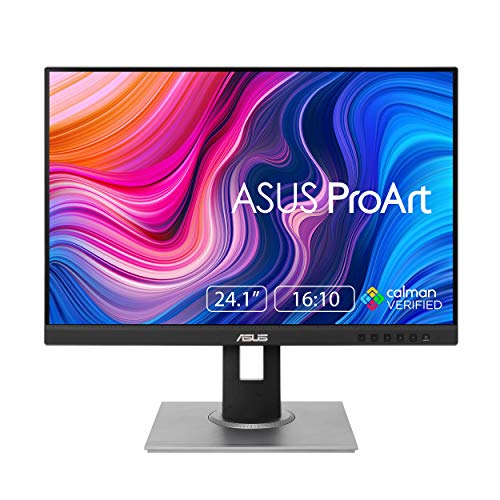 ASUS ProArt PA248QV 24 Inch WUXGA 16:10 Professional24 inches22.55 x 18.66 x 7.56 inches13.45 poundsCheck on Amazon
 Dell UltraSharp U2412M 24-Inch 1920x1200 Screen LED-Lit Monitor7.1 x 21.89 x 20.22 inches17.6 poundsCheck on Amazon
 ASUS BE248QF 24 Inch 1200P Computer Monitor24 Inch8.3 x 20.9 x 18.6 inches12.1 poundsCheck on Amazon
 ASUS ProArt PA248CRV 24 Inch WUXGA USB-C Professional24 Inch20.93 x 7.49 x 15.72 inches17.8 poundsCheck on Amazon
Top 3 picks at a glance
Quick comparison of 16:10 monitor picks
| Pick | Best for | Key specs | Price range |
|---|---|---|---|
| Dell Pro 24 Plus P2425E | Office and home desk | 24.07 inch IPS, 1920×1200, 100 Hz, 99% sRGB, USB-C up to 90 W, Ethernet port | Budget to mid |
| ASUS ProArt PA248CRV | Photo and design work | 24.1 inch, 1920×1200, 75 Hz, 100% sRGB, 97% DCI-P3, Delta E under 2, USB-C 96 W | Mid-range |
| BenQ SW242Q | Photography workflows | 24 inch class 16:10 photographer’s monitor | Premium |
| Dell UltraSharp U2421E | Older UltraSharp option (check availability) | 24.1 inch IPS, 1920×1200, 60 Hz, 99% sRGB, 90 W USB-C | Mid-range |
The list is short on purpose: only a handful of 16:10 monitors are on sale today, and most are 24-inch office or creator models. Specs above follow the manufacturers’ product pages.
Best overall: Dell Pro 24 Plus P2425E
This 24-inch IPS display is the easiest recommendation for everyday work. It runs at 1920×1200 with a 100 Hz refresh rate, which makes scrolling smoother than the 60 Hz common on this form factor. At 94 pixels per inch, text is readable but not razor-sharp. The USB-C port carries video and power to a laptop (up to 90 W on the E model), and the built-in Ethernet and DisplayPort daisy-chain make it a one-cable docking screen. It also carries a three-year warranty. The trade-off is that 1200 pixels of height is modest next to newer 1440p-class screens.
Best for colour work: ASUS ProArt PA248CRV
ASUS lists the PA248CRV as factory-calibrated to a Delta E below 2 and Calman Verified, with 100 percent sRGB and 97 percent DCI-P3 coverage. It has USB-C with up to 96 W power delivery and supports daisy chaining. Its 75 Hz refresh rate is fine for creative work but not for fast games. Choose it if colour accuracy matters more than raw speed.
Best for photographers: BenQ SW242Q
PCWorld described the BenQ SW242Q as the first 16:10 monitor it had seen in years. It is aimed at photo editing, so expect a hardware-calibration oriented feature set and a price above the Dell. Verify the exact resolution and panel specification on BenQ’s page before buying, as variants differ.
Why 16:10 instead of 16:9?
The extra height is the entire argument. Here is the arithmetic for two 24-inch panels:
| Panel | Resolution | Width x height (approx.) | Vertical pixels |
|---|---|---|---|
| 24-inch 16:9 | 1920×1080 | 20.9 x 11.8 inch | 1080 |
| 24-inch 16:10 | 1920×1200 | 20.4 x 12.7 inch | 1200 |
That is 120 extra rows, or about 11 percent more room for lines of code, spreadsheet rows or a Word page without scrolling. In a 10-point document view, a 1200-pixel screen shows roughly six more lines.
Sharpness math: pixel density at common 16:10 sizes
Pixel density is the diagonal resolution divided by the diagonal size. For a 24-inch 1920×1200 panel, the diagonal is about 2264 pixels, so 2264 / 24.1 is roughly 94 PPI. The same resolution stretched to 27 inches drops to about 84 PPI, which looks visibly coarse at desk distance. A 16-inch portable at 1920×1200 reaches about 142 PPI and looks crisp. That is why 24 inches is the sweet spot for 1920×1200 and why larger 16:10 screens need 2560×1600 to look sharp: 2560×1600 at 27 inches gives about 109 PPI, the same as a 1440p monitor.
| Size | Resolution | Approx. PPI | Verdict |
|---|---|---|---|
| 16 inch | 1920×1200 | 142 | Very sharp (portable) |
| 24 inch | 1920×1200 | 94 | Good for office use |
| 27 inch | 1920×1200 | 84 | Soft text |
| 27 inch | 2560×1600 | 109 | Sharp, scarce |
Setup tips for a 16:10 monitor
- Set native resolution first. Running a 1920×1200 panel at 1920×1080 stretches or letterboxes the image and blurs text.
- Leave scaling at 100 percent. At 94 PPI no scaling is needed; fractional scaling softens text.
- Position the top edge at eye level. The extra height makes this more important than on 16:9 screens.
- Use a USB-C cable that supports video. Not every USB-C cable carries a display signal; check the cable is rated for DisplayPort alt mode.
- For games, choose a 16:10 resolution in the settings. If a title shows black bars, use windowed mode or the game’s 16:10 option.
Decision matrix
| If you… | Choose |
|---|---|
| Work from home with a laptop | Dell Pro 24 Plus (USB-C power, Ethernet) |
| Edit photos or video | ASUS ProArt PA248CRV or BenQ SW242Q |
| Code or write all day | Any 16:10, or consider a 3:2 monitor for more height |
| Play fast games | Look at 16:9 gaming monitors instead |
| Need a portable screen | A 16-inch 16:10 portable (1920×1200 class) |
What to check before you buy
- Resolution and size: 1920×1200 is common at 24 inches. A 27-inch 16:10 at 1920×1200 would look coarse, so expect 2560×1600 at larger sizes, which are rare.
- Refresh rate: 60 Hz is acceptable for office use; 75 to 100 Hz feels smoother.
- Connectivity: USB-C with power delivery removes a dock; check wattage against your laptop’s charger.
- Ergonomics: Height, tilt, swivel and pivot adjustment matter for all-day use.
- Scaling: At 94 PPI, run at 100 percent scaling and avoid fractional values that blur text.
Frequently Asked Questions
What does 16:10 mean on a monitor?
It is the ratio of width to height. A 16:10 screen is slightly taller than the common 16:9, which gives more room for documents, code and web pages.
Is a 16:10 monitor good for gaming?
It can work, since many games support 16:10 resolutions, but the models available are mostly office and creative displays with refresh rates of 60 to 100 Hz. Dedicated gaming monitors are usually 16:9.
What resolution is a 16:10 monitor?
Common sizes are 1920×1200 and 2560×1600, with 1920×1200 the standard at 24 inches.
Are 16:10 monitors better for productivity?
For text-heavy tasks, yes. The extra vertical space shows more lines and rows, which reduces scrolling.
Can I run a 16:10 monitor alongside a 16:9 one?
Yes. Windows and macOS handle mixed ratios, but align the screens in display settings so the cursor moves cleanly between them.
Related guides
More from Amazon
Programs that pair well with the guide above. Offers and eligibility are set by Amazon and may change.
Free shipping on eligible items, Prime Video and more. Eligible new members can start with a free trial.
Start a Prime free trialAd-free music streaming. Eligible new subscribers can start with a free trial.
Try Music Unlimited freeA Prime membership for ages 18-24 with a trial period. Eligibility is set by Amazon.
See Prime for Young AdultsAudiobooks and podcasts to listen to on the go. Eligible new members can start with a free trial.
Try Audible freeAs an Amazon Associate we earn from qualifying purchases.