Ultrawide monitors solve a specific problem: you want more horizontal room than a single 16:9 screen offers without the bezel gap of two displays. The catch is that “ultrawide” covers a huge range, from a 2560 x 1080 office panel to a 49-inch super-wide gaming display, and the right pick depends on resolution, curve, refresh rate, and how much desk depth you have. Choosing wrong usually means either a blurry screen or a panel too big for the room.
This guide is for people moving from a standard monitor to a wide format for spreadsheets, editing timelines, racing and flight games, or multitasking with several windows open. The eight models below span the common sizes, and the notes rely only on what each listing states. Read it as a way to narrow the field in 2026, then check physical dimensions and your graphics hardware before ordering.
Our Top Picks
 SAMSUNG 34" ViewFinity S50GC Series Ultra-WQHD Monitor34- in Flat8.7 x 32.1 x 18 inches10.8 poundsCheck on Amazon


Top 3 picks at a glance
Quick Picks
As an Amazon Associate we earn from qualifying purchases at no extra cost to you.




| Product | Best for | Key spec from the listing |
|---|---|---|
| Sceptre 34-inch curved (180Hz) | Fast WQHD gaming on a budget | 3440 x 1440, up to 180Hz/165Hz, 1ms |
| Dell S3425DW | Work-first ultrawide with strong contrast | WQHD VA, 120Hz, 3,000:1, 95% DCI-P3 |
| Sceptre C345B 34-inch | Color-focused WQHD gaming | 3440 x 1440, 180Hz/165Hz, 100% sRGB |
| Samsung ViewFinity S50GC | Office multitasking | Ultra-WQHD, 100Hz, PIP and PBP |
| Samsung Odyssey G7 (G75F) 40-inch | Immersive, high-resolution gaming | WUHD curved, 180Hz, DisplayHDR 600 |
| LG 34U530A-W | Entry-level wide productivity | 2560 x 1080 IPS, 100Hz, USB-C |
| Sceptre Prime 34-inch | High-refresh esports on a wide screen | 3440 x 1440, up to 240Hz, 1ms |
| Samsung Odyssey G9 (G91F) 49-inch | Super-ultrawide immersion | DQHD 32:9, 144Hz, DisplayHDR 600 |
How to Choose
Resolution decides how sharp a wide screen looks
The most common ultrawide resolution in this group is 3440 x 1440 (often called UWQHD), found on the 34-inch Sceptre and Dell models. It keeps text and games crisp at 34 inches. The LG 34U530A-W is 2560 x 1080, which stretches the same pixel height of a 1080p monitor over a wider panel, so each pixel is larger and detail is softer. If you will edit documents or video all day, favor the higher-resolution models. The Samsung 40-inch is listed as WUHD and the 49-inch G9 as DQHD (a 32:9 shape, effectively two 1440p screens side by side), both of which carry far more pixels and need a strong graphics card.
Refresh rate and response time for games
For office work, 100Hz is plenty. For gaming, look for 144Hz or higher, which several of these list, and note that a 240Hz panel only pays off if your graphics card can push those frame rates at 3440 x 1440. Response times listed as 1ms (GtG or MPRT, depending on the maker) help with motion clarity, but the number alone does not tell you how sharp fast movement looks. Adaptive sync such as FreeSync Premium or FreeSync Premium Pro reduces tearing on supported cards.
Do the arithmetic on pixel density before you commit. A 34-inch panel at 3440 x 1440 lands near 110 pixels per inch, a comfortable level for reading text without scaling. The same 34 inches at 2560 x 1080 drops to roughly 80, which is why small fonts look fuzzy on it. The larger 40-inch and 49-inch models regain density only because their resolutions climb along with their size.
Curve, panel type, and size
A curve rating like R1500 means a 1,500mm radius, a gentle bend that suits a desk at arm’s length. Curved screens feel more natural at 34 inches and above, though they can reflect side lighting. VA panels, like the Dell, offer deeper contrast; IPS panels, like the LG, hold color from the sides. Measure your desk before buying: a 34-inch ultrawide is roughly the width of two 24-inch monitors, and a 49-inch model needs a deep, wide desk and a sturdy stand.
Ports and extras
Check the video inputs against your computer. Several Sceptre models list two DisplayPort connections, which suits PCs but offers fewer HDMI options for consoles. The LG lists USB-C, useful for laptops. Features like PIP (picture in picture) and PBP (picture by picture) on the Samsung S50GC let you show two sources at once. Budget models often cut corners on stands, so look for tilt, height, and VESA options if you plan to mount an arm.
Do not overlook the mounting side of things. Wide, curved panels are heavy and the supplied stand often takes a large part of the desk. If you have a monitor arm, confirm that the model supports the VESA pattern it needs, and leave a few inches of clearance behind the screen so the curve does not push you into the wall.
Finally, set a budget tier: the LG and Samsung S50GC sit at the budget to mid-range end, the 34-inch WQHD gaming models are mid-range, and the 40-inch and 49-inch Odyssey monitors are premium.
The 8 Best Options
Sceptre 34-inch Curved (180Hz)
This curved 34-inch ultrawide lists 3440 x 1440 resolution, an R1500 curve, refresh rates up to 180Hz or 165Hz, and a 1ms response time. It also carries two DisplayPort inputs, 99% sRGB, and built-in speakers.
- Strength: the high refresh rate at WQHD suits fast games without a premium price.
- Strength: built-in speakers cover casual audio needs.
- Trade-off: only DisplayPort is highlighted, so console owners should confirm HDMI availability.
Skip it if you need a wide color gamut beyond sRGB or want USB-C.
Dell S3425DW
The S3425DW is a WQHD VA ultrawide with 120Hz, FreeSync Premium, HDR10, and an anti-glare finish. The title lists 300 cd/m2 brightness, 3,000:1 contrast, 95% DCI-P3 coverage, and 2 x 10W speakers.
- Strength: 95% DCI-P3 and 3,000:1 contrast give richer color and darker blacks.
- Strength: Eye Comfort technology and anti-glare treatment suit long workdays.
- Trade-off: 120Hz trails the 180Hz and 240Hz gaming models in this group.
Skip it if esports-level motion matters more than color and contrast.
Sceptre C345B 34-inch Curved
Very similar to the first Sceptre, this C345B model lists 3440 x 1440, an R1500 curve, up to 180Hz or 165Hz, two DisplayPort inputs, 1ms, and built-in speakers, but with 100% sRGB coverage.
- Strength: 100% sRGB suits buyers who also do light photo editing.
- Strength: the WQHD resolution keeps text sharp across 34 inches.
- Trade-off: it is nearly identical to its sibling, so choose by availability and listed color coverage.
Skip it if you need HDR labeling, since none is stated in the title.
Samsung ViewFinity S50GC
A 34-inch Ultra-WQHD monitor with 100Hz, a 5ms response, HDR10, AMD FreeSync, Eye Care features, and a borderless design. The title also highlights PIP and PBP for splitting sources.
- Strength: PIP and PBP help when juggling a laptop and desktop on one screen.
- Strength: Ultra-WQHD resolution fits spreadsheets and timelines comfortably.
- Trade-off: 100Hz and 5ms make it better suited to work than competitive gaming.
Skip it if you want a 144Hz or higher refresh rate.
Samsung Odyssey G7 (G75F) 40-inch
This 40-inch curved gaming monitor is listed as WUHD with 180Hz, a 1ms GtG response, VESA DisplayHDR 600, and AMD FreeSync Premium Pro.
- Strength: WUHD resolution offers a lot of screen detail at 40 inches.
- Strength: DisplayHDR 600 is a step above basic HDR10 labeling.
- Trade-off: its size and resolution demand a powerful graphics card and a deep desk.
Skip it if your computer has modest graphics hardware or your desk is shallow.
LG 34U530A-W
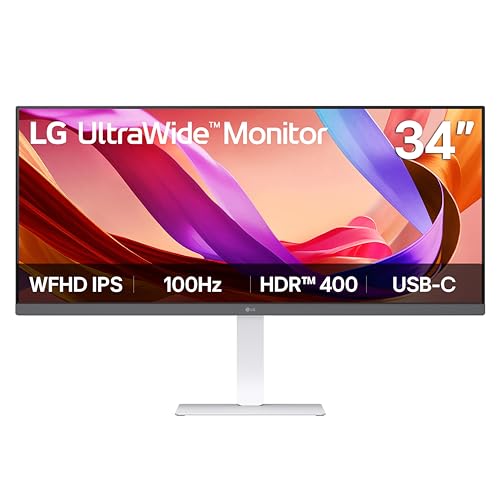
An IPS ultrawide at 2560 x 1080, this LG lists 100Hz, VESA DisplayHDR 400, HDMI, DisplayPort, USB Type-C, and tilt, height, and swivel adjustment.
- Strength: the stand adjusts in several directions, which many ultrawides lack.
- Strength: USB-C helps laptop users connect with a single cable.
- Trade-off: 1080p-height resolution looks less sharp than the WQHD models at 34 inches.
Skip it if you want crisp text for heavy document work.
Sceptre Prime 34-inch Gaming
This curved 3440 x 1440 monitor lists up to 240Hz, an R1500 curve, 1ms, 100% sRGB, and a full set of ports: two DisplayPort and two HDMI, plus built-in speakers.
- Strength: 240Hz is the highest refresh rate in this group at WQHD.
- Strength: two HDMI inputs make it more console-friendly than its siblings.
- Trade-off: reaching 240Hz requires a graphics card capable of those frame rates.
Skip it if your computer will not exceed 100 frames per second.
Samsung Odyssey G9 (G91F) 49-inch
The 49-inch G9 uses a 32:9 DQHD curved panel at 144Hz with DisplayHDR 600, AMD FreeSync Premium Pro, and an ergonomic stand.
- Strength: the 32:9 shape replaces a dual-monitor setup in one panel.
- Strength: an ergonomic stand is highlighted in the title.
- Trade-off: it is the largest and most demanding model here, and some games do not support the 32:9 ratio.
Skip it if you need a compact desk footprint.
Which One Fits Your Situation
You split a laptop and desktop
The Samsung ViewFinity S50GC and LG 34U530A-W are the practical choices. The Samsung gives you PIP and PBP; the LG gives you USB-C.
You play fast shooters
The Sceptre Prime 34-inch lists up to 240Hz at 3440 x 1440 with a 1ms response, the strongest motion spec here. It also lists both two DisplayPort and two HDMI inputs, so a gaming PC and a console can stay plugged in together and switching sources becomes a menu choice instead of a cable swap.
You want color and contrast for work and movies
The Dell S3425DW lists 95% DCI-P3 and 3,000:1 contrast, which suits creative work and film viewing.
You want the biggest possible view
Choose the Samsung Odyssey G9 49-inch if your desk allows it, or the 40-inch G75F if you prefer a less extreme shape.
Common Mistakes
- Buying 2560 x 1080 and expecting the sharpness of 3440 x 1440.
- Ignoring desk depth and width, especially with 40-inch and 49-inch models.
- Chasing 240Hz without a graphics card that can supply the frames.
- Assuming every game supports 21:9 or 32:9 without black bars or stretched visuals.
- Skipping the port check, then discovering the model has only DisplayPort for a console.
Related guides
- Gaming Chair Cushions And Lumbar Supports
- Warranty Considerations When Buying On Sale
- How To Use Camelcamelcamel For Amazon Deals
Frequently Asked Questions
Is a curved ultrawide better than a flat one?
A gentle curve like R1500 keeps the screen edges at a similar viewing distance, which many people find more comfortable on 34-inch and larger panels. It is a preference, not a requirement.
What does 21:9 versus 32:9 mean?
21:9 is the common ultrawide shape found on 34-inch models, roughly like a movie screen. 32:9, used by the 49-inch G9, is twice as wide as a standard screen and acts like two monitors in one.
Do I need a powerful graphics card?
For office work, no. For games at 3440 x 1440 or higher at high refresh rates, yes. The 40-inch and 49-inch models push the most pixels, so they ask the most of the graphics card, while the 2560 x 1080 LG is easy for almost any recent integrated or entry-level graphics chip to drive.
Can an ultrawide replace two monitors?
Mostly. A 34-inch model covers two side-by-side windows well, and a 49-inch model covers about two screens, but you lose the bezel-free flexibility of rotating a single monitor. Window-snapping software or the monitor’s own picture-by-picture mode helps keep windows organized, and a wide screen also reduces the cable and stand clutter of two separate displays.
Related guides
More from Amazon
Programs that pair well with the guide above. Offers and eligibility are set by Amazon and may change.
Free shipping on eligible items, Prime Video and more. Eligible new members can start with a free trial.
Start a Prime free trialAd-free music streaming. Eligible new subscribers can start with a free trial.
Try Music Unlimited freeA Prime membership for ages 18-24 with a trial period. Eligibility is set by Amazon.
See Prime for Young AdultsAudiobooks and podcasts to listen to on the go. Eligible new members can start with a free trial.
Try Audible freeAs an Amazon Associate we earn from qualifying purchases.