A 34 inch ultrawide sits in an odd sweet spot: wide enough to replace two side-by-side screens on a desk, yet narrow enough that you are not turning your head to read a taskbar. The catch is that “34 inch” covers panels with very different sharpness, speed, and curvature. Some listings pack 3440 x 1440 pixels at 180Hz or more, while others stop at 2560 x 1080 and 100Hz. Choosing well means deciding up front whether the monitor is mainly for fast games, spreadsheets and timelines, or a mix of both.
This guide is written for buyers who already know the 34 inch, 21:9 shape suits their desk and want a shortlist they can compare quickly. We sorted eight listings by the specs printed in their titles: resolution, refresh rate, panel type, color coverage, and ports. Prices move constantly, so the picks are grouped by what each monitor is built to do rather than by cost, and the 2026 market still rewards patience on the high-refresh models.
Our Top Picks
 SAMSUNG 34" ViewFinity S50GC Series Ultra-WQHD Monitor34- in Flat8.7 x 32.1 x 18 inches10.8 poundsCheck on Amazon
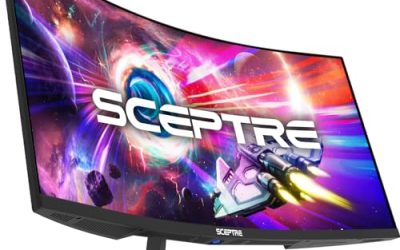
 New! Sceptre Curved 34-inch Prime Gaming Monitor 344034 inches8.5 x 31.8 x 18 inches14 poundsCheck on Amazon


Top 3 picks at a glance
Quick Picks
As an Amazon Associate we earn from qualifying purchases at no extra cost to you.




| Product | Best for | Key spec from the title |
|---|---|---|
| Sceptre 34-inch Curved (99% sRGB) | Value gaming on a curved panel | 3440 x 1440, up to 180Hz/165Hz, 1ms |
| Samsung ViewFinity S50GC | Office work and multitasking | Ultra-WQHD, 100Hz, PIP and PBP |
| Sceptre Prime Gaming 34 | Highest refresh ceiling plus the most inputs | Up to 240Hz, 1500R, HDMI x2 and DisplayPort x2 |
| Dell S3425DW | Color-aware home office | WQHD VA, 120Hz, 95% DCI-P3, 3,000:1 contrast |
| Sceptre C345B | Full sRGB coverage with fast response | Up to 180Hz/165Hz, 100% sRGB, 1ms |
| LG 34U530-W | Ergonomics and USB-C connectivity | WFHD 2560 x 1080 IPS, 100Hz, USB Type-C |
| INNOCN 34 WQHD | Mixed gaming and creative use on IPS | IPS, 180Hz, G-SYNC Compatible, HDR |
| SANSUI 34 Curved UWQHD | Competitive speed at the top of the range | 3440 x 1440, 200Hz, 130% sRGB, 300 nits |
How to Choose
Resolution decides sharpness
On a 34 inch panel, 3440 x 1440 (often sold as WQHD, UWQHD, or Ultra-WQHD) gives roughly 110 pixels per inch, which is comfortable for text and games. The 2560 x 1080 WFHD tier drops to about 82 pixels per inch, so small fonts look softer and you need more screen distance. If you read code, edit video, or keep many windows tiled, treat 3440 x 1440 as the baseline and move to WFHD only for light office tasks or a tight budget.
Refresh rate and response time
For gaming, 144Hz is the practical floor, and anything from 165Hz to 240Hz adds smoothness only if your graphics card can push those frame rates at 3440 x 1440. A 100Hz or 120Hz screen is plenty for work and casual play. Ignore the headline “1ms” number as a quality measure; it is usually a gray-to-gray figure under the most aggressive overdrive setting. Check that the refresh rate is available over the port you intend to use, since DisplayPort often unlocks the top speed that HDMI cannot.
Panel type, color, and HDR
IPS panels offer wide viewing angles and steady color, while VA panels trade some of that for deeper blacks and higher contrast, such as the 3,000:1 figure on one Dell listing. For photo or design work, look for a stated sRGB or DCI-P3 percentage; 95% to 100% sRGB is a sensible minimum. Treat basic HDR10 labels and 300 nit brightness as compatibility tags rather than true HDR. Real highlight punch usually starts well above 400 nits with local dimming.
Ports, curvature, and desk fit
A 1500R curve is aggressive and suits immersive games at arm’s length, while flatter or IPS designs feel more natural for spreadsheets. Count the inputs you need: two DisplayPort and two HDMI is flexible, while a USB Type-C port can power a laptop and carry video over one cable. Built-in speakers are convenient but thin. Height and swivel adjustment matter more than most buyers expect, because a fixed-height stand at the wrong level causes neck strain within days.
The 8 Best Options
Sceptre 34-inch Curved WQHD (99% sRGB)
This listing leads with a 3440 x 1440 curved panel, a 1500R curve, two DisplayPort inputs, and a refresh rate of up to 180Hz or 165Hz depending on the connection. It suits a buyer who wants a gaming-first ultrawide with built-in speakers and does not need premium color work.
- Strength: WQHD resolution with a high refresh ceiling gives it a strong gaming profile on paper.
- Strength: Two DisplayPort inputs let you connect a desktop and a second source without swapping cables.
- Trade-off: The title lists only 99% sRGB and no HDMI count, so check your source device before buying.
Skip it if you need USB-C docking or rely on a laptop that outputs only over HDMI. Because the title names no HDMI ports at all, a console or a laptop without a DisplayPort output may need an adapter, so confirm your source devices first.
Samsung ViewFinity S50GC
The ViewFinity S50GC pairs an Ultra-WQHD panel with 100Hz, 5ms response, HDR10, AMD FreeSync, and an Eye Care mode. PIP and PBP are listed, which lets two sources share the screen. It targets office users who want a clean borderless design more than competitive gaming.
- Strength: PIP and PBP make it useful for juggling a work laptop and a desktop.
- Strength: Eye Care features and a borderless look suit long daytime sessions.
- Trade-off: 100Hz and 5ms trail the gaming-focused models in this list.
Skip it if fast shooters are your priority. Anyone who spends most of the day in documents, email, and video calls is the real audience here, since 100Hz is already a visible upgrade over a standard 60Hz office display.
Sceptre Prime Gaming 34
This Sceptre listing advertises up to 240Hz at 3440 x 1440, a 1500R curve, 1ms response, 100% sRGB, and a generous input panel of two DisplayPort and two HDMI. It is aimed at gamers who want the widest port selection and a very high refresh ceiling. A console on one HDMI port, a desktop on DisplayPort, and a spare input for a work laptop all fit without a switch box, which is rare at this size.
- Strength: Two HDMI plus two DisplayPort inputs cover a PC and a console together.
- Strength: 100% sRGB coverage is better than the 99% on its sibling models.
- Trade-off: A 240Hz target at this resolution demands a powerful graphics card to use fully.
Skip it if your system cannot approach 200 frames per second.
Dell S3425DW
Dell’s S3425DW is a WQHD VA monitor at 120Hz with FreeSync Premium, HDR10, an anti-glare coating, 300 cd/m2 brightness, 3,000:1 contrast, and 95% DCI-P3 coverage. Twin 10W speakers are included. It fits home-office users who care about color and contrast and still want smooth motion.
- Strength: 95% DCI-P3 coverage is the widest color claim among the non-gaming models here.
- Strength: Anti-glare treatment and Eye Comfort tuning help in bright rooms.
- Trade-off: 120Hz is lower than the gaming-oriented panels in this roundup.
Skip it if you want the fastest refresh rate for competitive play. It also lists no curvature rating, which some buyers prefer for shared desks and wall-adjacent setups where a curved panel looks awkward.
Sceptre C345B
The C345B shares the 3440 x 1440 resolution, 1500R curve, and up to 180Hz/165Hz refresh figures with the first Sceptre, but the listing moves color coverage up to 100% sRGB. Two DisplayPort inputs and built-in speakers round it out.
- Strength: Full sRGB coverage suits mixed work and play.
- Strength: 1ms response and a high refresh ceiling give gaming headroom.
- Trade-off: Near-identical siblings make the choice confusing, so compare model numbers carefully.
Skip it if you need HDMI-heavy setups.
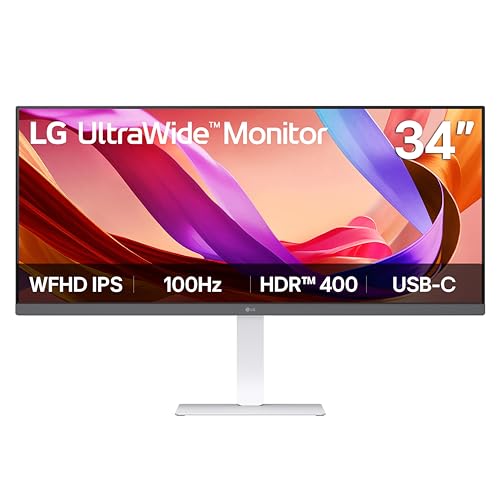
LG 34U530-W
LG takes a different route: a WFHD 2560 x 1080 IPS panel at 100Hz with VESA DisplayHDR 400, HDMI, DisplayPort, and USB Type-C. Tilt, height, and swivel adjustment are all listed. It is the most desk-friendly option for office workers who want one-cable laptop connections.
- Strength: USB Type-C simplifies a laptop dock-style setup.
- Strength: Full stand adjustment avoids neck strain.
- Trade-off: The lower WFHD resolution looks softer than the WQHD rivals.
Skip it if you want crisp text or serious gaming. Buyers upgrading from a 27 inch 1440p screen will notice the drop in sharpness right away, so this suits those moving up from older 1080p displays.
INNOCN 34 WQHD IPS
INNOCN lists a 3440 x 1440 IPS panel at 180Hz with Adaptive-Sync, G-SYNC Compatible support, HDMI, DisplayPort, PIP and PBP, HDR, and MPRT motion tuning. It is a flexible pick for someone who games in the evening and works with multiple windows during the day.
- Strength: IPS panel plus 180Hz covers both color and speed.
- Strength: G-SYNC Compatible labeling helps owners of supported graphics cards.
- Trade-off: The title shows a single speaker mention and few detailed brightness figures.
Skip it if you want a curved screen, since the listing does not mention a curve. Also note that PIP and PBP are handy, but they only help if you actually own two sources to feed it.
SANSUI 34 Curved UWQHD
SANSUI pushes the headline numbers: 3440 x 1440 at 200Hz, a curved design, 1ms overdrive, HDR, 300 nits, and 130% sRGB. PBP support is listed. This one is for competitive players who want the highest refresh rate available in the group.
- Strength: 200Hz is the second-fastest refresh figure in the list.
- Strength: PBP support helps with multitasking.
- Trade-off: A 130% sRGB figure describes gamut size, not accuracy, so it can look oversaturated.
Skip it if color-accurate editing matters. Photographers and video editors are better served by the IPS or DCI-P3 listings, because an oversized gamut without calibration tends to push skin tones toward orange.
Which One Fits Your Situation
You split time between spreadsheets and games
The INNOCN 34 WQHD IPS combines an IPS panel with a 180Hz ceiling and PBP, so one monitor covers both jobs.
You need a laptop-friendly office screen
The LG 34U530-W has USB Type-C and full stand adjustment, which makes it the easiest to live with at a work desk, even at lower resolution.
You want maximum frame rate for shooters
Choose the Sceptre Prime Gaming 34 for its 240Hz ceiling and plentiful inputs, or the SANSUI if you prefer 200Hz with PBP.
You care about color and a calm workspace
The Dell S3425DW offers 95% DCI-P3 coverage, an anti-glare finish, and a VA panel with strong stated contrast.
Common Mistakes
- Assuming the top refresh rate works on every port; confirm which input unlocks it.
- Buying 240Hz without a graphics card that can reach those frame rates at 3440 x 1440.
- Treating “HDR10” on a 300 nit panel as a true HDR experience.
- Ignoring stand adjustability on monitors with a fixed height.
- Confusing a large sRGB percentage with accurate, calibrated color.
Related guides
- Gaming Chair Cushions And Lumbar Supports
- How To Use Camelcamelcamel For Amazon Deals
- Warranty Considerations When Buying On Sale
Frequently Asked Questions
Is 3440 x 1440 worth it over 2560 x 1080?
For most buyers, yes. The extra pixel density makes text and game scenes noticeably sharper, and it needs only a mid-range graphics card to run well at 100Hz to 144Hz.
Do I need a curved monitor?
Not strictly. A 1500R curve helps immersion in games at close range, but flat or gently curved panels are often easier for office layouts and shared desks.
What does G-SYNC Compatible or FreeSync mean?
Both are adaptive-sync features that match the monitor’s refresh rate to your graphics card to reduce tearing. Check that your card supports the standard listed.
Are built-in speakers good enough?
They are fine for video calls and casual audio, but headphones or desktop speakers will sound fuller for games and music.
Related guides
More from Amazon
Programs that pair well with the guide above. Offers and eligibility are set by Amazon and may change.
Free shipping on eligible items, Prime Video and more. Eligible new members can start with a free trial.
Start a Prime free trialAd-free music streaming. Eligible new subscribers can start with a free trial.
Try Music Unlimited freeA Prime membership for ages 18-24 with a trial period. Eligibility is set by Amazon.
See Prime for Young AdultsAudiobooks and podcasts to listen to on the go. Eligible new members can start with a free trial.
Try Audible freeAs an Amazon Associate we earn from qualifying purchases.