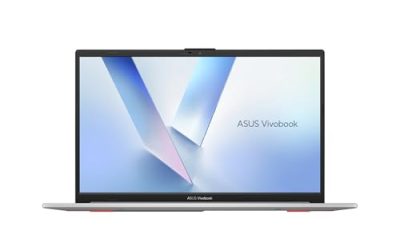
“Computer bag” covers a surprisingly wide range: a padded sleeve that slides into another bag, a messenger that hangs from one shoulder, a leather-look tote that doubles as a handbag, and a briefcase with a trolley strap. The keyword tells you only that a laptop needs protection while it travels, so the first decision is how you carry it: in your hand, on your shoulder, or tucked inside a larger pack.
This guide is for office workers, teachers, students, and travelers who want a bag matched to a laptop size and a daily routine. Seven options are compared using only the specs in their listings, from a basic Lenovo messenger to briefcases built for 17-inch machines. Pick by fit and carrying style first, then by extras like water resistance or a pass-through strap. Screen sizes keep shifting in 2026, so a bag bought for an older 15-inch model may not suit its replacement.
Our Top Picks
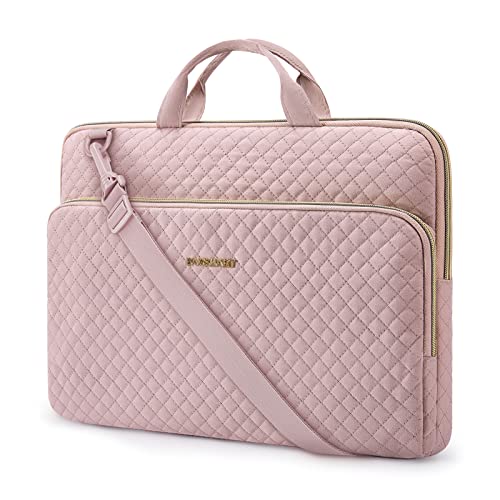 BAGSMART Laptop Sleeve Case with Handle Protective Water-Resistant15.6 Inch15.74 x 0.98 x 11.41 inches0.7 poundsCheck on Amazon


Top 3 picks at a glance
Quick Picks
As an Amazon Associate we earn from qualifying purchases at no extra cost to you.


| Product | Best for | Key spec taken from the product title |
|---|---|---|
| Lenovo Laptop Bag T210 | Simple everyday carry | Messenger shoulder bag for laptop or tablet |
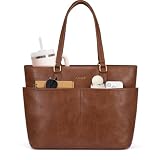
| LOVEVOOK Laptop Tote | Teachers and office staff | Leather-look work tote, waterproof, large handbag style |
| BAGSMART 3 In 1 Briefcase | Large 17.3-inch laptops | Fits 17.3-inch, water-repellent shoulder bag |
| Targus 15-16 Inch Briefcase | Business travel | Padded compartment, trolley strap, 16-inch fit |
| BAGSMART Laptop Sleeve Case | Bag-in-bag protection | 15-15.6 inch, handle, water-resistant, front pockets |
| Ytonet Laptop Case 16 inch | Slim sleeve for 16-inch laptops | TSA friendly, water resistant, 15-15.6 inch fit |
| Ferkurn 17.3-inch Laptop Bag | Big HP, Dell, and Lenovo laptops | 17 to 17.3 inch fit, compatibility list in title |
How to Choose
Size and fit come before style
Check the screen size printed on your laptop’s spec sheet, then pick a bag listed for that size or a close step above it. Labels like 15-15.6 inch suit most mainstream 15-inch machines, while 16 and 17.3-inch bags are needed for large workstations and some gaming models. A loose fit lets the laptop slide, and a tight fit stresses the zipper. Measure width and depth if your machine has a large bezel or a protective case.
Carry style decides daily comfort
Messenger and briefcase styles hang from a shoulder strap and suit short walks. A tote works for a person who carries lunch and papers too, though it can strain one shoulder. A sleeve with a handle is the lightest option and slips into a backpack or tote. If you walk long distances, a backpack is easier on your back than any of these. Anyone who commutes by bicycle or on foot for more than twenty minutes should think about that before buying a one-strap model.
Protection and weather resistance
Look for padded compartments and a raised lining at the bottom, which protect against drops. Water-resistant or water-repellent fabric helps in drizzle, but a bag that is only coated can soak through in heavy rain. For flying, a pass-through strap that slides over a rolling suitcase handle is a genuine time saver.
What to ignore and where corners get cut
Ignore gift-oriented wording; it does not change materials. Ignore vague words such as premium or heavy duty unless a material or construction detail backs them up. Cheaper bags usually cut corners on zipper quality, strap stitching, and padding thickness. Leather-look finishes vary widely, so read the material details on the page rather than assuming real leather. Extra pockets are less important than a secure main compartment, and a magnetic or flimsy closure is a warning sign for a bag meant to hold an expensive device.
The 7 Best Options
These write-ups lean only on what each title states. Dimensions, weight, and materials beyond the title are not assumed, so confirm those on the full product page before you decide.
Lenovo Laptop Bag T210
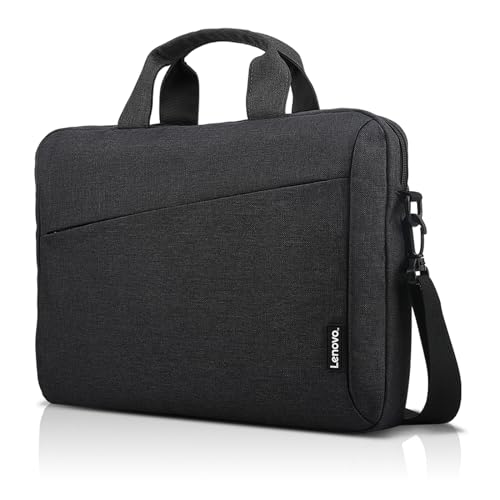
Lenovo’s T210 is a messenger-style shoulder bag intended for a laptop or tablet. The title gives few details beyond that, so treat it as a straightforward bag from a known laptop brand.
- Messenger design makes the laptop easy to reach in an office or classroom.
- Works for a laptop or tablet, which suits mixed-device households.
- Trade-off: the listing mentions no size, water resistance, or padding details.
It is a sensible low-fuss option for a worker who wants a familiar brand name and a bag that does not draw attention in a meeting. Skip it if you need a confirmed fit for a particular laptop size before ordering.
LOVEVOOK Laptop Tote Bag
LOVEVOOK pitches a large leather-look tote for women that doubles as a work handbag. The title mentions a waterproof, business-teacher style that works as a purse or briefcase.
- The tote shape holds a laptop plus papers and a lunch.
- Waterproof wording and a work-bag look suit teachers and office staff.
- Trade-off: a tote lacks a balanced strap, so a heavy load rests on one shoulder.
The large handbag format also means a wallet, keys, and a notebook can ride in the same bag as the computer. Skip it if you want a bag for 17-inch laptops or a unisex look.
BAGSMART 3 In 1 Laptop Bag
This briefcase-style shoulder bag from BAGSMART fits laptops up to 17.3 inches and is described as water-repellent. It targets business travel and office use, in black.
- A 17.3-inch fit covers the largest mainstream laptops.
- The 3-in-1 label points to multiple carrying styles in one bag.
- Trade-off: a bag sized for 17.3 inches can feel oversized with a small laptop.
It suits designers, analysts, and travelers who need a large screen on the road and a bag that adapts to a shoulder, hand, or desk. Skip it if you carry a 13-inch or 14-inch laptop and want a slim bag.
Targus 15-16 Inch Slim Briefcase
Targus offers a slim, lightweight briefcase in black that doubles as a messenger and shoulder bag. A padded compartment protects laptops up to 16 inches, and a trolley strap lets it ride on a suitcase handle.
- Trolley strap makes airport travel easier.
- Slim profile suits a commuter who carries little else.
- Trade-off: a slim bag has limited space for chargers, files, and extras.
It pairs well with a roller bag on business trips, where the main luggage carries the bulk and this holds only the essentials. Skip it if you pack a lot of paperwork or a large power adapter.
BAGSMART Laptop Sleeve Case
This BAGSMART sleeve is a protective, water-resistant case with a handle and front pockets, made for 15 to 15.6 inch laptops. It is lighter than a full briefcase.
- Handle and front pockets let it work on its own for short trips.
- Slim and lightweight, so it slides into a backpack or tote.
- Trade-off: a sleeve has no strap, so it is less convenient for long walks.
Students sometimes use a sleeve like this to keep a laptop dry inside a gym bag or backpack. Skip it if you want one bag that carries everything.
Ytonet Laptop Case 16 inch
Ytonet’s sleeve is made for 15 to 16 inch laptops and mentions TSA friendly design, a water-resistant cover, and compatibility with MacBook Pro and other brands. It is a protective layer rather than a full bag.
- A 16-inch capacity suits larger laptops in a slim format.
- Water-resistant material adds some protection from drizzle.
- Trade-off: as a sleeve it offers less storage for accessories.
A TSA-friendly claim is attractive for frequent flyers, though checkpoint rules vary and are worth confirming. Skip it if you need a shoulder strap and room for a charger.
Ferkurn 17.3-inch Laptop Bag
Ferkurn is built for big laptops, with a 17 to 17.3 inch fit and a title that lists compatibility with HP OmniBook, Envy, Omen and Pavilion, LG Gram, Dell Inspiron and Precision, and Yoga and ThinkPad models.
- Large size fits several big-laptop families.
- The compatibility list helps owners of those brands confirm a fit.
- Trade-off: the oversized bag is awkward with a smaller laptop.
Always compare your exact model number with the list before ordering, because large laptops vary by a surprising amount. Skip it if you carry a 15-inch laptop or smaller.
Which One Fits Your Situation
You are a teacher or office worker who carries papers
Choose the LOVEVOOK tote. It carries a laptop with documents and personal items, and the work-bag look suits school and office. Teachers who walk between classrooms with grading folders will likely find the open tote format convenient.
You fly often with a 15 or 16 inch laptop
Choose the Targus briefcase. The trolley strap and padded compartment suit airports, and the slim profile makes it easy to stow under a seat. It is also a good pick if you want a work bag that does not look like a student pack. The 15-16 inch range also makes it flexible if you change laptops within that bracket.
You own a 17-inch laptop
Choose the BAGSMART 3 In 1 or the Ferkurn. The BAGSMART is a water-repellent shoulder bag, while the Ferkurn lists brand compatibility, which helps if you own one of the named series.
You already use a backpack
Choose the BAGSMART sleeve or the Ytonet. They add padded protection inside a bigger pack without adding much weight. The BAGSMART brings a handle and front pockets, while the Ytonet covers a 16-inch laptop in a slimmer shape, so pick by laptop size.
Common Mistakes
- Choosing by laptop brand compatibility alone and not checking the screen size.
- Buying a bag that is too large, which lets a laptop slide and bang around.
- Assuming a water-resistant label means a bag survives heavy rain.
- Carrying a heavy tote on one shoulder every day when a strap or backpack would be easier on you; switching sides only helps a little.
- Skipping a padded compartment because the outside looks sturdy; protection comes from the lining, not the shell.
Related guides
- Gaming Chair Cushions And Lumbar Supports
- Travel Backpack With Laptop Compartment
- Business Laptops With Long Battery Life
Frequently Asked Questions
What is the difference between a laptop sleeve and a laptop bag?
A sleeve is a thin protective cover, usually without a strap. A bag adds a strap, pockets, and room for a charger and papers. Many people combine the two: a sleeve for protection and a bag for carrying.
How do I know my laptop will fit?
Match the screen diagonal to the size listed on the bag, then compare the case’s inside dimensions with your laptop’s width and depth. When in doubt, choose a size slightly above, and keep in mind that a thick protective shell on the laptop itself adds bulk.
Are leather-look bags durable?
It depends on the material and stitching. Read the material description rather than relying on the look, and expect more wear on corners and handles. Look for reinforced stitching where straps attach, because that is where inexpensive bags tend to fail first.
Is a TSA friendly bag necessary for travel?
It is optional but convenient. A checkpoint-friendly layout lets you open the bag flat so the laptop can be scanned without removal, which speeds up security lines.
Related guides
More from Amazon
Programs that pair well with the guide above. Offers and eligibility are set by Amazon and may change.
Free shipping on eligible items, Prime Video and more. Eligible new members can start with a free trial.
Start a Prime free trialAd-free music streaming. Eligible new subscribers can start with a free trial.
Try Music Unlimited freeA Prime membership for ages 18-24 with a trial period. Eligibility is set by Amazon.
See Prime for Young AdultsAudiobooks and podcasts to listen to on the go. Eligible new members can start with a free trial.
Try Audible freeAs an Amazon Associate we earn from qualifying purchases.