A business laptop earns its place through boring strengths: it boots, it connects to the conference room display, it survives eight hours of spreadsheets and email, and it does not need babysitting from IT. Searching for top rated laptops for business usually means the buyer wants those dependable traits without wading through gaming specs. The catch is that a model labeled “business” on a listing may be a true corporate machine or a consumer laptop with a sticker, so the details below matter.
This guide is for small business owners, office managers and remote professionals shopping in 2026 who want a short, honest list. We rank nothing by popularity and cite no ratings; instead the seven laptops below are judged on the specs their titles state, such as memory, storage, ports, security features and operating system edition. Use it to decide which configuration deserves a closer look, then confirm the full spec sheet before you commit.
Our Top Picks
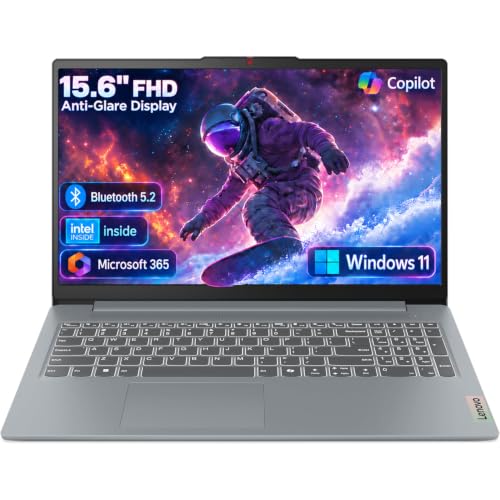
 Lenovo V15 Gen 4 Business Laptop16GB RAM | 512GB SSD14.13 x 9.29 x 0.78 inches3.64 poundsCheck on Amazon
 Dell Latitude 5420 14" FHD Business Laptop Computeri5-1145G7-16-256-SV-Win1112.76 x 8.35 x 0.76 inches3 poundsCheck on Amazon



Top 3 picks at a glance
Quick Picks
As an Amazon Associate we earn from qualifying purchases at no extra cost to you.




| Product | Best for | Key spec from the title |
|---|---|---|
| HP 17-inch Business Laptop | Large-screen desk work | Ryzen 5, 16GB RAM, 512GB SSD, 17.3″ FHD |
| Lenovo V15 Gen 4 | Office wiring and docking | Core i5-13420H, HDMI, RJ45, Windows 11 Pro |
| Dell Latitude 5420 (Renewed) | Compact, Pro-licensed fleet use | 14″ FHD, Core i5-1145G7, 16GB, Windows 11 Pro |
| HP Business Laptop (Ryzen 5 7430U) | Roomy display with 16GB memory | Ryzen 5 7430U, 17.3″ FHD, Wi-Fi 6, 512GB |
| Dell Inspiron 15 3530 | Storage-heavy touchscreen use | Core i7-1355U, 16GB, 1TB SSD, touchscreen |
| HP 255 G10 | Secure everyday office tasks | 16GB, 512GB SSD, Windows 11 Pro, webcam shutter |
| Dell 15.6 (Core Ultra 5) | Newer-generation processor with DDR5 | Core Ultra 5 225U, 16GB DDR5, 300-nit anti-glare |
How to Choose
Operating system edition matters more than it looks
Windows 11 Pro adds features that office environments rely on, such as domain join and BitLocker drive encryption. Windows 11 Home does not include domain join. Three of the seven laptops here list Pro in the title, while the Dell with the Core Ultra 5 lists Home, so check that before buying for a company network.
Memory and storage thresholds
Sixteen gigabytes of RAM is a comfortable target for a modern office workload with browser tabs, a video call and a few documents open together. Eight gigabytes still works for light roles but leaves little headroom. For storage, 256GB can feel tight once local files and updates pile up, while 512GB or 1TB gives more breathing room.
Ports and connectivity
Business use depends on cables. Look for HDMI for presentations, an RJ45 Ethernet port where Wi-Fi is unreliable, and a numeric keypad if you enter data all day. The Lenovo V15 Gen 4 lists both HDMI and RJ45, and several 15.6-inch and 17.3-inch models list a numeric keypad. Check Wi-Fi generation too: Wi-Fi 6 is a sensible floor.
Screen size and where cheap models cut corners
A 17.3-inch FHD display is excellent at a desk but heavy to carry, while a 14-inch model like the Latitude is easier to move around. Low-end business laptops often skimp on brightness and keyboard backlighting, so a listing that states a nit rating or backlit keyboard is worth noting. Treat vendor claims such as outperforming another processor with caution, since titles do not show the testing behind them. Compare model numbers and generations instead, and remember that a U-series chip is built for efficiency, not peak speed.
The 7 Best Options
HP 17-inch Business Laptop (Ryzen 5)
This HP combines a 17.3-inch FHD display with an AMD Ryzen 5 processor, 16GB of RAM and a 512GB SSD, plus a numeric keypad. It suits accountants, bookkeepers and anyone who works with wide spreadsheets at a fixed desk. Its pitch is simple: a roomy panel, current-generation Ryzen silicon and enough memory that a day of open files should not feel cramped on paper.
- Strength: 16GB and 512GB cover a full workload for most office roles.
- Strength: the large display and numeric keypad speed up data entry.
- Trade-off: a 17.3-inch chassis is less convenient for frequent travel.
Skip it if you commute daily with your laptop, or if you need the Pro operating system, since the title does not state the edition.
Lenovo V15 Gen 4
The V15 Gen 4 lists an Intel Core i5-13420H, a 15.6-inch FHD display, HDMI, an RJ45 Ethernet port, a webcam, a numeric keypad and Windows 11 Pro. That combination reads like a checklist for a small office that wants to plug in, dock and join the company network. For a five-person firm setting up several identical machines, that consistency is the main selling point.
- Strength: Windows 11 Pro and a wired Ethernet port suit managed networks.
- Strength: HDMI and a numeric keypad cover presentations and data entry.
- Trade-off: the title does not state memory or storage, so confirm both before buying.
Skip it if you need verified memory and storage figures in the listing, or a touchscreen.
Dell Latitude 5420 (Renewed)
The Latitude 5420 is a 14-inch FHD business laptop with a quad-core Core i5-1145G7, 16GB of DDR4 and a 256GB SSD, running Windows 11 Pro. The “Renewed” tag means it is a refurbished unit, which may suit cost-conscious teams who value the Latitude line. It is the one entry here that leans on a refurbished supply chain, so the buyer is trading novelty for a business-class name.
- Strength: the Latitude name and Windows 11 Pro fit workplace deployments.
- Strength: 14 inches is a more portable size than the 15.6-inch and 17.3-inch options.
- Trade-off: an older processor generation and only 256GB of storage.
Skip it if you need a brand-new unit, a long upgrade runway, or generous local storage.
HP Business Laptop (Ryzen 5 7430U)
This HP lists a Ryzen 5 7430U, a 17.3-inch FHD display, Wi-Fi 6, 16GB of RAM and a 512GB PCIe drive. It targets users who want a large screen and a newer-generation AMD U-series chip in one package. Buyers who like the idea of the other HP but want a different processor name can use this one as the direct comparison.
- Strength: Wi-Fi 6 with 16GB RAM and 512GB PCIe storage is a solid mainstream mix.
- Strength: the 17.3-inch screen gives room for split-window work.
- Trade-off: it overlaps with the other 17-inch HP, so compare the two before choosing.
Skip it if you want a compact machine, or a built-in Ethernet port, which the title does not mention.
Dell Inspiron 15 3530
The Inspiron 15 3530 is a 13th-generation Dell with a Core i7-1355U, 16GB of RAM, a 1TB SSD and a 15.6-inch FHD touchscreen, plus a webcam, HDMI and Wi-Fi 6. It suits professionals who keep a large local library of files and like touch input. Drawing on the listed 1TB drive, it can hold large project folders, scans and media without relying on external disks.
- Strength: 1TB of storage is the largest drive among the seven.
- Strength: an i7 U-series processor with 16GB handles multitasking.
- Trade-off: the Inspiron line is consumer-oriented, so management features may differ from a Latitude.
Skip it if your IT department requires a specific corporate line or Pro-only features, or if you want a lighter machine for travel.
HP 255 G10
The 255 G10 lists an AMD quad-core CPU, 16GB of RAM, a 512GB SSD, Windows 11 Pro, a 15.6-inch Full HD display, a webcam with a privacy shutter and a numeric keypad. It is a straightforward office tool for staff who need security basics and no frills. Offices that deploy the same model to many employees will appreciate that it is plain, familiar and focused on the basics.
- Strength: Windows 11 Pro plus a webcam shutter suit privacy-minded offices.
- Strength: 16GB and 512GB are well matched to daily office work.
- Trade-off: the title does not name the exact processor model.
Skip it if you want a premium design, a touchscreen, or a clearly specified CPU in the title.
Dell 15.6 (Core Ultra 5 225U)
This Dell pairs an Intel Core Ultra 5 225U with 16GB of DDR5, a 512GB SSD and a 15.6-inch FHD anti-glare screen rated at 300 nits, with a backlit keyboard and Windows 11 Home. It is the newest platform in the group, and the screen and keyboard details make it pleasant for long days in a bright room.
- Strength: the 300-nit anti-glare screen helps in bright offices.
- Strength: DDR5 memory and a backlit keyboard add polish.
- Trade-off: Windows 11 Home lacks the domain features of the Pro edition.
Skip it if your company network requires Windows Pro, or if you plan to manage laptops centrally. Anyone who prefers a proven, older platform over the newest chip generation may also prefer the Latitude or Inspiron.
Which One Fits Your Situation
You manage a small office network
The Lenovo V15 Gen 4 or the HP 255 G10 are the natural fits, since both list Windows 11 Pro and practical office features.
You live in spreadsheets
Choose the HP 17-inch Business Laptop with Ryzen 5, which offers the big display and the numeric keypad together with 16GB of RAM. The second 17.3-inch HP is a close alternative if you want to compare processors.
You carry the laptop between sites
The Dell Latitude 5420 at 14 inches is the most portable pick, with the tradeoff of a Renewed unit and a smaller drive. Pair it with cloud storage or an external drive if your files outgrow 256GB.
You need lots of local storage
The Dell Inspiron 15 3530 offers a 1TB SSD and a touchscreen, making it the strongest storage option on the list. Consultants and designers who keep large local archives will find it the most comfortable fit.
Common Mistakes
- Assuming the word “business” in a title guarantees Pro features or corporate-grade support.
- Buying a Windows 11 Home laptop for a network that requires domain join.
- Ignoring the Renewed label and expecting the warranty terms of a new unit.
- Skipping ports, then discovering the office projector needs HDMI or the desk needs Ethernet.
- Paying for a large 17.3-inch screen when daily travel is part of the job.
Related guides
- Gaming Chair Cushions And Lumbar Supports
- Travel Backpack With Laptop Compartment
- Business Laptops With Long Battery Life
Frequently Asked Questions
Do I need Windows 11 Pro for business?
If you plan to join a company domain or use enterprise encryption management, yes. For a solo professional with basic needs, Home can be enough, but Pro is the safer choice for shared networks. Upgrading later is possible, though it is simpler to buy the right edition up front.
How much RAM does a business laptop need?
Sixteen gigabytes is a sensible target for most office workloads. Eight gigabytes can work for lighter roles but offers less headroom over time.
Is a renewed business laptop a good idea?
It can stretch a budget, especially for a line like the Latitude. Make sure you understand the seller’s return and warranty terms, because those differ from a brand-new unit.
Which port types should I look for?
HDMI covers presentations and external monitors, RJ45 helps in offices with weak Wi-Fi, and USB-C adds docking flexibility. Not every title here lists all three, so check the full spec sheet. If a dock is part of your desk setup, confirm the port type before you order, because adapters add clutter and cost.
Related guides
More from Amazon
Programs that pair well with the guide above. Offers and eligibility are set by Amazon and may change.
Free shipping on eligible items, Prime Video and more. Eligible new members can start with a free trial.
Start a Prime free trialAd-free music streaming. Eligible new subscribers can start with a free trial.
Try Music Unlimited freeA Prime membership for ages 18-24 with a trial period. Eligibility is set by Amazon.
See Prime for Young AdultsAudiobooks and podcasts to listen to on the go. Eligible new members can start with a free trial.
Try Audible freeAs an Amazon Associate we earn from qualifying purchases.