
Business school puts a particular kind of load on a laptop. Spreadsheet models with a dozen linked tabs, case-study PDFs open beside a video call, group presentations built in slides, and exam software that sometimes demands a specific Windows setup all run on the same machine, often at once. A laptop that is fine for browsing and streaming can feel painfully slow when a finance course asks for a large Excel workbook and a team meeting at the same time.
This guide is for MBA and undergraduate business students, and for anyone buying a Windows laptop meant to survive coursework in 2026 without a premium tier outlay. Eight models are compared, from a 17 inch Ryzen 5 workhorse and an ASUS Vivobook with a 10-core Core i5 to several budget machines with only 4GB of memory. The point is to show where the specs support serious spreadsheet work and where they do not.
Our Top Picks
 HP 14" Laptop Computer for 2026 Student Business4GB RAM + 628GB Storage12.76 x 8.86 x 0.71 inches3.24 poundsCheck on Amazon
 ASUS Vivobook 14" FHD Laptop for Student Businessi5|16GB RAM|512GB SSD20 x 10.8 x 0.96 inches7 poundsCheck on Amazon



Top 3 picks at a glance
Quick Picks
As an Amazon Associate we earn from qualifying purchases at no extra cost to you.




| Product | Best for | Key spec from the title |
|---|---|---|
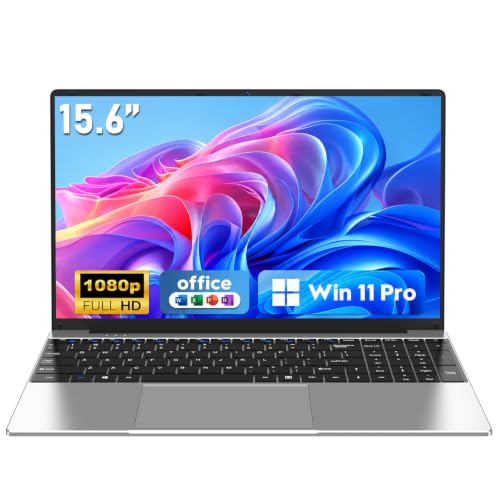
| HP 17″ Business Laptop | Big spreadsheets, desk use | Ryzen 5, 16GB RAM, 512GB SSD, 17.3″ FHD |
| HP 15.6″ N200 Laptop | Light note-taking | Intel N200, 4GB RAM, 128GB SSD |
| NAIKLULU 15.6″ Laptop | Memory on a budget | 16GB RAM, 256GB SSD, Win 11 Pro |
| HP 14″ Student Business | Office bundle | Win 11 Pro, Office, 4GB DDR5 |
| Phatom 15.6″ Laptop | Upgradable basics | 4GB RAM, 128GB SSD, upgradeable |
| ASUS Vivobook 14″ | All-round school laptop | Core i5-1334U, 16GB, 512GB SSD |
| Lenovo Business 15.6″ | Everyday Office use | 8GB DDR5, USB-C, anti-glare |
| Lenovo V15 G4 | Finance and wired work | Ryzen 3, 16GB DDR5, 1TB SSD, Ethernet |
How to Choose
Set a memory floor for spreadsheets and calls
Sixteen gigabytes of RAM is the number to target for business coursework, because Excel, a browser with many tabs, and a video call can crowd out an 8GB machine. Eight gigabytes is acceptable for lighter use, and four gigabytes will frustrate anyone who multitasks. Memory that can be upgraded later is a plus on a tight budget.
Pick storage and processor that match your workload
An SSD of at least 256GB leaves room for software and course files; 512GB or 1TB is comfortable. Core i5 and Ryzen 5 class chips handle spreadsheets and presentations well. Entry processors such as the Celeron-class and N200 chips are fine for documents and video lectures, but they struggle with large models, and they are slow at multitasking.
Check the keyboard, screen, and ports
A numeric keypad speeds up data entry for finance and accounting courses, and it is common on 15 and 17 inch models but absent on many 13 and 14 inch ones. Look for a Full HD display, USB-C and HDMI for presentations, and Ethernet if your campus exam rooms use wired connections. Anti-glare screens help in bright lecture halls.
Mind the Windows edition and where budget models cut corners
Windows 11 Home in S mode only runs apps from the Microsoft Store, which can block some course software, so check whether you can switch out. Windows 11 Pro adds management features some programs expect. Budget laptops often cut corners on memory, storage speed, keyboard quality, and battery life, so read the specs and not only the marketing words.
The 8 Best Options
HP 17″ Business Laptop
This 17.3 inch Full HD laptop lists an AMD Ryzen 5 processor, 16GB of RAM, a 512GB SSD, a numeric keypad, and long battery life. It suits students who work mostly at a desk and want a big screen for spreadsheets, side-by-side windows, and case-study reading, with enough memory to keep a modeling project responsive.
- Strength: 16GB of RAM and a 512GB SSD.
- Strength: Large Full HD screen and a numeric keypad.
- Trade-off: A 17 inch body is bulky to carry between classes.
Skip it if you carry your laptop all day or sit in cramped lecture seats. A 14 inch model will be far easier on a shoulder and a tray table. For a student who studies in a dorm room or a library carrel and rarely leaves it, the large panel and full-size keyboard are a real benefit during long modeling sessions.
HP 15.6″ N200 Laptop
The listing shows an Intel N200 four-core processor, 4GB of RAM, a 128GB SSD, long battery life, and Windows 11 Home in S mode. It is aimed at buyers who want a basic, portable machine for notes, documents, and streaming lectures, rather than for advanced analytics or heavy multitasking.
- Strength: Portable 15.6 inch body with long battery life.
- Strength: SSD storage for fast startup.
- Trade-off: Only 4GB of RAM and S mode limit business use.
Skip it if you plan to run large Excel models or specialty software. Four gigabytes of memory is the real constraint here, and S mode can block software your program requires. It is better seen as a lecture-notes and reading machine that costs little, not as the main tool for a finance concentration.
NAIKLULU 15.6″ Laptop
This 15.6 inch Full HD laptop lists Windows 11 Pro, 16GB of RAM, a 256GB SSD, an M3-6Y30 processor, Wi-Fi 5, and Bluetooth 4.2. The standout is the 16GB of memory on a low-tier machine, although the processor listed is an older, low-power class chip that will limit raw speed.
- Strength: 16GB of RAM and Windows 11 Pro.
- Strength: Full HD display at 1920×1080.
- Trade-off: An older low-power processor and Wi-Fi 5.
Skip it if you need a recent, fast processor for demanding work. Also read return terms, since lesser-known brands vary on support. If memory is your biggest worry and your budget is tight, it is worth shortlisting, but keep expectations modest for large workbooks, because the processor will set the pace on heavy files.
HP 14″ Student Business Laptop
A 14 inch laptop with Windows 11 Pro, a Microsoft Office offering, Copilot AI features, an Intel four-core CPU, and 4GB of DDR5 memory. The title quotes a large storage figure that appears to combine internal and extra capacity, so confirm how much internal SSD space you actually get before relying on it.
- Strength: Windows 11 Pro and Office included.
- Strength: Compact 14 inch size for carrying.
- Trade-off: 4GB of RAM and unclear internal storage.
Skip it if you run heavy spreadsheets or many apps together. It suits note-taking and simple documents. The included Office offering and Windows 11 Pro are practical for coursework, but the memory limit means you should close extra browser tabs during video calls, and pair it with cloud storage for files.
Phatom 15.6″ Laptop
A 15.6 inch Full HD laptop with 4GB of RAM, a 128GB SSD, a Pentium processor, Windows 11 compatibility, HDMI output, and upgradeable memory and storage up to 2TB. It suits students who want to start cheap and add RAM or an SSD later, which is the right instinct for a limited budget.
- Strength: Upgradeable memory and storage.
- Strength: HDMI output for presentations.
- Trade-off: Starts at only 4GB and 128GB.
Skip it if you are not comfortable upgrading parts. The base configuration is too thin for business coursework on its own, so plan the memory upgrade on day one, and confirm the exact module type before ordering so you do not buy the wrong part and lose the savings you were chasing.
ASUS Vivobook 14″
This 14 inch Full HD laptop lists a 10-core Intel Core i5-1334U, 16GB of RAM, a 512GB SSD, a numeric keypad, a private webcam shutter, and Windows 11. It is the most balanced pick for students who want serious spreadsheet power in a body that is easy to carry, with a webcam cover for video calls.
- Strength: Core i5 with 16GB of RAM and a 512GB SSD.
- Strength: Numeric keypad and a private webcam.
- Trade-off: Likely a higher cost tier than the budget models.
Skip it if you only need light note-taking. The extra power is wasted on basic tasks. For a business student who builds financial models in the morning and joins group calls in the afternoon, the combination of memory, storage, and a webcam shutter covers the full day without compromise.
Lenovo Business 15.6″
This 15.6 inch Full HD laptop lists an Intel processor, 8GB of DDR5 memory, 128GB of storage, Office 365, Copilot AI features, Wi-Fi 6, USB-C, an anti-glare screen, and long battery life. It suits students who need a middle-of-the-road Office machine with modern connections and a screen that handles bright rooms.
- Strength: 8GB of DDR5 and Wi-Fi 6 with USB-C.
- Strength: Anti-glare Full HD screen.
- Trade-off: Only 128GB of storage.
Skip it if you store many large files locally. An external drive or cloud storage will be necessary. The anti-glare finish and USB-C port are the practical highlights, since presentation rooms and shared study spaces are rarely kind to glossy screens or to old-style connectors, and eight gigabytes is a workable middle step for students who keep their spreadsheets modest.
Lenovo V15 G4
The V15 G4 pairs a 15.6 inch Full HD screen with an AMD Ryzen 3 7320U, 16GB of DDR5 memory, a 1TB SSD, Windows 11 Pro, an Ethernet RJ-45 port, and a numeric keypad. It suits finance and accounting students who need memory, storage, wired networking, and a keypad in one business-oriented body.
- Strength: 16GB of DDR5 and a 1TB SSD.
- Strength: Ethernet port and numeric keypad.
- Trade-off: A Ryzen 3 processor is entry-level for heavy modeling.
Skip it if you want a thin, light laptop. Business-style 15.6 inch machines are not built for ultra-portability. What you get in exchange is practical: generous storage for datasets, a wired network jack for lab or exam rooms, and a keypad that keeps long data-entry sessions comfortable.
Which One Fits Your Situation
Finance and accounting coursework
The Lenovo V15 G4 offers 16GB of DDR5, a 1TB SSD, a numeric keypad, and Ethernet, which covers data-heavy coursework and any exam rooms that insist on a wired connection.
Carrying a laptop between classes
The ASUS Vivobook 14″ combines a Core i5, 16GB of RAM, and a compact body, so it slips into a bag for back-to-back classes and still handles a spreadsheet and a video call together.
Big-screen desk setup
The HP 17″ Business Laptop gives a 17.3 inch display, a Ryzen 5, and 16GB of RAM.
Starting cheap with plans to upgrade
The Phatom 15.6″ lists upgradeable RAM and SSD, which stretches the budget.
Common Mistakes
- Accepting 4GB of RAM for spreadsheet-heavy coursework.
- Overlooking Windows 11 S mode restrictions on software.
- Choosing a 17 inch laptop and then carrying it everywhere.
- Ignoring the numeric keypad for finance courses.
- Counting external storage as internal capacity.
Related guides
- Warranty Considerations When Buying On Sale
- How To Use Camelcamelcamel For Amazon Deals
- Browser Extensions For Finding Deals
Frequently Asked Questions
How much RAM do I need for business school?
Aim for 16GB. Eight gigabytes works for lighter use, but four will feel slow once you open a large workbook beside a browser and a video call, which is routine in a business program.
Is Windows 11 S mode a problem?
It only allows Store apps, which can block some course software. You can usually switch out of it.
Do I need a numeric keypad?
It helps with data entry in finance and accounting. It is not essential for general study.
Is a budget laptop enough?
For notes and documents, yes. For large Excel models, look for 16GB of RAM and a stronger processor, and confirm that any required exam or proctoring software runs on the Windows edition that comes with the laptop.
Related guides
More from Amazon
Programs that pair well with the guide above. Offers and eligibility are set by Amazon and may change.
Free shipping on eligible items, Prime Video and more. Eligible new members can start with a free trial.
Start a Prime free trialAd-free music streaming. Eligible new subscribers can start with a free trial.
Try Music Unlimited freeA Prime membership for ages 18-24 with a trial period. Eligibility is set by Amazon.
See Prime for Young AdultsAudiobooks and podcasts to listen to on the go. Eligible new members can start with a free trial.
Try Audible freeAs an Amazon Associate we earn from qualifying purchases.









