Choosing the best Zowie gaming mouse is a different kind of decision from choosing most gaming mice. BenQ’s Zowie line does not compete on lighting, software suites, or long lists of programmable buttons. Instead, the range is built around one idea: shape comes first. Every Zowie mouse is a variation on a shell geometry developed for competitive play, offered in several sizes, with settings adjusted on the mouse itself rather than through a driver. That means the right question is rarely which Zowie mouse has the most features. The right question is which shape fits your hand and grip, and whether you want a wired model or one of the newer wireless versions.
This guide walks through four current Zowie options that cover the main use cases: the EC2-DW for ergonomic wireless play, the FK2-DW for a low, symmetrical wireless shape, the EC2-C as the classic wired ergonomic choice, and the EC3-C for smaller hands that still want the ergonomic EC profile. Along the way, it explains how Zowie sizing works, what the DPI and polling numbers actually mean in practice, and how to narrow the range down before you buy.
As an Amazon Associate we earn from qualifying purchases.
Top 3 picks at a glance


How Zowie Mice Are Organized
Zowie divides its mice into families named by letters, and each family is a shape rather than a feature tier. The EC family is the ergonomic, right-handed line, with a shell that slopes down on the right side and a fuller back that supports the palm. The FK family is symmetrical with a notably low profile, designed so the palm sits further from the shell and the fingers do most of the work. The ZA family is also symmetrical but with a higher hump positioned toward the back, while the S family is a shorter symmetrical design and the U family adds inward-curved sides aimed at claw grip players.
Within each family, the number indicates size. A 1 is the large version, a 2 is the medium version, and a 3 is the small version. The suffix then tells you the generation and connection type. Models ending in C are wired mice with a paracord cable and a 24-step scroll wheel. Models ending in DW are the current wireless generation, built around an enhanced receiver that also supports higher polling rates. Because the numbering is consistent, a player who knows that a medium ergonomic shell suits them can move between generations without relearning the sizing system.
This structure is why comparing Zowie mice on specifications alone can mislead. Two mice in this guide share very similar DPI ranges and button counts, yet they feel completely different in the hand. The sections below therefore lead with shape and size for each model, and treat the electronics as supporting information.
What to Look For in a Zowie Gaming Mouse
Shape and grip style
Grip style is the strongest predictor of whether a Zowie mouse will suit you. Palm grip players, who rest most of the hand on the shell, are usually best served by the EC family, because its curved back fills the palm and its right side is shaped to support the ring and little fingers. Claw grip players, who arch their fingers and contact the mouse at fewer points, have more freedom: the EC shape still works, but the FK and U shapes are designed to give claw players room to pull the mouse back into the fingers. Fingertip players, who steer with the fingers alone, generally prefer the low FK profile, since there is less shell interfering with small vertical adjustments.
Hand size and mouse size
Zowie publishes a size for every model, and matching it to your hand matters more than small differences in sensor hardware. As a rough guide drawn from the lineup itself, the large EC1-class shells are intended for bigger hands that want full palm contact, the medium EC2 and FK2 shells are the middle option that fits the widest range of players, and the small EC3-class shells suit smaller hands or players who want a shorter mouse they can move with the wrist and fingers. If you are between sizes, consider grip as the tiebreaker: palm players often prefer the larger shell for support, while claw and fingertip players often prefer the smaller shell for freedom of movement.
Wired or wireless
The C-series wired mice keep things simple. There is no battery to manage, the paracord cable is flexible, and the raised cable attachment point is designed to reduce the chance of the cable dragging on the pad. The DW wireless mice remove the cable entirely and add an enhanced receiver that doubles as a charging dock, along with higher polling rate options. The trade-off is charging: battery life depends heavily on the polling rate selected, so the convenience of wireless comes with a routine of docking the mouse between sessions.
DPI, polling rate, and on-mouse adjustment
Every mouse in this guide is driverless. DPI steps, report rate, lift-off distance, click response time, and, on the wireless models, motion sync are changed with buttons and switches on the mouse itself, with indicator lights showing the current setting. This is deliberate: settings travel with the mouse, so it behaves the same on any computer without software. The DPI ranges here top out at 3,200, which reflects the low-sensitivity settings common in tactical shooters rather than a limitation for most players, since in-game sensitivity multiplies the mouse DPI. Polling rate describes how often the mouse reports its position; the wired models here offer up to 1,000 Hz, while the DW models offer up to 4,000 Hz through the enhanced receiver.
The Best Zowie Gaming Mice to Consider
1. BenQ Zowie EC2-DW Wireless Gaming Mouse
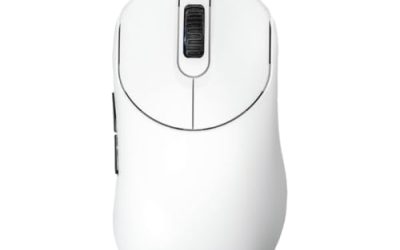
The EC2-DW takes the medium ergonomic EC shape and moves it to the current wireless platform, making it the most direct answer for palm and relaxed claw players who want to drop the cable. The shell keeps the defining EC traits: an asymmetrical right-handed design, a smooth curve intended to support fast horizontal movements, and a rounded right side that gives the fingers a consistent ledge when lifting the mouse.
According to the manufacturer’s specifications, the EC2-DW is a medium size mouse with seven buttons and a 24-step optical scroll wheel. It connects over 2.4 GHz wireless and is listed at around 60 grams. DPI can be set to 400, 800, 1000, 1200, 1600, or 3200, and the report rate can be set to 125, 500, 1000, 2000, or 4000 Hz, with the highest rates using the included enhanced receiver. That receiver also works as a charging dock, which addresses the main practical cost of the higher polling settings: rated battery life is 80 hours at 1,000 Hz, 30 hours at 2,000 Hz, and 24 hours at 4,000 Hz. The box also includes a standard USB wireless receiver, a USB Type-C adapter, and a 2 metre cable for charging or wired use.
For buyers choosing within the EC family, the EC2-DW is the balanced middle size. Players with larger hands who want the same ergonomic idea have the larger EC1-DW to look at, and smaller-handed players have the EC3-DW, but the medium EC2-DW is the version that matches the broadest range of palm grip players. If you already like the EC shape and simply want its wireless, higher-polling generation, this is the natural pick.
2. BenQ Zowie FK2-DW Wireless Gaming Mouse
The FK2-DW is the symmetrical counterpart to the EC2-DW: same wireless generation, very different shape philosophy. The FK shell is low and relatively flat, with a lower hump that leaves more space between the palm and the mouse. Zowie positions that design around micro-adjustments, because a fingertip or claw player can nudge the mouse with the fingers without the shell pushing back against the palm.
The manufacturer’s specifications list the FK2-DW as a medium symmetrical mouse weighing 65 grams, with seven buttons and a 24-step optical scroll wheel. Its DPI steps are 400, 800, 1000, 1200, 1600, and 3200, and its report rate options are 125, 500, 1000, 2000, and 4000 Hz through the enhanced receiver. Battery life ratings match the EC2-DW at 80 hours at 1,000 Hz, 30 hours at 2,000 Hz, and 24 hours at 4,000 Hz, and the enhanced receiver again doubles as a charging dock. Adjustable settings include DPI, report rate, lift-off distance, click response time, and motion sync, all handled on the mouse with no driver required.
Choose the FK2-DW if your grip keeps your palm off the mouse. Fingertip players and claw players with medium hands are the audience this shape was drawn for, and players who aim with frequent small corrections tend to value the low profile. Palm grip players with medium or large hands, by contrast, may find the low shell offers less support than they expect, and should look at the EC models first.
3. BenQ Zowie EC2-C Wired Gaming Mouse
The EC2-C is the wired version of the medium ergonomic shape, and it remains the straightforward choice for players who prefer a cable and the lowest-maintenance setup possible. There is nothing to charge and nothing to pair: plug in the USB cable and the mouse is ready, with all settings stored on the device itself.
The Amazon listing describes the EC2-C as a medium right-handed ergonomic mouse with a matte black finish, a lighter-weight design, a paracord cable, and a 24-step scroll wheel. Its 3360 optical sensor offers four adjustable DPI levels of 400, 800, 1600, and 3200, and the polling rate can be adjusted between 125, 500, and 1000 Hz, all without additional software. The listing also notes that the EC-C series comes in three sizes, so the same shape is available smaller as the EC3-C and larger as the EC1-C for players whose hands fall outside the medium range.
The EC2-C makes sense in two situations. The first is a dedicated wired setup where the desk arrangement keeps the flexible paracord cable out of the way, so cable drag is a non-issue. The second is as a first Zowie mouse: it lets a player confirm that the EC shape and medium size suit them before considering the wireless generation. What it does not offer is the 4,000 Hz reporting or the freedom of the DW models, so the decision is about simplicity and connection preference rather than about shape, which is shared.
4. BenQ Zowie EC3-C Wired Gaming Mouse
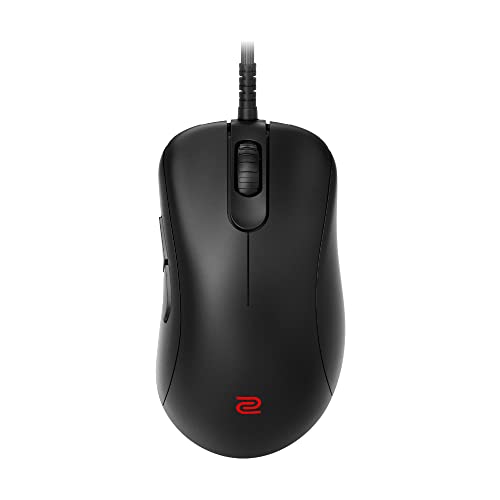
The EC3-C applies the same ergonomic EC design in the small size, with a shorter overall length than the EC2-C. That shorter front-to-back measurement is the point of the model: it gives smaller-handed players full palm contact without reaching, and it gives players of any hand size more freedom for vertical movement and quick flicks, because there is less shell extending under the fingers.
BenQ’s own product answers on Amazon confirm the EC3-C as part of the current EC-C series with reduced weight for additional movement flexibility and stability, and the listing presents it as the small size in the same family as the EC2-C above, with the paracord cable and 24-step scroll wheel that define the C generation. Like the rest of the line, it is driverless, so DPI and polling rate are set on the mouse.
Pick the EC3-C if the medium EC2-C sounds appealing but your hand is on the smaller side, or if you play with a claw grip and find medium ergonomic mice feel long and restrictive. Avoid it if you have large hands and a full palm grip, since the shorter shell will leave part of the palm unsupported and the larger EC1-C or medium EC2-C will distribute contact more evenly.
Side-by-Side: How the Four Models Differ
The cleanest way to read this lineup is in two steps. First choose the shape family: EC for an ergonomic shell that supports the palm, FK for a low symmetrical shell that stays out of the palm’s way. Then choose the generation: C for wired simplicity with polling up to 1,000 Hz, or DW for wireless with an enhanced receiver, a charging dock, and polling up to 4,000 Hz at the cost of managing battery life. Size is the final filter, and within the EC wired line it runs from the small EC3-C through the medium EC2-C to the large EC1-C.
On paper, the two DW models share most of their platform numbers, including DPI steps, report rate options, and battery ratings, so the decision between them is almost purely about shape. The two wired EC models share their sensor generation and adjustment approach, so the decision between them is almost purely about size. That consistency is the appeal of the range: once you find your shape and size, the rest of the specification sheet largely stays put.
Who Should Buy Which Zowie Mouse
Palm grip players with medium hands should start with the EC2-DW if they want wireless, or the EC2-C if they prefer wired. Both give the same supported, curved feel, and the choice reduces to connection and polling preferences. Palm players with smaller hands should substitute the EC3-C on the wired side, or look at the small EC3-DW on the wireless side.
Claw grip players have the widest choice. A relaxed claw on an ergonomic shell points to the EC models, while an aggressive claw that pulls the mouse into the fingertips points to the FK2-DW and its low hump. Fingertip players should begin with the FK2-DW, since its shape is the one in this guide designed to leave the palm disengaged.
Players who compete or practice on multiple computers should weigh the driverless design heavily. Because every setting lives on the mouse, any of these four models behaves identically on a home PC, a laptop, or a tournament machine, with no profiles to rebuild. Players who dislike charging routines should stay with the C models; players who dislike cables entirely should accept the docking habit that comes with the DW models, especially if they run the higher polling rates that shorten battery life.
A Note on DPI and Polling Settings
Because Zowie mice are adjusted on the device, it helps to decide your settings deliberately rather than cycling at random. A practical approach is to pick one DPI step and keep it constant across games, adjusting only the in-game sensitivity per title, so your muscle memory for desktop use and menu navigation stays consistent. For polling, 1,000 Hz is the long-standing competitive standard and gives the DW models their longest battery life; the 2,000 Hz and 4,000 Hz options are there for players with high-refresh monitors who want the most frequent reporting available and are comfortable docking the mouse more often. Lift-off distance and click response time are best left at their defaults unless you have a specific reason to change them, such as a very thick or very thin mouse pad surface.
Final Verdict
There is no single best Zowie gaming mouse, because the range is deliberately built as a set of shapes rather than a ladder of better and worse models. The best one is the one whose shell matches your hand and grip, in the connection style you prefer. For most palm and relaxed claw players who want the current wireless platform, the EC2-DW is the central recommendation. For fingertip and claw players who want a low symmetrical wireless mouse, the FK2-DW is the pick. For wired players, the EC2-C covers medium hands and the EC3-C covers smaller hands, both with the same driverless, set-it-on-the-mouse approach. Start with your grip, confirm your size, and the Zowie lineup narrows itself down quickly.
Related guides
More from Amazon
Programs that pair well with the guide above. Offers and eligibility are set by Amazon and may change.
Free shipping on eligible items, Prime Video and more. Eligible new members can start with a free trial.
Start a Prime free trialAd-free music streaming. Eligible new subscribers can start with a free trial.
Try Music Unlimited freeA Prime membership for ages 18-24 with a trial period. Eligibility is set by Amazon.
See Prime for Young AdultsAudiobooks and podcasts to listen to on the go. Eligible new members can start with a free trial.
Try Audible freeAs an Amazon Associate we earn from qualifying purchases.