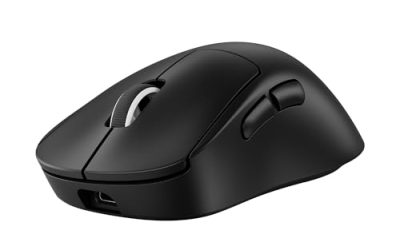
Buying a keyboard and mouse as one set looks simple until you read the fine print: most gaming combos hide a membrane keyboard, and the word mechanical appears in plenty of listings where it only describes the feel. The real decision is whether the keyboard in the box has actual mechanical switches, named in the listing, and whether the bundled mouse is good enough that you will not replace it within a month.
This roundup is for gamers who want one purchase to cover the whole desk: first-time mechanical buyers, tenkeyless fans short on space, and players who prefer a single brand on both sides of the pad. Every set below is sold as one product, and every keyboard is mechanical according to its own Amazon listing, with the switch type stated rather than implied.
Our Top Picks

Top 3 picks at a glance
Quick Picks
As an Amazon Associate we earn from qualifying purchases.
| Product | Best for | Key spec from title |
|---|---|---|
| Logitech G413 SE + G502 HERO Bundle | One established brand covering both parts | HERO 25K sensor, up to 25,600 DPI |
| Redragon K552-RGB-BA Combo | Tenkeyless desks and clicky switch fans | 87-key board, mouse up to 7,200 DPI |
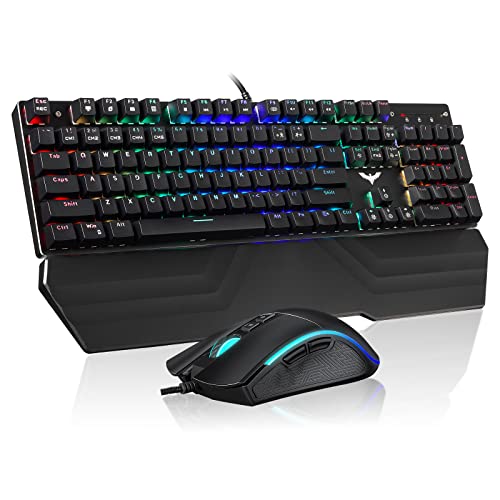
| Havit HV-KB389L Combo | Full-size typists who want a wrist rest included | 104 blue-switch keys, 4,800 DPI mouse |
| Havit HV-KB486 Combo | Compact desks that still want a pad in the box | 89 red-switch keys, mouse pad included |
How to Choose
Confirm the Switches Are Really Mechanical
Plenty of combo listings lean on the phrase mechanical feel, which describes a membrane board shaped to imitate a switch. A genuine mechanical set names its switch type in the title or bullets: blue, red, brown or tactile, sometimes with the switch maker. Check that wording before anything else, because it decides the sound, the resistance under your fingers and how the board ages. If a listing never names a switch, treat the keyboard as membrane no matter how gaming the photos look.
Match the Layout to Your Desk
Combos come in full-size 104-key boards, tenkeyless 87-key boards and compact layouts around 89 keys that squeeze the arrows and function row closer together. A full-size board suits players who use the number pad for binds or daytime data entry, while a tenkeyless or compact board frees mouse room for low-sensitivity aiming. Measure your desk before ordering: a detachable wrist rest adds depth, and a bundled pad needs a flat run of space beside the keyboard.
Judge the Mouse as Its Own Product
The mouse is where combo makers save money, so read its numbers separately. Look at the top DPI figure and how many steps sit below it, the button count, and whether the listing calls the buttons programmable. A mouse that only lists a single fixed DPI gives you no way to slow down for sniping or speed up for turning. Weights, extra buttons and a braided cable are bonuses; a stated DPI range and side buttons matter every session.
Count the Cables, Ports and Extras
Nearly every mechanical combo is wired, and each half usually takes its own USB port, so a laptop with two free ports is the minimum and a hub may be needed once a headset joins. Then weigh the extras that change daily use: RGB modes you can dim at night, a wrist rest for long sessions, a pad sized for your sweep, and software support if you plan to record macros or remap buttons across both devices.
The 4 Best Options
Logitech G413 SE + G502 HERO Bundle

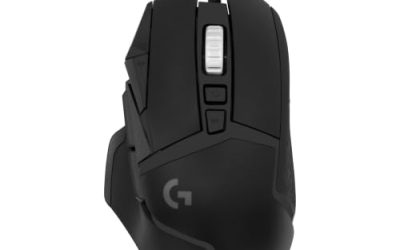
Logitech sells this pairing as a single bundle, which makes it the natural pick for a gamer who wants one brand, one box and no guesswork about whether the halves suit each other. The G413 SE is a full-size mechanical board with tactile switches and PBT keycaps under an aluminum top case, while the G502 HERO brings the strongest mouse in this roundup, with 11 programmable buttons and LIGHTSYNC RGB that can match the rest of a Logitech desk.
Specs
- Keyboard: G413 SE, full-size layout
- Switches: tactile mechanical
- Keycaps: PBT, backlit keyboard with anti-ghosting
- Top case: aluminum
- Mouse: G502 HERO wired gaming mouse
- Sensor: HERO 25K, up to 25,600 DPI
- Mouse buttons: 11 programmable
- Lighting: LIGHTSYNC RGB on the mouse
Best for: gamers who want a matched set from one established brand.
Watch out for: both halves are wired, so plan on two free USB ports and a full-size footprint.
ASIN: B0BBFWTD7T
Redragon K552-RGB-BA Combo
The K552-RGB-BA pairs Redragon’s Kumara tenkeyless board with the M602 Griffin mouse, and it suits a desk where mouse room matters more than a number pad. The 87-key keyboard uses custom mechanical blue switches, so every press lands with an audible click, and the metal and ABS frame keeps the compact board planted. The Griffin mouse reaches 7,200 DPI with programmable buttons, which is generous reach for a set at this end of the combo market.
Specs
- Keyboard: K552 RGB, 87-key tenkeyless layout
- Switches: custom mechanical blue switches
- Construction: metal and ABS, wired USB with gold-plated connector
- Backlighting: RGB LED
- Mouse: M602A-RGB Griffin wired gaming mouse
- Mouse DPI: up to 7,200, adjustable 800 / 1200 / 1600 / 2400 / 7200
- Acceleration: 10G
- Mouse features: programmable buttons, RGB backlighting
Best for: shooter players who want a compact board and a loud, definite click.
Watch out for: blue switches carry into the next room; check the model code carefully, since the similar K552-BA set ships a different mouse and a pad instead.
ASIN: B07F3MDC2Q
Havit HV-KB389L Combo
Havit’s 104-key set is built for the player who types as much as they game and wants the whole full-size layout, number pad included. Every key sits on its own blue switch with full N-key rollover, the panel is metal with floating keys, and the detachable wrist rest snaps on for long sessions. The bundled mouse is programmable with six DPI steps, and its lighting colour changes with the step you pick, a quick visual check before a match starts.
Specs
- Keyboard: HV-KB389L, 104 keys
- Switches: blue mechanical, individual switch per key
- Rollover: full N-key rollover
- Panel: all-metal with floating key design
- Backlighting: RGB, 14 backlit modes
- Wrist rest: detachable, included
- Mouse: programmable gaming mouse, 7 buttons
- Mouse DPI: 6 levels, 800 / 1600 / 2400 / 3200 / 4000 / 4800
Best for: full-size typists who want a wrist rest and clicky switches in one box.
Watch out for: with the wrist rest attached this is the deepest footprint here, so measure a shallow desk first.
ASIN: B07QS6MG8B
Havit HV-KB486 Combo

The HV-KB486 trims the formula down: an 89-key board with red mechanical switches, a six-button mouse and a non-slip pad, all in one box. Red switches travel straight down without the click of the blue-switch sets above, which makes this the easier recommendation for a shared room or a late-night session. The 89-key layout keeps the arrow keys and function row while dropping the number pad, so the pad gets a board, a mouse and room to move on a smaller desk.
Specs
- Keyboard: HV-KB486, 89 keys
- Switches: red mechanical
- Backlighting: 21 backlight effects
- Connection: wired USB
- Mouse: 6 buttons, RGB lighting with 7 effects
- Mouse DPI: 800 / 1600 / 2400 / 3200 / 4000 / 4800
- Included extra: non-slip gaming mouse pad
- Compatibility per listing: PC and laptop
Best for: compact desks and shared rooms that need quieter linear switches.
Watch out for: there is no number pad, and the lighting runs through preset effects rather than per-key control.
ASIN: B0861459MX
Which One Fits Your Situation
You Want One Brand Behind the Whole Desk
Pick the Logitech bundle. The G413 SE and G502 HERO are both current Logitech G products, the mouse is the most capable here, and support, software and spares run through a single maker. It is the set to choose when the combo is a long-term desk foundation rather than a first experiment with mechanical switches.
Your Desk Is Narrow and Your Aim Is Low-Sensitivity
Pick the Redragon K552-RGB-BA. Dropping the number pad moves the mouse hand closer to the keyboard and opens a wider sweep area, which is exactly what a low-DPI shooter player needs. The Griffin’s 7,200 DPI ceiling also gives you headroom to raise sensitivity for desktop work without swapping mice.
You Type All Day and Game at Night
Pick the Havit HV-KB389L. The full 104-key layout keeps the number pad for spreadsheets and binds, the wrist rest supports long typing sessions, and full N-key rollover means fast gaming inputs still register in the evening. Just confirm your desk can take the depth with the rest attached before you order.
You Share a Room or Play Late
Pick the Havit HV-KB486. Its red switches skip the click that makes blue-switch boards hard to live with at night, the 89-key frame leaves space on a small desk, and the included pad means the setup is complete the day the box arrives, with nothing else to buy.
Common Mistakes
- Assuming every gaming combo is mechanical, when many hide membrane keyboards behind mechanical-feel wording.
- Judging a set by its keyboard alone and discovering the mouse has a low fixed DPI or too few buttons.
- Forgetting that both halves are wired and each needs its own USB port on the PC or laptop.
- Ordering a full-size board with a wrist rest for a shallow desk, then losing the mouse room the set was meant to protect.
- Mixing up lookalike model codes such as K552-BA and K552-RGB-BA, which bundle different mice and extras.
Frequently Asked Questions
Are all gaming keyboard and mouse combos mechanical?
No. Many of the most common combos pair a membrane keyboard with a gaming mouse, and the packaging often leans on phrases like mechanical feel. A true mechanical set names its switch type, such as blue, red or tactile, in the listing. All four sets in this roundup state a mechanical switch for the keyboard half.
Can I split a combo and use each half with other gear?
Yes. In these sets the keyboard and mouse are separate wired USB devices that happen to share a box, so either one can later be paired with a different partner. Nothing in the listings ties them together with a shared receiver or proprietary link, which keeps an upgrade path open for whichever half you outgrow first.
Which switch type should a beginner pick from these sets?
It depends on your room. Blue switches, in the Redragon and the Havit 104-key set, feel tactile and sound clicky, which some players love and housemates hate. Red switches, in the Havit 89-key set, press straight down and stay quieter. The Logitech bundle uses tactile switches, a middle path with a bump you can feel but less noise.
Do these combos work with laptops and consoles?
The listings aim these sets at Windows PCs, and a laptop works as long as it has two free USB ports, or one port plus a hub. Console support varies by game and platform rather than by the combo itself, so check your console’s keyboard and mouse policy for the titles you play before relying on a set there.
Related guides
More from Amazon
Programs that pair well with the guide above. Offers and eligibility are set by Amazon and may change.
Free shipping on eligible items, Prime Video and more. Eligible new members can start with a free trial.
Start a Prime free trialAd-free music streaming. Eligible new subscribers can start with a free trial.
Try Music Unlimited freeA Prime membership for ages 18-24 with a trial period. Eligibility is set by Amazon.
See Prime for Young AdultsAudiobooks and podcasts to listen to on the go. Eligible new members can start with a free trial.
Try Audible freeAs an Amazon Associate we earn from qualifying purchases.