Extra buttons only help when they sit where your thumb naturally lands and the software lets you map them without a fight. A mouse with twenty buttons you never reach is a worse buy than one with eleven buttons you press every match. The real decision is not the button count on the box. It is the layout under your thumb, the size of your hand, and whether you want a wired workhorse or a wireless flagship that can run for weeks between charges.
This guide is for MMO players who want a full thumb grid for long ability bars, MOBA and strategy players who want a few extra keys within easy reach, and anyone who binds push-to-talk, mounts, or macros to the mouse instead of the keyboard. Each pick below comes from its Amazon listing, with the sensor, button count, connection, and weight as listed, so you can compare what each mouse actually offers before you choose one.
Our Top Picks


Top 3 picks at a glance

Quick Picks
As an Amazon Associate we earn from qualifying purchases
| Product | Best for | Key spec from title |
|---|---|---|
| Logitech G502 HERO | everyday MMO and MOBA play with 11 buttons | 25,600 DPI HERO 25K sensor |
| Razer Naga V2 Pro | swapping thumb grids between games | 19+1 programmable buttons |
| Logitech G600 | the maximum button count in a classic shape | 20 buttons incl. 12-button thumb grid |
| Corsair Scimitar Elite Wireless | wireless MMO play with a sliding thumb panel | 26,000 DPI MARKSMAN sensor |
| Razer Naga V2 HyperSpeed | long wireless sessions with 19 buttons | up to 400 hours of battery |
How to Choose
Button Layout and Thumb Reach
Count the buttons you can reach without shifting your grip, not the buttons on the box. A twelve-button thumb grid suits MMO play, where each key maps to an ability, while a row of two or three thumb buttons suits shooters and MOBA games, where you need a couple of extras within easy reach. Hand size matters as much as layout: a wide grid can feel cramped on a small hand and lost on a large one. Before you buy, picture your thumb at rest. If the far buttons sit beyond a comfortable stretch, you will ignore them, and the extra count buys you nothing.
Sensor, Polling, and Connection
Extra buttons mean little if the sensor cannot keep up with fast flicks. Look for a modern optical sensor with a wide DPI range and a polling rate of at least 1,000 Hz, which covers most play. Wired mice give you a steady link and no charging, while wireless mice now match them for latency when they use a dedicated 2.4 GHz link, though battery life varies a lot: some run for hundreds of hours, others need a charge every week or two. Match the connection to your desk. If you hate cables, go wireless and check the battery figure. If you hate charging, go wired.
Software and On-Board Memory
Buttons only work as well as the software behind them. Check that the mouse software runs on your system, lets you remap every button, and saves profiles you can switch between games. On-board memory matters more than most buyers expect: a mouse that stores profiles on the device keeps your binds when you move it to another computer, while one that relies on cloud software can leave you with default binds on a fresh machine. Read the listing for profile storage and operating system support before you buy, and keep the software updated so new features and fixes reach your mouse.
Weight, Shape, and Grip
A button-heavy mouse carries more weight, and that weight shapes how it feels in long sessions. MMO mice often weigh over 120 grams, which suits a palm grip and slow, deliberate play, while lighter mice near 60 grams suit fast flicks and claw grips. Shape matters as much as weight: an ergonomic right-handed shell supports the thumb, while a symmetrical shell suits both hands and fingertip grips. Hold the shape in mind as you read the specs. If your grip does not match the shell, even the best sensor and the most buttons will feel wrong.
The 5 Best Options
Logitech G502 HERO

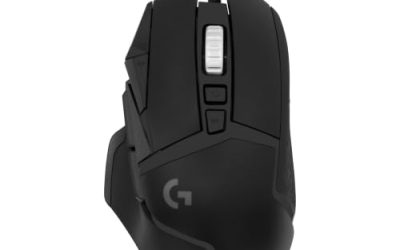
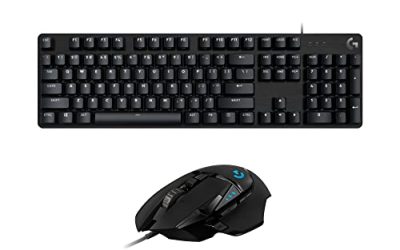
The G502 HERO is the safe pick for anyone who wants extra buttons without committing to a thumb grid. Its eleven programmable buttons cover push-to-talk, weapon swaps, and macros, while the dual-mode scroll wheel switches between notched steps and free spin. Five removable weights let you tune the heft, and on-board memory keeps your binds when you move between computers. It suits MMO and MOBA players who want a familiar shape with room to grow, and it works on PC and Mac. The wired link means no charging and no battery worries.
Specs
- HERO 25K sensor, up to 25,600 DPI
- 11 programmable buttons
- Five removable 3.6 g weights
- Wired USB connection
- On-board memory
- Item weight 121 g
- PC and Mac compatible
Best for: MMO and MOBA players who want extra buttons in a familiar shape.
Watch out for: the wired cable suits a fixed desk setup better than a lap or couch setup.
Razer Naga V2 Pro
The Naga V2 Pro is the pick for players who want the button layout to change with the game. Three magnetic side plates swap between twelve, six, and two buttons, so the same mouse covers MMO raids, MOBA matches, and shooters without a second device. The Focus Pro 30K sensor tracks fast flicks, the HyperScroll Pro wheel switches modes on the fly, and the battery runs up to 300 hours on Bluetooth. It suits players who switch genres often and want one mouse that adapts. The swappable plates are the feature to weigh against simpler mice.
Specs
- 19+1 programmable buttons
- Three swappable side plates: 12, 6, or 2 buttons
- Focus Pro 30K optical sensor
- HyperScroll Pro wheel
- Gen-3 optical switches
- Up to 300 hours on Bluetooth, up to 150 hours on HyperSpeed wireless
- Item weight 134 g
- Windows, macOS, and Linux
Best for: players who switch genres and want the thumb grid to change with the game.
Watch out for: keep the spare side plates in a safe place, since they are small and easy to lose.
Logitech G600 MMO Gaming Mouse
The G600 is the classic maximum-buttons pick, built around a twelve-button thumb grid that MMO players can map to a full ability bar. Twenty buttons in total give you room for macros, mounts, and G-Shift, which adds a second layer to every key. The wired link keeps the connection steady, and the RGB lighting marks the thumb keys so you can find them by feel and sight. It suits players who want the most buttons for the least fuss. Stock now moves through marketplace sellers, so read the listing details with care before you buy.
Specs
- 20 programmable buttons incl. 12-button thumb grid
- Up to 8,200 DPI
- G-Shift for a second button layer
- RGB lighting
- Wired USB connection
- Item weight 133 g
Best for: MMO players who want a full thumb grid and the most buttons in one mouse.
Watch out for: check the seller and listing details before buying, since stock comes through marketplace sellers.
Corsair Scimitar Elite Wireless

The Scimitar Elite Wireless is the pick for MMO players who want a thumb grid without a cable. Its twelve-button Key Slider panel slides to match your thumb reach, and the 26,000 DPI MARKSMAN sensor keeps tracking sharp in fast fights. SLIPSTREAM wireless runs at 2,000 Hz, and the battery lasts up to 150 hours, so charging stays rare. iCUE software handles remapping and profiles on Windows and macOS. It suits players who want a wireless MMO mouse with a panel that fits their hand. Availability varies, so check the listing before you settle on it.
Specs
- 16 programmable buttons
- 26,000 DPI MARKSMAN optical sensor
- 12-button Key Slider side panel
- SLIPSTREAM wireless at 2,000 Hz
- Up to 150 hours battery
- iCUE software
- Windows and macOS
Best for: wireless MMO players who want a thumb grid that slides to fit their hand.
Watch out for: availability varies, so confirm the listing shows stock before you settle on it.
Razer Naga V2 HyperSpeed

The Naga V2 HyperSpeed is the pick for players who want nineteen buttons and a battery that lasts for months. Its Focus Pro 30K sensor and HyperScroll wheel cover fast play, while Bluetooth and USB wireless give you two ways to connect. Up to 400 hours of battery means charging barely enters your routine. It suits MMO and MOBA players who want a big button count in a wireless mouse without swapping side plates. Keep it distinct from the Naga V2 Pro: this model skips the swappable plates and HyperScroll Pro in favor of battery life and Gen-2 mechanical switches.
Specs
- 19 programmable buttons
- Focus Pro 30K optical sensor
- HyperScroll wheel
- Up to 400 hours battery
- Bluetooth and USB wireless
- Gen-2 mechanical switches
Best for: players who want nineteen buttons and months of battery in a wireless mouse.
Watch out for: this model has no swappable side plates, so the button layout is fixed.
Which One Fits Your Situation
You play MMOs with long ability bars
Pick the Logitech G600 or the Razer Naga V2 Pro. The G600 gives you a fixed twelve-button grid and twenty buttons in total, which maps cleanly to a full ability bar. The Naga V2 Pro adds swappable plates, so you can run twelve buttons in raids and six in other games. Both keep every key under your thumb, which is what long MMO sessions need.
You want extra buttons without a thumb grid
Pick the Logitech G502 HERO. Its eleven buttons sit in a familiar layout, with thumb buttons, a DPI shift key, and a dual-mode wheel, so you gain macros and push-to-talk without learning a grid. The wired link and on-board memory keep it simple, and the removable weights let you tune the feel. It is the easiest move from a standard mouse to a button-heavy one.
You play wireless and hate charging
Pick the Razer Naga V2 HyperSpeed. Its battery runs up to 400 hours, which is months of play for most people, and it still gives you nineteen programmable buttons. If you want a thumb grid as well, the Corsair Scimitar Elite Wireless is the wireless grid pick, with up to 150 hours and a sliding panel. Either way, check the battery figure on the listing and keep a cable nearby for the odd top-up.
You share one mouse between work and play
Pick the Logitech G502 HERO or the Corsair Scimitar Elite Wireless. The G502 HERO stores profiles on the mouse and works on PC and Mac, so your binds travel with it between machines. The Scimitar Elite Wireless runs iCUE on Windows and macOS and gives you a thumb grid for game nights. Both handle daily work without feeling like a single-purpose device, which is the point of a shared setup.
Common Mistakes
- Buying the most buttons without checking whether your thumb can reach them in a normal grip.
- Assuming every button is programmable in every game without opening the software first.
- Ignoring operating system support, then finding the mapping software does not run on your machine.
- Forgetting to check whether profiles live on the mouse or only in the software.
- Picking a heavy MMO mouse for fast flick shooters, where weight works against you.
Frequently Asked Questions
How many extra buttons do I actually need?
Most players use between six and twelve extra buttons. A few thumb buttons cover push-to-talk, weapon swaps, and a couple of macros, while a full twelve-button grid suits MMO ability bars. Count the binds you press in a typical match, then pick a mouse with a few more buttons than that number, so you have room to grow without paying for keys you never touch.
Do extra buttons slow down aiming?
No, as long as the mouse fits your hand and the weight stays manageable. The sensor and shape decide aiming feel, not the button count. Trouble comes when a heavy grid mouse forces a grip change or your thumb keeps brushing keys by accident. If that happens, remap the stray keys or pick a lighter mouse with fewer buttons, and your aim should settle back to normal.
Can I use these mice on macOS?
Most of them, with limits. The G502 HERO, G600, and Scimitar Elite Wireless list macOS support, and the Naga V2 Pro lists Windows, macOS, and Linux. Full mapping software is often Windows-only, so on macOS you may rely on on-board profiles or a simpler tool. Check the listing for your system before you buy, and keep your profiles stored on the mouse when you can.
Should I pick wired or wireless for a button-heavy mouse?
Pick wired if you hate charging and want a steady link with no battery to manage. Pick wireless if you hate cables and the battery figure covers your play: the Naga V2 HyperSpeed runs up to 400 hours, while the Scimitar Elite Wireless runs up to 150. Check the polling rate and the connection type on the listing, since a wireless link matters more than the cable question alone.
Related guides
More from Amazon
Programs that pair well with the guide above. Offers and eligibility are set by Amazon and may change.
Free shipping on eligible items, Prime Video and more. Eligible new members can start with a free trial.
Start a Prime free trialAd-free music streaming. Eligible new subscribers can start with a free trial.
Try Music Unlimited freeA Prime membership for ages 18-24 with a trial period. Eligibility is set by Amazon.
See Prime for Young AdultsAudiobooks and podcasts to listen to on the go. Eligible new members can start with a free trial.
Try Audible freeAs an Amazon Associate we earn from qualifying purchases.