Picking a USB-C gaming mouse is really a decision about cables and downtime. A mouse that charges over USB-C tops up from the same lead that feeds your laptop, keyboard and headset dock, and most models here can also run wired through that port, so a flat battery mid-match becomes a cable swap rather than a dead session. The port also future-proofs the mouse against desks that are steadily dropping older connectors.


This guide suits competitive FPS players chasing the lightest shell they can flick, palm-grip players who want an ergonomic shape that still charges the modern way, and anyone running one mouse across a gaming PC and a laptop. Every pick below was chosen from its Amazon listing name and stated specifications, with the USB-C connection confirmed on each product page or listing evidence.
Top 3 picks at a glance

Quick Picks
As an Amazon Associate we earn from qualifying purchases.
| Product | Best for | Key spec from title |
|---|---|---|
| Razer Viper V3 Pro | Competitive players who want top polling out of the box | 8K polling, 54 g, 35K DPI optical sensor |
| Logitech G PRO X Superlight 2 | Symmetrical-shape players who want long battery life | 44K DPI sensor, 8 kHz report rate, 60 g |
| Razer DeathAdder V3 Pro | Palm and claw players loyal to an ergonomic shape | 63 g lightweight ergonomic, 30K DPI optical sensor |
| ASUS ROG Harpe Ace Aim Lab Edition | Players switching between a PC and other devices | Tri-mode connectivity, 36K DPI, 54 g |
How to Choose
Decide what the USB-C port needs to do
On some mice USB-C is purely a charging socket, while on others the same port carries a full wired mode, so the mouse keeps working at its normal polling rate while it refuels. The Viper V3 Pro and Harpe Ace both list wired play over the included Type-C cable, which matters if you game at a desk where a wireless dongle would sit behind a metal case. Check the listing wording before buying: a mouse that only charges over USB-C leaves you wireless-only during a top-up, which is fine for casual play but awkward in a ranked queue.
Match polling rate to the dongle in the box
Polling headline figures depend on the receiver. The Viper V3 Pro ships with its HyperPolling dongle and reaches 8,000 Hz wirelessly, while the DeathAdder V3 Pro runs at 1,000 Hz from its standard receiver and needs a separately bought HyperPolling dongle for higher rates. Higher polling also drains the battery faster on every model here, so treat 8K as a mode you switch on for competitive sessions rather than a permanent setting. If a listing bundles the fast dongle, that saves a second purchase later.
Pick the shape before the sensor
All four sensors in this guide track far beyond what a human arm can challenge, so shape decides comfort. Symmetrical shells like the Viper V3 Pro and Superlight 2 suit claw and fingertip grips and either hand position on the buttons, while the DeathAdder V3 Pro’s taller right-handed hump fills a palm and supports the hand through long sessions. Weight follows shape: the two 54 g mice reward fast, low-sensitivity arm aim, whereas the 63 g DeathAdder adds a little stability for players who found ultralight shells twitchy.
Read battery claims at the polling rate you will use
Battery figures on listings are quoted at 1,000 Hz, and they drop sharply at higher polling. The Viper V3 Pro lists up to 95 hours at 1,000 Hz, and the DeathAdder V3 Pro lists up to 90 hours at the same rate but far fewer once a high-polling dongle is fitted. Work out your weekly play hours and divide: a 20-hour-a-week player on a 90-hour mouse charges roughly once a month at standard polling, which makes the USB-C top-up an occasional habit instead of a nightly one.
The 4 Best Options
Razer Viper V3 Pro
The Viper V3 Pro is the pick for players who want the strongest wireless specification without buying accessories afterwards. Its symmetrical shell weighs 54 g in black, the Focus Pro 35K Gen-2 sensor tracks on surfaces including glass, and the included HyperPolling dongle unlocks the full 8,000 Hz wireless polling from day one. Optical switches remove the debounce delay of mechanical designs, and the battery rating stretches to 95 hours when you settle back to 1,000 Hz for everyday play. The included USB Type A to Type C cable covers both charging and wired sessions.
Specs
- Sensor: Razer Focus Pro 35K Optical Sensor Gen-2, up to 35,000 DPI
- Tracking: up to 750 IPS and 70 G acceleration
- Polling: up to 8,000 Hz wireless with included HyperPolling dongle, 1,000 Hz wired
- Switches: Razer Optical Mouse Switches Gen-3, rated for 90 million clicks
- Weight: 54 g (black)
- Battery: up to 95 hours at 1,000 Hz
- Connection: HyperSpeed 2.4 GHz wireless or wired via included USB Type A to Type C cable
Best for: competitive FPS players who want 8K polling included rather than sold separately.
Watch out for: there is no Bluetooth mode, so laptop use away from the dongle means carrying the receiver or the cable.
ASIN: B0CW25XR5R
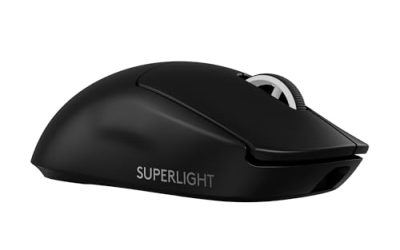
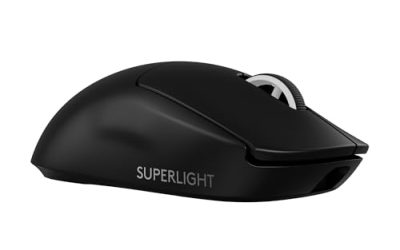
Logitech G PRO X Superlight 2
Logitech’s flagship suits players who prefer a safe, low-profile symmetrical shape and rarely want to think about charging. The HERO 2 sensor reaches 44,000 DPI, LIGHTSPEED wireless runs at up to an 8 kHz report rate, and the battery is rated for up to 95 hours between charges. At 60 g it carries a touch more heft than the lightest rivals, which some claw players prefer for stopping power on a pad. Charging runs through the included USB A to C cable, and the mouse is also compatible with Logitech’s POWERPLAY wireless charging system if you already own the mat.
Specs
- Sensor: HERO 2, up to 44,000 DPI, up to 888 IPS and 88 G acceleration
- Polling: up to 8 kHz report rate over LIGHTSPEED wireless
- Switches: LIGHTFORCE hybrid optical-mechanical
- Weight: 60 g
- Battery: up to 95 hours
- Buttons: 5 programmable
- Charging: USB-C via included USB A to C charging and data cable, POWERPLAY compatible
- Model number: 910-006628
Best for: players who want a proven symmetrical shape, long battery life and the option of mat-based charging.
Watch out for: it has only five buttons, so players who bind many abilities to the mouse should look at the DeathAdder instead.
ASIN: B09NBWL8J5
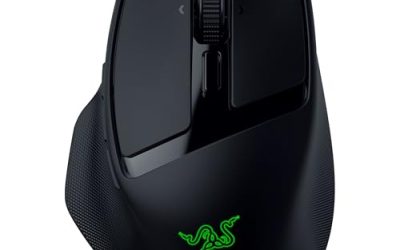
Razer DeathAdder V3 Pro
The DeathAdder V3 Pro brings the USB-C treatment to one of the best-known ergonomic shapes in gaming. The right-handed shell weighs 63 g, supports palm and relaxed claw grips through long sessions, and runs Razer’s Focus Pro 30K sensor with Gen-3 optical switches. Battery life is listed at up to 90 hours at 1,000 Hz, recharged over the USB Type-C port at the front, and that same port supports wired play when the battery runs low at a bad moment. Full PTFE feet keep the glide consistent across cloth pads.
Specs
- Sensor: Razer Focus Pro 30K optical, up to 30,000 DPI, tracks on glass
- Switches: Razer Optical Mouse Switches Gen-3, rated for 90 million clicks
- Weight: 63 g (black)
- Battery: up to 90 hours at 1,000 Hz, rechargeable via USB Type C
- Polling: 1,000 Hz as standard, higher rates with the HyperPolling Wireless Dongle sold separately
- Connection: HyperSpeed wireless, USB-C charging and wired operation
- Feet: 100 percent PTFE
- Buttons: 5 programmable
Best for: medium-to-large hands using palm or claw grip who want an ergonomic shape that still charges over USB-C.
Watch out for: the 8,000 Hz mode needs a separate dongle purchase, and the shape is right-handed only.
ASIN: B0B6XZLNHQ
ASUS ROG Harpe Ace Aim Lab Edition
The Harpe Ace is the flexible option in this group because its USB-C wired mode sits alongside two wireless systems. Tri-mode connectivity covers 2.4 GHz through the ROG Omni Receiver, Bluetooth pairing for up to three devices, and a wired link over the included ROG Paracord Type-C to Type-A cable, so one mouse can serve a gaming rig and a work laptop without swapping hardware. The ROG AimPoint sensor reaches 36,000 DPI with under one percent CPI deviation, the shell weighs 54 g, and the listing rates battery life at 90 hours.
Specs
- Sensor: ROG AimPoint optical, up to 36,000 DPI, under 1 percent CPI deviation
- Tracking: up to 650 IPS and 50 G acceleration
- Weight: 54 g
- Connectivity: tri-mode 2.4 GHz RF with ROG SpeedNova and Omni Receiver, Bluetooth, wired USB Type-C
- Battery: up to 90 hours
- Buttons: 5 programmable
- Switches: ROG Micro Switches
- Extras: Aim Lab Settings Optimizer support, grip tape and spare mouse feet in the box
Best for: players who split time between a gaming PC and a laptop and want Bluetooth as well as a fast receiver.
Watch out for: polling tops out at 1,000 Hz, so players chasing 8K modes should pick the Viper V3 Pro instead.
ASIN: B0BSKX9V7C
Which One Fits Your Situation
You play ranked FPS most nights
Choose the Razer Viper V3 Pro. The HyperPolling dongle is in the box, the 54 g shell suits fast target switching, and the symmetrical shape works for claw and fingertip grips. Run it at high polling for matches, then drop to 1,000 Hz on casual days to stretch the 95-hour battery rating across several weeks.
Your hand aches with flat, small mice
Choose the Razer DeathAdder V3 Pro. Its taller ergonomic hump fills the palm and takes weight off your fingers during long sessions, and at 63 g it still moves quickly for an ergonomic design. The USB-C port at the front also means a mid-session top-up uses a cable angle that points away from your hand.
One mouse covers your PC and your laptop
Choose the ASUS ROG Harpe Ace Aim Lab Edition. Bluetooth pairing for up to three devices handles the laptop without a dongle, the 2.4 GHz receiver stays plugged into your gaming PC, and the USB-C wired mode covers charging and desk play. It is the only mouse here that treats multi-device switching as a headline feature.
You hate thinking about battery levels
Choose the Logitech G PRO X Superlight 2. The 95-hour rating already covers weeks of ordinary play, and POWERPLAY compatibility means an owner of that mat never plugs in a cable at all. Everyone else gets a simple USB-C top-up with the cable included in the box, and a short charge during a break restores hours of play, so refuelling never has to interrupt an evening session.
Common Mistakes
- Assuming every USB-C mouse plays wired through the port; some use it for charging only, so confirm wired mode on the listing if that matters to you.
- Comparing battery figures without checking the polling rate they were measured at, since 8,000 Hz modes cut runtime dramatically on every mouse here.
- Buying a mouse for its headline polling rate when the fast dongle is a separate purchase, as with the DeathAdder V3 Pro.
- Choosing by sensor numbers alone and ignoring shape, when grip comfort decides aim consistency far more than the gap between 30K and 44K DPI sensors.
- Forgetting that white versions of some models weigh a gram or two more than black ones, which matters if you are chasing the lightest possible shell.
Frequently Asked Questions
Can a USB-C gaming mouse be used while it charges?
Usually yes, provided the model supports wired mode through the port. The Viper V3 Pro, DeathAdder V3 Pro and Harpe Ace all list wired operation over their Type-C cables, so a low battery becomes a wired session rather than a pause. Check the individual listing wording, because a charging-only port leaves the mouse wireless while it refuels.
Does 8,000 Hz polling make a visible difference?
It shortens the interval between mouse reports, which can smooth cursor motion on high-refresh monitors, but the gain is subtle next to shape, weight and sensor quality. It also cuts battery life sharply. Treat it as a competitive mode for ranked sessions, and use 1,000 Hz for everyday play where the longer battery rating applies.
Will any USB-C cable work for charging these mice?
A standard USB-C data cable will charge all four mice here, and each box includes a cable matched to the mouse. For wired play, use the included cable or another data-capable lead, since some cheap cables carry power only. The bundled cables are also shaped to fit the recessed ports on the Razer models.
Is Bluetooth worth having on a gaming mouse?
Bluetooth adds latency compared with a 2.4 GHz receiver, so it is not the mode for competitive play. It earns its place for a second machine: office work, a laptop on the sofa or travel, where the Harpe Ace can stay paired without moving a dongle. Serious sessions should always use the receiver or the cable.
Related guides
More from Amazon
Programs that pair well with the guide above. Offers and eligibility are set by Amazon and may change.
Free shipping on eligible items, Prime Video and more. Eligible new members can start with a free trial.
Start a Prime free trialAd-free music streaming. Eligible new subscribers can start with a free trial.
Try Music Unlimited freeA Prime membership for ages 18-24 with a trial period. Eligibility is set by Amazon.
See Prime for Young AdultsAudiobooks and podcasts to listen to on the go. Eligible new members can start with a free trial.
Try Audible freeAs an Amazon Associate we earn from qualifying purchases.