A standard gigabit port is rarely the bottleneck for online play itself, but it quickly becomes one for everything around play: downloading huge game installs, patching on release day, moving recordings to a network drive, and backing up a growing library. A 10 gigabit network card removes that ceiling, provided the rest of the chain, from the switch port to the cable in the wall, can keep up.
This guide compares five PCIe 10 gigabit adapter cards for gaming PCs, covering copper RJ45 models and SFP+ models that suit fiber or direct attach links. Each pick lists the port type, the slot it needs, and the buyer it fits best.
As an Amazon Associate, we earn from qualifying purchases.
Top 3 picks at a glance


What to look for in a 10 gigabit network card for a gaming PC
Start with the connector. RJ45 copper cards speak 10GBASE-T over ordinary Ethernet cable, the natural choice when your switch already offers a 10 gigabit copper port, or when you plan to add one later. Copper cards usually fall back to 5 gigabit, 2.5 gigabit, and standard gigabit, so they still work on an older switch while you upgrade piece by piece. SFP+ cards take plug in modules or direct attach cables instead, suiting short links, fiber runs, and buyers who already own SFP+ gear.
Next, check the slot. Most single port copper cards need a PCIe x4 slot, while many SFP+ and dual port cards need x8. A free physical slot is not enough on its own: on some motherboards a secondary slot shares bandwidth with the graphics card or an M.2 socket, so read the manual and confirm the slot keeps its full lane count. Low profile brackets matter in compact cases.
Cable choice decides whether copper delivers full speed. For 10GBASE-T, Cat6a is the safe pick for longer runs, while short Cat6 patch leads often handle 10 gigabit over modest distances. Old or damaged Cat5e runs are the most common reason a card negotiates a slower link, so test with a short known good cable first. For SFP+, a direct attach cable is the tidy answer for a PC near its switch.
Heat deserves a thought. 10GBASE-T chipsets run warm, especially where a graphics card exhausts hot air over the slots. Cards with a proper heatsink cope better, and a little case airflow helps any adapter hold a stable link during a long download.
Finally, check driver support before ordering, particularly for older Intel based server cards whose drivers favor Windows Server and Linux. A card only speeds up traffic to devices that can also move data that fast: a network drive with spinning disks or a gigabit switch port will set the real ceiling.
1. TP-Link 10GB PCIe Network Card (TX401)
The TP-Link TX401 is the straightforward copper pick for most gaming PCs. It is a single port 10GBASE-T card on a PCIe x4 interface, built around a Marvell AQtion controller, and it connects with the same RJ45 cable style the PC already uses. TP-Link includes a Cat6a Ethernet cable in the box, giving you one known good cable for the first connection.
Backward compatibility is a strength. The TX401 also supports 5 gigabit, 2.5 gigabit, gigabit, and slower speeds, so it pairs happily with a multigig switch today and a full 10 gigabit switch later. Fit the card now, enjoy faster links to multigig gear you already own, and unlock full speed when the switch and network drive catch up. Support covers modern Windows releases and Linux, and both standard and low profile brackets are included for smaller cases.
For a gaming rig, the appeal is simplicity. There are no modules to choose and no change of cable type. Plug in, install the driver, confirm the link speed, and large transfers to a fast network drive or a second PC can finally use the network you paid for.
Specs
| Item | Detail |
|---|---|
| Port | 1 x RJ45 10GBASE-T |
| Interface | PCI Express x4 |
| Speeds | 10 gigabit, 5 gigabit, 2.5 gigabit, 1 gigabit, 100 megabit |
| Controller | Marvell AQtion |
| Brackets | Standard and low profile included |
| Extras | Cat6a Ethernet cable included |
2. ASUS XG-C100C 10GBase-T PCIe Network Adapter
The ASUS XG-C100C is the copper card aimed squarely at enthusiasts and gamers, with a gamer friendly design, a built in quality of service feature, and a single RJ45 port that handles 10 gigabit down through 100 megabit speeds. It uses a PCIe x4 connection, and it is a natural match for the multigig routers and switches that already sit in many gaming setups.
The XG-C100C can join a network at whatever speed your current switch offers and step up as you replace gear. Built in QoS prioritization is the headline extra, designed to favor latency sensitive traffic when the connection is busy, which suits households where a game session, a video call, and a large download compete at once. A red accent heatsink helps shed the warmth a 10GBASE-T controller produces under load.
Choose this card if you prefer a consumer focused adapter rather than a repurposed server part. Documentation and drivers are aimed at desktop builders, and the single copper port keeps cabling simple. Feed it a decent Cat6a run and check the link rate after installation rather than assuming the fastest mode connected automatically.
Specs
| Item | Detail |
|---|---|
| Port | 1 x RJ45 10GBASE-T |
| Interface | PCI Express x4 |
| Speeds | 10 gigabit, 5 gigabit, 2.5 gigabit, 1 gigabit, 100 megabit |
| Feature | Built in QoS prioritization |
| Design | Heatsink with red accent |
| Use case | Gaming and enthusiast desktops |
3. Syba 1 Port 10 Gigabit Ethernet Network Card (SD-PEX24055)
The Syba SD-PEX24055 is a value minded copper card built on the Aquantia AQC107 controller, a widely used 10GBASE-T chipset with mature driver support. It offers a single RJ45 port on a PCIe x4 interface, supports the usual ladder of speeds below 10 gigabit, and includes features such as jumbo frames and wake on LAN that home server and media PC builders often look for alongside raw speed.
This is a good fit for a second gaming PC, a living room rig, or a home server, because the formula is simple: a known controller, a standard slot, and ordinary copper cabling.
The card needs the same supporting cast as every pick here: a cable run that can carry 10GBASE-T, a port at the other end that can negotiate it, and enough airflow to keep a warm copper controller happy. Get those basics right and the Syba delivers far faster local transfers without paying for extras you may never use.
Specs
| Item | Detail |
|---|---|
| Port | 1 x RJ45 10GBASE-T |
| Interface | PCI Express x4 |
| Controller | Aquantia AQC107 |
| Speeds | 10 gigabit down to 100 megabit |
| Features | Jumbo frames, wake on LAN |
| Use case | Gaming PCs, media PCs, home servers |
4. 10Gtek 10Gb PCI-E NIC Network Card, Single SFP+ Port (Intel 82599EN)
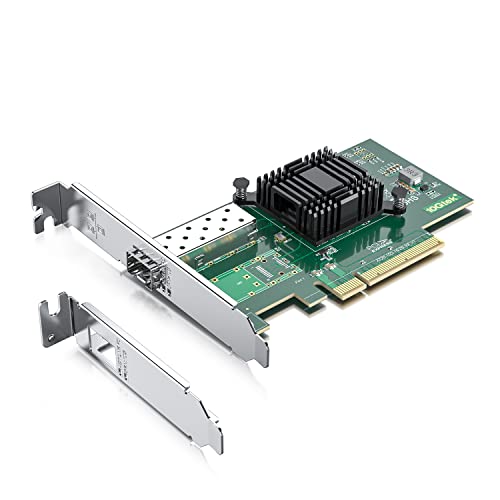
The 10Gtek single port SFP+ card takes the other route to 10 gigabit. Instead of a copper RJ45 socket, it offers one SFP+ cage driven by an Intel 82599EN controller, a long established server chipset with strong support in Windows Server, Linux, and virtualization platforms. Connect it with a direct attach cable for a short hop to a switch, or with fiber modules for a longer run.
This card makes the most sense in a mixed rig that also does homelab, streaming, or file serving work, or where the switch offers SFP+ ports but no spare copper socket. Direct attach cables are tidy and low power for rack to desk distances, and fiber avoids the heat and distance limits of 10GBASE-T over copper. The card uses a PCIe x8 interface, so confirm your motherboard has a suitable slot.
Driver planning matters more here than with the consumer copper cards. Check that your exact operating system is supported before ordering, and budget for the cable or modules in the same purchase, because the SFP+ cage on its own connects to nothing. Chosen deliberately, this is a proven and flexible way into 10 gigabit.
Specs
| Item | Detail |
|---|---|
| Port | 1 x SFP+ |
| Interface | PCI Express x8 |
| Controller | Intel 82599EN |
| Media | Direct attach cable or fiber modules |
| Support | Windows Server, Linux, VMware |
| Use case | SFP+ switches, homelab and fiber links |
5. 10Gtek for X540-T2 10GbE Network Adapter, Dual RJ45 Port

The 10Gtek X540-T2 adapter is the heavy duty copper option, built around the Intel X540 controller with two RJ45 10GBASE-T ports on a PCIe x8 interface. Two ports open up layouts a single port card cannot offer: one link to the main switch and another direct link to a network drive or a second PC, or separate paths for gaming traffic and bulk transfers. It suits a gaming PC that doubles as the household media and backup hub.
Dual ports also help staged upgrades. Connect one port now and leave the second ready for a fast NAS or a streaming machine later, without opening the case again. The X540 platform is well known in server and workstation circles, although desktop buyers should confirm driver support for their exact Windows release before ordering.
This is the largest and warmest card in the guide, and it asks the most of your case and motherboard: a free x8 capable slot, decent airflow, and two cable runs worth planning. In return it gives a gaming rig a genuinely workstation grade network foundation, with the most room to grow.
Specs
| Item | Detail |
|---|---|
| Ports | 2 x RJ45 10GBASE-T |
| Interface | PCI Express x8 |
| Controller | Intel X540 |
| Speeds | 10 gigabit and 1 gigabit per port |
| Support | Windows, Windows Server, Linux, ESX |
| Use case | Dual links, NAS and second PC connections |
FAQ
Do I need a 10 gigabit switch to use one of these cards?
No, but you need one to see 10 gigabit speeds. The copper cards fall back to slower speeds, so a card can join a gigabit or multigig network today and run faster later. The link only moves as fast as the slowest device in the chain, usually the switch port, the cable, or the storage at the other end.
Will a 10 gigabit card lower my ping in online games?
Not in any meaningful way. Online game traffic is small, and ping depends mainly on your internet connection and the path to the game server. These cards shine at local speed: transfers to a network drive, game library moves, and streaming inside the home all finish far sooner on a 10 gigabit link.
Can I connect two PCs directly with 10 gigabit cards?
Yes. Two copper cards can link directly with a suitable Ethernet cable, with no special crossover cable needed. Give each PC a fixed address on its own small subnet, and that link becomes a very fast private path for backups and library transfers.
Which cable should I buy for a 10 gigabit copper card?
Choose Cat6a for new runs, especially anything longer or hidden in walls. A short, good quality Cat6 patch cable is fine for desk length links. If a new card connects below 10 gigabit, swap in a short Cat6a cable first, since cabling is the most common cause of a slow link.
Final verdict
For most gaming PCs, the TP-Link TX401 is the easiest recommendation: one copper port, a cable in the box, and friendly fallback speeds. The ASUS XG-C100C suits enthusiasts who want QoS, while the Syba SD-PEX24055 covers the same copper ground with a proven controller. Builders with SFP+ gear should look at the 10Gtek 82599EN card, and anyone who wants two copper ports should choose the 10Gtek X540-T2. Match the card to your switch, slot, and cable first.
Product and ASIN Reference
| Product | ASIN |
|---|---|
| TP-Link 10GB PCIe Network Card (TX401) | B08D71PVXG |
| ASUS XG-C100C 10GBase-T PCIe Network Adapter | B072N84DG6 |
| Syba 1 Port 10 Gigabit Ethernet Network Card (SD-PEX24055) | B07G2DV9K2 |
| 10Gtek 10Gb PCI-E NIC Network Card, Single SFP+ Port (Intel 82599EN) | B01LZRSQM9 |
| 10Gtek for X540-T2 10GbE Network Adapter, Dual RJ45 Port | B01HMGWOU8 |
Related guides
More from Amazon
Programs that pair well with the guide above. Offers and eligibility are set by Amazon and may change.
Free shipping on eligible items, Prime Video and more. Eligible new members can start with a free trial.
Start a Prime free trialAd-free music streaming. Eligible new subscribers can start with a free trial.
Try Music Unlimited freeA Prime membership for ages 18-24 with a trial period. Eligibility is set by Amazon.
See Prime for Young AdultsAudiobooks and podcasts to listen to on the go. Eligible new members can start with a free trial.
Try Audible freeAs an Amazon Associate we earn from qualifying purchases.