A gaming laptop, a Steam Deck and a ROG Ally all charge through the same small oval port, yet the cables that fit that port vary enormously in what they can actually do. One cable delivers full fast charging and moves game files at USB4 speed, while another that looks identical trickles power and copies data at a pace from another era. The cable is often the quiet bottleneck in an otherwise fast desk setup.
This guide compares five USB-C cables for gaming laptops and handhelds, covering high-wattage charging cables, certified USB4 cables for docks and fast storage, and everyday cables for travel. Each pick suits a different job, so the sections below explain where each fits best and where its limits sit.
As an Amazon Associate, we earn from qualifying purchases.
Top 3 picks at a glance


What to look for in USB-C cables for gaming laptops and handhelds
Start with the charging rating, because it decides whether a handheld or laptop charges at full speed, holds its battery level during play, or slowly drains while plugged in. Handhelds such as the Steam Deck and ROG Ally ship with chargers in the mid range of USB Power Delivery, and gaming laptops commonly need considerably more. A 100W cable covers handhelds and most laptops, while 240W cables follow the Power Delivery 3.1 extended power range and leave headroom for larger machines. Cables rated above 60W carry an e-marker chip that handles the negotiation.
Data speed is the second divide. Many charging focused cables are built on USB 2.0 and move data at 480Mbps, fine for charging but slow for copying a game library to an external drive. USB4 cables rated at 40Gbps handle fast storage, docks and displays, and stay short for signal reasons, usually around one metre. A 20Gbps cable sits between the two camps and suits a single display dock setup well.
Video support follows the same split. A cable that carries DisplayPort Alt Mode can run a monitor from a laptop or a docked handheld, and USB4 cables generally include that support. Pure charging cables often omit video entirely, which surprises people when a docked handheld charges happily but shows no picture.
Length and build round out the choice. Braided nylon jackets resist abrasion and tangling in bags, and reinforced housings matter because gaming gear gets plugged and unplugged constantly. One charging cable plus one USB4 cable covers every scenario.
1. INIU USB-C to USB-C Cable 240W (6.6 ft, 2-Pack)
The INIU 240W cable is the charging workhorse of this roundup. Each cable in the two pack measures 6.6 feet, long enough to run from a desk charger to a handheld on a stand, or from a wall socket to a laptop on a riser, without dragging the charger across the desk. That reach is the main reason to pick it over shorter rivals.
Power headroom is the other headline. The cable is rated at 240W under USB Power Delivery 3.1, which covers handhelds with ease and gives gaming laptops all the wattage their chargers can offer. An e-marker chip manages the higher current levels, and an LED indicator shows at a glance that power is flowing.
The trade off is data speed. Like most long charging cables, this one is a USB 2.0 design, so file transfers run at 480Mbps and it cannot drive a display through a dock. Treat it as a dedicated power cable: one for the desk, one for the travel bag, both braided and ready for the most demanding charger in the house.
Specs
| Detail | Value |
|---|---|
| Brand | INIU |
| Connectors | USB-C to USB-C |
| Charging rating | 240W USB Power Delivery 3.1 |
| Data speed | USB 2.0 up to 480Mbps |
| Length | 6.6 ft (2 m), two cables included |
| Jacket | Braided nylon |
| Extras | E-marker chip, LED power indicator |
2. UGREEN 100W USB-C to USB-C Cable (3.3 ft, 2-Pack)
The UGREEN 100W cable is the sensible everyday pick for handhelds and mid range gaming laptops. Its 100W rating covers the Steam Deck, ROG Ally and similar devices at full charging speed, and it handles most thin gaming laptops as well. As a two pack of 3.3 foot cables, it suits a desk and a carry case at the same time.
Build quality is the quiet strength here. The nylon braided jacket resists fraying where cables usually fail, and the aluminium connector housings feel solid in a dock or charger. At one metre, the length keeps a desk tidy, reaching a charger behind a monitor stand without pooling in loops under a keyboard.
Data transfer runs at USB 2.0 speed, so this is a charging and light sync cable rather than a storage cable, and it does not carry video. Within that role it is hard to fault, and the e-marker chip inside supports the full 100W safely with compatible chargers.
Specs
| Detail | Value |
|---|---|
| Brand | UGREEN |
| Connectors | USB-C to USB-C |
| Charging rating | 100W USB Power Delivery |
| Data speed | USB 2.0 up to 480Mbps |
| Length | 3.3 ft (1 m), two cables included |
| Jacket | Nylon braided |
| Connector housing | Aluminium alloy |
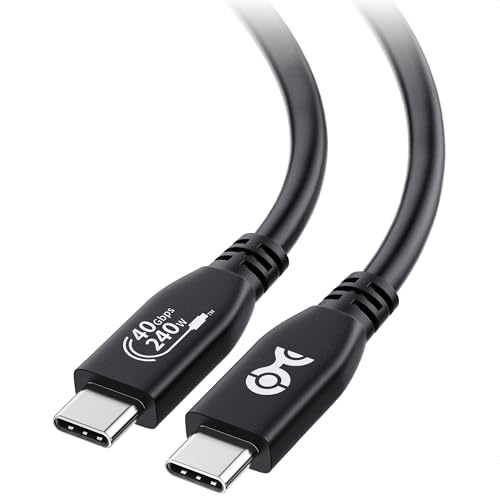
3. Cable Matters USB-IF Certified 40Gbps USB4 Cable (3.3 ft)
When a cable has to do everything at once, the Cable Matters USB4 cable is the pick built for the job. It carries up to 40Gbps of data, supports video output up to 8K, and still charges at up to 240W under USB Power Delivery 3.1. That makes it the natural choice for a one cable desk, where the same cable handles power, display and peripherals together through a dock.
Certification backs up the headline numbers. The cable is USB-IF certified to the USB4 standard, meaning its model has been through the compliance programme behind the specification rather than relying on marketing claims alone. For a dock connection that must stay stable during long sessions, that certification is a meaningful detail.
The limitation is length, a physical one rather than a flaw. At 3.3 feet the cable reaches from a laptop to a nearby dock or monitor, exactly the layout USB4 is designed for, but it will not stretch to a distant wall outlet. Keep the dock close to the machine, and this cable becomes the single link that replaces separate power, video and data leads.
Specs
| Detail | Value |
|---|---|
| Brand | Cable Matters |
| Connectors | USB-C to USB-C |
| Standard | USB4, USB-IF certified |
| Data speed | Up to 40Gbps |
| Charging rating | 240W USB Power Delivery 3.1 |
| Video | Up to 8K via DisplayPort Alt Mode |
| Length | 3.3 ft (1 m) |
| Model | 201304-BLK-1m |
4. Silkland USB 4 Cable for Thunderbolt 4 (4 ft)

The Silkland USB4 cable answers a specific frustration with high speed cables: most stop at one metre, which can leave a dock or monitor just out of reach. At four feet, this is among the longest USB-IF certified USB4 cables available, and it keeps the full 40Gbps data rate along with 240W charging. That extra reach helps when a laptop sits on a stand and the dock lives off to one side.
Performance matches the other USB4 pick in this guide. The cable supports a single 8K display, or dual 4K displays through a suitable dock, and it works with Thunderbolt 4 and Thunderbolt 3 ports as well as USB4 hosts. An e-marker chip handles the extended power range, so the cable that drives a monitor also fast charges the machine.
For handheld gaming, this cable suits a permanent dock station where one cable runs from the cradle to the television setup. The braided jacket handles the bend behind a media unit, and the four foot run reaches between shelves that a one metre cable cannot bridge.
Specs
| Detail | Value |
|---|---|
| Brand | Silkland |
| Connectors | USB-C to USB-C |
| Standard | USB4, USB-IF certified, Thunderbolt 4 compatible |
| Data speed | Up to 40Gbps |
| Charging rating | 240W USB Power Delivery 3.1 |
| Video | Single 8K or dual 4K via DisplayPort Alt Mode |
| Length | 4 ft (1.2 m) |
| Model | S3614 |
5. Belkin Connect USB4 Cable (4 ft, 240W, 20Gbps)

The Belkin Connect USB4 cable takes a balanced middle path for desk setups that need video and data without chasing the highest transfer speeds. It is USB4 compliant and USB-IF certified, carries up to 20Gbps of data, supports a 4K display at 60Hz, and charges at up to 240W. For a single monitor dock driving a gaming laptop or handheld, those numbers cover the whole job.
Belkin builds this cable with a durable, fire resistant jacket, a practical detail for a cable that stays plugged into a dock around the clock. The four foot length suits a laptop beside a monitor or a handheld dock beside a television, and backward compatibility with Thunderbolt and earlier USB standards means it also works with older machines.
The honest limitation is the 20Gbps ceiling: fast external SSDs that can use a 40Gbps connection will run at half their potential rate on this cable. Gamers whose desk revolves around a dock and a single display will rarely notice, while players who regularly move huge game installs between drives should pick one of the 40Gbps options above instead.
Specs
| Detail | Value |
|---|---|
| Brand | Belkin |
| Connectors | USB-C to USB-C |
| Standard | USB4 compliant, USB-IF certified |
| Data speed | Up to 20Gbps |
| Charging rating | 240W USB Power Delivery |
| Video | 4K at 60Hz via DisplayPort Alt Mode |
| Length | 4 ft (1.2 m) |
| Model | INZ004tt1.2MBK |
FAQ
Can one USB-C cable charge a gaming laptop and run a monitor at the same time?
Yes, if the cable supports both high wattage Power Delivery and DisplayPort Alt Mode, which the USB4 cables in this guide do. The laptop port or dock must also support that combination, and the charger must supply enough wattage for the machine.
Why is a USB4 cable so much shorter than a charging cable?
High data rates are harder to sustain over distance, so 40Gbps USB4 cables are kept near one metre to hold signal quality. Charging only cables carry power rather than high frequency data, which is why they can reach two metres or more without problems.
Does a 240W cable charge a Steam Deck or ROG Ally faster than a 100W cable?
No. A handheld only draws the wattage it is designed for, and both ratings exceed that level comfortably. The higher rating matters for gaming laptops with bigger chargers, while handheld owners can choose on length, build and data speed instead.
Will these cables work with a dock for television play?
The USB4 options will, because they carry the display signal as well as power and data. The charging focused cables will power the handheld through the dock but cannot carry the picture, so keep a USB4 cable with the dock and use charging cables elsewhere.
Final verdict
Match the cable to the job and the setup gets simpler. The INIU 240W two pack is the reach and power pick for long charging runs, the UGREEN 100W two pack covers everyday charging, and the Cable Matters USB4 cable is the certified one cable answer for docks and displays. The Silkland USB4 cable adds extra length at full speed, while the Belkin Connect USB4 cable balances 20Gbps data, 4K video and 240W charging for a single monitor desk. Most setups are happiest with one charging cable and one USB4 cable.
Product and ASIN Reference
| Product | ASIN |
|---|---|
| INIU USB-C to USB-C Cable 240W (6.6 ft, 2-Pack) | B0C2V1512F |
| UGREEN 100W USB-C to USB-C Cable (3.3 ft, 2-Pack) | B09N94MZG9 |
| Cable Matters USB-IF Certified 40Gbps USB4 Cable (3.3 ft) | B094STPLX3 |
| Silkland USB 4 Cable for Thunderbolt 4 (4 ft) | B0D1VFF7HP |
| Belkin Connect USB4 Cable (4 ft, 240W, 20Gbps) | B0D4YGGDBT |
Related guides
More from Amazon
Programs that pair well with the guide above. Offers and eligibility are set by Amazon and may change.
Free shipping on eligible items, Prime Video and more. Eligible new members can start with a free trial.
Start a Prime free trialAd-free music streaming. Eligible new subscribers can start with a free trial.
Try Music Unlimited freeA Prime membership for ages 18-24 with a trial period. Eligibility is set by Amazon.
See Prime for Young AdultsAudiobooks and podcasts to listen to on the go. Eligible new members can start with a free trial.
Try Audible freeAs an Amazon Associate we earn from qualifying purchases.