Most gaming desks now have a motherboard with a 2.5GbE port, a console or two that top out at gigabit, and a NAS or router that sits somewhere in the closet. A 2.5GbE switch is the glue that lets the faster devices talk at full speed without forcing everything down to the slowest port. For gaming specifically, the questions are narrow: how many 2.5G ports you need today, whether an uplink faster than 2.5G helps, and whether a managed feature set such as IGMP snooping is worth the extra effort.
This guide is for players and streamers who are upgrading a wired setup, not for data centers. It compares ten switches using only the specifications named in their listings, from a five-port desk unit to a 24-port rackmount model. Note that raw switch speed does not change your ping to a game server; what it changes is local transfers, backups, and how many fast devices you can connect without a bottleneck.
Our Top Picks


Top 3 picks at a glance
Quick Picks
As an Amazon Associate we earn from qualifying purchases at no extra cost to you.




| Product | Best for | Key spec from the title |
|---|---|---|
| BrosTrend 5-Port 2.5G Switch | A single desk with PC, console, NAS | 5 ports, unmanaged, low-heat |
| Omada ES210X-M2 | Gamers who want VLAN and IGMP controls | 8 ports 2.5G, 2 SFP+ 10G, easy managed |
| D-Link DMS-1016 | Large households with many wired devices | 16 ports 2.5G, fanless, lifetime warranty |
| SODOLA 16-Port 2.5G | Racks and fiber uplinks | 16 x 2.5GBASE-T, 2 x 10G SFP+, 120Gbps |
| BrosTrend 8-Port 2.5G Switch | Console and PC setups | 8 ports, fanless, plug and play |
| VunLink 10-Port 2.5G/10G Switch | Fast NAS with a 10GbE link | 8 x 2.5GbE plus 2 x 10GbE RJ45 |
| YuanLey 8-Port 2.5G PoE Switch | Powering cameras and access points | 8 PoE ports, 2 x 10G uplinks, 120W budget |
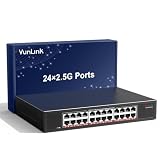
| VunLink 24-Port 2.5GbE Switch | Shared houses and LAN rooms | 24 x 2.5GbE, rackmount or desktop |
| NICGIGA 6-Port 10Gbe Switch | A compact 10G hub | 2 x 10Gb RJ45, 4 x 2.5Gb |
| VunLink 8-Port 2.5G Switch | Simple desk upgrade | 8 x 2.5Gbps, fanless metal body |
How to Choose
Port count and spare room
Count every wired device you own, then add two. A desktop PC, laptop dock, console, NAS, and router uplink already makes five. Eight ports is the comfortable size for most desks, while 16 and 24 ports suit LAN rooms, shared houses, or setups with rack gear. Remember that each port only runs at 2.5G if the device on the other end supports it.
Uplinks and 10G ports
A 10G port or an SFP+ cage lets your NAS or your router connect to the switch at a rate higher than any single 2.5G client. Without it, several PCs pulling files at once share a single 2.5G link. SFP+ needs a module or a direct-attach cable; RJ45 10G works with regular Cat6a cable over normal distances.
Managed versus unmanaged
Unmanaged switches are plug and play and cover most gamers. Easy-managed models add VLANs, loop prevention, and IGMP snooping, useful if you run IPTV, a separate guest network, or a home lab. Skip management features if you will never open the interface; they add nothing for casual play.
Cooling, mounting, and extras
Fanless metal bodies run silently, which matters on a desk. Rack-mount ears matter only if you own a rack. PoE adds convenience for cameras and access points but draws from a fixed wattage budget, so check the total, not just the number of PoE ports. Budget models cut corners on switching capacity statements and warranty length, so look for both in the listing.
What to ignore: marketing language about “gaming” acceleration, since a plain switch does not prioritize game traffic unless it offers quality-of-service settings you configure yourself. Focus instead on port speeds, the uplink plan, and whether the casing is metal and fanless, because those three details decide how the switch behaves in daily use for years.
The 10 Best Options
BrosTrend 5-Port 2.5G Switch
This small unmanaged switch is marketed as low-heat and plug and play for PCs, game consoles, and NAS drives. Five ports covers a single desk neatly, and the listing’s emphasis on low heat suggests a quiet, compact build for a shelf behind the monitor.
- Strength: Simple plug-and-play setup with no configuration.
- Strength: Port count suits a PC, console, NAS, and router.
- Trade-off: No spare ports once those devices are connected.
Skip it if you plan to add more wired devices over the next year. A capture card, second console, or smart TV would push you past five ports quickly.
Omada ES210X-M2
The Omada ES210X-M2 offers eight 2.5G ports and two 10G SFP+ ports with an easy managed feature set that includes VLAN, loop prevention, and IGMP snooping. Its fanless metal body with shielded ports points to a durable, silent unit.
- Strength: Managed features and SFP+ uplinks in a compact box.
- Strength: Fanless metal casing for quiet operation.
- Trade-off: SFP+ ports need modules or cables, which add cost.
Skip it if you want zero configuration and never touch settings. The extra control is only valuable to people who will actually open the web interface and use it.
D-Link DMS-1016
D-Link markets the DMS-1016 as a 16-port 2.5Gb unmanaged gaming switch that is fanless, plug and play, and compliant with NDAA and TAA, backed by a limited lifetime warranty. It is aimed at households where every room has a wired drop.
- Strength: 16 multi-gig ports with a lifetime warranty.
- Strength: Fanless and plug and play.
- Trade-off: No stated 10G uplink in the title.
Skip it if your NAS needs a link faster than 2.5G. Shoppers outside the United States should also note that the compliance wording in the title refers to U.S. procurement rules.
SODOLA 16-Port 2.5G
SODOLA lists sixteen 2.5GBASE-T ports plus two 10G SFP+ ports, a 120Gbps switching capacity, port isolation, 1U rack-mount fit, and fanless operation. That mix suits a small rack or a closet with a fiber or DAC uplink.
- Strength: Large port count with two SFP+ uplinks.
- Strength: Stated 120Gbps capacity and port isolation.
- Trade-off: Rack mounting suits a closet more than a desk.
Skip it if you want a switch that sits on a bedroom shelf. Rack gear is built for closets and equipment cabinets, and the mounting ears add little for a desk.
BrosTrend 8-Port 2.5G Switch
BrosTrend’s eight-port unmanaged switch is marketed for gaming, Xbox, and NAS, fanless and plug and play. It occupies the sweet spot for a desk with a few devices and room to grow.
- Strength: Eight ports leave room for expansion.
- Strength: Fanless and simple to deploy.
- Trade-off: No 10G uplink in the title.
Skip it if you need PoE or managed features. For a typical console and PC corner, though, eight ports with silent operation is hard to fault.
VunLink 10-Port 2.5G/10G Switch
VunLink’s ten-port unmanaged model pairs eight 2.5GbE RJ45 ports with two 10GbE RJ45 ports for desktop use. The RJ45 10G ports mean you can connect a fast NAS or workstation with normal twisted-pair cable.
- Strength: Two 10GbE copper ports avoid SFP+ modules.
- Strength: Plug and play with a desktop footprint.
- Trade-off: Only two 10G ports, so plan uplinks carefully.
Skip it if you want PoE built in. Check that your NAS or workstation network card actually supports 10GbE over copper before counting on those two ports.
YuanLey 8-Port 2.5G PoE Switch
YuanLey lists eight 2.5G PoE ports with a 120W PoE budget and two 10G RJ45 uplinks in a metal fanless body. It is built for people who also run cameras, access points, or a smart-home bridge off the same device.
- Strength: PoE on every port with a stated 120W budget.
- Strength: Two 10G RJ45 uplinks.
- Trade-off: PoE power is shared, so heavy devices share the budget.
Skip it if you only connect PCs and consoles. Paying for a PoE budget you never use only adds cost and a larger power supply.
VunLink 24-Port 2.5GbE Switch
This VunLink model gives twenty-four 2.5GbE RJ45 ports in a fanless metal body that mounts on a rack or sits on a desk. It targets LAN rooms, shared houses, and small studios with many fast devices.
- Strength: Twenty-four multi-gig ports in one box.
- Strength: Fanless metal design with flexible mounting.
- Trade-off: The title does not list 10G uplinks.
Skip it if you have fewer than ten wired devices. A smaller switch costs less and wastes less desk or rack space.
NICGIGA 6-Port 10Gbe Switch
NICGIGA’s six-port switch includes two 10Gb RJ45 ports and four 2.5Gb ports for desktop or wall mounting. It fits setups with one or two 10G devices, such as a workstation and NAS, plus a few 2.5G clients.
- Strength: Two 10G copper ports in a compact switch.
- Strength: Wall-mount option for tidy installs.
- Trade-off: Only four 2.5G ports, which fills quickly.
Skip it if most of your devices run at 2.5G. Four ports at that speed will be gone after a PC, console, and two more clients.
VunLink 8-Port 2.5G Switch
This second VunLink eight-port unit lists eight 2.5Gbps RJ45 ports, a fanless metal body, and desktop or wall mounting. It is the straightforward pick for a basic upgrade with no frills.
- Strength: Eight ports with a quiet fanless build.
- Strength: Desktop or wall mounting.
- Trade-off: No uplink above 2.5G in the title.
Skip it if your NAS can use 10G.
Which One Fits Your Situation
You have one desk and three or four devices
The BrosTrend 5-Port 2.5G Switch fits, with the 8-port version a safer choice if you expect to add a capture card or a second PC.
You stream and want traffic control
The Omada ES210X-M2 gives VLAN and IGMP snooping, handy for separating a stream PC or a guest network.
You host a LAN party room
The VunLink 24-Port or D-Link DMS-1016 gives enough ports for a group, and the SODOLA adds fiber uplinks.
You also run cameras and Wi-Fi access points
The YuanLey 8-Port PoE switch handles both wired gaming and powered devices from one box.
Common Mistakes
- Buying a switch with too few ports and needing a second one within months.
- Expecting lower ping, when a switch mainly improves local throughput.
- Using old Cat5 cable and wondering why 2.5G links fail to negotiate; Cat5e or better is the baseline.
- Choosing SFP+ uplinks without buying a module or cable.
- Paying for PoE or management features that never get used.
Related guides
- Gaming Chair Cushions And Lumbar Supports
- Travel Backpack With Laptop Compartment
- Business Laptops With Long Battery Life
Frequently Asked Questions
Will a 2.5G switch lower my game latency?
No. Online latency is set by your internet connection and route. A switch helps local file transfers and keeps fast devices from sharing slower links.
Do I need a managed switch?
Most players do not. Managed features matter for VLANs, IGMP, or lab setups. A plain unmanaged switch is simpler and quieter in 2026.
What cable do I need for 2.5G?
Cat5e supports 2.5G over normal home distances, and Cat6 or better is a safer choice. 10G over copper is best served by Cat6a.
Is a fanless switch worth it?
For a desk or bedroom, yes. Silent operation is a benefit, and metal bodies help dissipate heat without a fan.
Related guides
More from Amazon
Programs that pair well with the guide above. Offers and eligibility are set by Amazon and may change.
Free shipping on eligible items, Prime Video and more. Eligible new members can start with a free trial.
Start a Prime free trialAd-free music streaming. Eligible new subscribers can start with a free trial.
Try Music Unlimited freeA Prime membership for ages 18-24 with a trial period. Eligibility is set by Amazon.
See Prime for Young AdultsAudiobooks and podcasts to listen to on the go. Eligible new members can start with a free trial.
Try Audible freeAs an Amazon Associate we earn from qualifying purchases.