Not every gaming setup can run an Ethernet cable. Maybe your PC sits two rooms from the router, maybe your motherboard shipped without wireless, or maybe a laptop’s internal card has started dropping connections mid-match. A USB WiFi adapter is the fastest fix: plug it in, install the driver, and your machine is back online at modern speeds without opening the case or replacing internal hardware.
This guide compares five adapters across three speed classes, from a flagship WiFi 6E model with access to the 6 GHz band down to a pocket-size AC1300 stick for travel and backup duty. Each entry covers real speed ratings, antenna design, and operating system support, because those three details decide whether an adapter actually improves your gaming connection or just adds another weak link.
As an Amazon Associate, we earn from qualifying purchases.
Our Top Picks
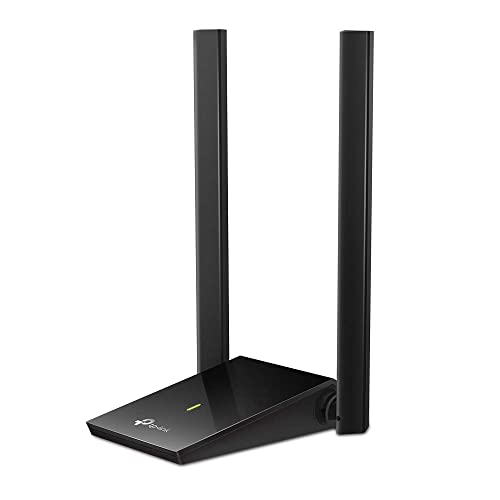
 TP-Link USB WiFi Adapter for Desktop PCAC1300, Single Antenna2.28 x 0.71 x 6.83 inches0.04 poundsCheck on Amazon

Top 3 picks at a glance
What to look for in a USB WiFi adapter for gaming
Speed class sets the ceiling. WiFi 6E adapters add the 6 GHz band, which is wide and uncrowded, and they carry the highest rated throughput. WiFi 6 models in the AX1800 class are the current sweet spot for most homes, while AC1300 adapters remain fine for internet connections in the few-hundred-megabit range. Remember that the rated number combines all bands; a single device connects on one band at a time, so the per-band figures are the ones that matter.
Antennas decide how much of that ceiling you actually reach. External high-gain antennas, especially on a short extension cable or cradle, let you position the adapter for a cleaner signal path instead of hiding it behind a metal PC case. Compact sticks are convenient but their internal antennas lose signal through walls and furniture more quickly, which shows up in games as ping spikes rather than slow downloads.
USB version and drivers are the quiet deal-breakers. An adapter rated above a few hundred megabits needs a USB 3.0 port; plugged into USB 2.0 it is capped far below its wireless speed. Check operating system support before buying as well — most current adapters target Windows 10 and 11, Mac support has narrowed on newer models, and the 6 GHz band requires Windows 11.
For gaming specifically, look for MU-MIMO and OFDMA support, which help the router serve your adapter efficiently alongside other devices, and WPA3 support for current security standards. No adapter can fix a weak router signal, though: if your room barely receives the network, position the adapter with its extension cable first, and treat a mesh system or a wired run as the longer-term answer.
1. NETGEAR Nighthawk A8000

The A8000 is the flagship of this roundup and the only pick with WiFi 6E. Its AXE3000 rating splits across three bands — 600 Mbps on 2.4 GHz, 1200 Mbps on 5 GHz and 1200 Mbps on the 6 GHz band — and that third band is the draw for gaming, since few neighboring networks compete there yet. A flip-up antenna improves reception, and the included cradle on an extension cable lets you place the adapter on top of the desk or case instead of behind it.
It connects over USB 3.0, supports WPA3 security, and works with Windows 10 and Windows 11, with the 6 GHz band available on Windows 11 systems paired with a WiFi 6E router. For a gaming desktop that sits near a modern router, this is the adapter that comes closest to wired consistency over the air. For older routers without 6 GHz, its 5 GHz band still delivers AX-class performance.
Specs
| Detail | Value |
|---|---|
| Model | A8000-100PAS |
| Standard | WiFi 6E, AXE3000 |
| Band speeds | 600 + 1200 + 1200 Mbps |
| Interface | USB 3.0 |
| Antenna | Flip-up antenna, cradle included |
| Security | WPA3 |
| System support | Windows 10 and 11, 6 GHz needs Windows 11 |
2. TP-Link Archer TX20U Plus
The Archer TX20U Plus is the WiFi 6 pick for players who want strong signal without stepping up to 6E. Its AX1800 rating combines 1201 Mbps on 5 GHz with 574 Mbps on 2.4 GHz, and two adjustable 5 dBi high-gain antennas do the heavy lifting for range. The adapter ships with a one-meter USB 3.0 extension cable, so the antennas can sit on top of a desk or tower where the signal is cleanest.
Under the hood it supports MU-MIMO and OFDMA for efficient router communication, beamforming to focus signal toward the router, and WPA3 encryption. Drivers cover Windows 10 and Windows 11. For most gaming rooms one or two walls away from the router, this is the balanced choice: current-generation speeds, real antennas, and placement flexibility that compact sticks cannot match.
Specs
| Detail | Value |
|---|---|
| Model | Archer TX20U Plus |
| Standard | WiFi 6, AX1800 |
| Band speeds | 1201 + 574 Mbps |
| Antennas | 2x 5 dBi high-gain, adjustable |
| Interface | USB 3.0, 1 m extension cable included |
| Features | MU-MIMO, OFDMA, beamforming, WPA3 |
| System support | Windows 10 and 11 |
3. TP-Link Archer T4U Plus
The Archer T4U Plus is the dual-antenna option in the AC1300 class. It pairs 867 Mbps on 5 GHz with 400 Mbps on 2.4 GHz, and its two high-gain 5 dBi antennas rotate for positioning, mounted on a base connected by a one-meter USB 3.0 cable. That arrangement suits desktop PCs especially well, since the antennas can rise above the case and monitors instead of sitting in the signal shadow behind the machine.
MU-MIMO support helps in busy households where several devices share the router, and the adapter works with Windows 11 and Windows 10 as well as older Mac OS versions from 10.9 to 10.14, giving it the widest system support in this group. If your internet plan sits in the mid-hundreds of megabits and your router is AC-class, this adapter matches that setup without paying for speed you cannot use.
Specs
| Detail | Value |
|---|---|
| Model | Archer T4U Plus |
| Standard | WiFi 5, AC1300 |
| Band speeds | 867 + 400 Mbps |
| Antennas | 2x 5 dBi high-gain, adjustable |
| Interface | USB 3.0, 1 m extension cable included |
| Features | MU-MIMO |
| System support | Windows 11 and 10, Mac OS 10.9 to 10.14 |
4. TP-Link Archer T3U Plus
The Archer T3U Plus takes the same AC1300 speeds — 867 Mbps on 5 GHz and 400 Mbps on 2.4 GHz — and mounts a single high-gain antenna on a compact stick body. That makes it a natural fit for laptops and small-form-factor PCs where a cabled antenna base would clutter the desk, while the external antenna still reaches noticeably further than the internal antennas of mini adapters.
It plugs into USB 3.0, supports MU-MIMO, and carries broad driver support across Windows, Mac OS and Linux systems, which also makes it a handy rescue adapter for older machines. Gaming performance on a solid 5 GHz signal is perfectly workable for online play, with the understanding that a single antenna gives up some range compared with the dual-antenna models above it in this list.
Specs
| Detail | Value |
|---|---|
| Model | Archer T3U Plus |
| Standard | WiFi 5, AC1300 |
| Band speeds | 867 + 400 Mbps |
| Antenna | 1 high-gain adjustable antenna |
| Interface | USB 3.0 |
| Features | MU-MIMO |
| System support | Windows, Mac OS, Linux |
5. TP-Link Archer T3U
The Archer T3U is the mini version of the same AC1300 platform, shrinking the adapter to a stick that sits nearly flush with the port. It keeps the 867 plus 400 Mbps band ratings, USB 3.0 connectivity and MU-MIMO support, trading antenna size for portability. In a laptop bag it is the adapter you forget you packed until a hotel room or a friend’s house needs it.
On a desktop it works best in the same room as the router or one wall away, where its internal antennas still hold a stable 5 GHz link for online games. It supports Windows and Mac systems with downloadable drivers. As a backup adapter, a travel companion, or a first step up from a failing internal laptop card, it covers the essentials in the smallest body here.
Specs
| Detail | Value |
|---|---|
| Model | Archer T3U |
| Standard | WiFi 5, AC1300 |
| Band speeds | 867 + 400 Mbps |
| Design | Mini USB stick |
| Interface | USB 3.0 |
| Features | MU-MIMO |
| System support | Windows and Mac OS |
FAQ
Is a USB WiFi adapter good enough for online gaming?
Yes, with the right expectations. Online games need modest bandwidth but stable, low-latency connections, and a WiFi 6 or WiFi 6E adapter with external antennas on a clean 5 or 6 GHz signal delivers that in most homes. Distance and walls matter more than the adapter’s headline speed, so use the extension cable to position antennas in the open.
Should I use the 2.4 GHz or 5 GHz band for gaming?
Choose 5 GHz, or 6 GHz on WiFi 6E gear, whenever the signal is usable: those bands are faster and less congested, which keeps ping steadier. The 2.4 GHz band travels further through walls but is crowded with neighboring networks and household devices, so reserve it for rooms where the higher bands cannot hold a stable connection.
Why is my adapter slower than its rated speed?
Rated speeds combine every band and describe ideal lab conditions. Real throughput is lower after distance, walls, interference and protocol overhead, and it is also capped by your internet plan and your router’s own speed class. A USB 2.0 port caps an adapter further still, so confirm the adapter is in a USB 3.0 port before troubleshooting anything else.
Do USB adapters work on gaming laptops and consoles?
They work on Windows gaming laptops and desktops, and most models here also list Mac support. Game consoles are different: PlayStation and Xbox systems do not accept third-party USB WiFi adapters, and the Nintendo Switch likewise relies on its built-in wireless. For consoles, improve the router position or use a wired connection instead.
Final verdict
Choose the NETGEAR Nighthawk A8000 if you own a WiFi 6E router and want the clearest band available, or the Archer TX20U Plus for the strongest all-round WiFi 6 value with real antennas. The T4U Plus and T3U Plus serve AC-class routers and mixed systems well, and the mini Archer T3U is the travel and backup pick.
Product and ASIN Reference
| Product | ASIN |
|---|---|
| NETGEAR Nighthawk A8000 | B0B94R78N7 |
| TP-Link Archer TX20U Plus | B0B5YPK9L1 |
| TP-Link Archer T4U Plus | B08KHV7H1S |
| TP-Link Archer T3U Plus | B08D72GSMS |
| TP-Link Archer T3U | B07P6N2TZH |
Related guides
More from Amazon
Programs that pair well with the guide above. Offers and eligibility are set by Amazon and may change.
Free shipping on eligible items, Prime Video and more. Eligible new members can start with a free trial.
Start a Prime free trialAd-free music streaming. Eligible new subscribers can start with a free trial.
Try Music Unlimited freeA Prime membership for ages 18-24 with a trial period. Eligibility is set by Amazon.
See Prime for Young AdultsAudiobooks and podcasts to listen to on the go. Eligible new members can start with a free trial.
Try Audible freeAs an Amazon Associate we earn from qualifying purchases.