
A 17-inch business laptop is a different purchase from a standard 15.6-inch work machine. You are choosing a screen big enough to hold two documents side by side, a chassis with room for a full keyboard and number pad, and a computer that mostly lives on a desk or travels between two fixed locations. If you spend your day in spreadsheets, accounting software, or long email threads, the extra screen area matters more than shaving a pound off the bag.
This guide is for office workers, small-business owners, and students who want that large canvas without paying for a workstation. Every model below is an HP 17-inch design, so the real decision is not brand but configuration: how much memory, how much storage, which Windows edition, and whether the bundled extras are useful or just padding. The picks are compared on the specs listed in each product title, so read the trade-offs carefully before you settle on a tier.
Our Top Picks
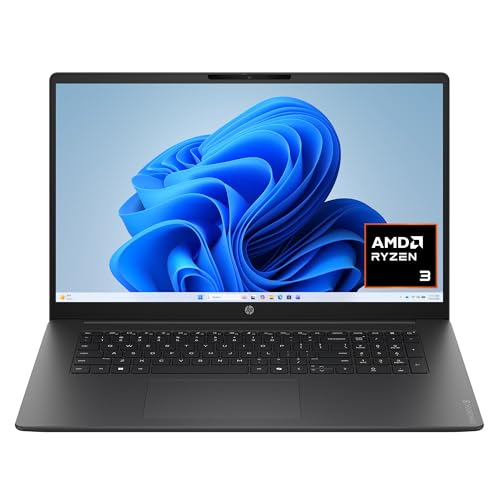 HP OmniBook 3 17.3 inch Laptop PCRyzen3|8GB|256GB|Touch15.65 x 10.09 x 0.65 inches4.43 poundsCheck on Amazon


Top 3 picks at a glance
Quick Picks
As an Amazon Associate we earn from qualifying purchases at no extra cost to you.




| Product | Best for | Key spec from the title |
|---|---|---|
| HP 17 Ryzen 5 (16GB, 512GB SSD) | Balanced everyday office work | 16GB RAM, 512GB SSD, 17.3″ FHD |
| HP 17 FHD 8GB (Win 11 Pro) | Light work with Office included | 8GB RAM, 256GB SSD + 500GB external |
| HP 17 Ryzen 5 7430U (32GB, 1TB) | Heavy multitasking | 32GB RAM, 1TB SSD |
| HP OmniBook 3 17 | Entry-level desk laptop | Ryzen 3, 8GB RAM, 512GB SSD |
| HP 17 Ryzen 5 7430U (16GB, 512GB) | Windows 11 Pro on a sensible budget | 16GB RAM, 512GB SSD, IPS display |
| HP 17 Ryzen 5 (8GB, external drive) | Lowest-memory Ryzen 5 with Office | 8GB RAM, 256GB SSD + 500GB external |
| HP 17 Ryzen 5 (16GB, 1TB total) | Extra file storage on a budget | 16GB RAM, 512GB SSD + 500GB external |
How to Choose
Screen: resolution matters more than inches
All of these list a 17.3-inch panel, and the useful baseline is 1920×1080 (FHD). Anything below that looks soft at this size, because the same pixels are stretched over a larger area. Look for the word IPS, which usually means wider viewing angles when you share the screen with a colleague across a desk. Ignore marketing about “stunning visuals”; for office work you want an anti-glare finish and comfortable text, not color-grading performance. If you will sit under bright overhead lights, a matte coating is worth more than any resolution upgrade.
Memory: 16GB is the practical floor
Eight gigabytes of RAM will run a browser and a document, but a dozen tabs plus a video call pushes it hard, and memory in most thin laptops is not easy to upgrade later. For business use in 2026, 16GB is the comfortable minimum and 32GB is for people who keep accounting software, a browser full of tabs, and a meeting open at once. Budget configurations cut corners on RAM first, so it is the first line to check on the spec sheet.
Storage: internal SSD versus bundled external drive
Several listings count an external 500GB drive toward the total storage figure. That drive is useful for backups, but it is not the same as internal capacity, and it is easy to leave at home when you travel between offices. Judge the laptop by its internal SSD: 512GB is a good target, while 256GB fills quickly once Office, system updates, and project files pile up. A 1TB internal drive is the premium choice for people who store large files locally.
Operating system and extras
Windows 11 Pro adds device management and encryption options that small offices often need; Windows 11 Home does not. Be skeptical of “lifetime Office” bundles and “Copilot AI” labels, which come from the seller rather than the hardware. A numeric keypad is a real benefit for data entry, and it is one of the main reasons to buy a 17-inch body in the first place. If a listing leans on adjectives instead of numbers, weigh the numbers.
The 7 Best Options
HP 17 Ryzen 5 (16GB, 512GB SSD)
This configuration is the most straightforward pick for someone who wants a big-screen work machine without obvious compromises. The title lists a Ryzen 5 processor, 16GB of RAM, a 512GB SSD, and a 17.3-inch FHD display with a numeric keypad and a long-battery claim. It is the sort of laptop that suits a bookkeeper, an administrator, or a freelancer who lives in documents and browser tabs and wants a screen that does not force constant scrolling.
- Strength: 16GB and 512GB internal is a balanced pairing for office software and files.
- Strength: the numeric keypad suits spreadsheet and bookkeeping work.
- Trade-off: the battery claim is vague, so do not plan around unplugged all-day use.
Skip it if you need heavy multitasking beyond office apps or a lot of local storage.
HP 17 FHD 8GB (Win 11 Pro)
Aimed at business owners and students who want Windows 11 Pro and an Office suite out of the box. The title lists 8GB of RAM, a 256GB SSD plus a 500GB external drive, and a 17.3-inch IPS display. For a small shop owner who mostly writes invoices and answers email, the bundle removes a few setup steps and gives a ready backup target, which is a practical advantage when nobody on staff manages IT.
- Strength: Windows 11 Pro is included, which helps with encryption and device management.
- Strength: the external drive gives an immediate place to keep backups.
- Trade-off: 8GB of RAM limits tab-heavy and multitasking workflows.
Skip it if you want memory headroom for several years of software updates.
HP 17 Ryzen 5 7430U (32GB, 1TB SSD)
This is the heavy-duty option in the group. The title lists the AMD R5 7430U processor, 32GB of RAM, a 1TB SSD, a 17.3-inch FHD IPS display, and Windows 11 Pro. It is the configuration for someone who keeps large spreadsheets open next to a browser, a messaging app, and a video meeting, and does not want to close anything to keep the machine responsive.
- Strength: 32GB of RAM handles large spreadsheets, many tabs, and video calls together.
- Strength: 1TB of internal SSD storage means you rarely need an external drive.
- Trade-off: it sits at the premium end of this lineup for what is still an FHD screen.
Skip it if your work is email and documents; the extra memory would sit idle.
HP OmniBook 3 17
The OmniBook 3 is the only named HP product line in the group, listing a 17.3-inch FHD display, Ryzen 3, 8GB of RAM, a 512GB SSD, and Radeon 610M graphics. It ships with Windows 11 Home in a Mica Silver finish. It suits a household or a very small business that wants a large screen for paperwork and web browsing, and values a recognizable retail model over a generic configuration.
- Strength: a 512GB internal SSD is generous for an entry-level model.
- Strength: it is a clearly named retail line rather than an anonymous configuration.
- Trade-off: Windows 11 Home lacks the Pro management features some offices expect.
Skip it if you need Pro-level security or more than 8GB of memory.
HP 17 Ryzen 5 7430U (16GB, 512GB SSD)
The middle ground of the R5 7430U family. The title lists 16GB of RAM, a 512GB SSD, a 17.3-inch FHD IPS display, Windows 11 Pro, and Copilot features. It is a sensible fit for an office manager or consultant who needs managed-device features and enough memory for a normal workday, without paying for the 32GB tier or the larger drive.
- Strength: Windows 11 Pro with 16GB of RAM covers most small-office needs.
- Strength: the IPS panel offers better viewing angles for shared screens.
- Trade-off: its specs overlap with the first pick, so compare final cost before choosing.
Skip it if you want Office bundled or extra backup storage.
HP 17 Ryzen 5 (8GB, external drive)
This one targets buyers who value the Office license and bundled storage more than raw speed. The title lists a Ryzen 5, 8GB of RAM, a 256GB SSD plus a 500GB external drive, lifetime Office, and a 17.3-inch display. A student writing papers or a retiree managing household accounts would find the software ready to go and the screen comfortable for long reading sessions.
- Strength: includes an Office license, saving a separate software purchase.
- Strength: a Ryzen 5 processor in a lower-memory configuration keeps the cost down.
- Trade-off: only 8GB of RAM and a small internal drive.
Skip it if you plan to keep the laptop through years of growing software demands.
HP 17 Ryzen 5 (16GB, 512GB SSD + 500GB external)
This is the same family with more memory. The title lists a Ryzen 5, 16GB of RAM, 1TB of combined storage (a 512GB SSD plus a 500GB external drive), lifetime Office, and a 17.3-inch display. It works for a student or home-office worker who wants the software bundle and enough RAM that the machine will not feel cramped halfway through a semester or a busy tax season.
- Strength: 16GB of RAM plus an Office license in one package.
- Strength: the external drive adds backup room for project files.
- Trade-off: the 1TB figure is only partly internal, so it is less flexible than a true 1TB SSD.
Skip it if you want all of your storage inside the laptop.
Which One Fits Your Situation
You run a small office and need security tools
Pick the HP 17 Ryzen 5 7430U with 16GB and 512GB. Windows 11 Pro and a sensible amount of memory cover encryption, remote management, and everyday software without paying for the top tier.
You work in large spreadsheets all day
The HP 17 Ryzen 5 7430U with 32GB and 1TB gives the most headroom, and the numeric keypad speeds up data entry. This is the one to choose if slowdowns cost you billable time.
You are a student who needs Office and a backup drive
The HP 17 Ryzen 5 with 16GB, a 512GB SSD, and an external drive bundles the software and the backup space, and 16GB of RAM is plenty for coursework and research tabs.
You want the simplest, lowest-commitment desk laptop
The HP OmniBook 3 17 gives a large screen and 512GB of SSD storage in an entry configuration, which is well matched to browsing, paperwork, and video calls with family.
Common Mistakes
- Counting an external drive as internal storage and then discovering the SSD is only 256GB.
- Buying 8GB of RAM for a laptop you plan to keep through several Windows updates.
- Assuming a “long battery” claim means a full workday; large screens drain faster.
- Overlooking Windows 11 Home versus Pro when your employer requires managed devices.
- Paying extra for AI labels when the processor and memory are what actually determine speed.
Related guides
- Gaming Chair Cushions And Lumbar Supports
- Warranty Considerations When Buying On Sale
- Business Laptops For Graphic Designers
Frequently Asked Questions
Is a 17-inch laptop too heavy for commuting?
It is heavier than a 14-inch model and fits best in a larger bag. If you carry it daily, weigh the screen gain against the extra bulk; for desk-to-desk use it is rarely a problem.
Is 8GB of RAM enough for business work?
For light document and email use, it works. For many browser tabs, video calls, and accounting software together, 16GB is a more comfortable target, and the gap is noticeable over a long workday.
Do I need Windows 11 Pro?
Pro adds disk encryption and device-management options that many workplaces require. Home is fine for personal use or a sole proprietor with no IT policy, so check your employer’s rules before buying.
Does the numeric keypad really matter?
For data entry, accounting, and spreadsheets, a full keypad saves real time. If you mostly write and browse, it matters much less, and a smaller laptop may be a better fit.
Related guides
More from Amazon
Programs that pair well with the guide above. Offers and eligibility are set by Amazon and may change.
Free shipping on eligible items, Prime Video and more. Eligible new members can start with a free trial.
Start a Prime free trialAd-free music streaming. Eligible new subscribers can start with a free trial.
Try Music Unlimited freeA Prime membership for ages 18-24 with a trial period. Eligibility is set by Amazon.
See Prime for Young AdultsAudiobooks and podcasts to listen to on the go. Eligible new members can start with a free trial.
Try Audible freeAs an Amazon Associate we earn from qualifying purchases.









