
Shopping for an ASUS laptop in 2026 means choosing between two very different families that share one badge. The Vivobook and Vivobook Go lines are everyday machines for documents, video calls and streaming, while the ROG Strix G16 line is built around discrete NVIDIA graphics and high refresh rate panels. Picking the wrong family is the costliest error, because a gaming laptop wasted on email is just as mismatched as a 4GB Vivobook Go asked to run modern titles.
This guide is for buyers who already know they want the ASUS name and need help sorting seven specific configurations by what the spec sheets actually show. It covers three ROG Strix G16 gaming laptops and four Vivobook-family models, spanning entry-level to high-end. Everything below is based on the listed specs in each product title, so use it to narrow your shortlist and then confirm the exact configuration before you buy.
Our Top Picks


Top 3 picks at a glance
Quick Picks
As an Amazon Associate we earn from qualifying purchases at no extra cost to you.



| Product | Best for | Key spec from the title |
|---|---|---|
| ROG Strix G16 (RTX 5060) | Balanced 1080p-plus gaming | RTX 5060, Core i7 14650HX, 16GB DDR5, 165Hz |
| Vivobook 15 (Core i9) | Heavy multitasking without a gaming GPU | Core i9-13900H, 32GB RAM, 1TB SSD |
| ROG Strix G16 (RTX 5050) | Entry gaming on the ROG platform | RTX 5050 Laptop GPU, Core i5 14450HX, 16GB DDR5-5600 |
| Vivobook Go 15 (N150) | Basic browsing and school tasks | Intel N150, 4GB RAM, 128GB SSD |
| Vivobook Go 15 (Ryzen 5) | Everyday work with a sturdier build | Ryzen 5, 8GB RAM, 512GB SSD, WiFi 6E |
| ROG Strix G16 (RTX 5080) | Top-tier display and graphics | RTX 5080, Core Ultra 9 290HX Plus, 2.5K 240Hz |
| Vivobook Go Slim (N4500) | Lightest-duty student use | Dual Core N4500, 4GB RAM, 128GB SSD |
How to Choose
Decide between Vivobook and ROG Strix first
The ROG Strix G16 models in this list carry NVIDIA RTX graphics and H-series Intel processors, which is the combination that matters for games and GPU-accelerated creative work. The Vivobook models rely on integrated graphics. If your workload is spreadsheets, browser tabs and video meetings, an RTX card adds cost and weight you will never use. If you play current games, integrated graphics will not keep up.
Match memory and storage to the job
Four gigabytes of RAM, as seen on the N150 and N4500 models, is a floor that gets tight with a handful of browser tabs and Windows 11 running. Eight gigabytes is the practical minimum for general use, and 16GB is the sensible target for gaming or multitasking. For storage, 128GB fills quickly once updates and apps accumulate, so 512GB is a more comfortable baseline.
Read the display line carefully
For the ROG models, look at refresh rate and resolution together: 165Hz at FHD+ suits fast-paced games on a mid-range GPU, while the 2.5K 240Hz panel on the RTX 5080 model asks for a much stronger GPU to make use of it. The Vivobook Go models list a 60Hz FHD panel, which is fine for office work but not for motion-heavy content.
Know where budget models cut corners
Entry processors such as the N150 and N4500 trade speed for low cost, and four gigabytes of memory magnifies that. Wireless standards also slip at the low end, so a listing that names WiFi 6E, as one Vivobook Go does, is a small but real step up. Ignore marketing phrases like “AI ready” unless the processor and memory back them up.
The 7 Best Options
ASUS ROG Strix G16 (RTX 5060)
This configuration pairs a GeForce RTX 5060 with a Core i7 14650HX, 16GB of DDR5 and a 1TB Gen 4 drive, behind a 16-inch 16:10 FHD+ panel running 165Hz with 3ms response. It suits buyers who want one machine for current games and school or work, without paying for the highest tier. Because it sits between the RTX 5050 and RTX 5080 versions, it is the model most buyers end up comparing against both neighbors.
- Strength: the 16GB DDR5 and Gen 4 storage listing gives it room to grow into larger game libraries.
- Strength: the 165Hz, 16:10 screen is well matched to a mid-range GPU.
- Trade-off: the title says nothing about weight or battery hours, so portability is unconfirmed.
Skip it if you only need office software, or if you want the best possible 2.5K display and are willing to move up a tier.
ASUS Vivobook 15 (Core i9-13900H)
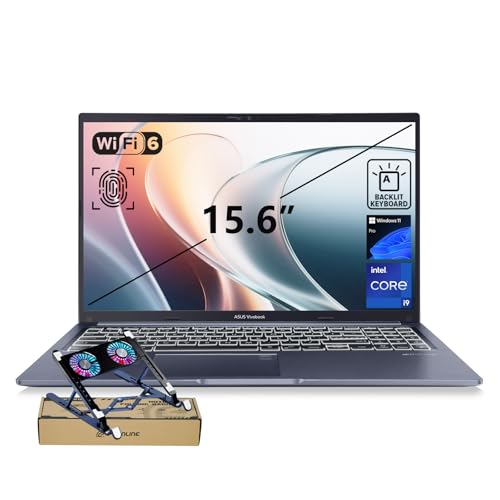
The Vivobook 15 stands out for raw memory and processor headroom: a Core i9-13900H, 32GB of RAM and a 1TB SSD in a 15.6-inch FHD body. The title also lists a physical webcam shield, backlit keyboard and fingerprint reader, which appeal to professionals working in shared spaces such as offices, libraries and coworking desks, where privacy and fast sign-in matter as much as speed.
- Strength: 32GB RAM is generous for heavy multitasking and large spreadsheets.
- Strength: the webcam shield and fingerprint sensor add practical privacy features.
- Trade-off: no discrete graphics are listed, so gaming and GPU rendering are not its strengths.
Skip it if you want smooth modern gaming, or if you prioritize a lightweight everyday machine, since the title gives no weight or battery figures to rely on.
ASUS ROG Strix G16 (RTX 5050)
This is the entry ticket to the ROG G16 family, featuring an RTX 5050 Laptop GPU, Core i5 14450HX, 16GB of DDR5-5600 and 512GB of storage on the same 165Hz FHD+ 16:10 display. It fits newer gamers who want a real gaming platform and plan to play at 1080p-class settings. It also works as a first gaming laptop for a student who wants room to grow without stepping into premium pricing.
- Strength: DDR5-5600 memory at 16GB matches the other ROG models in this list.
- Strength: the 165Hz panel makes it a proper gaming screen, not an office display.
- Trade-off: 512GB of storage fills fast with modern game installs.
Skip it if you want more graphics headroom or a larger drive from day one.
ASUS Vivobook Go 15 (Intel N150)
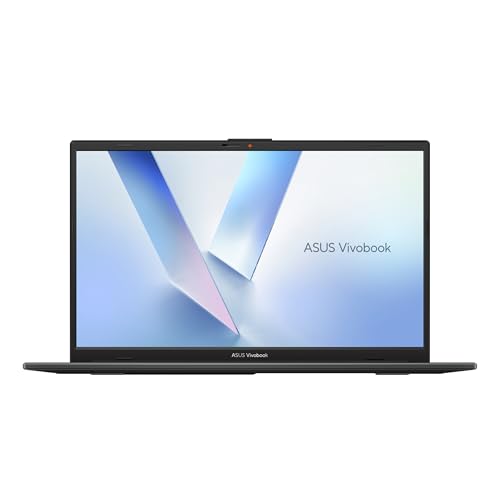
The N150 version of the Vivobook Go 15 is the leanest configuration here: Intel N150, integrated UHD Graphics, 4GB of RAM and a 128GB SSD with a 15.6-inch FHD 60Hz screen. It is aimed at buyers who need a simple Windows laptop for web pages, documents and streaming. Think of it as a basic family or classroom laptop rather than a performance machine.
- Strength: a full-size 15.6-inch FHD screen at the entry tier.
- Strength: a low-power processor class suited to light tasks.
- Trade-off: 4GB of RAM and 128GB of storage limit multitasking and long-term headroom.
Skip it if you plan to keep many tabs open, install large apps, or keep the laptop for several years, in which case the larger-memory Vivobook models are safer.
ASUS Vivobook Go 15 (Ryzen 5)
This Vivobook Go 15 steps up to a Ryzen 5 processor with Radeon graphics, 8GB of RAM and a 512GB SSD. The title also notes military-grade durability, an ErgoSense keyboard and WiFi 6E, features that point toward daily commuting and long typing sessions. It is the Vivobook Go that makes the most sense for someone who carries a laptop between home, campus and a coffee shop every day.
- Strength: 8GB RAM and 512GB storage hit a more usable baseline than the N150 sibling.
- Strength: WiFi 6E and a rugged-build claim add value for mobile users.
- Trade-off: the 60Hz FHD panel and integrated graphics keep it away from serious gaming.
Skip it if you need a discrete GPU or a high refresh rate display.
ASUS ROG Strix G16 (RTX 5080)
The flagship of the group combines an RTX 5080, Core Ultra 9 290HX Plus, 32GB of DDR5 and 1TB of PCIe storage with a 16-inch ROG Nebula HDR 2.5K display at 240Hz and 3ms. It is for enthusiasts who want the strongest graphics and screen in the ROG G16 range. The Core Ultra 9 processor and 32GB of memory also make it the most future-proof configuration of the three ROG models listed.
- Strength: the 2.5K HDR 240Hz panel is the most advanced display in this list.
- Strength: 32GB DDR5 supports gaming plus streaming or content creation at once.
- Trade-off: this is clearly the premium tier, and it is overkill for non-gaming use.
Skip it if your budget is limited or if you mostly need office and school tools.
ASUS Vivobook Go Slim (Intel N4500)
The Vivobook Go Slim L510KA pairs an Intel Dual Core N4500 with 4GB of RAM and a 128GB SSD in a 15.6-inch Windows 11 body, pitched at student study. It is for light, occasional use such as homework, reading and video lessons. Parents shopping for a first laptop for a younger student are the likeliest audience for this configuration.
- Strength: a slim, portable design aimed at students on the move.
- Strength: a simple, low-cost configuration for basic tasks.
- Trade-off: a dual-core processor and 4GB of RAM leave little room for heavier software or a second year of updates.
Skip it if you want smooth multitasking, if the laptop must handle more than the basics, or if you would rather step up to the Ryzen 5 Vivobook Go for a similar footprint.
Which One Fits Your Situation
You game but also study or work
The ROG Strix G16 with the RTX 5060 is the sensible middle path, offering strong graphics and 16GB DDR5 without stepping to the flagship tier.
You need a workhorse for office and multitasking
The Vivobook 15 with the Core i9 and 32GB of RAM is built for this job, particularly for large files and many open windows.
You are buying for a student on a tight budget
The Vivobook Go 15 with the Ryzen 5 and 8GB of RAM offers a more durable, more capable base than the N150 or N4500 versions, which pay for their low cost with 4GB of memory.
You want the best display and graphics ASUS offers here
The ROG Strix G16 with the RTX 5080 and the 2.5K 240Hz panel is the clear choice, provided you accept that it targets enthusiasts.
Common Mistakes
- Choosing a Vivobook and expecting it to play modern games without discrete graphics.
- Buying a 4GB RAM laptop and assuming it will feel fine after a year of updates.
- Comparing model names instead of full configurations, since the same ROG Strix G16 name appears with different GPUs, processors and storage.
- Paying for a 240Hz screen on a laptop whose graphics cannot push that frame rate.
- Ignoring storage size, then running out of room after a few large game installs.
Related guides
- Gaming Chair Cushions And Lumbar Supports
- Travel Backpack With Laptop Compartment
- Business Laptops With Long Battery Life
Frequently Asked Questions
Is a ROG Strix G16 worth it over a Vivobook?
Only if you need discrete NVIDIA graphics for games or GPU-based creative work. For documents, browsing and video calls, a Vivobook with 8GB or more RAM covers the job at a lower tier.
How much RAM should an ASUS laptop have?
Eight gigabytes is the practical minimum for everyday use, and 16GB suits gaming and heavier multitasking. The 4GB models in this list are best kept for very light tasks.
Do the Vivobook Go models handle gaming?
The listed integrated graphics and entry-level processors point to casual, low-demand use. Gamers should look at the ROG Strix G16 models instead.
Which ROG Strix G16 is the best starting point?
The RTX 5060 version balances graphics, 16GB DDR5 and a 1TB drive. The RTX 5050 version lowers the entry point, while the RTX 5080 version is the premium option.
Related guides
More from Amazon
Programs that pair well with the guide above. Offers and eligibility are set by Amazon and may change.
Free shipping on eligible items, Prime Video and more. Eligible new members can start with a free trial.
Start a Prime free trialAd-free music streaming. Eligible new subscribers can start with a free trial.
Try Music Unlimited freeA Prime membership for ages 18-24 with a trial period. Eligibility is set by Amazon.
See Prime for Young AdultsAudiobooks and podcasts to listen to on the go. Eligible new members can start with a free trial.
Try Audible freeAs an Amazon Associate we earn from qualifying purchases.









