A cheap business laptop has a different job from a cheap student laptop. It has to join a company network, survive eight hours of spreadsheets and video calls, and protect customer data if it is left on a train seat. That is why the right question is not simply how little you can spend, but which inexpensive model still carries the business essentials: Windows 11 Pro rather than Home, enough memory to keep a CRM and a browser open together, a webcam you can cover, and a real keyboard with a numeric keypad.
This guide is for owners of small firms, freelancers, office managers equipping a few desks, and employees buying their own work machine. It compares eight laptops that span the range from a barebones Intel N150 portable to a Dell business model with a dedicated security camera, and it judges them only on the specs shown in each listing. As 2026 buyers know, a low cost often means a trade-off in storage speed or software, so the focus here is on those trade-offs.
Our Top Picks
 Lenovo V15 Gen 4 Business Laptop16GB RAM | 512GB SSD14.13 x 9.29 x 0.78 inches3.64 poundsCheck on Amazon


Top 3 picks at a glance
Quick Picks
As an Amazon Associate we earn from qualifying purchases at no extra cost to you.


| Product | Best for | Key spec from the title |
|---|---|---|
| HP 17 Business Laptop | Spreadsheet-heavy desk work | Ryzen 5, 16GB RAM, 512GB SSD, 17.3″ FHD, numeric keypad |
| 15.6″ Pentium Windows 11 Pro Laptop | Basic office tasks with Office included | Windows 11 Pro, Office 365, 8GB RAM, 256GB SSD, 6H battery |
| HP Business Students Laptop | Light portable use with backup drive | Intel CPU, 128GB UFS, 500GB external HDD, WiFi 6, 14″ display |
| Phatom 15.6″ FHD Laptop | Upgradeable budget machine | 4GB RAM, 128GB SSD, upgradeable RAM and SSD, up to 2TB |
| HP 255 G10 | Small-office workhorse | AMD quad-core, 16GB RAM, 512GB SSD, Windows 11 Pro, webcam shutter |
| Lenovo V15 Gen 4 | Wired networking and ports | Core i5-13420H, 15.6″ FHD, HDMI, RJ45, Windows 11 Pro |
| HP 14 Business Laptop | Lightest carry for basic tasks | 14″, N150, 4GB RAM, 128GB UFS, one-year Office 365 |
| Dell Pro 16 PC16250 | Premium security and display | Core 5 120U, 16GB DDR5, 512GB SSD, 16″ FHD+ anti-glare, IR camera |
How to Choose
Windows 11 Pro versus Home
Windows 11 Pro adds features that matter in a workplace, including BitLocker drive encryption, the ability to join a company domain and remote-management options. Several models here list Pro, while the HP 14 lists Home. If your business uses managed devices or you handle sensitive client files, favor a Pro listing; upgrading later usually costs more than choosing it up front.
Memory and storage for real work
Business apps are heavier than they look: a browser with a dozen tabs, a video-call app, accounting software and a PDF reader together can strain 4GB of memory. Treat 8GB as the minimum and 16GB as the comfortable level, as on the HP 17, HP 255 G10 and Dell Pro 16. For storage, a 256GB or 512GB SSD is far better than 128GB of eMMC or UFS flash, which is slower and fills quickly.
Security, ports and keyboard
A physical webcam shutter, listed on the HP 255 G10, blocks unwanted video access without software. An IR camera, listed on the Dell, supports Windows Hello face sign-in. An RJ45 Ethernet port, as on the Lenovo V15, gives a stable wired connection for a desk or conference room. A numeric keypad speeds up data entry, so favor a 15.6 inch or larger body if you work with numbers all day.
Screen, battery and what to ignore
A full HD screen is the baseline for documents, and anti-glare finishes help in bright offices. Ignore Copilot AI labels and bundled earphones when comparing hardware, and treat a bundled Office subscription as a limited-time convenience. Cheap models usually cut corners on build quality, keyboard feel, display brightness and drive speed, so lean on RAM, SSD size and the listed processor tier. If several people will share the same model, buying identical units also simplifies spare chargers, imaging and support, which is worth more than a small spec difference.
The 8 Best Options
HP 17 Business Laptop
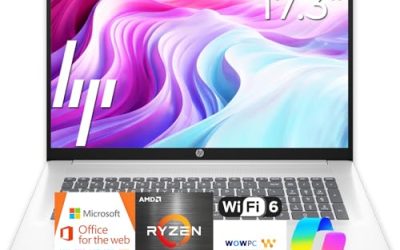
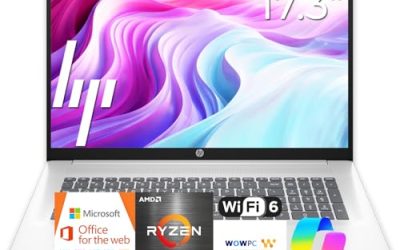
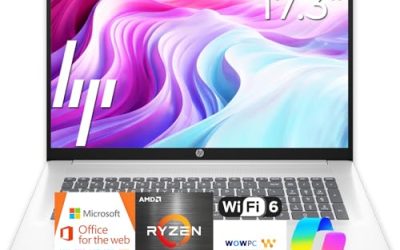
The HP 17 is the big-screen desk machine. The title lists a 17.3″ FHD display, a Ryzen 5 processor, 16GB of RAM, a 512GB SSD, a numeric keypad and a long-battery description. It suits people who live in spreadsheets and want a large workspace at an economical tier.
- Strength: 16GB of RAM and a 512GB SSD are strong figures for the segment.
- Strength: a 17.3 inch screen with a numeric keypad suits data entry.
- Trade-off: a 17 inch body is bulky for frequent travel.
It also leaves room on the desk for a full-size keypad without a separate accessory. Skip it if you carry your laptop daily or need Windows 11 Pro, which the title does not list.
15.6″ Pentium Windows 11 Pro Laptop
This unbranded 15.6 inch model is a simple office machine. The title lists Windows 11 Pro, Office 365, 8GB of RAM, a 256GB SSD, an Intel Pentium processor, a 6H battery, a mini HDMI port and a camera and mic. It covers documents, email and video calls.
- Strength: Windows 11 Pro and Office 365 are named in the title.
- Strength: 8GB of RAM and a 256GB SSD are a sensible business baseline.
- Trade-off: a Pentium chip and a 6H stated battery are modest.
Skip it if you need a recognized support channel or faster performance.
HP Business Students Laptop
This HP is a lightweight portable with a few extras. The title lists a 14″ LED display, an Intel CPU, 128GB of UFS storage, a 500GB external hard drive, WiFi 6, Copilot AI and Microsoft 365, in an ultra-light size. The external drive adds backup space.
- Strength: the included 500GB external drive provides backup or extra storage.
- Strength: WiFi 6 supports faster wireless in modern offices.
- Trade-off: 128GB of UFS storage is slow and small for heavy business use.
Skip it if you want a large internal drive or a named processor model.
Phatom 15.6″ FHD Laptop
The Phatom is the upgradeable budget option. The title lists a 15.6″ FHD display, 4GB of RAM, a 128GB SSD, a Pentium processor, Windows 11 compatibility, upgradeable RAM and SSD up to 2TB, and 1080P HDMI. The upgrade path lets you add memory later.
- Strength: the listing states that RAM and the SSD can be upgraded.
- Strength: a full HD screen and an HDMI output suit a basic desk setup.
- Trade-off: it ships with only 4GB of RAM and 128GB of storage.
That is useful for a business that wants to start cheap and add memory once workloads grow. Skip it if you do not want to open a laptop to upgrade it, or need Windows 11 Pro listed.
HP 255 G10
The HP 255 G10 is a straightforward small-office workhorse. The title lists an AMD quad-core CPU, 16GB of RAM, a 512GB SSD, Windows 11 Pro, a 15.6″ Full HD display, a webcam with a shutter, a numeric keypad and Microsoft Copilot. It pairs business-grade software with solid memory.
- Strength: 16GB of RAM, a 512GB SSD and Windows 11 Pro cover the key business needs.
- Strength: a webcam shutter adds a physical privacy control.
- Trade-off: the processor is described only as a quad-core AMD part.
Skip it if you want the fastest processor tier or a premium chassis.
Lenovo V15 Gen 4
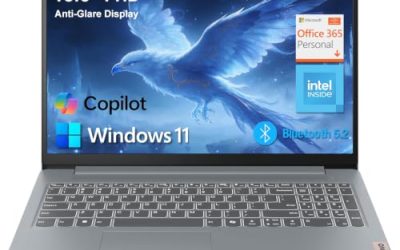
The Lenovo V15 Gen 4 is the ports-and-power option. The title lists a 15.6″ FHD display, an Intel Core i5-13420H, HDMI, RJ45 Ethernet, a webcam, a numeric keypad, Wi-Fi and Windows 11 Pro. The Core i5 is the most capable processor named among the non-Dell models here.
- Strength: an i5-13420H processor and Windows 11 Pro fit demanding office work.
- Strength: an RJ45 Ethernet port gives a stable wired connection.
- Trade-off: the title shown gives no RAM or storage figure.
Skip it if you need to see memory and drive sizes spelled out before buying.
HP 14 Business Laptop
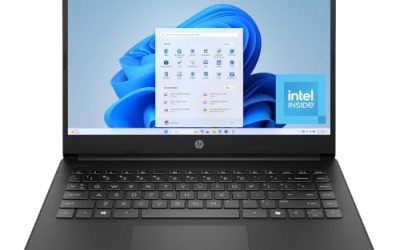
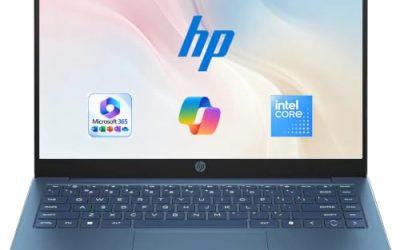
The HP 14 is the lightweight basic model. The title lists a 14″ display, a one-year Office 365 subscription, an Intel quad-core N150 processor, 4GB of RAM, 128GB of UFS storage and Windows 11 Home, with earphones included. It is light and simple for email and documents.
- Strength: a 14 inch body is easy to carry between sites.
- Strength: a one-year Office 365 subscription is included.
- Trade-off: Windows 11 Home, 4GB of RAM and UFS storage are limiting for business use.
Skip it if you need Windows 11 Pro, multitasking headroom or domain features.
Dell Pro 16 PC16250
The Dell Pro 16 is the premium end of this list. The title lists an Intel Core 5 120U processor, 16GB of DDR5 RAM, a 512GB SSD, a 16″ FHD+ anti-glare display, an IR camera and a business AI PC description tied to the Latitude 5550 line. It is the strongest on security and display.
- Strength: an IR camera and an anti-glare FHD+ display suit professional use.
- Strength: 16GB of DDR5 RAM and a 512GB SSD give strong working headroom.
- Trade-off: it sits at the higher end of the price range for this list.
For client-facing roles, the business-oriented positioning is also a plus. Skip it if your budget is strict or you only need basic document work.
Which One Fits Your Situation
You run a small office and want one dependable model for every desk
Choose the HP 255 G10. Windows 11 Pro, 16GB of RAM, a 512GB SSD and a webcam shutter cover the essentials in a single, uniform machine.
You work with numbers and want a big screen
Go with the HP 17 Business Laptop for its 17.3 inch display and numeric keypad, as long as you can live with the larger body.
You need wired networking and a strong processor
Pick the Lenovo V15 Gen 4. The Core i5-13420H and RJ45 port suit an office with Ethernet, though you should confirm RAM and storage first.
You handle sensitive data on the road
The Dell Pro 16 PC16250 fits best. The IR camera supports face sign-in and the 16 inch anti-glare display helps in bright rooms.
Common Mistakes
- Buying Windows 11 Home for a machine that must join a company network.
- Accepting 4GB of RAM for a laptop that will run several business apps at once.
- Counting a bundled Office subscription as a long-term software plan.
- Skipping a webcam shutter or sign-in camera when handling confidential files.
- Choosing a 17 inch laptop and then finding it too large to carry.
Related guides
- Gaming Chair Cushions And Lumbar Supports
- How To Use Camelcamelcamel For Amazon Deals
- Warranty Considerations When Buying On Sale
Frequently Asked Questions
Do I need Windows 11 Pro for a small business?
It is strongly worth it if you want drive encryption, domain joining or remote management. A single freelancer working alone can often manage with Home.
How much RAM should a business laptop have?
Aim for 8GB at minimum and 16GB if you run many apps, large spreadsheets or video calls together. Four gigabytes tends to slow down quickly.
Is an SSD important for a work laptop?
Yes, a true SSD boots and opens files faster than eMMC or UFS flash. Look for 256GB or more.
Are bundled subscriptions worth counting?
They can save money in the first year, but they expire. Judge the laptop on its hardware and treat the subscription as a bonus.
Related guides
More from Amazon
Programs that pair well with the guide above. Offers and eligibility are set by Amazon and may change.
Free shipping on eligible items, Prime Video and more. Eligible new members can start with a free trial.
Start a Prime free trialAd-free music streaming. Eligible new subscribers can start with a free trial.
Try Music Unlimited freeA Prime membership for ages 18-24 with a trial period. Eligibility is set by Amazon.
See Prime for Young AdultsAudiobooks and podcasts to listen to on the go. Eligible new members can start with a free trial.
Try Audible freeAs an Amazon Associate we earn from qualifying purchases.