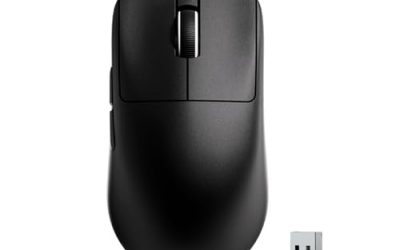
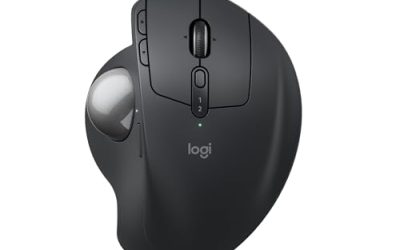
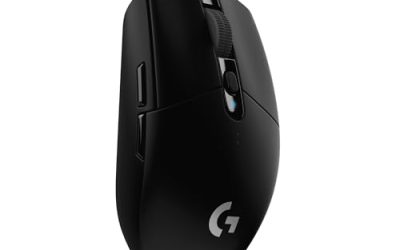
The switch under each main button decides how a gaming mouse feels in your hand. It sets the click weight, the sound, the speed of each press, and how many clicks the button survives before it wears out. Two mice can share the same sensor and the same shape yet feel completely different, and the switch is usually the reason.
Three switch families dominate the market today. Optical switches fire a beam of light through the click, so no metal contact can bounce or wear. Mechanical switches use a metal leaf and spring for the classic crisp click. Hybrid switches pair an optical actuation path with a mechanical click feel, keeping the speed of optical designs and the familiar feedback of a metal contact. This guide explains each family and compares five mice that show them at their best.
Our Top Picks


Top 3 picks at a glance

Quick Picks
| Mouse | Switch Type | Sensor | Weight | Best For |
|---|---|---|---|---|
| Razer Viper V2 Pro | Optical Gen-3 | Focus Pro 30K | 58 g | Competitive FPS players |
| Logitech G Pro X Superlight 2 | LIGHTFORCE hybrid | HERO 2, 44,000 DPI | 60 g | Pro-level wireless play |
| Razer DeathAdder V3 Pro | Optical Gen-3 | Focus Pro 30K | 63 g | Ergonomic comfort |
| Logitech G502 X | LIGHTFORCE hybrid | HERO 25K | 89 g | Button-heavy games |
| Logitech G502 HERO | Mechanical | HERO 25K | 121 g | Classic click feel |
How to Choose
Optical vs mechanical vs hybrid
An optical switch registers a click when a light beam is interrupted, so the signal reaches the computer with no debounce delay. With no metal contact, one press always registers once, even after years of use. A mechanical switch closes a metal contact, and the spring tension gives the click its snap. Over time the contact can bounce, which is why older mechanical mice sometimes develop double-click faults. A hybrid switch keeps the metal leaf for feel but uses light to register the press, so it feels mechanical under your finger while acting optical inside.
Actuation speed and click feel
Actuation speed is the time between your finger pressing the button and the game receiving the input. Optical and hybrid switches actuate in about 0.2 ms, while a good mechanical switch is only a fraction slower in practice. Optical clicks tend to feel light and snappy. Mechanical clicks feel firmer and more defined. Hybrid clicks sit between the two, with a tactile snap and a short travel. If you play fast-paced shooters, a light optical click helps you fire in quick bursts. A firmer mechanical click helps you avoid accidental presses in strategy or MMO games.
Lifespan and double-clicking
Switch lifespan is expressed as a click count, and the numbers on the box are a useful guide to durability. Optical switches commonly carry a 90-million-click lifespan because there is no contact to pit or corrode. Hybrid switches are built for a similar span. Mechanical switches usually last 20 to 50 million clicks, which still covers years of heavy use for most players. Optical and hybrid designs are the safer pick if you have lost a mouse to double-clicking before, since the failure mode that causes it is engineered out of the design.
Weight, shape, and sensor
A switch never works alone. A 58 g mouse with optical switches suits flick-heavy FPS play, while a 121 g mouse with mechanical switches suits players who want heft and extra buttons. Palm-grip players usually favor the ergonomic DeathAdder curve, while claw and fingertip players lean toward the slim Viper and Superlight shells. Every mouse here tracks at 25,600 DPI or higher, so the sensor will not hold you back. Match the shape to your hand first, then let the switch type decide between close contenders.
Wired vs wireless
Three of the mice in this guide are wireless, and two are wired. Modern wireless mice poll at up to 8,000 Hz and last 90 hours or more on a charge, so the cable is no longer a performance question. Wired mice still win on simplicity: no charging, no dongle, and a lower cost for the same switch technology. A light wireless mouse is easier to pack for travel, while a wired model gives you the same switches with fewer things to manage at a fixed desk.
1. Razer Viper V2 Pro

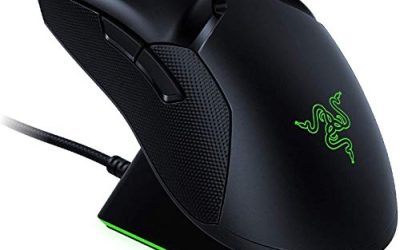
The Viper V2 Pro is the clearest example of what an optical switch can do. Its Gen-3 optical switches use a light beam to register each press, with a 0.2 ms actuation and a 90-million-click lifespan. There is no metal contact to bounce, so a single press always registers once, even after years of use. The click itself is light and snappy, which suits rapid firing in competitive shooters where you may click several times per second.
The Focus Pro 30K sensor tracks flawlessly on glass and cloth pads, the 58 g shell is one of the lightest wireless designs available, and the battery lasts up to 90 hours. On-mouse DPI controls move between five sensitivity stages without opening software, and the PTFE feet glide smoothly across a pad.
The trade-off is simplicity: no RGB lighting and only six buttons, so MMO players who want a thumb grid should look elsewhere. The Viper V2 Pro does one job extremely well — fast, consistent clicks in a shell that disappears in your hand.
Specs
- Switches: Razer Optical Mouse Switches Gen-3, 0.2 ms actuation, 90-million-click lifespan
- Sensor: Razer Focus Pro 30K optical sensor
- Weight: 58 g
- Battery: Up to 90 hours
- Buttons: 6
- Connectivity: HyperSpeed wireless, USB-C
- Dimensions: 126.73 x 57.6 x 37.81 mm
- Model: RZ01-04390100-R3U1
Best for: Competitive FPS players who want the fastest optical clicks in a featherweight wireless shell.
Watch out for: No RGB lighting and only six buttons, so it is a poor fit for players who want a thumb grid or a light show.
2. Logitech G Pro X Superlight 2
The Superlight 2 shows the hybrid approach at its best. Its LIGHTFORCE switches combine an optical actuation path with a mechanical click, so you get the speed and zero-debounce behavior of an optical design with the crisp, tactile feel of a metal leaf. The result is a click that feels familiar to anyone coming from a mechanical mouse, yet never develops the double-click fault that ends the life of so many mechanical designs.
The click feels familiar to anyone coming from a mechanical mouse, yet never develops the double-click fault that ends the life of so many mechanical designs.
The HERO 2 sensor reaches 44,000 DPI with tracking up to 500 IPS and more than 40 G of acceleration. The mouse weighs 60 g, polls at up to 8,000 Hz over LIGHTSPEED wireless, and runs for up to 95 hours on a charge. The symmetrical shape is a favorite among professional FPS players, and USB-C charging keeps the setup modern.
The Superlight 2 suits players who want a premium wireless mouse with a switch that feels mechanical but behaves like an optical design. The button count is modest, so macro-heavy players will want a different shape.
Specs
- Switches: LIGHTFORCE hybrid optical-mechanical switches
- Sensor: HERO 2 optical sensor, up to 44,000 DPI
- Weight: 60 g
- Battery: Up to 95 hours
- Buttons: 5 programmable
- Polling rate: Up to 8,000 Hz
- Connectivity: LIGHTSPEED wireless, USB-C
- Model: 910-006628
Best for: Pro-level wireless play where a mechanical click feel matters and double-clicking is not an option.
Watch out for: Only five programmable buttons and a premium position in the lineup, so button-heavy players may want a larger mouse.
3. Razer DeathAdder V3 Pro
The DeathAdder V3 Pro brings Gen-3 optical switches to the most popular ergonomic shape in gaming: the same fast, light, 90-million-click design as the Viper V2 Pro, with 0.2 ms actuation and no metal contact to wear out. The refined right-handed curve supports the palm through long sessions, making the V3 Pro the comfortable choice for players who game for hours at a time.
At 63 g it is one of the lightest ergonomic mice ever made, and the Focus Pro 30K sensor tracks cleanly on any surface, including glass. HyperSpeed wireless keeps latency low, the battery lasts up to 90 hours, and the 128 x 68 x 44 mm body suits medium to large hands in a palm or claw grip.
The V3 Pro is the pick if you love the DeathAdder shape and want optical switches inside it. With six buttons and no RGB lighting, it is not the mouse for players who map a dozen abilities to their thumb or want a light show.
Specs
- Switches: Razer Optical Mouse Switches Gen-3, 0.2 ms actuation, 90-million-click lifespan
- Sensor: Razer Focus Pro 30K optical sensor
- Weight: 63 g
- Battery: Up to 90 hours
- Buttons: 6
- Connectivity: HyperSpeed wireless, USB-C
- Dimensions: 128 x 68 x 44 mm
- Model: RZ01-04630100-R3G1
Best for: Palm-grip players who want optical switches in a light, ergonomic wireless shell.
Watch out for: Six buttons only and no RGB lighting, so macro-heavy players and lighting fans should look at the G502 models below.
4. Logitech G502 X
The G502 X is the wired showcase for LIGHTFORCE hybrid switches. The primary buttons use the same optical-mechanical hybrid design as the Superlight 2, giving a crisp mechanical click with optical actuation and no debounce delay. Around them Logitech kept the shape that made the G502 line a desk staple, with 13 programmable controls, a reversible and removable DPI-shift button, and a dual-mode scroll wheel that moves between hyper-fast free spin and precise ratcheting.
The HERO 25K sensor covers 100 to 25,600 DPI with sub-micron precision and zero smoothing, filtering, or acceleration. The mouse weighs 89 g, carries PTFE feet, and stores up to five profiles in on-board memory. The wired connection means nothing to charge, and thin-wall molding keeps the body light for a mouse with this many buttons.
The G502 X is the pick for players who want hybrid switches and a lot of buttons without paying for wireless. The wired cable is the only real compromise, and the right-handed shape means left-handed players need a different mouse.
Specs
- Switches: LIGHTFORCE hybrid optical-mechanical primary switches
- Sensor: HERO 25K, 100 to 25,600 DPI
- Weight: 89 g
- Buttons: 13 programmable controls
- On-board memory: Up to 5 profiles
- Feet: PTFE
- Connectivity: Wired USB
- Dimensions: 131.4 x 41.1 x 79.2 mm
- Model: 910-006136
Best for: Button-heavy games where hybrid switches and 13 programmable controls matter more than wireless freedom.
Watch out for: Wired only, and the right-handed shape does not suit left-handed players.
5. Logitech G502 HERO

The G502 HERO is the mechanical entry in this guide, showing what the classic switch design still does well. Its buttons use mechanical switch button tensioning, with a metal spring system and pivot hinges that give a crisp, clean click with rapid feedback. The click is firmer and more defined than the optical and hybrid switches above, which many players prefer for deliberate presses in MMO, ARPG, and strategy games.
The HERO 25K sensor reaches 25,600 DPI with 1:1 tracking and zero smoothing, filtering, or acceleration. Eleven programmable buttons cover macros and abilities, the dual-mode scroll wheel moves between hyper-fast and ratchet modes, and five 3.6 g weights adjust the balance. On-board memory holds up to five profiles, RGB lighting ties the mouse into the rest of a setup, and the 121 g weight gives it a planted feel that lighter mice cannot match.
The HERO suits players who like a firm mechanical click and want the most affordable mouse in this guide. The mechanical switches are the one area where it shows its age: the design can develop double-clicking after long use, the exact failure that optical and hybrid switches are built to avoid.
Specs
- Switches: Mechanical switch button tensioning with metal spring system and pivot hinges
- Sensor: HERO 25K, 100 to 25,600 DPI
- Weight: 121 g
- Buttons: 11 programmable
- Adjustable weights: 5 x 3.6 g removable weights
- On-board memory: Up to 5 profiles
- Scroll wheel: Dual-mode hyper-fast
- Connectivity: Wired USB
- Model: 910-005469
Best for: Players who want a firm, classic mechanical click, a planted 121 g feel, and a full set of programmable buttons.
Watch out for: Mechanical switches can develop double-clicking after long use, and the 121 g weight is heavy for flick-heavy FPS play.
Which One Fits
Pick the Viper V2 Pro if you play competitive shooters and want the lightest mouse with the fastest optical clicks. Pick the Superlight 2 if you want a hybrid click feel in a premium wireless body and you are willing to pay for it. Pick the DeathAdder V3 Pro if your hand prefers an ergonomic curve and you want optical switches inside it. Pick the G502 X if you need 13 programmable controls and a wired connection with hybrid switches. Pick the G502 HERO if you prefer a firm mechanical click, a heavier mouse, and the lowest cost of entry in this group.
If you are torn between optical and hybrid, choose optical when your priority is the lightest click and the longest lifespan, and choose hybrid when you want a click that feels mechanical under your finger. Both actuate at about 0.2 ms, so the decision comes down to feel rather than speed. Mechanical is the right call only when you genuinely prefer its firm click and accept that double-clicking may appear after years of use.
Common Mistakes
Choosing by DPI alone. Every mouse here reaches at least 25,600 DPI, and no hand benefits from sensitivity above a few thousand DPI in normal play. The switch type and the shape matter far more than the DPI number on the box.
Ignoring the click weight. A light optical click can cause accidental presses in games where you rest a finger on the button, while a firm mechanical click can tire your hand in a game that needs constant clicking. Match the click weight to the game you play most.
Buying for the switch and ignoring the shape. A great switch in a shell that cramps your hand is a bad mouse. Palm players should favor the DeathAdder curve, claw and fingertip players should favor the slim Viper and Superlight shells, and players who want many buttons should favor the G502 shape.
Assuming wireless means lag. The wireless mice here poll at up to 8,000 Hz and last 90 hours or more, so latency is no reason to avoid them. Choose wired for simplicity and cost, not for speed.
Forgetting the double-click risk. If you have lost a mouse to double-clicking before, do not buy another mechanical design and hope for a different outcome. Optical and hybrid switches remove the contact that causes it.
FAQ
Are optical switches better than mechanical switches for gaming?
Optical switches actuate faster, last longer, and cannot develop the double-click fault of a wearing metal contact. Mechanical switches still win on click feel for players who like a firm, defined press. Neither is better for everyone, which is why hybrid switches exist: they keep the mechanical feel and add optical actuation.
Do hybrid switches feel like mechanical switches?
Yes, for the most part. A hybrid switch keeps the metal leaf and spring, so the click under your finger feels mechanical. The difference is inside the mouse, where light registers the press instead of a metal contact. Most players cannot tell a hybrid click from a mechanical click without being told which is which.
How long do gaming mouse switches last?
Optical switches commonly carry a 90-million-click lifespan, and hybrid switches are built for a similar span. Mechanical switches usually last 20 to 50 million clicks. For a player who clicks a few thousand times a day, any of these spans covers several years of use.
Can I replace the switches in my gaming mouse?
Some mice use hot-swappable sockets, but none of the five mice here are sold as hot-swappable. Replacing switches in a standard mouse needs soldering tools and voids the warranty, so it is simpler to choose the right switch type when you buy.
Conclusion
Switches are the part of a gaming mouse you feel on every single click, yet they get less attention than sensors and weight. Optical switches give you speed and longevity, mechanical switches give you a classic firm click, and hybrid switches give you both in one design. The five mice here cover the full range: the Viper V2 Pro and DeathAdder V3 Pro for optical speed, the Superlight 2 and G502 X for hybrid feel, and the G502 HERO for mechanical click lovers. Choose the switch that matches your games, then the shape that matches your hand.
As an Amazon Associate, we earn from qualifying purchases.
Related guides
More from Amazon
Programs that pair well with the guide above. Offers and eligibility are set by Amazon and may change.
Free shipping on eligible items, Prime Video and more. Eligible new members can start with a free trial.
Start a Prime free trialAd-free music streaming. Eligible new subscribers can start with a free trial.
Try Music Unlimited freeA Prime membership for ages 18-24 with a trial period. Eligibility is set by Amazon.
See Prime for Young AdultsAudiobooks and podcasts to listen to on the go. Eligible new members can start with a free trial.
Try Audible freeAs an Amazon Associate we earn from qualifying purchases.