The Logitech G502 has been a fixture on gaming desks for years, and the best mouse pad for Logitech G502 is the one that matches how you actually move the mouse. The G502 family covers the wired G502 HERO, the wireless G502 LIGHTSPEED, and the newer G502 X models, and all of them share the same right-handed shape, the thumb rest, and a sensor that expects a clean, even surface under the feet. A pad that is too small, too slick, or too rough can make a good mouse feel inconsistent.
Size is the first thing most G502 owners get wrong. The G502 is a full-size mouse with some weight behind it, and many owners play at low sensitivity, which means wide arm sweeps rather than small wrist flicks. A small pad runs out of room in the middle of a turn and forces a lift and a reset at the worst moment, while a large pad gives the G502 room to travel without hitting an edge. Wireless owners have one more option: the G502 LIGHTSPEED and the G502 X LIGHTSPEED can charge while they move, but only on a charging pad built for that job.
This guide covers five pads that suit the G502, from a wireless charging pad made by Logitech itself to large cloth pads and one full desk mat. Every pad below is a mouse pad only, and every specification comes from the product listing. Match the pad to your desk, your sensitivity, and whether your G502 is wired or wireless.
Our top pick: Logitech G POWERPLAY 2 Wireless Charging Mouse Pad. Runner-up: Logitech G640 Large Cloth Gaming Mouse Pad.
Our Top Picks

Quick Picks
As an Amazon Associate, we earn from qualifying purchases.
| Product | Best for | Key spec from listing |
|---|---|---|
| Logitech G POWERPLAY 2 Wireless Charging Mouse Pad | G502 LIGHTSPEED owners who never want to plug in | Charges compatible mice in motion and at rest, 13.5 x 11.2 inches, 3.5 mm total height |
| Logitech G640 Large Cloth Gaming Mouse Pad | Control players who want a steady, moderate glide | Cloth surface, 460 x 400 mm, 3 mm rubber base |
| SteelSeries QcK Large Gaming Mouse Pad | A classic cloth pad for any G502 | Micro-woven cloth, 450 x 400 mm, 2 mm thick |
| Razer Gigantus V2 Large Gaming Mouse Pad | A stitched-edge cloth pad with a textured weave | Textured micro-weave cloth, 450 x 400 mm, 3 mm thick |
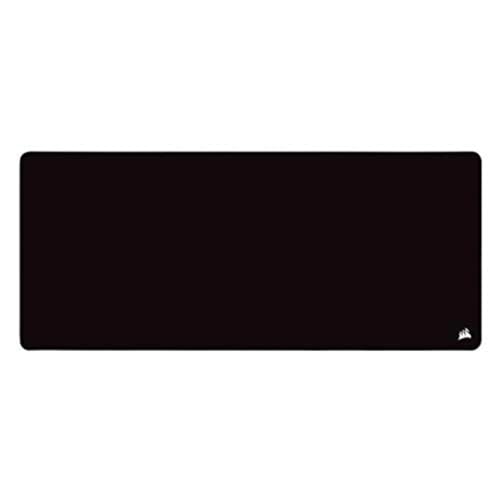
| Corsair MM350 PRO Extended XL Gaming Mouse Pad | A full desk mat for keyboard and mouse | Spill-proof micro-weave cloth, 930 x 400 mm, 4 mm thick |
How to Choose
Size and sweep room
The G502 rewards a pad with room to spare. Low-sensitivity players move the mouse with the arm, and a sweep across a wide arc can cover a large part of the desk in one motion. If the pad ends before the movement ends, the mouse feet catch the edge and the aim pulls off line. A pad in the 450 x 400 mm range covers the mouse zone for most players, with room for the keyboard beside it. Players who use very low sensitivity, or who like the keyboard and mouse on one unbroken surface, should look at a desk mat in the 900 mm range instead.
Measure the desk before ordering. A large pad that hangs over the front edge will curl, and a desk mat wider than the desk will bunch against a wall or a monitor arm. Leave a small margin on each side so the pad lies flat, and check the depth as well as the width.
Surface friction and glide
Cloth and hard surfaces give the G502 a different feel, and the choice comes down to how much stopping power you want. A cloth surface has a little more friction, so the mouse stops where the hand stops, which suits players who flick to a target and hold still. A hard surface has less friction, so the mouse glides further with less effort, which suits players who track a moving target. The G502 HERO 25K sensor tracks on both, and Logitech tunes its own cloth pads to match its sensors, but the feet of the mouse and the texture of the pad decide how the glide feels under the hand.
Moderate-friction cloth is the middle ground, and it is the surface most G502 owners end up with. It is fast enough for tracking and slow enough for precise stops, and it stays consistent as the pad warms up during a long session. A very rough cloth can feel slow and can wear the mouse feet faster, while a very smooth cloth can feel slippery when the hand is relaxed.
Thickness, edges, and base grip
Thickness changes how the pad feels under the wrist. A thin pad in the 2 mm range sits close to the desk and gives a firm, direct feel, with the wrist resting almost on the desk itself. A thicker pad in the 3 to 4 mm range adds a little cushion under the wrist, which some players find more comfortable during long sessions. A thick pad can also raise the wrist relative to the keyboard, so players who type a lot on the same desk may prefer the thinner option.
Edges and base matter just as much. Stitched edges keep a cloth pad from fraying where the wrist rubs it every day, and an unstitched edge can peel or lift after months of use. A rubber base keeps the pad planted during hard swipes, and a pad that slides on the desk will drift out of position with every flick.
Charging and the G502 LIGHTSPEED
Wireless G502 owners have a choice that wired owners do not: a charging pad. The Logitech G POWERPLAY 2 is a mouse pad with a charging base built in, and it keeps a compatible wireless mouse powered while the mouse moves and while it rests. The compatible list from Logitech includes the G502, the G502 X LIGHTSPEED, and the G502 X PLUS. The system works with a small coin that fits into the mouse, and the pad connects to the computer with an attached USB-A cable. The wired G502 HERO cannot use this feature, because it has no battery and no coin slot, so wired owners should skip the charging pad and choose a larger cloth surface instead.
A charging pad is a pad first and a charger second, so the surface still matters. The POWERPLAY 2 ships with a cloth pad on the base, and the total height is 3.5 mm, close to a standard cloth pad. The charging field works through the pad, so the mouse keeps charging during play rather than only when it is parked. One limit to note: the base will not work on desk surfaces made of ferrous metal, so a metal desk needs a different pad.
Logitech G POWERPLAY 2 Wireless Charging Mouse Pad
The POWERPLAY 2 is the only pad in this guide that does more than sit under the mouse, and it is the natural top pick for a wireless G502. Logitech lists the G502, the G502 X LIGHTSPEED, and the G502 X PLUS among the compatible mice. The pad charges the mouse in motion and at rest, which means the battery question goes away entirely: the mouse is powered whenever it is on the pad. The base is 2.2 mm and the cloth pad on top is 1.3 mm, for a total height of 3.5 mm, and the surface measures 13.5 x 11.2 inches, or 344 x 284 mm. That is a compact footprint next to the large cloth pads in this guide, but it is sized for the mouse alone, not for a keyboard as well.
Setup is a short job. The base connects with an attached USB-A cable, the coin fits into the mouse, and the cloth pad sits on the base. There is no wireless receiver in the POWERPLAY 2, so the mouse still needs its own LIGHTSPEED receiver connected to the computer. The cloth surface is a performance cloth tuned for gaming sensors, and the base carries a 2-year limited hardware warranty.
Specs
- Surface: Performance cloth gaming mouse pad
- Size: 13.5 x 11.2 inches (344 x 284 mm)
- Total height: 3.5 mm (base 2.2 mm, pad 1.3 mm)
- Charging: Continuous wireless charging in motion and at rest
- Compatible mice include: G502, G502 X LIGHTSPEED, G502 X PLUS
- Connection: Attached USB-A cable, 1.8 m cord
- Part number: 947-000001
- Warranty: 2-year limited hardware warranty
- In the box: POWERPLAY 2 Base, cloth gaming mouse pad, POWERPLAY 2 Coin, USB charging cable, user documentation
Logitech G640 Large Cloth Gaming Mouse Pad
The G640 is the runner-up, and it is the pad to buy if the G502 in question is wired, or if a wireless owner would rather have a bigger surface than a charger. Logitech describes the G640 as a large cloth pad with moderate surface friction and a consistent surface texture, matched to Logitech G sensors, which is the sensor family the G502 uses. At 460 x 400 mm, it is almost square, which gives room for vertical pulls as well as side-to-side swipes, and the 3 mm rubber base keeps it planted during hard movements. The moderate friction gives a controlled glide: fast enough to track, with enough grip to stop cleanly.
The G640 suits control players best. Its surface is a little slower than a speed cloth, so flicks stop where the hand stops instead of sliding past the target. That pairs well with the G502, a mouse that many owners use at low sensitivity with a palm or claw grip, because the extra friction helps the heavier mouse settle. It has no stitched edge, which is the one weak point to note: the edge can show wear after long use, especially where the wrist rests.
Specs
- Surface: Cloth, moderate surface friction
- Size: 460 x 400 mm
- Thickness: 3 mm
- Base: Rubber base
- Texture: Consistent surface texture, matched to Logitech G sensors
- Model number: 943-000088
- Color: Black
SteelSeries QcK Large Gaming Mouse Pad
The QcK Large is the classic cloth pad, and it has been the default recommendation in this category for years because it does the basics well. The listing describes a micro-woven cloth surface optimized for gaming sensors, with a non-slip silicone rubber base, and the Large size measures 450 x 400 mm with a 2 mm thickness. That is a touch thinner than the G640, so the wrist sits closer to the desk, and the surface is a smooth, even cloth that suits both optical and laser sensors. The G502 tracks cleanly on it, and the pad is large enough for low-sensitivity sweeps.
The QcK Large is the pad for a G502 owner who wants a simple, proven surface without any extra features. It is not a desk mat, so the keyboard stays on the bare desk, and it has no stitched edge, which means the border can fray over time where the wrist rubs it. The 2 mm profile is a strength for players who like a firm feel, and the cloth is washable, so a pad that picks up dust can be cleaned and used again.
Specs
- Surface: Micro-woven cloth, optimized for gaming sensors
- Size: 450 x 400 mm
- Thickness: 2 mm
- Base: Non-slip silicone rubber base
- Part number: 63003
- Color: Black
Razer Gigantus V2 Large Gaming Mouse Pad
The Gigantus V2 Large is the stitched-edge option in this guide, and that edge is the reason to pick it over the other cloth pads. The listing describes a textured micro-weave cloth surface on a thick, high-density rubber foam base, with an anti-slip base and a stitched edge that resists fraying. The Large size measures 450 x 400 mm with a 3 mm thickness, and the model number is RZ02-03330300-R3M1. The textured weave gives a little more feedback under the mouse feet than a smooth cloth, which some G502 owners prefer because the heavier mouse feels more planted.
The Gigantus V2 suits players who keep a pad for years and want the border to last. Stitched edges are the main defense against the fraying that kills cloth pads, and the 3 mm foam base adds a little cushion under the wrist. The surface is tuned for pixel-level tracking accuracy, and it works with the G502 sensor as well as any other modern optical mouse. The pad is black with a green rubber base, and the Large size covers the mouse zone without taking over the desk.
Specs
- Surface: Textured micro-weave cloth
- Size: 450 x 400 mm
- Thickness: 3 mm
- Base: High-density rubber foam, anti-slip
- Edges: Stitched anti-fray edge
- Model number: RZ02-03330300-R3M1
- Color: Black
Corsair MM350 PRO Extended XL Gaming Mouse Pad
The MM350 PRO Extended XL is the desk mat of the group, and it is the pick for a G502 owner who wants the keyboard and the mouse on one surface. The listing describes a spill-proof, stain-resistant micro-weave cloth surface on a 4 mm plush rubber base, with anti-fray stitched edges and a textured rubber base that keeps the mat from moving. The surface measures 930 x 400 mm, wide enough for a full-size keyboard and a wide mouse sweep side by side, and the model number is CH-9413770-WW. The spill-proof coating lets liquids slide off instead of soaking into the cloth, which matters on a desk where a drink sits next to the keyboard.
A desk mat changes how the G502 feels, because there is no edge under the wrist at all: the hand moves from the keyboard to the mouse across one unbroken surface. The 4 mm thickness cushions the wrist during long sessions, and the glide-enhanced micro-weave gives a faster, smoother glide than the moderate cloth pads. The trade-off is size: a 930 mm mat needs a desk to match, and it does not travel well, so it is a poor fit for a small desk.
Specs
- Surface: Spill-proof, stain-resistant micro-weave cloth
- Size: 930 x 400 mm
- Thickness: 4 mm
- Base: Plush rubber, textured non-slip
- Edges: Anti-fray stitched
- Coating: Spill-proof and stain-resistant
- Model number: CH-9413770-WW
- Warranty: 2 year manufacturer
- Color: Black
Frequently Asked Questions
Does the G502 work on a hard pad, or only on cloth?
The G502 works on both. Its sensor tracks on cloth and on hard surfaces, so the choice is about feel, not function. Cloth gives more friction and more stopping power, while a hard surface gives a faster glide with less effort. If you play at low sensitivity and like to stop precisely on a target, cloth is the easier choice.
What size pad suits a G502 for low sensitivity?
A pad around 450 x 400 mm is the minimum that works well for most low-sensitivity players, because it covers a full arm sweep without running out of room. Players who use very low sensitivity, or who want the keyboard on the same surface, should look at a desk mat around 900 mm wide, like the MM350 PRO Extended XL in this guide.
Does the POWERPLAY 2 charge the wired G502 HERO?
No. The POWERPLAY 2 charges compatible wireless mice only, and the wired G502 HERO has no battery to charge. The compatible list includes the G502, the G502 X LIGHTSPEED, and the G502 X PLUS, which are wireless models that take the POWERPLAY coin. Wired G502 HERO owners should choose a standard cloth pad instead, such as the G640 or the QcK Large.
How do I keep a cloth mouse pad in good shape?
Keep the pad flat on the desk and clean it when the surface feels uneven. A mild soap and water wash, followed by air drying flat, works for most cloth pads; avoid folding a pad sharply or putting it in a dryer, which can warp the rubber base. Stitched edges last longer than unstitched edges, so if the border on a pad begins to fray, that is the sign to replace it.
A good pad is a quiet upgrade: it does not change the G502, it lets the G502 work the way it was built to work. Pick the charging pad if your G502 is wireless and you want to forget about batteries, pick a large cloth pad if you want control and consistency, and pick the desk mat if your desk has room for one surface under everything.
Related guides
More from Amazon
Programs that pair well with the guide above. Offers and eligibility are set by Amazon and may change.
Free shipping on eligible items, Prime Video and more. Eligible new members can start with a free trial.
Start a Prime free trialAd-free music streaming. Eligible new subscribers can start with a free trial.
Try Music Unlimited freeA Prime membership for ages 18-24 with a trial period. Eligibility is set by Amazon.
See Prime for Young AdultsAudiobooks and podcasts to listen to on the go. Eligible new members can start with a free trial.
Try Audible freeAs an Amazon Associate we earn from qualifying purchases.