A red gaming mouse is a colour decision first and a hardware decision second, and the order matters. Most gaming mice ship in black or white, so the red options are a smaller pool, and a striking shell means little if the sensor, weight and grip do not suit the way you play. The real question is whether the red mouse you like is also the right shape for your hand, the right sensor for your sensitivity and the right connection for your desk.
This guide is for players building a red-themed setup, for anyone who wants a mouse that stands out on a dark desk, and for buyers who need a capable wireless mouse and happen to want it in red. Every pick below is a genuinely red mouse sold on Amazon, chosen from the exact model name and specifications shown on its own listing, so you can compare the four on sensor, weight, connection and extras before choosing.
Top 3 picks at a glance
Quick Picks
As an Amazon Associate we earn from qualifying purchases at no extra cost to you.
| Product | Best for | Key spec from title |
|---|---|---|
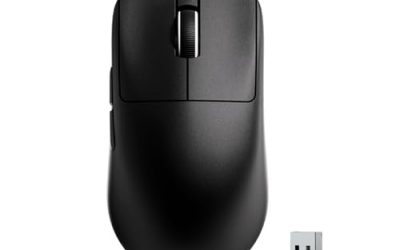
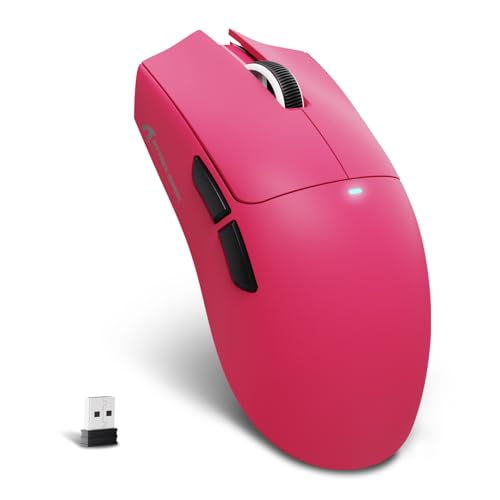
| ATTACK SHARK X11 SE (Red) | A light wireless mouse in bright red | PixArt PAW3311 sensor, 22,000 DPI |
| ATTACK SHARK X11 SE (Berry Red) | A deeper red shade on the same light platform | PixArt PAW3311 sensor, 22,000 DPI |
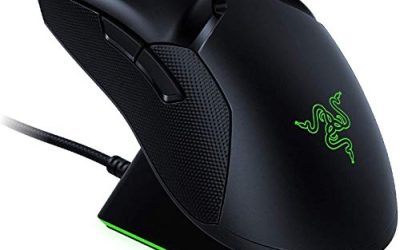
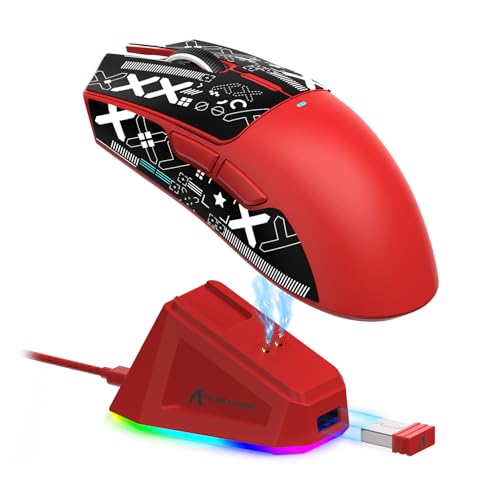
| ATTACK SHARK X11 (Red) | A red mouse with a charging dock in the box | PixArt PAW3311 sensor, RGB charging dock |
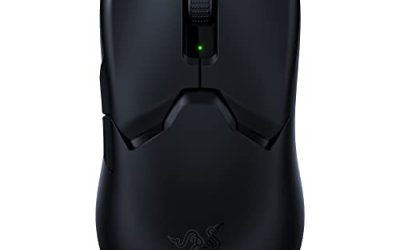
| Pulsar X2H Mini (Red) | A premium mini red mouse for claw grip | PixArt PAW3395 sensor, 26,000 DPI |
How to Choose
Check the exact shade before you buy
Red is not one colour on a mouse listing. A bright red shell, a deep berry red and a red-accented black shell look very different on a desk, and product photos can shift the tone under studio lighting. Read the colour field on the listing itself, not just the headline, and confirm the variant you are ordering matches the shade you want. If the listing offers several colours, the red option is usually a separate variant with its own code, so double-check the colour line at checkout. A mismatch here is the most common disappointment with a colour-first purchase, and it is entirely avoidable.
Match the sensor to your sensitivity
A red mouse still has to track. For most players, a sensor reaching 22,000 DPI or higher leaves plenty of headroom, because the sensitivity you actually play at sits far below the maximum. What matters more is the sensor family and the tracking speed behind it, since those decide how cleanly the cursor follows fast flicks. A PAW3311 sensor covers competitive play comfortably, while a PAW3395 sensor adds higher tracking speed and acceleration headroom for very low sensitivity players who move the mouse across a large pad. Pick the sensor for your play style, then let the colour break the tie.
Weigh the mouse against your grip
Weight changes how a mouse feels far more than its colour does. A mouse near 59 g lifts and stops with very little effort, which suits fast flick shots and long sessions, while a slightly heavier shell can feel steadier for players who rest their palm and make small adjustments. Mini-sized mice suit smaller hands and claw or fingertip grips, whereas a medium shell with a higher rear hump supports the palm better. If you can, compare the listed length and weight against the mouse you use now, because a red mouse that is too small or too heavy will annoy you long after the colour stops impressing you.
Decide how the mouse connects and charges
Most red gaming mice on the market are wireless, and the connection setup decides daily convenience. A tri-mode mouse that offers 2.4 GHz wireless, Bluetooth and wired USB-C gives you a fallback for every situation, from a dead battery to a laptop without a spare port. A charging dock in the box is a genuine extra here, since it keeps the mouse topped up between sessions and clears the cable from the desk. If the mouse has no dock, check the battery figure on the listing and whether it charges over a standard USB-C cable, so a flat battery never ends a session early.
The 4 Best Options
ATTACK SHARK X11 SE (Red)
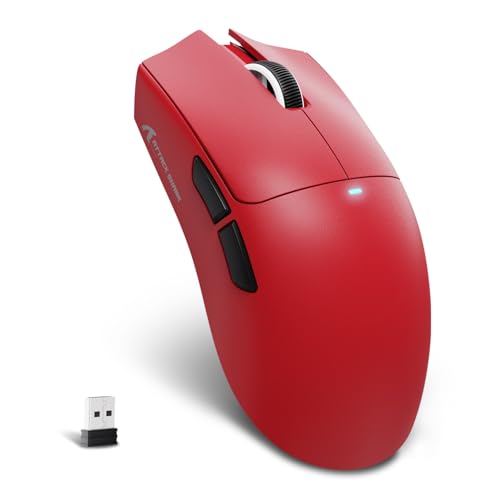
The X11 SE in bright red is the most straightforward pick in this group: a light tri-mode wireless mouse in a clear, vivid red that reads as red from across the room. Its PAW3311 sensor and 22,000 DPI ceiling cover fast shooters and MOBA play without asking you to learn a new shape, and the 59 g shell keeps flicks quick. Five programmable buttons give you enough inputs for common binds without crowding the thumb side. If you want a red mouse that simply works across genres, this is the natural starting point.
Specs
- PixArt PAW3311 sensor, up to 22,000 DPI
- Tri-mode connection: Bluetooth 5.2, 2.4 GHz wireless and USB-C wired
- 5 programmable buttons
- 1,000 Hz polling rate
- 300 mAh battery
- 59 g lightweight shell
- Colour: Red
Best for: Players who want a bright red wireless mouse for everyday competitive play.
Watch out for: Confirm the Red variant at checkout, since the same model also ships in black, white and berry red.
ATTACK SHARK X11 SE (Berry Red)
The Berry Red X11 SE is the same mouse as the bright red version, with one difference that matters to a themed setup: the shade. Berry red is deeper and darker, closer to burgundy, so it pairs better with black and dark grey desks and with deep red keyboards, where a bright red shell can look out of place. Everything else carries over, including the PAW3311 sensor, the tri-mode connection and the five programmable buttons, so the choice between the two X11 SE variants is purely about which red fits your desk. If your setup leans dark, this is the better-looking of the pair.
Specs
- PixArt PAW3311 sensor, up to 22,000 DPI
- Tri-mode connection: Bluetooth 5.2, 2.4 GHz wireless and USB-C wired
- 5 programmable buttons
- 1,000 Hz polling rate
- 300 mAh battery
- 59 g lightweight shell
- Colour: Berry Red
Best for: Darker red-themed setups where a bright red shell would clash.
Watch out for: Berry Red and Red are separate variants with separate codes, so check the colour line carefully before ordering.
ATTACK SHARK X11 (Red)
The full-size X11 in red adds the one extra the X11 SE pair does not include: a magnetic RGB charging dock in the box. You drop the mouse on the dock between sessions, the dock lights up, and the receiver can live in the dock for a clean wireless link. The mouse itself runs the same PAW3311 sensor at up to 22,000 DPI, connects over 2.4 GHz wireless, Bluetooth or USB-C, and ships with anti-slip grip tape for sweaty sessions. HUYU switches handle the clicks, and five programmable buttons cover standard binds. This is the pick if you want the red mouse and the desk setup to arrive together.
Specs
- PixArt PAW3311 sensor, up to 22,000 DPI
- Tri-mode connection: 2.4 GHz wireless, Bluetooth and USB-C wired
- Magnetic RGB charging dock included
- 5 programmable buttons
- HUYU switches
- Anti-slip grip tape included
- Colour: Red
Best for: Players who want a red mouse with a charging dock and a tidy desk.
Watch out for: The dock needs a free USB port and desk space of its own, so measure your setup before choosing it over the lighter X11 SE.
Pulsar X2H Mini (Red)

The Pulsar X2H Mini is the premium option here and the only one from a different brand. It is a limited colour edition of Pulsar’s high-hump mini mouse, built around the flagship PixArt PAW3395 sensor with a 26,000 DPI ceiling, 650 IPS tracking speed and 50 G acceleration. At 52 g it is the lightest mouse in this guide, and the elevated rear hump with a narrower waist supports claw grips while giving the palm support beyond the standard X2 shape. Optical switches remove the risk of double-clicking, and the mouse runs wireless over 2.4 GHz or wired over USB-C, with up to 100 hours of battery life.
Specs
- PixArt PAW3395 sensor, up to 26,000 DPI
- 650 IPS tracking speed, 50 G acceleration
- 52 g lightweight shell
- Optical switches
- 2.4 GHz wireless and USB-C wired connection
- Up to 100 hours battery life
- 4K polling rate with a separate 4K dongle
- Colour: Red, Limited Color Edition
Best for: Claw grip players who want the lightest red mouse with a flagship sensor.
Watch out for: This is a limited colour edition, so check that the Red variant is the one in stock before ordering, and note the 4K dongle is sold separately.
Which One Fits Your Situation
You want the brightest red on the desk
Choose the ATTACK SHARK X11 SE in Red. Its vivid shell is the most visible red in this group, the 59 g body suits fast play, and the tri-mode connection covers every desk setup you are likely to use. The PAW3311 sensor handles competitive shooters comfortably, so you are not trading performance for colour.
Your setup is dark and you want a deeper red
Choose the ATTACK SHARK X11 SE in Berry Red. The deeper shade sits better against black desks and dark keyboards, and you keep the same sensor, connection and button layout as the bright red version. It is the same mouse with a quieter colour, made for setups where bright red would stand out too much.
You want the mouse and its charger to be one purchase
Choose the ATTACK SHARK X11 in Red. The magnetic RGB charging dock in the box keeps the mouse charged between sessions and gives the receiver a home, while the grip tape helps in long sessions. It is the best fit if your desk has room for a dock and you dislike charging cables.
You play claw grip and want the lightest red mouse
Choose the Pulsar X2H Mini in Red. The 52 g shell, high rear hump and PAW3395 sensor are built for fast claw grip play, and the optical switches suit players who click hard. Confirm the Red limited edition is the variant listed before you buy, and check the mini size against your hand first.
Common Mistakes
- Ordering the wrong colour variant, because the same model ships in black, white, red and berry red under separate codes.
- Judging a mouse by its product photo alone, when the listing’s colour field is the reliable record of the shade.
- Choosing a mini mouse for a large palm grip hand, or a medium shell for a small fingertip grip hand, and blaming the sensor for a shape problem.
- Ignoring the charging setup, then discovering the mouse has no dock and the battery runs out mid-session.
- Assuming a red LED backlight makes a mouse red, when the shell itself may be black.
Frequently Asked Questions
Are red gaming mice harder to find than black ones?
Yes, and the pool is genuinely smaller. Most gaming mice launch in black and white first, and red usually appears as a limited colour edition or on a small number of models. That is why this guide leans on the brands that actually sell red shells, and why confirming the colour variant on the listing matters more here than with a standard black mouse.
Does a red mouse perform differently from the same model in black?
No. Colour is a shell finish, and the sensor, switches, weight and connection are the same across colour variants of one model. If a red mouse feels different from its black twin, the cause is the shape, the sensor settings or the grip, not the colour. Compare models on their specifications, then pick the colour you prefer.
What should I check on the listing before ordering a red mouse?
Check the colour field and the variant code first, then the sensor, weight and connection type. Make sure the listing title names the red variant, that the colour line at checkout says Red or Berry Red, and that the included accessories match the description, especially if a charging dock or grip tape is part of the reason you chose it.
Is a charging dock worth it on a red gaming mouse?
It depends on your desk. A dock keeps the mouse charged without a cable and gives the wireless receiver a fixed home, which suits a permanent desk setup. If you travel with the mouse or your desk is crowded, a lighter mouse without a dock and a standard USB-C cable is the more practical choice.
Related guides
More from Amazon
Programs that pair well with the guide above. Offers and eligibility are set by Amazon and may change.
Free shipping on eligible items, Prime Video and more. Eligible new members can start with a free trial.
Start a Prime free trialAd-free music streaming. Eligible new subscribers can start with a free trial.
Try Music Unlimited freeA Prime membership for ages 18-24 with a trial period. Eligibility is set by Amazon.
See Prime for Young AdultsAudiobooks and podcasts to listen to on the go. Eligible new members can start with a free trial.
Try Audible freeAs an Amazon Associate we earn from qualifying purchases.